
This page is not an official page of the app or its developer, but an independent editorial publication created for informational and commentary purposes. Unless expressly stated otherwise, neither the app nor its developer is affiliated with, endorsed by, sponsored by, authorized by, or otherwise officially connected with MWM, Apple, Google Play, the app publisher, or the app's developer, and nothing on this page implies that the app was developed using MWM's services. Any trademarks, logos, screenshots, and other content remain the property of their respective owners.


WSwitch for WeMo
Apple users reclaim control. WSwitch for WeMo puts your smart home back in your pocket, not Belkin's archives.
Downloads
25k+User Rating
Total Ratings
304Publisher
Category
UtilitiesLocales
1Latest Version
1.6.2Size
3.6 MBFirst Released
Jul 8, 2015Evaluating Key Features for Discerning WeMo Users in the Apple Ecosystem
WSwitch for WeMo: An Analytical Overview
Official App Replacement
The app serves as a vital replacement for the official WeMo app, which is no longer supported, ensuring continued control and functionality for existing WeMo device owners.
Apple Ecosystem Integration
This app extends control capabilities across the Apple ecosystem, including iPhone, home screen widgets, and Apple Watch, offering unparalleled convenience and accessibility for device management.
Device Grouping and Control
This tool enables the creation and management of device groups, allowing for simultaneous control of multiple WeMo devices, which enhances automation and convenience.
Global On/Off Toggle
The app offers the efficiency of controlling all connected WeMo devices with a single tap, streamlining routines and saving time for users.
Comprehensive Device Control
It provides fundamental control over WeMo devices, allowing users to effortlessly turn devices on or off and adjust the brightness of compatible LED bulbs.
Robust Device Discovery
The app supports flexible device discovery options, including automatic scanning of the local network and manual IP address entry, ensuring devices can always be located and connected.
The following screenshots and description are sourced directly from the app's official store listing and are the property of the app developer.
App Store
Screenshots
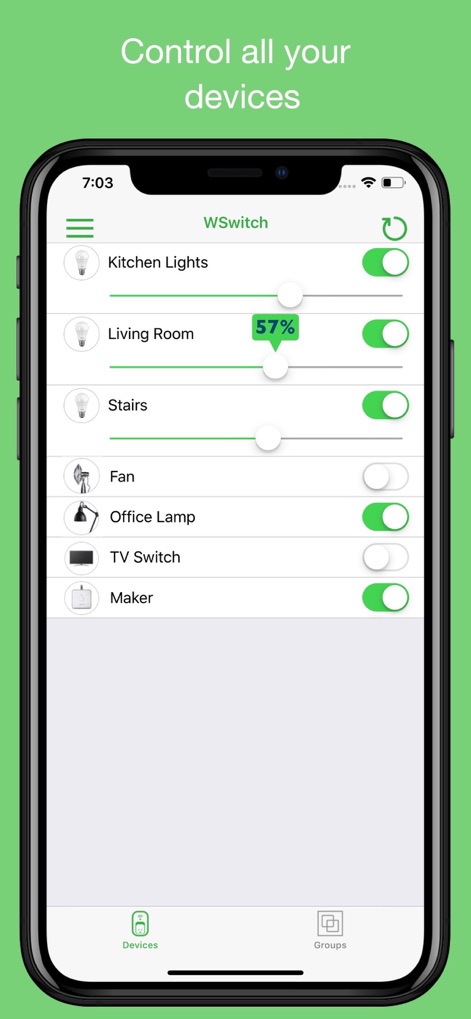
The app provides a streamlined interface for managing all Wemo devices, featuring clear on/off toggles and precise dimmer sliders for immediate command.
Unified Device Control

Users can benefit from the interactive home screen widget, offering swift control buttons for individual devices and custom group commands.
Widget Quick Actions
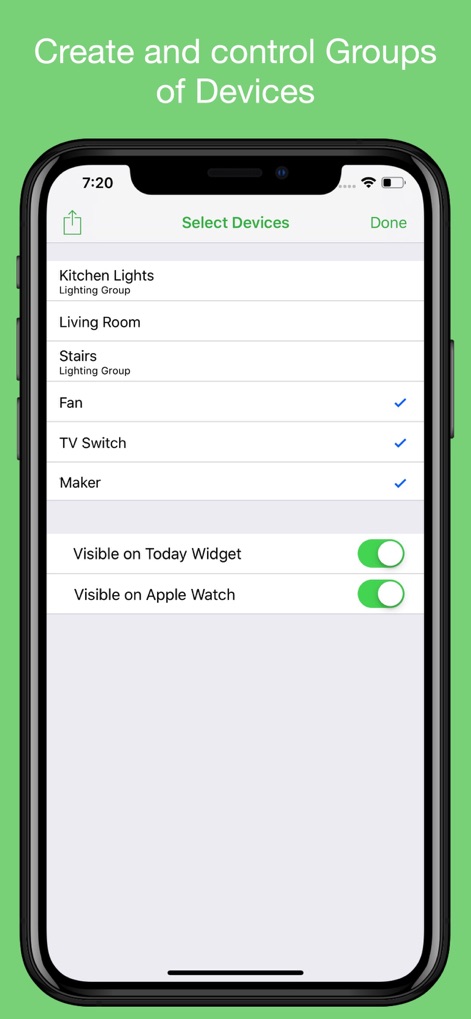
This tool enables effortless creation of device groups, alongside options to configure their visibility for quick access on both the Today Widget and Apple Watch.
Smart Group Configuration
Description
Download
More Like This
Top-ranked apps in the same category

Google LLC

Google Chrome
Google LLC

中国移动(手机营业厅)
China Mobile Online Services Co., Ltd.

Google Authenticator
Google LLC

CNH do Brasil
Servicos e Informacoes do Brasil

Cleanup: Phone Storage Cleaner
DEEP FLOW SOFTWARE SERVICES - FZCO

gov.br
Servicos e Informacoes do Brasil

中国电信-全国统一官方服务平台
CHINA TELECOM Corporation Ltd.

Microsoft Edge: AI Browser
Microsoft Corporation
This page is not an official page of the app or its developer, but an independent editorial publication created for informational and commentary purposes. Unless expressly stated otherwise, neither the app nor its developer is affiliated with, endorsed by, sponsored by, authorized by, or otherwise officially connected with MWM, Apple, Google Play, the app publisher, or the app's developer, and nothing on this page implies that the app was developed using MWM's services. Any trademarks, logos, screenshots, and other content remain the property of their respective owners.