
This page is not an official page of the app or its developer, but an independent editorial publication created for informational and commentary purposes. Unless expressly stated otherwise, neither the app nor its developer is affiliated with, endorsed by, sponsored by, authorized by, or otherwise officially connected with MWM, Apple, Google Play, the app publisher, or the app's developer, and nothing on this page implies that the app was developed using MWM's services. Any trademarks, logos, screenshots, and other content remain the property of their respective owners.


Zaptec
Finally, total command over your Zaptec charger, right from your phone. Users gain real-time oversight and control, turning a simple charger into a smart power hub. It proves essential.
Downloads
500k+User Rating
Total Ratings
887Publisher
Category
UtilitiesLocales
13Latest Version
5.41.10Size
62.3 MBFirst Released
Sep 10, 2019Analyzing Key Features for EV Charger Owners
Zaptec App Evaluation
Secure Cable Locking
The app enables users to securely lock the charging cable to the charger, preventing unauthorized removal or tampering.
Real-time Charging Monitoring
It provides instant updates on current charging sessions, including speed and status, for optimal oversight.
Comprehensive Charging History
This tool allows users to track and review their past charging sessions, offering insights into energy consumption and usage patterns.
User Access Management
The app offers control over who can access and use the charger, facilitating secure sharing with friends and family.
Frequently Asked Questions
Everything you need to know about Zaptec
What is the Zaptec app?
The Zaptec app provides owners of a Zaptec charger with tools to manage their charging experience. Users can monitor sessions, control access, and track charging history. It ensures a complete Zaptec experience.
How do I get started with the Zaptec app?
To use the Zaptec app, first ensure an authorized electrician completes the charger installation. Then, create a Zaptec user account and register your charger within the app to activate its features.
Can I monitor my charging session and speed with the Zaptec app?
Yes, the Zaptec app allows users to monitor their ongoing charging session and speed. This feature provides real-time information on the charging process for your Zaptec charger.
Does the Zaptec app allow me to lock the charging cable?
Yes, the Zaptec app enables users to remotely lock the charging cable to the charger. This feature secures the cable and prevents unauthorized removal during a charging session.
Can I manage who uses my Zaptec charger through the app?
Yes, the Zaptec app offers functionality to control access to your charger for friends and family. Users can assign and restrict guest access to the charging station through the app.
Does the Zaptec app record my charging history and energy consumption?
Yes, the Zaptec app provides a feature to track your charging history. It offers a full overview of the charging station's energy consumption, visible through historical data like kWh charged.
The following screenshots and description are sourced directly from the app's official store listing and are the property of the app developer.
App Store
Screenshots

The app's dashboard offers seamless control with a clear "Start charging" button and real-time status of "Cable Unlocked."
Intuitive Charging Control

This tool highlights robust security, displaying the "Cable Locked" status and providing "Access Restricted" options for user peace of mind.
Enhanced Charger Security

The "Dashboard" provides a quick overview, prompting users to "Authenticate" for secure and personalized charging sessions.
Authenticated Charging
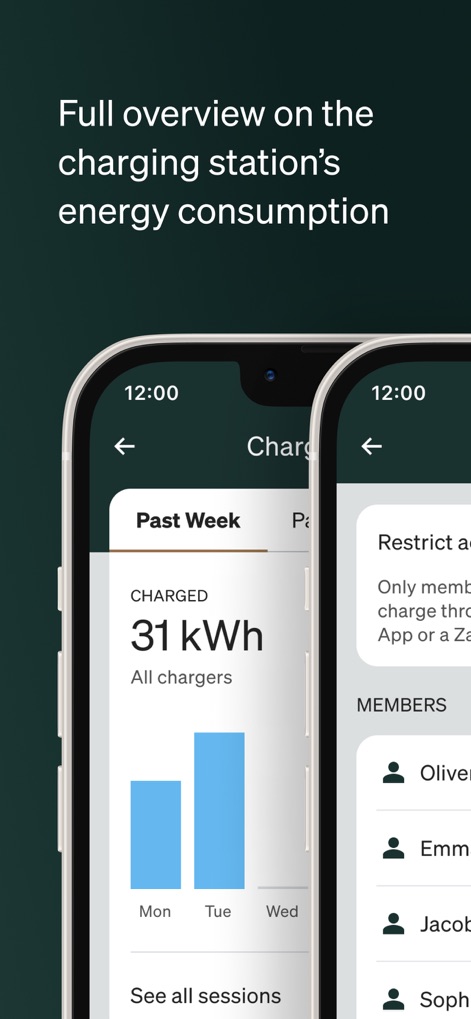
Users can review energy consumption with "Past Week" statistics and manage charger access for various "Members."
Usage & Sharing Insights

This interface allows easy toggling of "Access to charger" and clear oversight of the authorized "MEMBERS" list.
Flexible Access Management
Description
Download
More Like This
Apps with similar features and user experience

小米音箱
Beijing Xiaomi Co., Ltd

Starlink
Space Exploration Technologies Corp.

Bambu Handy
Shanghai Lunkuo Technology Co., Ltd

DREO
HESUNG INNOVATION LIMITED

My Verisure
Securitas Direct

Whisker
Automated Pet Care Products Inc.

geeni
Merkury Innovations LLC

ADT+
ADT LLC

X-Sense Home Security
X-Sense USA LLC.
This page is not an official page of the app or its developer, but an independent editorial publication created for informational and commentary purposes. Unless expressly stated otherwise, neither the app nor its developer is affiliated with, endorsed by, sponsored by, authorized by, or otherwise officially connected with MWM, Apple, Google Play, the app publisher, or the app's developer, and nothing on this page implies that the app was developed using MWM's services. Any trademarks, logos, screenshots, and other content remain the property of their respective owners.