
This page is not an official page of the app or its developer, but an independent editorial publication created for informational and commentary purposes. Unless expressly stated otherwise, neither the app nor its developer is affiliated with, endorsed by, sponsored by, authorized by, or otherwise officially connected with MWM, Apple, Google Play, the app publisher, or the app's developer, and nothing on this page implies that the app was developed using MWM's services. Any trademarks, logos, screenshots, and other content remain the property of their respective owners.


Zen Flip Clock - Minimal Timer
Command your focus. This app transforms raw time into a personal productivity engine.
Downloads
2.5M+User Rating
Total Ratings
25.2KPublisher
Category
LifestyleLocales
11Latest Version
4.13.4Size
95.0 MBFirst Released
Aug 4, 2017An evaluation of key functionalities for productivity and aesthetic integration.
Core Feature Analysis: Zen Flip Clock - Minimal Timer
Integrated Pomodoro Timer
It offers a built-in Pomodoro timer to facilitate focused work sessions and structured breaks, directly supporting enhanced productivity and concentration.
Focus Time Analytics
The app provides detailed statistics to track focus time and usage patterns, offering valuable insights into personal productivity habits for continuous improvement.
Multiple Clock Themes
The app provides a variety of aesthetic clock display options, including flip, digital, and minimalist styles, enabling users to customize their workspace and align with personal digital aesthetics.
Versatile Stopwatch Functionality
This tool features a precise stopwatch for timing various activities like workouts, meditation, or specific tasks, promoting accurate time tracking for diverse needs.
Configurable Hourly Chimes
The app allows users to set custom hourly reminders, aiding in the establishment of consistent routines and facilitating timely transitions between tasks or activities.
Convenient Widgets
It offers lock screen and home screen widgets for quick access and at-a-glance time checking, seamlessly integrating into daily routines without requiring the full app launch.
Intuitive Gesture Controls
The app provides simple swipe gestures for quick navigation between core functionalities like Pomodoro and Stopwatch, streamlining user interaction and enhancing efficiency.
Smooth Visual Animations
This tool incorporates clean and natural motion effects throughout its interface, contributing to a polished, modern, and enjoyable user experience that aligns with minimalist design principles.
Frequently Asked Questions
Everything you need to know about Zen Flip Clock - Minimal Timer
What are the main features of the Zen Flip Clock app?
Zen Flip Clock offers an all-in-one timing toolkit including a Pomodoro Timer, Stopwatch, and Hourly Chime. It also provides personalized minimalist aesthetics with various themes, life-like animations, and rich iOS lock screen and home screen widgets.
How do I activate the Pomodoro Timer in Zen Flip Clock?
Users start the Pomodoro Timer in Zen Flip Clock by swiping left on the screen. This action initiates focus sessions, which include page-flip sounds, making it suitable for study and exam preparation.
How does the Zen Flip Clock app serve as a stopwatch?
Zen Flip Clock functions as a stopwatch when users swipe right on the screen. This feature is useful for accurately timing activities such as rehearsals, meditation, and various workouts.
Does Zen Flip Clock provide custom reminder functionality?
Yes, Zen Flip Clock includes custom reminders through its Hourly Chime feature. These reminders assist users in maintaining disciplined daily routines effectively.
What display customization options are available in Zen Flip Clock?
Zen Flip Clock provides over 10 creative themes for its display, including vintage flip clock, digital, and sci-fi styles. It also features ultra-smooth physics-based page-turn animations for an enhanced visual experience.
Is Zen Flip Clock compatible with iOS lock screen and home screen widgets?
Yes, Zen Flip Clock supports rich iOS widgets, including both lock screen and home screen widgets. These allow for convenient and instant time checks directly from the device's main interfaces.
How do I open the settings menu in Zen Flip Clock?
Users access the settings menu in the Zen Flip Clock app by tapping the screen. This action reveals various customization and functional options within the application interface.
The following screenshots and description are sourced directly from the app's official store listing and are the property of the app developer.
App Store
Screenshots

The app showcases its commitment to sophisticated timekeeping with a minimalist digital clock and a classic flip clock display, offering users aesthetic variety.
Elegant Time Display
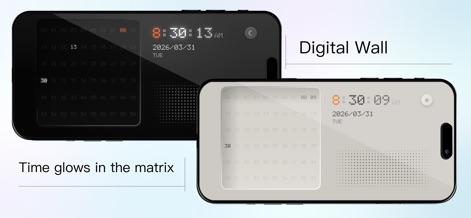
Explore the futuristic 'Digital Wall' theme, presenting time with a distinctive glowing matrix effect and offering both dark and light mode variations for diverse preferences.
Futuristic Digital Aesthetics

This tool provides a spectrum of visual styles, from a nostalgic retro blue LCD digital clock to an elegant wooden-framed flip clock, catering to varied design tastes.
Classic & Modern Themes

Users can enhance their productivity with the app's dedicated Pomodoro timer for focused work sessions and its versatile stopwatch functionality for precise timing tasks.
Focused Productivity Tools

This app extends its utility beyond the main screen, featuring seamless lock screen integration and a convenient custom Pomodoro timer widget for quick access.
Seamless Integration

The app offers extensive personalization through its customizable widget gallery, including multiple flip clock widget styles and diverse digital clock widget options for home screen tailoring.
Customizable Widget Gallery
Description
Download
More Like This
Apps with similar features and user experience

Nowmusi - Alarm Music & Sounds
"INPEK-ZE" d.o.o. Zenica
Alarm Clock App: myAlarm Clock
APPMIND - SOFTWARE TECHNOLOGIES LDA
ClockPhone big digital clocks
EVGENII KOSTIN
Alarm & Timer
KAZUTERU YOKOI

Smart Alarm Clock-Focus&Sleep
VISONXY LIMITED
Stopwatch & Countdown Timer
Appenvision Ltd
This page is not an official page of the app or its developer, but an independent editorial publication created for informational and commentary purposes. Unless expressly stated otherwise, neither the app nor its developer is affiliated with, endorsed by, sponsored by, authorized by, or otherwise officially connected with MWM, Apple, Google Play, the app publisher, or the app's developer, and nothing on this page implies that the app was developed using MWM's services. Any trademarks, logos, screenshots, and other content remain the property of their respective owners.