
このページはアプリまたはその開発者の公式ページではなく、情報提供および論評を目的として作成された独立した編集出版物です。明示的に別段の記載がない限り、アプリおよびその開発者は、MWM、Apple、Google Play、アプリのパブリッシャー、またはアプリの開発者と提携、承認、後援、認可、またはその他の公式的な関係はなく、このページのいかなる内容も、アプリがMWMのサービスを使用して開発されたことを意味するものではありません。すべての商標、ロゴ、スクリーンショット、その他のコンテンツはそれぞれの所有者の財産です。

Alight Motion
従来のモバイルツールの限界を打ち破り、Alight Motionはスマートフォンを、プロの動的表現を操るための、手中の強力な武器へと変貌させる。妥協なき創造性が、いま掌で息づくのだ。
ダウンロード
25M+ユーザー評価
評価数
241.1K開発元
カテゴリ
Photo & Video対応言語
18最新バージョン
6.2.53サイズ
187.1 MBリリース日
2019年12月21日Alight Motion テックアナリスト評価:主要機能分析
プロフェッショナルなモバイルモーションデザインを可能にする基盤技術とクリエイティブツール
全設定キーフレームアニメーション
本ツールは、すべての設定に対してキーフレームアニメーションを適用することができ、詳細な動きの制御を実現します。
多層編集機能
このアプリは、グラフィック、ビデオ、オーディオの複数のレイヤーをサポートし、複雑な構成を可能にします。
多彩なエクスポート形式
ユーザーは、MP4ビデオ、GIFアニメーション、PNGシーケンス、静止画など、様々な形式で成果物をエクスポートできます。
アニメーションイージング
このアプリは、より滑らかな動きを実現するためのアニメーションイージングを提供し、プリセット選択またはカスタムタイミングカーブの作成が可能です。
ベクター&ビットマップ編集
本ツールは、ベクターおよびビットマップ形式をサポートしており、ユーザーはスマートフォン上でベクターグラフィックを直接編集できます。
豊富なエフェクトライブラリ
このアプリは、160以上の基本エフェクトビルディングブロックを提供し、これらを組み合わせて高度な視覚効果を生成することが可能です。
高度なカメラ機能
このアプリは、パン、ズーム、フォーカスブラー、フォグをサポートするカメラ機能を提供し、奥行きのある映像表現を実現します。
親子レイヤーリンクとジョイントリグ
ユーザーは、親子レイヤーをリンクさせ、キャラクターのジョイントをリグすることができ、複雑なアニメーション表現を可能にします。
グループ化とマスキング
本ツールは、レイヤーのグループ化およびマスキング機能を備えており、整理された編集と選択的な表示が可能です。
カスタムフォント対応
このアプリは、カスタムフォントのサポートを通じて、ユーザーが独自のタイポグラフィをプロジェクトに組み込むことを可能にします。
よくある質問
について知っておくべきこと Alight Motion
What is Alight Motion?
Alight Motion is a professional motion design app for iPhone, iPad, and Mac. It provides tools for animation, motion graphics, visual effects, video editing, and compositing on a smartphone.
Is Alight Motion free to use?
Yes, Alight Motion is free to use with basic features. However, projects created in the free version will include a watermark. Paid membership options are available to remove the watermark and access premium features.
How do I remove the watermark from Alight Motion videos?
To remove the watermark from videos created with Alight Motion and unlock a full library of premium effects and features, users must purchase one of the paid membership options available within the app.
Does Alight Motion support keyframe animation?
Yes, Alight Motion fully supports keyframe animation for all settings, enabling users to create sophisticated custom animations. This feature is a core component of the app's motion design capabilities.
What export options are available in Alight Motion?
Alight Motion allows users to export projects as MP4 video, GIF animation, PNG sequences, and still images. The app also supports sharing project packages for collaborative workflows.
Can Alight Motion edit vector graphics?
Yes, Alight Motion provides full support for vector graphics. Users can edit vector graphics directly on their smartphone, making it possible to illustrate and bring vector-based designs to life.
What camera features does Alight Motion offer?
Alight Motion offers dynamic camera features including panning, zooming, and support for focus blur and fog effects. These tools enable users to build complex scenes and add depth to their animations.
How does Alight Motion manage layers for animation?
Alight Motion supports multiple layers for graphics, video, and audio. It also features 'Parenting,' which allows users to link layers hierarchically for sophisticated animations, including character rigging.
Where can I manage my Alight Motion subscription?
Alight Motion subscriptions are managed through your Apple ID settings after purchase. Subscriptions automatically renew unless canceled at least 24 hours prior to the start of the next billing period.
Does Alight Motion allow custom fonts?
Yes, Alight Motion supports custom fonts. The app includes over 2000 fonts, and users have the option to import their own custom fonts to personalize their motion graphic projects.
以下のスクリーンショットと説明は、アプリの公式ストアリスティングから直接取得されたものであり、アプリ開発者の所有物です。
アプリストア
スクリーンショット

高度なキーフレーム
本アプリは、キーフレームアニメーションを通じてオブジェクトの動きを精密に制御し、位置座標の調整により複雑なカスタムアニメーションを作成できます。

ダイナミックなカメラ
ユーザーは、カメラの動きをカスタマイズしてシーンに深みを与え、ズームとフォーカス設定で視覚的な表現を豊かにできます。
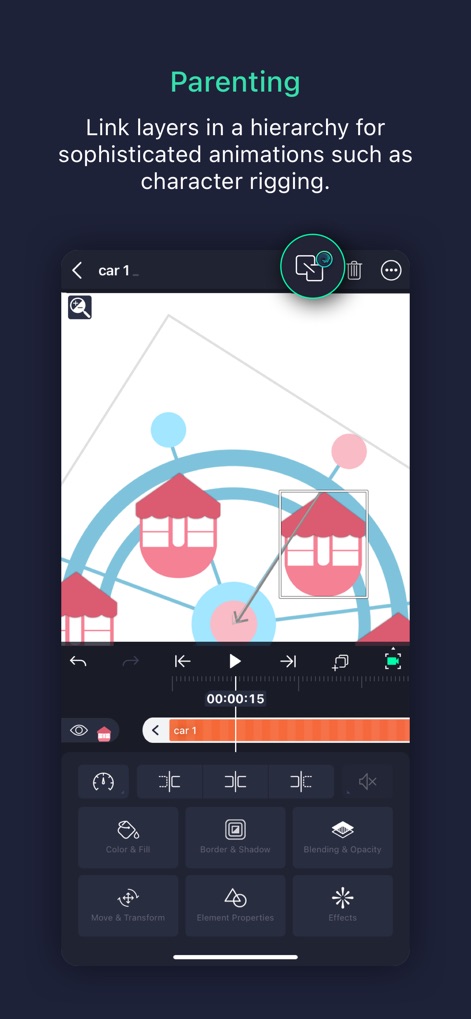
レイヤー階層制御
本ツールは、レイヤーを階層化することで複雑なアニメーションを実現し、キャラクターリギングのような高度な連携を可能にします。

精密な色彩調整
この機能により、カラーホイールを使用して視覚的な色調を直感的に調整し、LiftやGammaなどの詳細な色調補正でシーンの雰囲気を表現できます。
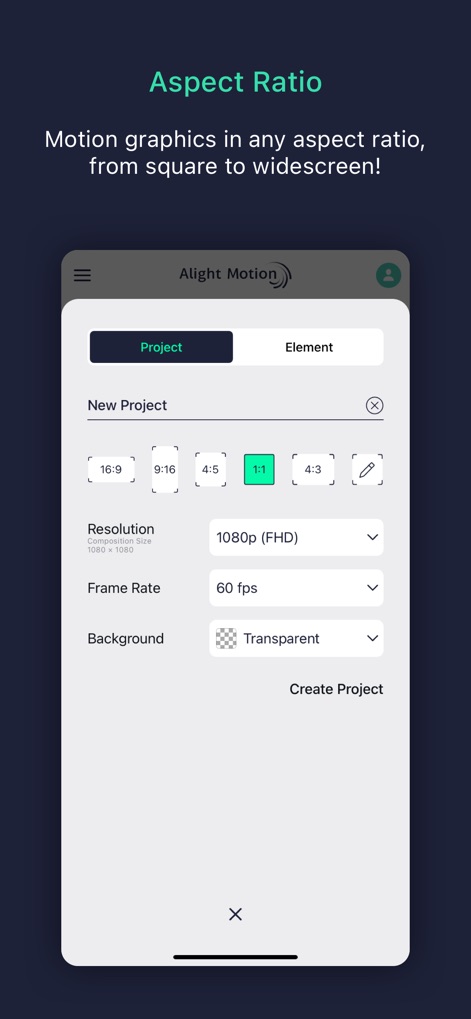
プロジェクト設定
ユーザーは、16:9や1:1などの多様なアスペクト比を選択して最適なプロジェクト環境を構築し、解像度とフレームレートを細かく設定できます。

高度なベクター
本アプリは、ベクターグラフィックを直接編集できるため、ユーザーはポイントの調整によって自由自在な図形を作成し、想像力を形にできます。

豊富な視覚効果
このツールは、多彩なエフェクトカテゴリを提供し、Chroma Keyなどのキーイング機能やSoft Glowなどのぼかし効果を適用してプロレベルの視覚表現を実現します。

柔軟なエクスポート
ユーザーは、MP4やGIFなどの多様なエクスポート形式から選択してコンテンツを出力でき、プロジェクト共有機能で共同作業もスムーズに行えます。

レイヤー合成
このアプリは、ScreenやLightenなどの多彩なブレンドモードを提供し、不透明度調整と組み合わせることで視覚的に魅力的なレイヤー合成を実現します。

フォントの選択
本ツールは、2000種類以上の豊富な内蔵フォントに加え、カスタムフォントのインポートにも対応しており、デザインに合わせた柔軟なテキスト表現が可能です。
説明
Download
類似アプリ
似た機能とユーザー体験を持つアプリ

VN: AI Video Editor
Ubiquiti Labs, LLC

Splice - Video Editor & Maker
Bending Spoons Apps ApS

Blurrr-Music video editor
TBPS INTERNATIONAL TECHNOLOGY PTE. LTD.

Node Video
小为 罗

Filmmaker Pro - Video Editor
Tinkerworks Apps

Time Cut: Smooth Slow Motion
立亚 林

LumaFusion
Luma Touch LLC

Slow Motion Video Fx Editor
Brain Craft Ltd

WEILO - My Last Video Editor
vimosoft
このページはアプリまたはその開発者の公式ページではなく、情報提供および論評を目的として作成された独立した編集出版物です。明示的に別段の記載がない限り、アプリおよびその開発者は、MWM、Apple、Google Play、アプリのパブリッシャー、またはアプリの開発者と提携、承認、後援、認可、またはその他の公式的な関係はなく、このページのいかなる内容も、アプリがMWMのサービスを使用して開発されたことを意味するものではありません。すべての商標、ロゴ、スクリーンショット、その他のコンテンツはそれぞれの所有者の財産です。