
このページはアプリまたはその開発者の公式ページではなく、情報提供および論評を目的として作成された独立した編集出版物です。明示的に別段の記載がない限り、アプリおよびその開発者は、MWM、Apple、Google Play、アプリのパブリッシャー、またはアプリの開発者と提携、承認、後援、認可、またはその他の公式的な関係はなく、このページのいかなる内容も、アプリがMWMのサービスを使用して開発されたことを意味するものではありません。すべての商標、ロゴ、スクリーンショット、その他のコンテンツはそれぞれの所有者の財産です。


ダウンロード
750k+ユーザー評価
評価数
41.3K開発元
カテゴリ
Productivity対応言語
1最新バージョン
2026.13.0サイズ
47.1 MBリリース日
2023年9月15日デジタルな気を散らすものを排除し、集中力を高めるための主要機能評価
「Brick - Ditch Distractions」アプリ分析
集中モードの有効化
デジタルな気を散らすものを一時的に除去し、ユーザーが本当に重要なことに集中できるようにします。
NFCによる簡単切り替え
NFC対応の専用デバイスをタップするだけで、集中モードのオン/オフを素早く切り替えることができます。
カスタマイズ可能なアプリブロック
特定のアプリのみを許可し、他のすべてのアプリをブロックすることで、ユーザーは自身のニーズに合わせて集中環境を調整できます。
プライバシー保護
ユーザーの利用情報はデバイスから外部に送信されることなく、ローカルに保存されるため、プライバシーが保護されます。
よくある質問
について知っておくべきこと Brick - Ditch Distractions
How does Brick - Ditch Distractions work?
Brick - Ditch Distractions combines software with NFC-powered hardware. Users tap the physical Brick device to temporarily block distracting apps and notifications, leaving only chosen essential tools. Tapping it again unblocks everything.
What features does the Brick app offer?
The Brick app enables users to customize which apps remain unblocked, track their usage history for distraction-free time, and contact the creators for feature requests or support.
Does Brick - Ditch Distractions collect personal usage data?
No, Brick - Ditch Distractions does not collect user data. The app explicitly states that none of your usage information leaves your phone, ensuring user privacy.
Can I select which apps Brick blocks?
Yes, users can choose which apps Brick blocks. The Brick app provides options to customize and select specific applications to be blocked during focus sessions.
How do I start a focus session with the Brick app?
To begin a focus session with Brick, simply open the app and tap your physical Brick device. This action initiates the blocking of distracting apps and notifications on your phone.
Can I schedule focus sessions using the Brick app?
Yes, the Brick app allows scheduling focus times. Users can create routines by setting a name, Brick Mode, start time, and repeating days to build daily habits for distraction-free periods.
Does Brick - Ditch Distractions track my focus time?
Yes, Brick - Ditch Distractions tracks your focus progress. The app monitors and displays your usage history, enabling you to see and review the time spent undistracted.
以下のスクリーンショットと説明は、アプリの公式ストアリスティングから直接取得されたものであり、アプリ開発者の所有物です。
アプリストア
スクリーンショット
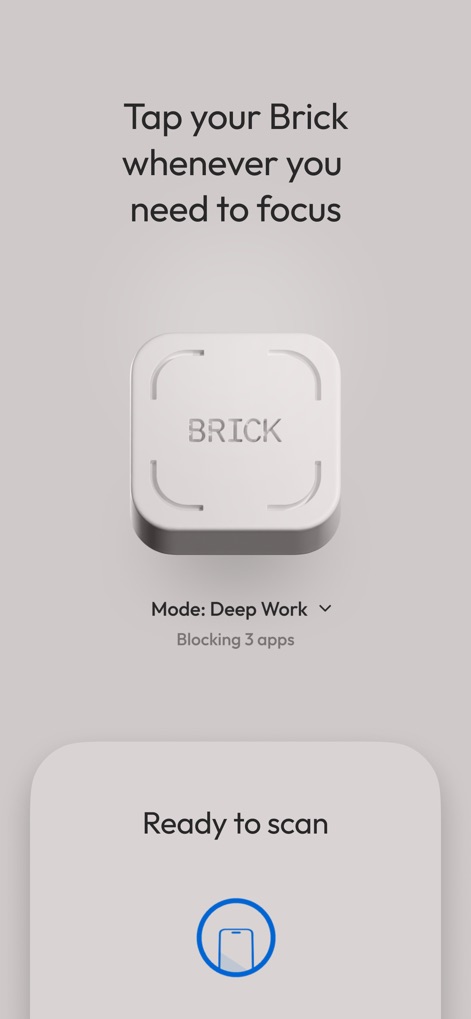
Brickデバイスをタップすることで、ユーザーは即座に集中モードを開始できます。画面には「Deep Work」モードと「3つのアプリをブロック中」という具体的な機能が表示されています。
タップで集中
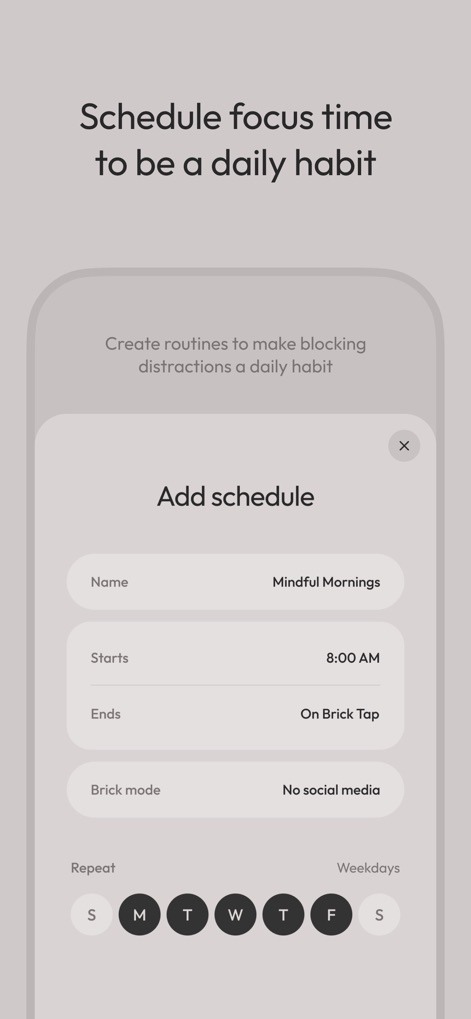
集中時間をルーティンとして設定し、日々の習慣にすることができます。「Mindful Mornings」というスケジュール名と「毎週月曜日から金曜日」という繰り返し設定が視覚的に確認できます。
習慣化をサポート
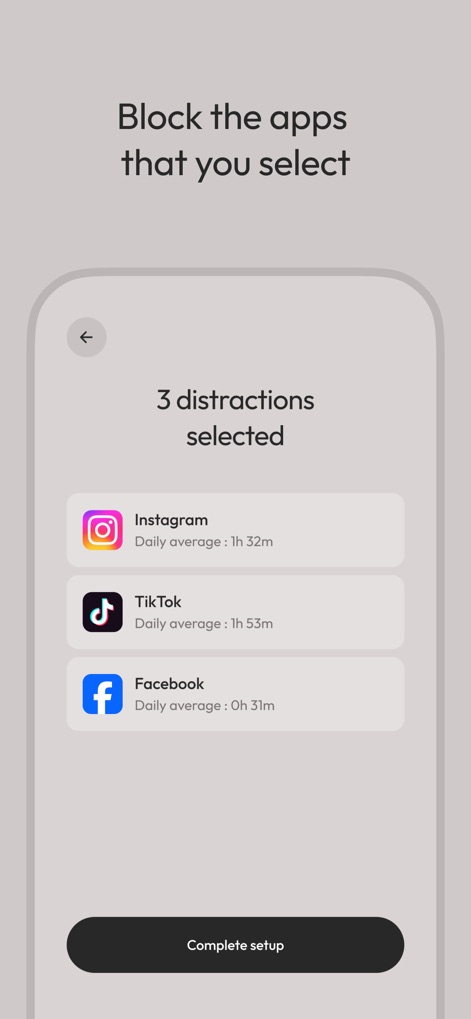
ユーザーは集中を妨げる特定のアプリを選択してブロックできます。InstagramとTikTokのアプリアイコン、および各アプリの「平均使用時間」というデータが明示されています。
アプリを厳選ブロック
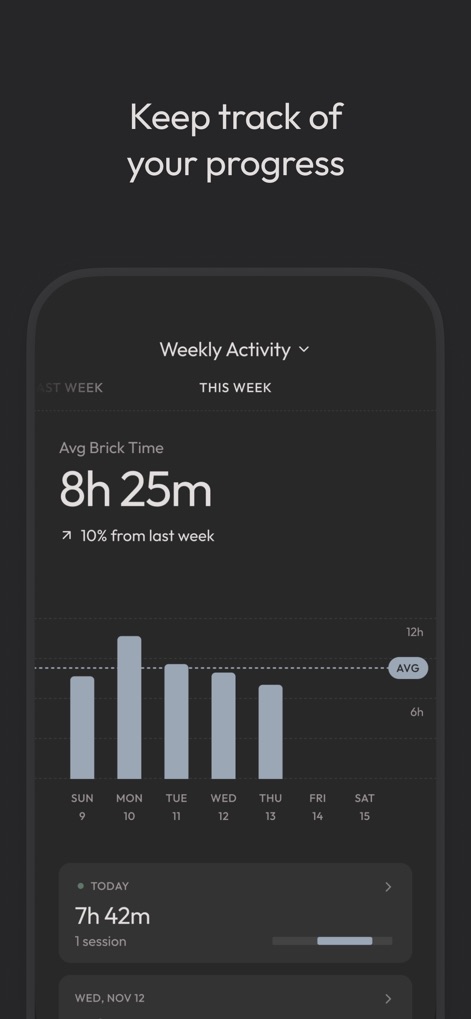
ユーザーは自身の集中時間の進捗を追跡し、改善状況を確認できます。グラフで示された「週間アクティビティ」と「平均Brick時間:8時間25分」という具体的な指標が提示されています。
進捗を可視化

デバイスをタップすると、電話は集中を妨げない状態になります。「2時間31分09秒」という集中経過時間と「Deep Workモード」でブロック中のアプリ数が視覚的に表示されます。
集中状態を維持
説明
Download
類似アプリ
似た機能とユーザー体験を持つアプリ
Opal: Screen Time Control
OPAL OS CORPORATION

BePresent: Screen Time Control
Screen Detox Inc

one sec | screen time + focus
riedel.wtf apps S.L.
ScreenZen- Screen Time Control
ScreenZen LLC

Refocus: Block Apps & Websites
Labi, LLC

Clarymind: Focus + Self Care
Seamint Co., Ltd.

Roots: Screen Time Control
MWM

AppBlock: Block Apps & Website
MobileSoft s.r.o.

ClearSpace: Reduce Screen Time
Clearspace Technologies, Inc.
このページはアプリまたはその開発者の公式ページではなく、情報提供および論評を目的として作成された独立した編集出版物です。明示的に別段の記載がない限り、アプリおよびその開発者は、MWM、Apple、Google Play、アプリのパブリッシャー、またはアプリの開発者と提携、承認、後援、認可、またはその他の公式的な関係はなく、このページのいかなる内容も、アプリがMWMのサービスを使用して開発されたことを意味するものではありません。すべての商標、ロゴ、スクリーンショット、その他のコンテンツはそれぞれの所有者の財産です。