
このページはアプリまたはその開発者の公式ページではなく、情報提供および論評を目的として作成された独立した編集出版物です。明示的に別段の記載がない限り、アプリおよびその開発者は、MWM、Apple、Google Play、アプリのパブリッシャー、またはアプリの開発者と提携、承認、後援、認可、またはその他の公式的な関係はなく、このページのいかなる内容も、アプリがMWMのサービスを使用して開発されたことを意味するものではありません。すべての商標、ロゴ、スクリーンショット、その他のコンテンツはそれぞれの所有者の財産です。

DaVinci Resolve for iPad
伝説的なカラーコレクションと高速編集を融合した、世界で唯一のソリューションを体験してください。AI搭載ツールとシームレスなクラウドコラボレーションで、どこにいても創造性を解き放ちましょう。
ダウンロード
2M+ユーザー評価
評価数
8K+開発元
カテゴリ
Photo & Video対応言語
12最新バージョン
20.3.1サイズ
3.6 GBリリース日
2022年12月21日ポータブルになったハリウッドのパワー
どこにいてもプロフェッショナルなスタジオワークフローを実現するためにiPad Pro向けに再設計された、世界で最も先進的な編集およびカラーコレクションツールを体験してください。
伝説的なカラーグレーディング
主要な長編映画で使用されているプライマリーホイールとHDRグレーディングツールで、シネマティックな「ハリウッドルック」を実現します。
DaVinci AIニューラルエンジン
AI搭載マジックマスク・トラッキング、プロオーディオ向けボイスアイソレーション、ソーシャルメディア向けスマートリフレームで、手作業の時間を大幅に短縮します。
よくある質問
について知っておくべきこと DaVinci Resolve for iPad
DaVinci Resolve for iPad とは何ですか?
DaVinci Resolve for iPad は、編集とカラーコレクションを 1 つのアプリケーションに統合したプロフェッショナルなソフトウェアツールです。新規ユーザーとプロフェッショナルの両方が、より高速かつ高品質な結果で作業できるよう、洗練されたインターフェイスを提供します。
DaVinci Resolve for iPad はコラボレーションをサポートしていますか?
はい、DaVinci Resolve for iPad は Blackmagic Cloud Collaboration をサポートしています。これにより、複数のユーザーがクラウドベースのワークフローと Blackmagic Cloud ID を使用して、同じプロジェクトタイムラインで作業できます。
DaVinci Resolve for iPad で利用できる AI ツールは何ですか?
DaVinci Resolve for iPad は、DaVinci AI Neural Engine を搭載した AI ツール(マジックマスク、スマートリフレーム、ボイスアイソレーションなど)を備えています。これらのツールは、Studio In-App-Purchase 経由で利用できます。
DaVinci Resolve for iPad はソーシャルメディア用に映像をリフレームできますか?
はい、DaVinci Resolve for iPad は、さまざまなアスペクト比に合わせて映像を再利用する AI ツールであるスマートリフレームを備えています。シーンのアクションを認識し、その中でパンして、ソーシャルメディア用の正方形または垂直バージョンを作成します。
DaVinci Resolve for iPad の互換性要件は何ですか?
DaVinci Resolve for iPad は、Apple iPad Pro M1 以降のモデルで、少なくとも 8GB の RAM を搭載したモデルに推奨されます。以前の iPad では、機能が制限されたり、HD 出力に限定されたりする場合があります。
DaVinci Resolve for iPad のプロジェクトはデスクトップバージョンと互換性がありますか?
はい、DaVinci Resolve for iPad のプロジェクト(.drp)とプロジェクトアーカイブ(.dra)は、デスクトップの DaVinci Resolve 20 と完全に互換性があります。これにより、デバイス間でのシームレスなワークフローが保証されます。
DaVinci Resolve for iPad はどのファイル形式をサポートしていますか?
DaVinci Resolve for iPad は、H.264、H.265、Apple ProRes、Blackmagic RAW ファイル形式をサポートしています。これにより、プロフェッショナルなビデオワークフローで幅広い互換性が確保されます。
DaVinci Resolve for iPad はどの入力デバイスをサポートしていますか?
DaVinci Resolve for iPad は、Magic Keyboard、Apple Pencil、Studio および PRO XDR ディスプレイをサポートしています。これらのアクセサリは、ユーザーエクスペリエンスを向上させ、機能を拡張します。
DaVinci Resolve for iPad には高度なカラーグレーディング機能が含まれていますか?
はい、DaVinci Resolve for iPad のカラーページには、PowerWindows™、クオリファイア、3D トラッカー、高度な HDR グレーディングツールが含まれています。正確な調整のためのプライマリコントロールスライダーも備えています。
DaVinci Resolve for iPad でダイアログから不要な音声を削除できますか?
はい、DaVinci Resolve for iPad は、AI ツールとしてボイスアイソレーションを提供しています。この機能により、ユーザーは騒がしい場所からのインタビューやダイアログの録音から、大きくて望ましくない音声を簡単に削除できます。
DaVinci Resolve for iPad の「カットページ」は何のために設計されていますか?
DaVinci Resolve for iPad の「カットページ」は、ドキュメンタリー制作のようなタイトな締め切りがあるプロジェクト向けに設計されています。ソーステープやスマート編集ツールなどの機能を備えた、合理化されたインターフェイスを提供し、迅速なターンアラウンドを可能にします。
DaVinci Resolve for iPad でビデオ内のオブジェクトを追跡するにはどうすればよいですか?
DaVinci Resolve for iPad は、マジックマスク AI ツールを提供しており、1 回のストロークでショット内の人物、特徴、オブジェクトを特定して追跡します。ソフトウェアには、UI に表示されている「トラッカー - ウィンドウ」も搭載されています。
DaVinci Resolve for iPad には顔の精細化機能がありますか?
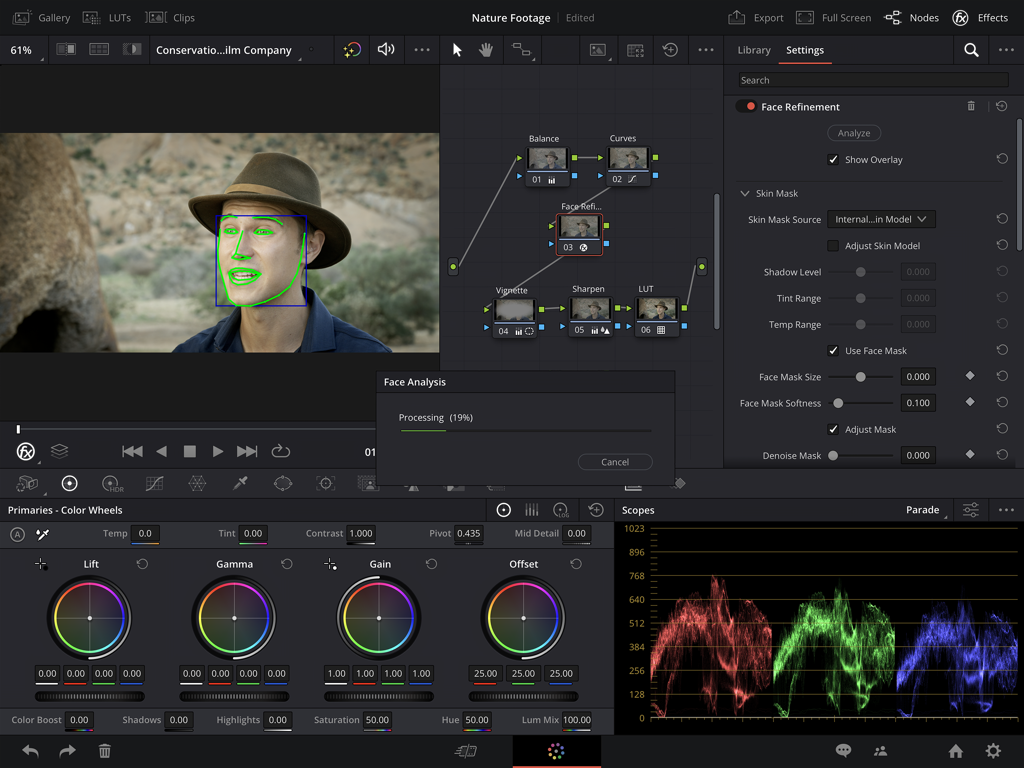
はい、DaVinci Resolve for iPad には、ユーザーインターフェイスに示されているように、エフェクトパネル内に「顔の精細化」が含まれています。この機能により、映像内の顔の詳細な分析と調整が可能になります。
以下のスクリーンショットと説明は、アプリの公式ストアリスティングから直接取得されたものであり、アプリ開発者の所有物です。
アプリストア
スクリーンショット
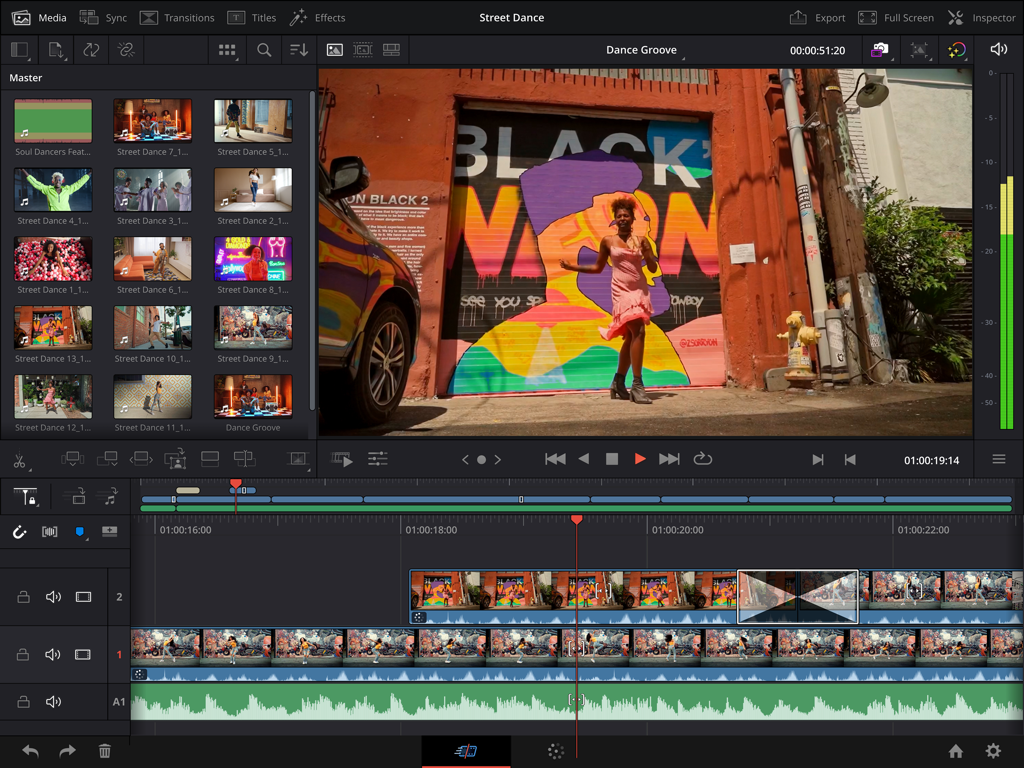
プロフェッショナルなビデオ編集タイムラインとAIマジックマスクツールを表示するiPad版 DaVinci Resolveインターフェース
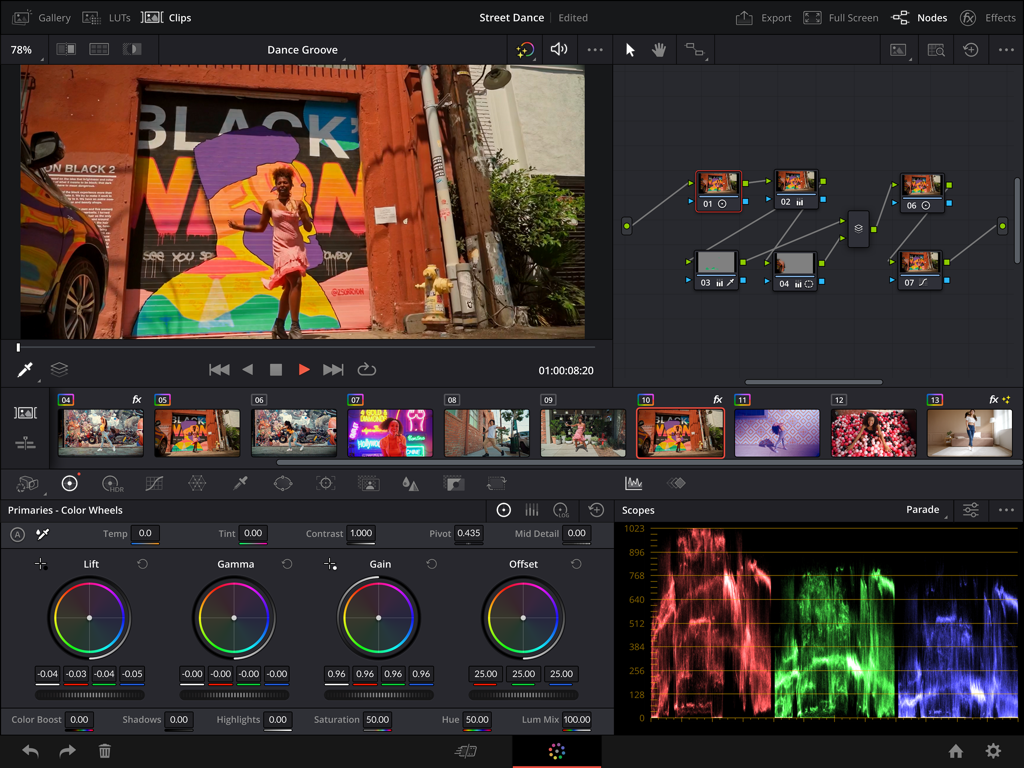
カラーホイール、ノードツリー、スコープを備えたiPad版 DaVinci Resolveのプロフェッショナルカラーグレーディングインターフェース
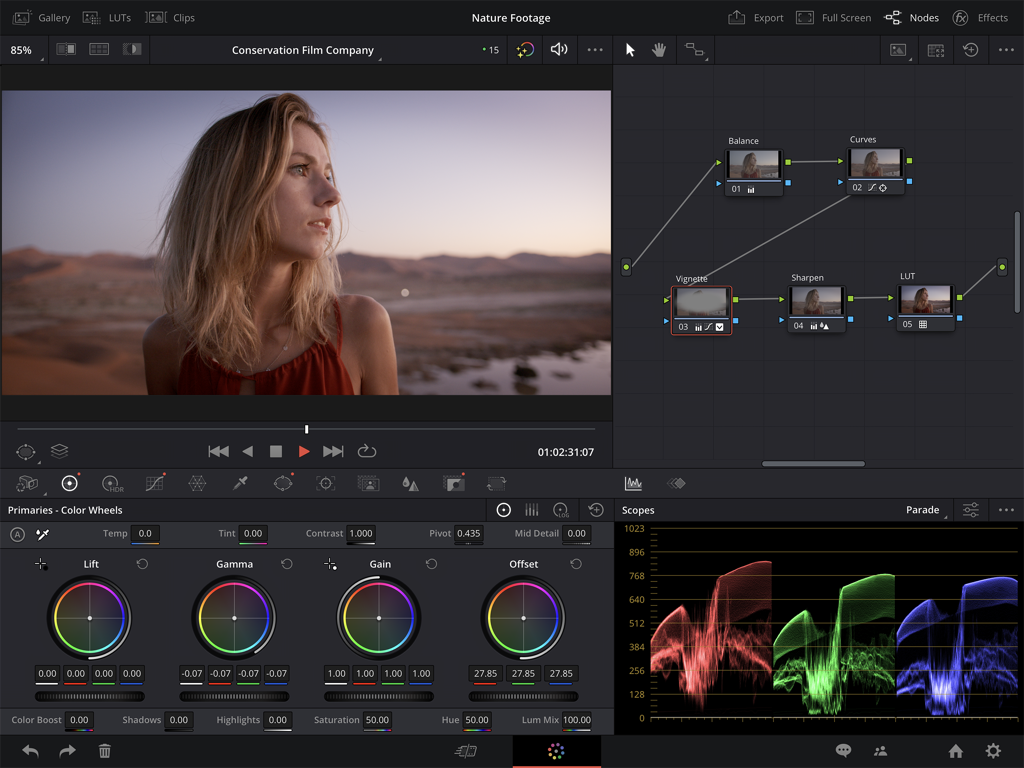
カラーホイールとスコープを備えたiPad版 DaVinci Resolveのプロフェッショナルカラーコレクションインターフェース
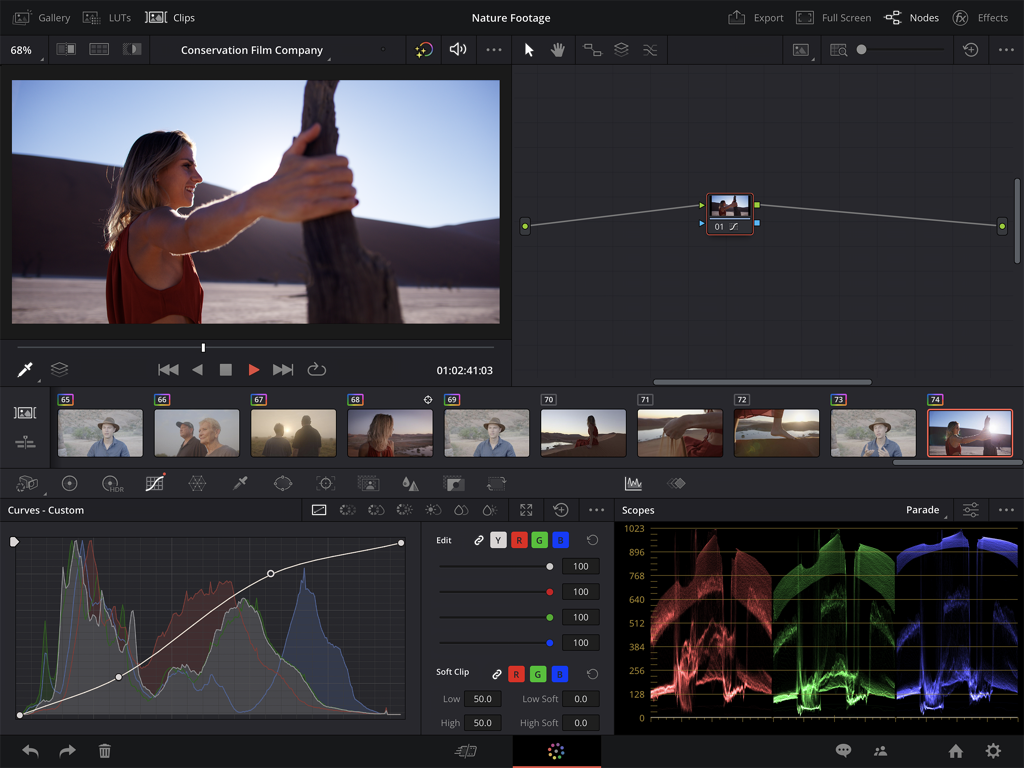
カーブとスコープを備えたiPad版 DaVinci Resolveのプロフェッショナルビデオカラーコレクションインターフェース
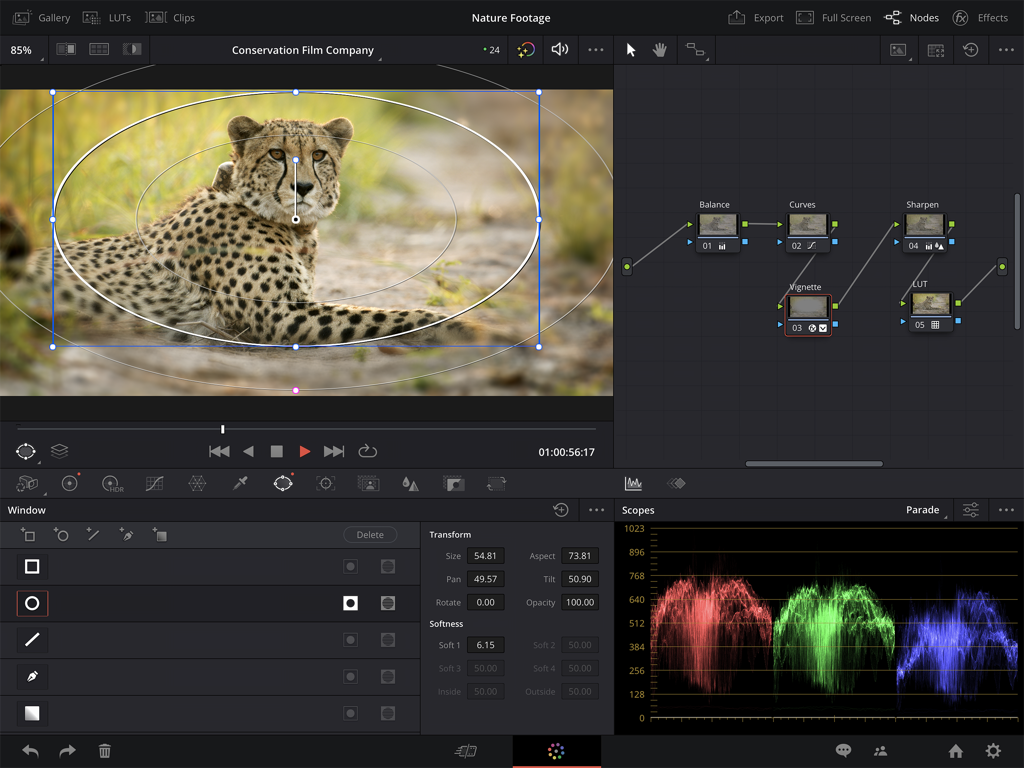
ノードグラフとビデオスコープを表示するiPad版 DaVinci Resolveのプロフェッショナルカラーグレーディングインターフェース
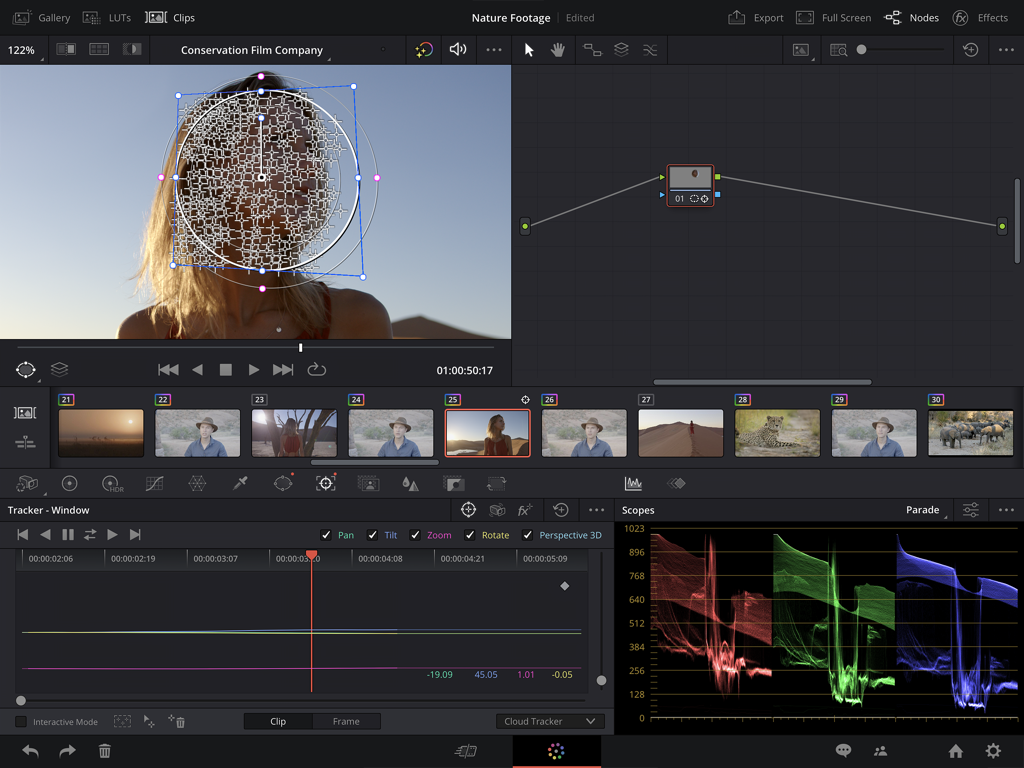
AIマジックマスク・トラッキングとカラーグレーディングスコープを備えたiPad版 DaVinci Resolveのプロフェッショナルビデオ編集インターフェース
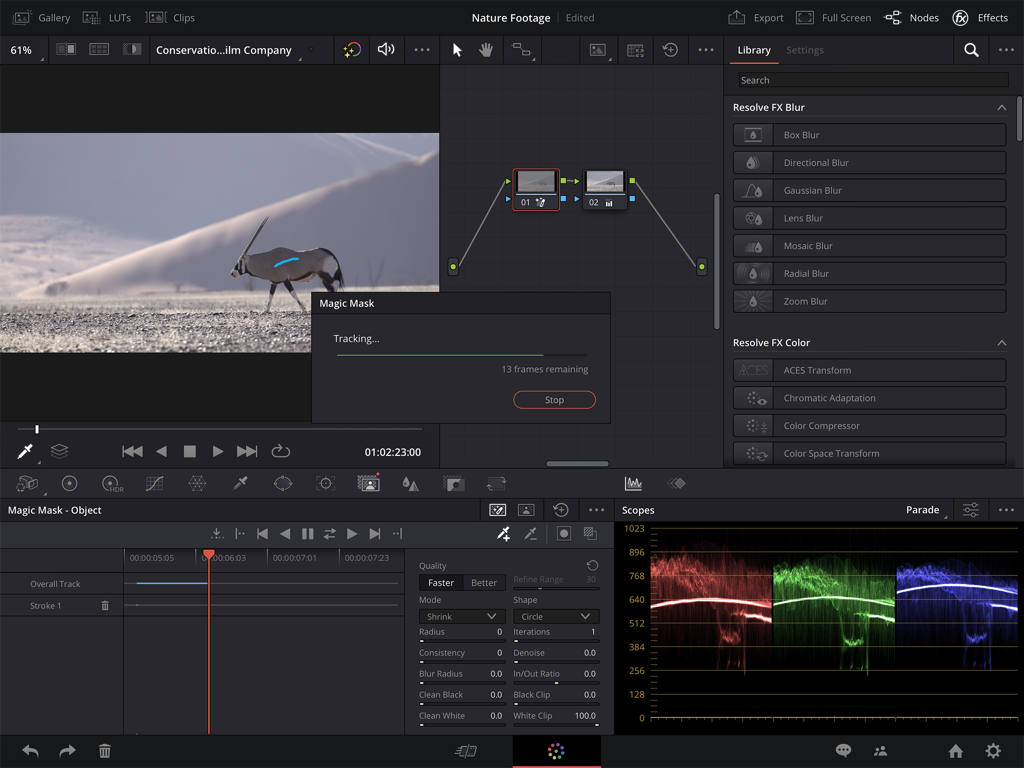
AI顔補正ツールとカラーホイールを表示するiPad版 DaVinci Resolveのプロフェッショナルカラーグレーディングインターフェース
説明
Download
類似アプリ
似た機能とユーザー体験を持つアプリ

VN: AI Video Editor
Ubiquiti Labs, LLC

Splice - Video Editor & Maker
Bending Spoons Apps ApS

Blurrr-Music video editor
TBPS INTERNATIONAL TECHNOLOGY PTE. LTD.

Node Video
小为 罗

Filmmaker Pro - Video Editor
Tinkerworks Apps

Time Cut: Smooth Slow Motion
立亚 林

LumaFusion
Luma Touch LLC

Slow Motion Video Fx Editor
Brain Craft Ltd

WEILO - My Last Video Editor
vimosoft
このページはアプリまたはその開発者の公式ページではなく、情報提供および論評を目的として作成された独立した編集出版物です。明示的に別段の記載がない限り、アプリおよびその開発者は、MWM、Apple、Google Play、アプリのパブリッシャー、またはアプリの開発者と提携、承認、後援、認可、またはその他の公式的な関係はなく、このページのいかなる内容も、アプリがMWMのサービスを使用して開発されたことを意味するものではありません。すべての商標、ロゴ、スクリーンショット、その他のコンテンツはそれぞれの所有者の財産です。