
このページはアプリまたはその開発者の公式ページではなく、情報提供および論評を目的として作成された独立した編集出版物です。明示的に別段の記載がない限り、アプリおよびその開発者は、MWM、Apple、Google Play、アプリのパブリッシャー、またはアプリの開発者と提携、承認、後援、認可、またはその他の公式的な関係はなく、このページのいかなる内容も、アプリがMWMのサービスを使用して開発されたことを意味するものではありません。すべての商標、ロゴ、スクリーンショット、その他のコンテンツはそれぞれの所有者の財産です。


Duet Display
iPadをただのタブレットから、プロのワークステーションに変える。このアプリは、ユーザーに第二の脳を与える。
ダウンロード
2.5M+ユーザー評価
評価数
139.6K開発元
カテゴリ
Productivity対応言語
15最新バージョン
3.1.4サイズ
67.3 MBリリース日
2014年12月18日生産性向上とクリエイティブワークフローを支える主要機能
アプリケーション「Duet Display」の機能分析
プロフェッショナル向け描画環境
iPadとApple Pencilをプロフェッショナルなグラフィックスタブレットとして活用し、デザイナーやアーティスト向けに最適化された超応答性の描画体験を提供します。圧力感知、傾き感知、ホバー、パームリジェクションなどに対応し、Photoshopなどの主要なクリエイティブソフトウェアで精密なコントロールを可能にします。
高性能なセカンドディスプレイ化
iPadやiPhoneをMacおよびPCのセカンドディスプレイとして機能させ、デジタルワークスペースを拡張することで、ユーザーはマルチタスクの生産性を大幅に向上させることができます。特に移動中やリモートワークでの生産性維持に貢献します。
遅延のない高速描画と表示
本アプリは、独自のレンダリングアルゴリズムにより、有線接続を通じてゼロラグで比類のないパフォーマンスとディスプレイ品質を提供します。ユーザーは、Wi-Fi接続の不安定さや遅延、画面のピクセル化を心配することなく、スムーズな作業体験を得られます。
簡単接続と即時利用開始
充電ケーブル一本でiPadをデスクトップに接続するだけで、無料のDuetデスクトップアプリがデバイスを自動的に検出し、高パフォーマンスのタッチスクリーンディスプレイに変換します。複雑な設定やネットワークパスワード管理は不要です。
直感的なタッチ&ジェスチャー操作
ユーザーはiPadのタッチスクリーンとジェスチャー機能を利用して、MacやPCのアプリケーションを直接操作できます。これには、2本指スクロール、パン、ズームなどが含まれ、これまでにない直感的なインタラクションを可能にします。
iPad上のMac Touch Bar機能
本アプリは、任意のMacを使用している場合、iPadにTouch Bar機能を追加する能力を提供します。これにより、Macの特定のコンテキスト依存機能をiPad上で利用でき、作業効率と操作性を向上させます。
よくある質問
について知っておくべきこと Duet Display
What is Duet Display?
Duet Display transforms your iPad or iPhone into an advanced extra display for your Mac or PC, providing unparalleled performance and zero lag with touch capabilities.
How do you connect devices with Duet Display?
Yes, Duet Display works by plugging your iPad or iPhone into your desktop with a charging cable. The free Duet desktop app automatically detects the device and converts it into a high-performance display.
Does Duet Display experience lag?
No, Duet Display offers zero lag performance and high display quality. It eliminates concerns about unreliable Wi-Fi or laggy performance, as affirmed by press reviews like The Guardian and Business Insider.
Does Duet Display support touch interaction?
Yes, Duet Display supports touchscreen interaction with both Mac and PC. It includes gestures like two-finger scrolling, pan, and zoom, and can add a touch bar to any iPad with any Mac.
What features are included with Duet Pro?
Duet Pro is an optional upgrade that turns your iPad and Apple Pencil into a professional graphics tablet. It offers ultra-responsive drawing, pressure and tilt sensitivity, hover, and palm rejection for creative software.
What devices are compatible with Duet Display and Duet Pro?
Duet Display is compatible with all iPhones and iPads running iOS 7.0+, all Macs with OS 10.9+, and all PCs with Windows 7+. Duet Pro requires iPad Pros with Apple Pencil and Windows 8.1+ (64 bit) for PCs.
以下のスクリーンショットと説明は、アプリの公式ストアリスティングから直接取得されたものであり、アプリ開発者の所有物です。
アプリストア
スクリーンショット
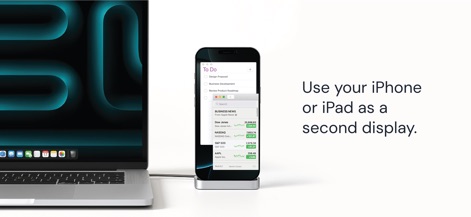
本アプリは、iPhoneをMacのセカンドディスプレイとして活用し、ToDoリストの管理やリアルタイムの株価情報を同時に表示することで、ユーザーのマルチタスク作業を大幅に向上させます。
効率的な拡張
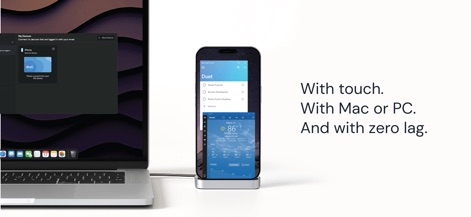
本ツールは、ユーザーのiPhoneをMacまたはPCのセカンドディスプレイとして接続し、ToDoリストや天気予報といった複数の情報をタッチ操作でスムーズに切り替えながら、遅延なく表示します。
シームレス操作

主要テクノロジーメディア各誌が本アプリを高く評価しており、TechCrunchの「まるで魔法のようだ」という表現や、Business Insiderの「遅延ゼロとTrue Retina解像度」というコメントが、本ツールの卓越した性能と信頼性を裏付けています。
各誌が絶賛
説明
Download
類似アプリ
似た機能とユーザー体験を持つアプリ

Mouse · Keyboard
Remote Sunrise LTD

Camo Camera
Reincubate Ltd

DroidCam Webcam & OBS Camera
DEV47 APPS LTD.

spacedesk - USB Display for PC
datronicsoft Technology GmbH

iVCam Webcam
俊红 柴

Remote Mouse
耀 阮

CamX - USB Camera
Touchbits Inc.

Genki Studio
Human Things, Inc

Astropad Studio Drawing Tablet
Astro HQ LLC
このページはアプリまたはその開発者の公式ページではなく、情報提供および論評を目的として作成された独立した編集出版物です。明示的に別段の記載がない限り、アプリおよびその開発者は、MWM、Apple、Google Play、アプリのパブリッシャー、またはアプリの開発者と提携、承認、後援、認可、またはその他の公式的な関係はなく、このページのいかなる内容も、アプリがMWMのサービスを使用して開発されたことを意味するものではありません。すべての商標、ロゴ、スクリーンショット、その他のコンテンツはそれぞれの所有者の財産です。