
このページはアプリまたはその開発者の公式ページではなく、情報提供および論評を目的として作成された独立した編集出版物です。明示的に別段の記載がない限り、アプリおよびその開発者は、MWM、Apple、Google Play、アプリのパブリッシャー、またはアプリの開発者と提携、承認、後援、認可、またはその他の公式的な関係はなく、このページのいかなる内容も、アプリがMWMのサービスを使用して開発されたことを意味するものではありません。すべての商標、ロゴ、スクリーンショット、その他のコンテンツはそれぞれの所有者の財産です。


OffScreen: Screen Time Control
集中力を解き放ち、デジタル習慣を再構築する究極のツール。OffScreenは、単なる監視を超え、ユーザーに真のコントロールを提供します。
ダウンロード
2.5M+ユーザー評価
評価数
55.0K開発元
カテゴリ
Health & Fitness対応言語
3最新バージョン
3.20.7サイズ
114.7 MBリリース日
2019年9月10日デジタルウェルビーイングと生産性向上に貢献する主要機能
OffScreen: Screen Time Control アプリ分析
詳細なスクリーンタイム追跡機能
本アプリは、ピックアップ回数、平均使用時間、歩行中の使用、静止状態での使用、睡眠時間など、ユーザーの多様な携帯電話使用パターンを深く理解するための詳細な指標を提供します。これにより、デジタルウェルビーイングの向上の基盤が築かれます。
高度な集中モード
本ツールは、ポモドーロ、カウントダウン、時間累積の3種類の集中モードをサポートし、ユーザーは特定のアプリの使用を制限して生産性を効果的に高めることが可能です。ライブアクティビティやStandByにも対応し、集中を維持するための多様な機能を提供します。
OFFタイム設定によるデジタルデトックス
ユーザーは、特定の時間帯にソーシャルアプリを無効にする「OFFタイム」を設定できます。これにより、デジタル機器から意識的に離れる時間を確保し、デジタルデトックスを促進して質の高い休憩を享受できます。
ゲーミフィケーションによるデジタルデトックスチャレンジ
このアプリは、スクリーンタイム、ピックアップ、睡眠に関するチャレンジを提供します。ユーザーはゲーム感覚でデジタル習慣の改善に取り組み、目標達成へのモチベーションを維持しながら、より健康的なデジタルライフを築くことが可能です。
集中モード中のアプリホワイトリスト
集中モード実行中においても、本アプリはユーザーが必要不可欠な辞書アプリや学習ツールなど、特定のアプリのみを許可するホワイトリスト機能を提供します。これにより、集中を妨げることなく、必要なツールを利用して生産性を維持できます。
Apple HealthKitとのシームレスなデータ同期
本アプリは、ユーザーの睡眠時間や集中時間をApple HealthKitと同期します。これにより、ユーザーは自身の健康データを一元的に管理し、デジタルウェルビーイングと身体的健康の包括的な関連性を把握することが可能です。
Apple Watch連携機能
本ツールはApple Watchとの連携をサポートしており、ユーザーはお気に入りの文字盤にスクリーンタイムデータを表示したり、ウォッチから直接集中モードを開始・管理したりできます。これにより、手軽にデジタル習慣をコントロールすることが可能です。
視覚的なデータ分析と共有
ユーザーは、週次、月次、年次のビューで自身の使用データを視覚的に分析できます。また、デザイン性の高い共有カードを通じて、進捗を友人や家族と簡単に共有し、デジタル習慣改善のモチベーションを維持することが可能です。
よくある質問
について知っておくべきこと OffScreen: Screen Time Control
What is OffScreen: Screen Time Control?
OffScreen: Screen Time Control helps users track their phone usage and enhance focus. It offers tools for screen time management, various focus modes, and digital detox challenges to promote healthier digital habits.
How does OffScreen help me track my screen time?
OffScreen tracks daily screen time, pickups, average usage, and time spent while walking or stationary. It allows users to set screen time goals and provides daily insights into their phone habits.
Can I set specific goals for my phone usage with OffScreen?
Yes, OffScreen allows users to set a screen time goal. The app provides daily insights to help monitor progress against this goal and manage phone usage effectively.
Does OffScreen offer a Pomodoro timer for focus sessions?
Yes, OffScreen's Focus Mode supports a Pomodoro timer. It also includes countdown and time accumulation modes to help users maintain concentration and productivity.
Can OffScreen block distracting social apps during my OFF Time?
Yes, OffScreen's OFF Time feature allows users to set disable times for social applications. This helps users enjoy periods of uninterrupted focus and reduce digital distractions.
Does OffScreen integrate with Apple HealthKit?
Yes, OffScreen syncs sleep time and focus mindfulness time with Apple HealthKit. This integration allows for a comprehensive overview of user wellness data.
How does OffScreen categorize my focus sessions?
OffScreen allows users to categorize their focus sessions using tags. This feature helps organize and track different types of focused work or study periods.
Can I see my OffScreen usage data over different periods?
Yes, OffScreen provides data visualization in week, month, and year views. Users can analyze their screen time and focus patterns over various durations.
Does OffScreen track location in the background?
Yes, OffScreen tracks your location in the background to collect walking time data. This activity can potentially affect the device's battery life.
What types of challenges does OffScreen offer for digital detox?
OffScreen offers digital detox challenges including screen time challenges, pickup challenges, and sleep challenges. These help users reduce phone dependency and improve well-being.
How do OffScreen subscriptions work?
OffScreen subscriptions are charged to your iTunes account upon purchase confirmation. They automatically renew unless auto-renew is turned off at least 24 hours before the current period ends.
Can I use other apps while OffScreen's focus mode is active?
Yes, OffScreen's focus mode allows users to set a concentration app whitelist. This enables using specific applications like a dictionary during a focus session without breaking concentration.
Does OffScreen provide widgets for quick data viewing?
Yes, OffScreen offers customizable widgets to clearly display data. Users can view essential metrics like screen time, pickups, and OFF time directly from their home screen.
以下のスクリーンショットと説明は、アプリの公式ストアリスティングから直接取得されたものであり、アプリ開発者の所有物です。
アプリストア
スクリーンショット
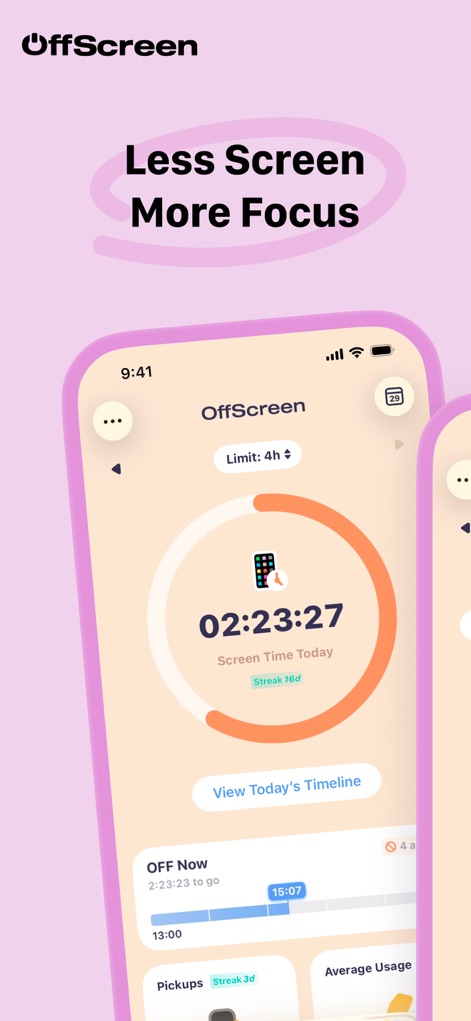
本アプリは、設定された利用時間目標と現在の利用状況を、視覚的に分かりやすいリング表示と「OFF Now」セクションでユーザーに提供します。
利用状況を可視化
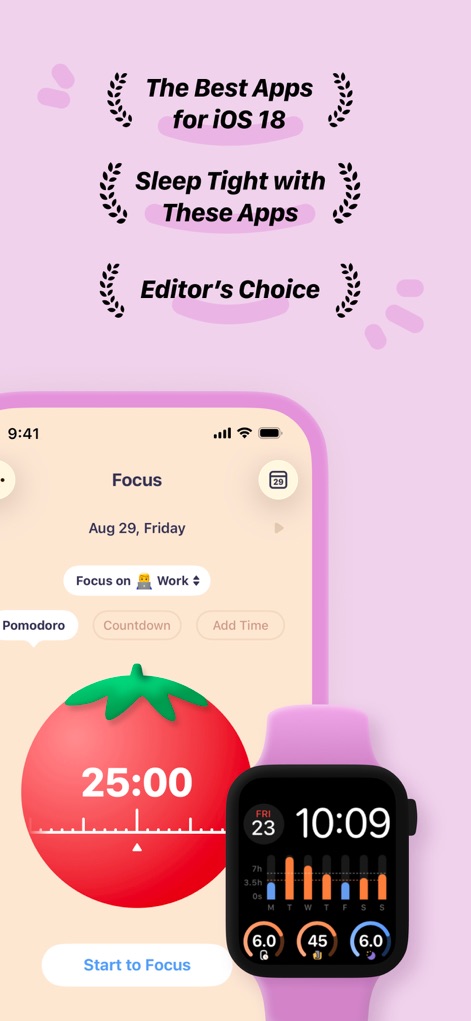
集中モード画面では、生産性を高めるためのポモドーロタイマーが利用でき、Apple Watch連携により手元で集中データの確認が可能です。
集中モードをサポート
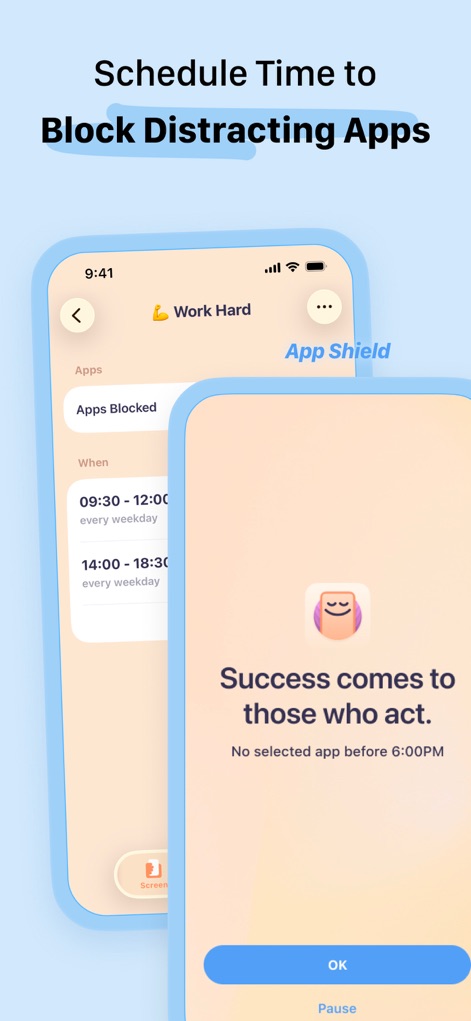
ユーザーは特定のアプリのブロック時間を柔軟に設定でき、ブロック中には集中を促すメッセージが表示され、より生産的な環境を築けます。
アプリ制限をスケジュール
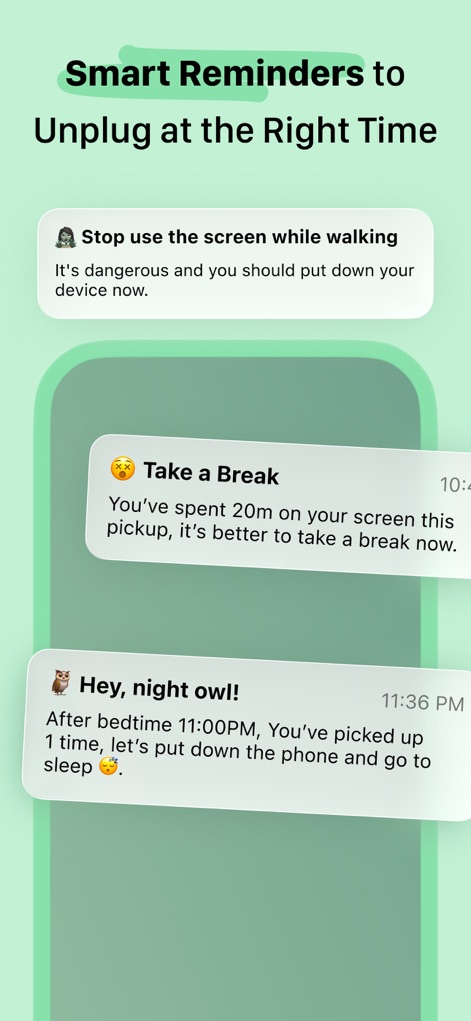
歩行中の使用停止警告や、休憩を促す通知など、スマートなリマインダー機能がユーザーに適切なタイミングでデジタルデトックスを提案します。
適切な休憩を通知
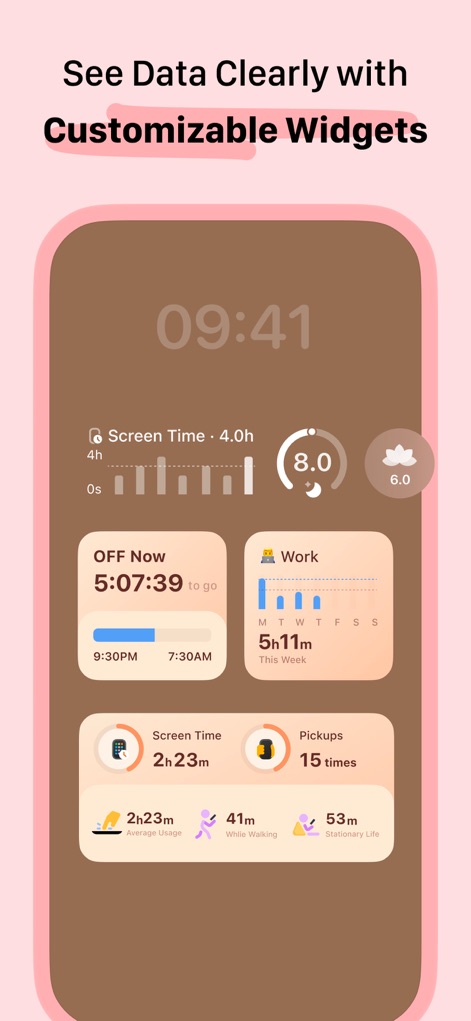
カスタマイズ可能な複数のウィジェットにより、スクリーン時間、OFF Nowの進捗、特定の活動への集中時間など、多様なデータをホーム画面で一目で確認できます。
ウィジェットで簡単確認
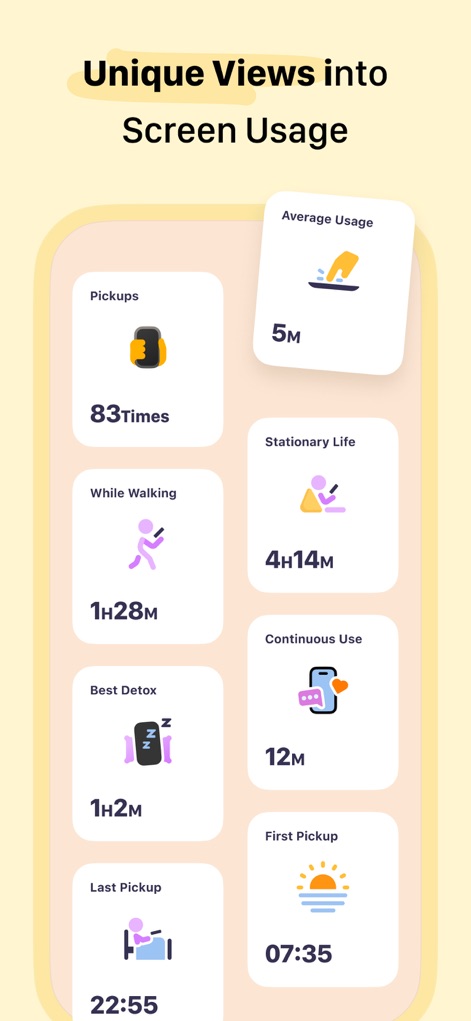
ピックアップ回数や歩行中の利用時間、平均利用時間といったユニークな指標を通じて、ユーザーのスクリーン利用習慣の詳細な分析を提供します。
利用習慣を深掘り
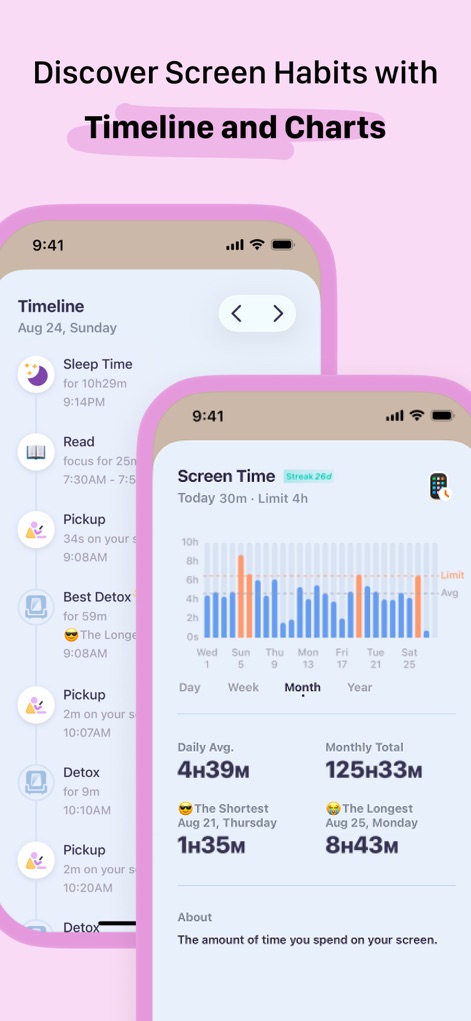
タイムライン表示で日々の活動履歴を追跡し、月間スクリーン時間の棒グラフで、長期的な利用傾向を分かりやすく把握できます。
習慣をグラフで発見
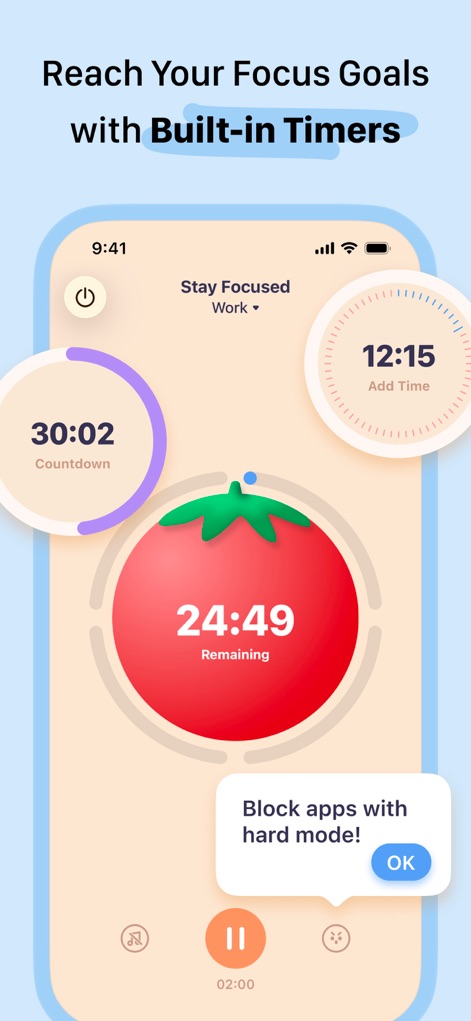
ポモドーロタイマーやカウントダウンタイマーといった内蔵機能により、ユーザーは集中目標を設定し、効果的な時間管理を実現します。
集中目標を達成
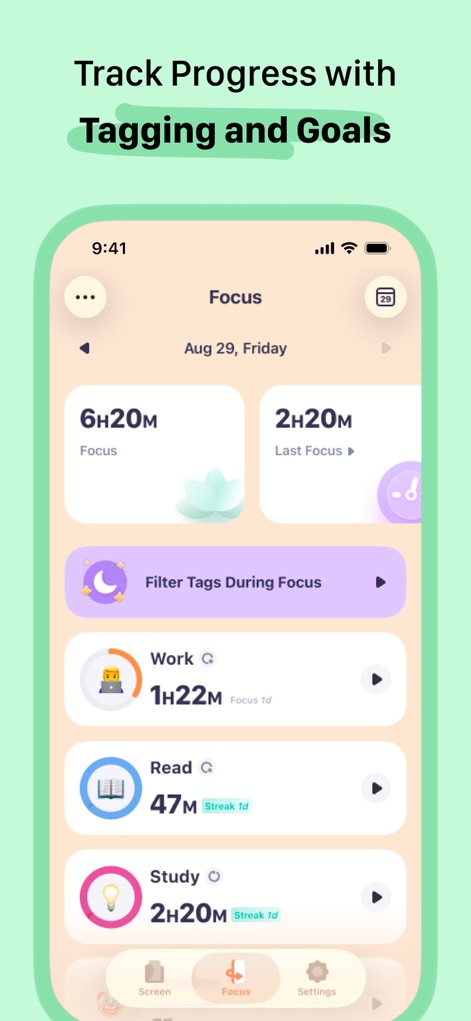
「Work」「Read」「Study」など、タグ付けされた集中セッションにより、ユーザーは自身の集中成果を追跡し、合計集中時間や前回集中時間を確認できます。
進捗をタグで管理
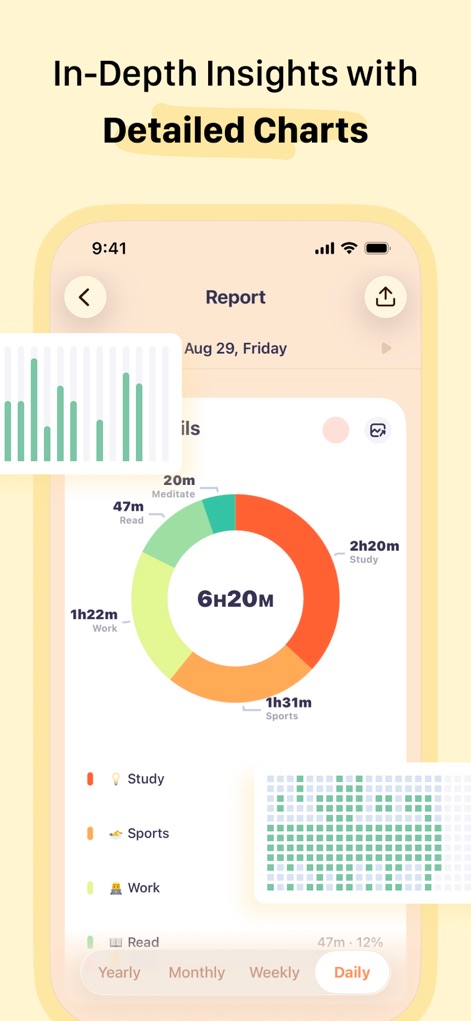
カテゴリ別の集中時間を示すドーナツグラフと、日別の利用状況を示すヒートマップを通じて、ユーザーは自身のデジタル習慣に関する深い洞察を得られます。
詳細分析と洞察
説明
Download
類似アプリ
似た機能とユーザー体験を持つアプリ
Opal: Screen Time Control
OPAL OS CORPORATION

BePresent: Screen Time Control
Screen Detox Inc

Brick - Ditch Distractions
Brick LLC (Wisconsin)

one sec | screen time + focus
riedel.wtf apps S.L.
ScreenZen- Screen Time Control
ScreenZen LLC

Refocus: Block Apps & Websites
Labi, LLC

Clarymind: Focus + Self Care
Seamint Co., Ltd.

Roots: Screen Time Control
MWM

AppBlock: Block Apps & Website
MobileSoft s.r.o.
このページはアプリまたはその開発者の公式ページではなく、情報提供および論評を目的として作成された独立した編集出版物です。明示的に別段の記載がない限り、アプリおよびその開発者は、MWM、Apple、Google Play、アプリのパブリッシャー、またはアプリの開発者と提携、承認、後援、認可、またはその他の公式的な関係はなく、このページのいかなる内容も、アプリがMWMのサービスを使用して開発されたことを意味するものではありません。すべての商標、ロゴ、スクリーンショット、その他のコンテンツはそれぞれの所有者の財産です。