
이 페이지는 앱이나 개발자의 공식 페이지가 아니며, 정보 제공 및 논평을 목적으로 작성된 독립 편집 간행물입니다. 명시적으로 달리 언급되지 않는 한, 해당 앱이나 개발자는 MWM, Apple, Google Play, 앱 퍼블리셔 또는 앱 개발자와 제휴, 보증, 후원, 승인 또는 공식적으로 연결되어 있지 않으며, 이 페이지의 어떤 내용도 해당 앱이 MWM의 서비스를 사용하여 개발되었음을 의미하지 않습니다. 모든 상표, 로고, 스크린샷 및 기타 콘텐츠는 해당 소유자의 자산입니다.


PDF Hero - PDF Editor & Reader
종이 문서에 얽매이지 않는 절대적인 통제력을 부여합니다. 이 앱은 당신의 손안에 디지털 오피스를 선사합니다.
다운로드
1M+사용자 평점
총 평가 수
30.6K개발사
카테고리
Business지원 언어
7최신 버전
2.14.21크기
535.6 MB출시일
2020년 7월 21일테크 분석가가 평가한 'PDF Hero - PDF Editor & Reader'의 주요 기능
PDF Hero: 모바일 생산성을 위한 포괄적인 PDF 솔루션
고급 텍스트 편집 및 주석
이 앱은 사용자가 PDF 파일 내의 텍스트를 직접 편집하고, 오타를 수정하며, 주석, 하이라이트, 도형 추가 및 자유로운 필기를 통해 문서에 상세한 피드백을 제공할 수 있도록 지원합니다.
PDF 양식 작성 및 전자 서명
이 도구는 사용자가 PDF 양식을 간편하게 작성하고, 기기 화면에서 직접 문서에 서명할 수 있게 하여, 종이 없는 워크플로우를 효율적으로 구축할 수 있도록 돕습니다.
OCR을 통한 텍스트 변환
이 기능은 광학 문자 인식(OCR) 기술을 활용하여 PDF 파일을 편집 가능한 텍스트로 변환함으로써, 문서 내용을 쉽게 수정하고 재활용할 수 있는 높은 유연성을 제공합니다.
PDF 페이지 관리 및 구성
이 앱은 사용자가 PDF 문서의 페이지를 추가, 회전, 재정렬 및 병합하여 문서를 원하는 방식으로 구조화하고 정리할 수 있도록 강력한 관리 기능을 제공합니다.
파일 가져오기 및 보안 공유
이 앱은 iCloud 및 Dropbox와 같은 클라우드 서비스에서 파일을 손쉽게 가져오고, PDF를 주석 포함 또는 미포함 상태로 공유하거나 민감한 데이터에 암호를 설정하여 보안을 강화할 수 있습니다.
PDF 압축 및 변환
이 도구는 PDF 파일을 압축하여 저장 공간을 절약하고 전송 효율성을 높이며, 이미지나 다른 문서를 PDF 파일로 손쉽게 변환할 수 있는 기능을 갖추고 있습니다.
직관적인 문서 보기 및 검색
이 앱은 어떤 PDF 파일이든 쉽게 열어보고, 확대/축소 및 텍스트 검색 기능을 통해 필요한 정보를 빠르게 찾을 수 있도록 지원하며, 책갈피를 생성하여 편리한 읽기 모드를 제공합니다.
문서 인쇄 기능
이 앱은 사용자의 기기에서 PDF 파일을 직접 인쇄할 수 있는 기능을 제공하여, 물리적인 문서가 필요한 경우에도 워크플로우를 중단 없이 이어갈 수 있도록 합니다.
자주 묻는 질문
에 대해 알아야 할 모든 것 PDF Hero - PDF Editor & Reader
What is PDF Hero?
PDF Hero is a mobile application for iPhone and iPad, designed to view, edit, annotate, fill, sign, and manage PDF files. It facilitates comprehensive digital document handling on the go.
Can I edit text in PDF documents with PDF Hero?
Yes, PDF Hero allows users to directly edit text within PDF files. Features include fixing typos and correcting paragraphs to update document content.
How can I annotate PDFs using PDF Hero?
PDF Hero enables annotations through text notes, highlighting key ideas, and adding shapes. Users can also write directly on PDFs with a finger or stylus.
Does PDF Hero support filling out PDF forms?
Yes, PDF Hero supports filling out PDF forms. Users can input information into various fields within PDF documents directly on their iPhone or iPad.
Can I sign documents electronically with PDF Hero?
Yes, PDF Hero offers electronic document signing as a Premium feature. Users can place their signature directly on the device screen.
How do I manage pages in a PDF using PDF Hero?
PDF Hero allows users to manage PDF pages by adding, rotating, reordering, deleting, and merging them. This feature is part of the Premium Management toolkit.
Can PDF Hero convert images to PDF format?
Yes, PDF Hero converts images and documents to PDF files. This is a Premium feature, facilitating the digitization of various file types into PDF format.
Is OCR technology available in PDF Hero?
Yes, PDF Hero includes OCR (Optical Character Recognition) technology as a Premium feature. It transforms PDF files into editable text, enabling content modification.
Can I password-protect my PDF documents in PDF Hero?
Yes, PDF Hero provides the ability to password-protect sensitive data within PDF documents. This Premium feature enhances the security of confidential files.
What devices are compatible with the PDF Hero app?
The PDF Hero app is compatible with Apple iPhone and iPad devices. It provides full PDF editing and reading functionalities on these mobile platforms.
How do PDF Hero subscriptions work?
PDF Hero subscriptions automatically renew and are charged to your App Store account. To cancel, auto-renew must be turned off at least 24 hours before the current period ends.
Can I add images to a PDF document using PDF Hero?
Yes, PDF Hero allows users to insert images into PDF documents. Users can also crop, resize, or adjust the angle of inserted images as required.
다음 스크린샷과 설명은 앱의 공식 스토어 목록에서 직접 가져온 것이며 앱 개발자의 자산입니다.
앱 스토어
스크린샷

이 앱은 사용자가 문서의 텍스트를 형광펜으로 강조하고 손글씨 주석을 추가할 수 있도록 지원하여 유연한 편집 기능을 제공합니다.
이동 중 PDF 편집

사용자는 이 도구를 사용하여 PDF 문서에 직접 텍스트를 삽입하고 다양한 글꼴과 크기로 편집할 수 있어 중요한 정보에 주석을 달 수 있습니다.
PDF에 직접 쓰기

이 앱은 사용자가 PDF 양식을 쉽게 읽고 채울 수 있도록 하며, 펜 도구를 사용하여 필드에 수기 텍스트를 입력하고 브러시 너비를 조절할 수 있습니다.
PDF 읽기 및 주석

사용자는 이 앱에서 문서에 직접 서명을 추가할 수 있으며, 서명 시 색상 및 선 두께를 포함한 스타일을 쉽게 사용자 지정할 수 있습니다.
한 번의 탭으로 서명

이 도구는 사용자가 PDF 문서에 시각적 요소를 풍부하게 추가할 수 있도록 그림을 삽입하고 도형의 비율과 불투명도를 조정하는 기능을 제공합니다.
이미지 및 도형 추가

이 앱을 통해 사용자는 여러 PDF 페이지를 시각적으로 관리하고 재정렬할 수 있으며, 각 페이지의 크기를 조절하거나 새 페이지를 쉽게 추가할 수 있습니다.
페이지 구성 및 재정렬
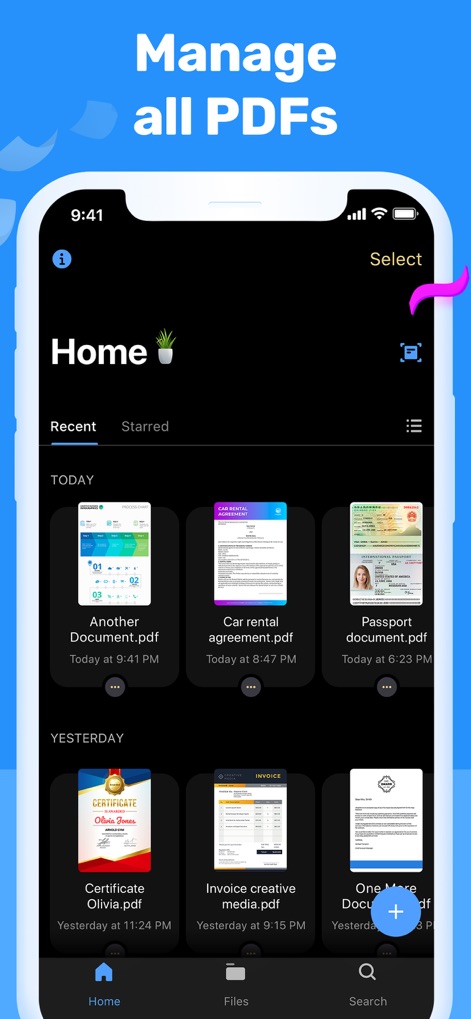
이 앱은 사용자가 모든 PDF 문서를 한곳에서 체계적으로 관리할 수 있도록 하며, 최근에 열어본 파일을 날짜별로 정렬하고 손쉽게 검색 기능을 이용할 수 있습니다.
모든 PDF 관리
설명
Download
비슷한 앱
유사한 기능과 사용자 경험을 가진 앱

PDF PRO Scan Image & Documents
Balzo srl

The PDF Scanner, PDF editor HQ
NEXT K.U.M. LTD

CamScanner - PDF Scanner App
INTSIG Information Co., Ltd

Adobe Scan: PDF & OCR Scanner
Adobe Inc.

WPS Office: PDF, Docs, Sheets
KINGSOFT OFFICE SOFTWARE CORPORATION LIMITED

iLovePDF - PDF Editor & Scan
ILOVEPDF S.L.

Scanner App: Genius Scan
The Grizzly Labs

Microsoft Lens: PDF Scanner
Microsoft Corporation

Clear Scan: Doc Scanner App
INDY MOBILE APP COMPANY LIMITED
이 페이지는 앱이나 개발자의 공식 페이지가 아니며, 정보 제공 및 논평을 목적으로 작성된 독립 편집 간행물입니다. 명시적으로 달리 언급되지 않는 한, 해당 앱이나 개발자는 MWM, Apple, Google Play, 앱 퍼블리셔 또는 앱 개발자와 제휴, 보증, 후원, 승인 또는 공식적으로 연결되어 있지 않으며, 이 페이지의 어떤 내용도 해당 앱이 MWM의 서비스를 사용하여 개발되었음을 의미하지 않습니다. 모든 상표, 로고, 스크린샷 및 기타 콘텐츠는 해당 소유자의 자산입니다.