
이 페이지는 앱이나 개발자의 공식 페이지가 아니며, 정보 제공 및 논평을 목적으로 작성된 독립 편집 간행물입니다. 명시적으로 달리 언급되지 않는 한, 해당 앱이나 개발자는 MWM, Apple, Google Play, 앱 퍼블리셔 또는 앱 개발자와 제휴, 보증, 후원, 승인 또는 공식적으로 연결되어 있지 않으며, 이 페이지의 어떤 내용도 해당 앱이 MWM의 서비스를 사용하여 개발되었음을 의미하지 않습니다. 모든 상표, 로고, 스크린샷 및 기타 콘텐츠는 해당 소유자의 자산입니다.

PDF Scanner Converter Document
이 앱은 종이를 디지털 명령으로 전환합니다. 더 이상 인쇄물에 얽매이지 마십시오. 필요한 모든 것이 화면 안에서 처리됩니다.
다운로드
250k+사용자 평점
총 평가 수
1.4K개발사
카테고리
Utilities지원 언어
33최신 버전
3.5.6크기
98.0 MB출시일
2021년 2월 15일포괄적인 모바일 문서 관리 솔루션의 주요 기능 평가
PDF Scanner Converter Document 앱 분석
정교한 문서 스캐닝
이 앱은 스마트폰을 사용하여 종이 문서, 신분증, 영수증 등을 빠르고 선명하게 스캔할 수 있도록 지원하며, 스마트 가장자리 감지 및 자동 보정 기능을 제공합니다.
고급 PDF 편집
이 도구는 PDF 파일을 직접 편집하여 주석 추가, 텍스트 하이라이트, 페이지 삽입/삭제 및 재배열을 지원하며, 문서에 서명을 추가하는 기능도 제공합니다.
유연한 문서 가져오기 및 내보내기
사용자가 기기, 이메일 또는 클라우드 저장소에서 DOC, XLS, PPT 등 다양한 형식의 문서를 가져올 수 있으며, PDF, TXT, Word, Excel 등 여러 형식으로 쉽게 내보낼 수 있도록 합니다.
다중 형식 PDF 변환
사용자가 PDF, TXT, DOC와 같은 파일 형식 간에 원활하게 변환할 수 있도록 하며, 이미지를 고품질 PDF 문서로 쉽게 변환하는 기능도 포함합니다.
간편한 문서 공유
이 앱은 스캔하거나 가져온 문서를 이메일, 메신저 또는 클라우드 서비스를 통해 다른 사람들과 신속하고 안전하게 공유할 수 있게 합니다.
무선 PDF 인쇄
사용자가 스캔하거나 편집한 문서를 무선 인쇄를 통해 스마트폰에서 직접 인쇄할 수 있으며, AirPrint 및 기타 주요 인쇄 프로토콜을 지원합니다.
수학 방정식 솔버
이 도구는 손글씨 수학 방정식을 스캔하여 즉각적인 해결책을 제공함으로써, 학생 및 수학 관련 작업을 하는 전문가에게 유용한 기능을 제공합니다.
QR 코드 스캐너
사용자가 웹사이트, 연락처, Wi-Fi 접속 등을 위한 QR 코드를 앱 내에서 즉시 스캔하고 읽을 수 있도록 지원합니다.
자주 묻는 질문
에 대해 알아야 할 모든 것 PDF Scanner Converter Document
What types of documents can the PDF Scanner app scan?
The PDF Scanner app scans paper documents, passports, ID cards, books, invoices, images, receipts, and notes. It features smart edge detection and auto-enhancement for clear results.
What file formats does the PDF Scanner app support for export?
The PDF Scanner app supports exporting documents in PDF, TXT, Word, DOC, and Excel formats. This ensures versatile compatibility for sharing and further use of scanned files.
Can users edit PDF files within the PDF Scanner app?
Yes, users can edit PDF files directly within the PDF Scanner app. Features include adding annotations, highlighting text, inserting or deleting pages, rearranging content, and adding signatures.
Does PDF Scanner allow conversion of images to PDF?
Yes, PDF Scanner allows users to convert images to high-quality PDF documents. You can capture photos instantly or import from your gallery, with customizable layouts and page order.
How does the PDF Scanner & Document Editor app facilitate document sharing?
The PDF Scanner & Document Editor app facilitates easy document sharing. Users can share scanned or imported files with others via email, messengers, or various cloud services directly.
Does the PDF Scanner app include a math equation solver?
Yes, the PDF Scanner app includes a Math Equations Solver. It scans handwritten math equations and provides instant solutions, making it a powerful tool for academic or professional use.
Is OCR (Optical Character Recognition) available in the PDF Scanner app?
Yes, the PDF Scanner app provides OCR (Optical Character Recognition) functionality. This feature recognizes text from scanned documents, enabling extraction and further editing of content.
Can users protect their PDFs with a password in PDF Scanner?
Yes, users can protect their PDFs within the PDF Scanner app. The application offers a feature to secure documents with a password for enhanced privacy and control over files.
What are the supported file formats for importing into PDF Scanner?
The PDF Scanner app supports importing DOC, DOCX, TXT, RTF, HTML, EML, XLS, XLSX, PPT, PPTX, HEIC, BMP, and GIF file types from devices or cloud storage.
What is the user count for the PDF Scanner & Document Editor app?
The PDF Scanner & Document Editor app has over 1 million users. This significant user base demonstrates its reliability and popularity as an all-in-one document management solution.
다음 스크린샷과 설명은 앱의 공식 스토어 목록에서 직접 가져온 것이며 앱 개발자의 자산입니다.
앱 스토어
스크린샷

이 앱은 스마트폰으로 문서를 스캔하여 PDF로 변환하는 과정을 보여주며, 하단에는 1백만 명 이상의 사용자 수를 자랑하는 배지가 표시됩니다.
스마트폰 문서 스캔

사용자는 이 앱에서 PDF 파일을 직접 편집하고 서명을 추가할 수 있으며, 하단 도구 모음에는 서명 기능과 내보내기/저장 버튼이 명확하게 표시됩니다.
PDF 편집 및 서명

이 앱은 여권과 신분증을 스캔하여 디지털화하는 과정을 보여주며, 하단 탐색 바에서는 '여권' 및 '카드' 스캔 모드를 선택할 수 있습니다.
신분증 디지털화

사용자는 스캔한 문서를 AirDrop이나 이메일을 통해 손쉽게 공유할 수 있으며, 공유 시트에는 개인 연락처와 클라우드 서비스 아이콘이 함께 제시됩니다.
간편한 문서 공유
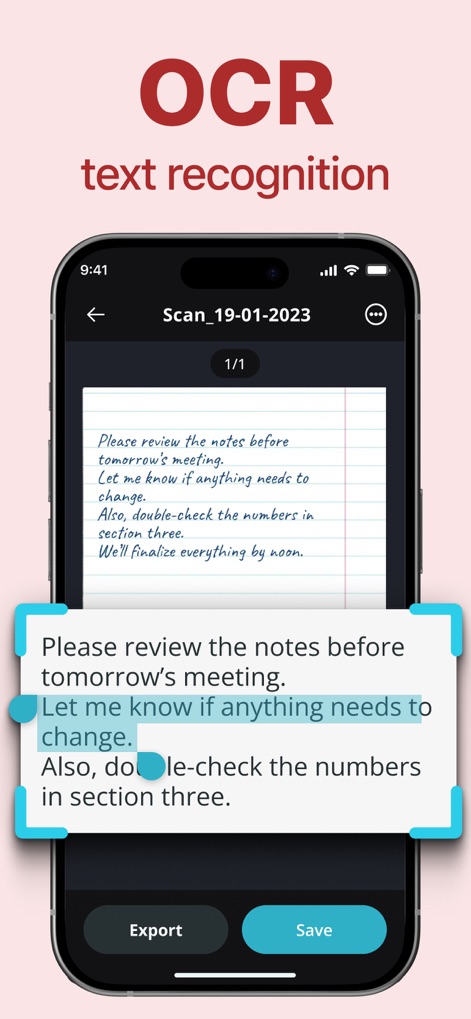
이 앱은 스캔된 문서에서 텍스트를 인식하는 OCR 기능을 보여주며, 인식된 텍스트 블록과 함께 하단에는 '내보내기' 및 '저장' 버튼이 배치되어 있습니다.
OCR 문자 인식

사용자는 PDF 파일에 암호를 설정하여 문서를 보호할 수 있으며, 이 스크린샷은 암호 입력 대화 상자와 화면 하단의 가상 키패드를 보여줍니다.
PDF 보안 설정
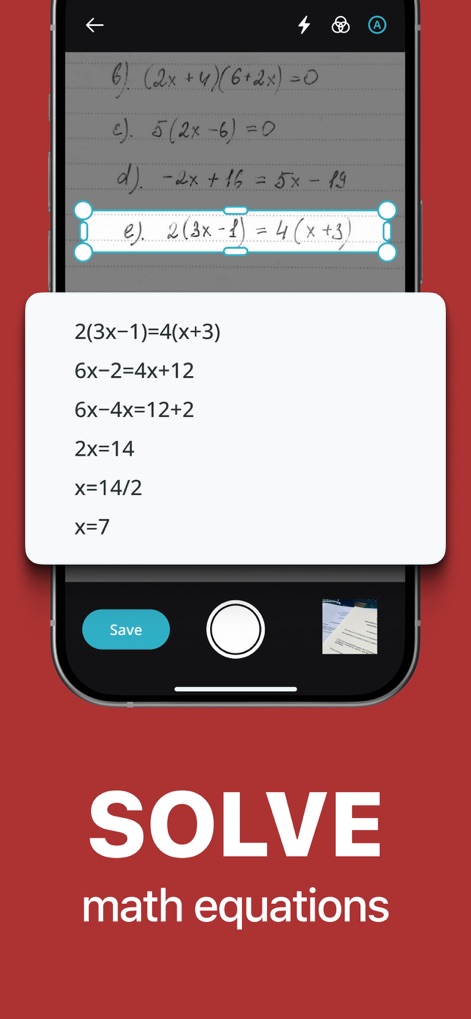
이 앱은 손으로 쓴 수학 방정식을 스캔하고 단계별 풀이를 제공하는 고유한 기능을 보여주며, 화면에는 스캔된 문제와 그에 대한 자세한 해답 과정이 시각적으로 나타납니다.
수학 방정식 해결
설명
Download
비슷한 앱
유사한 기능과 사용자 경험을 가진 앱

PDF PRO Scan Image & Documents
Balzo srl

The PDF Scanner, PDF editor HQ
NEXT K.U.M. LTD

CamScanner - PDF Scanner App
INTSIG Information Co., Ltd

Adobe Scan: PDF & OCR Scanner
Adobe Inc.

WPS Office: PDF, Docs, Sheets
KINGSOFT OFFICE SOFTWARE CORPORATION LIMITED

iLovePDF - PDF Editor & Scan
ILOVEPDF S.L.

Scanner App: Genius Scan
The Grizzly Labs

Microsoft Lens: PDF Scanner
Microsoft Corporation

Clear Scan: Doc Scanner App
INDY MOBILE APP COMPANY LIMITED
이 페이지는 앱이나 개발자의 공식 페이지가 아니며, 정보 제공 및 논평을 목적으로 작성된 독립 편집 간행물입니다. 명시적으로 달리 언급되지 않는 한, 해당 앱이나 개발자는 MWM, Apple, Google Play, 앱 퍼블리셔 또는 앱 개발자와 제휴, 보증, 후원, 승인 또는 공식적으로 연결되어 있지 않으며, 이 페이지의 어떤 내용도 해당 앱이 MWM의 서비스를 사용하여 개발되었음을 의미하지 않습니다. 모든 상표, 로고, 스크린샷 및 기타 콘텐츠는 해당 소유자의 자산입니다.