
This page is not an official page of the app or its developer, but an independent editorial publication created for informational and commentary purposes. Unless expressly stated otherwise, neither the app nor its developer is affiliated with, endorsed by, sponsored by, authorized by, or otherwise officially connected with MWM, Apple, Google Play, the app publisher, or the app's developer, and nothing on this page implies that the app was developed using MWM's services. Any trademarks, logos, screenshots, and other content remain the property of their respective owners.


Workday
The desktop shackles are broken; this app grants users the immediate authority to manage critical enterprise functions, anywhere.
Downloads
25M+User Rating
Total Ratings
2.3MPublisher
Category
BusinessLocales
21Latest Version
2026.03.1Size
196.6 MBFirst Released
Jun 5, 2009Workday Mobile App: Core Features Analysis
Evaluating key functionalities for on-the-go human capital and enterprise resource management.
Managerial Workflow Approvals
It allows managers to approve employee requests, process job changes, compensation adjustments, and provide performance feedback on the go, ensuring swift operational continuity.
On-the-Go Time & Expense Tracking
The app provides tools for employees to submit timesheets and expenses, track work hours, and manage time off requests from any location.
Secure Employee Self-Service
It enables employees to securely review pay slips, request time off, and access personal HR information directly from their mobile device.
Real-time Notifications & Reminders
This tool features push notifications for approvals, important updates, and time tracking reminders, allowing users to take immediate action within the app.
Robust Mobile Security
The app provides enhanced security features like Touch ID and Face ID support, ensuring that sensitive personal and company data remains protected on mobile devices.
Integrated Employee Directory
It allows users to browse the company directory and securely view coworker profiles, fostering better communication and collaboration across teams.
On-Demand Managerial Insights
This tool features interactive reports and dashboards, providing managers with quick insights into key business metrics to stay informed and make timely decisions.
Learning & Performance Feedback
The app provides access to learning courses and allows users to leave performance feedback on-the-go, supporting continuous employee development.
Frequently Asked Questions
Everything you need to know about Workday
What can employees do with the Workday app?
Employees use the Workday app to review pay, view or request time off, check in and out, submit timesheets and expenses. They can also browse the company directory, view profiles, leave feedback, and take learning courses.
What actions can managers perform using the Workday app?
Managers use the Workday app to approve employee requests, view team profiles, and perform actions like job changes or compensation adjustments. They can also provide performance feedback and gain business insights through interactive reports and dashboards.
Is the Workday app secure?
Yes, the Workday app secures user data. If a mobile device is lost or stolen, data remains safe. The app supports Touch ID and Face ID for authorized access, ensuring only the user can access their information.
Do I need authorization to use the Workday mobile app?
Yes, an organization must authorize access to the Workday mobile app. Users only access mobile features enabled by their organization and based on their specific role. Not all Workday features are available on mobile.
Can I check in and out for work using the Workday app?
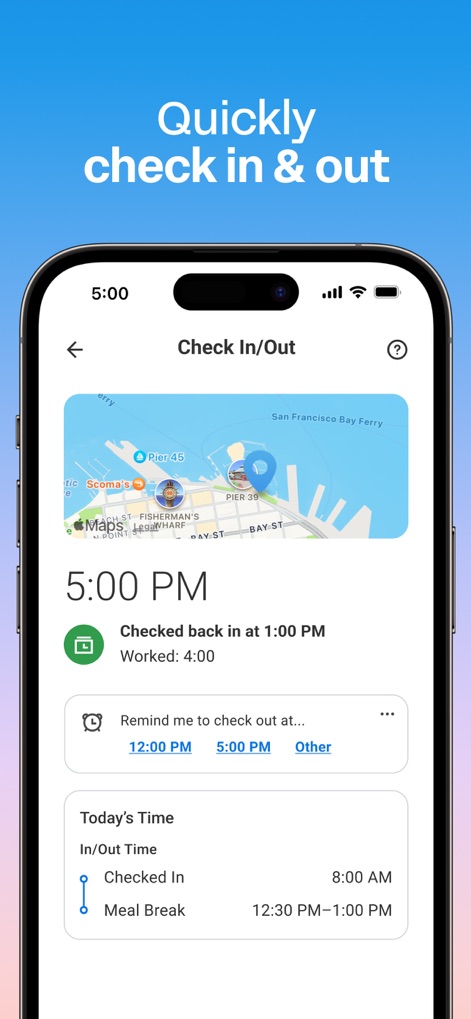
Yes, employees can quickly check in and out for work directly from the Workday app. The app also allows users to view their time worked and set reminders for checking in or out.
How do I view my payslips on the Workday app?
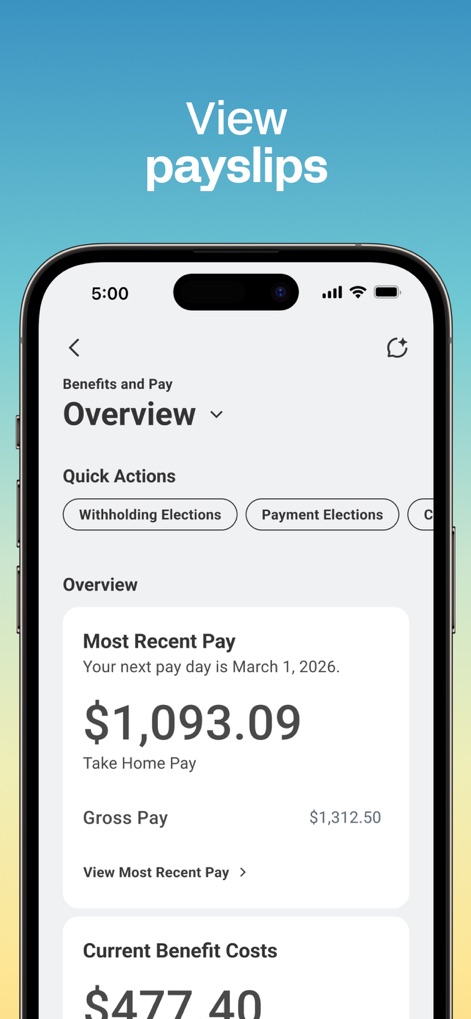
Users can view their payslips and pay details through the Workday app. The "Benefits and Pay" section displays information such as most recent pay, gross pay, and current benefit costs.
Does the Workday app allow submitting expense reports?
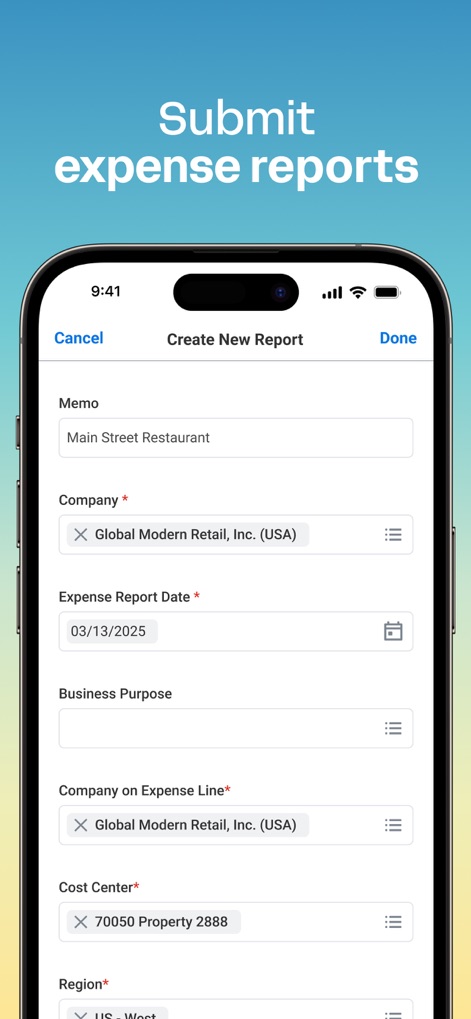
Yes, the Workday app allows users to submit expense reports. The app provides a dedicated interface to create new reports, including fields for memo, company, expense date, and business purpose.
Can I request and manage time off with the Workday app?
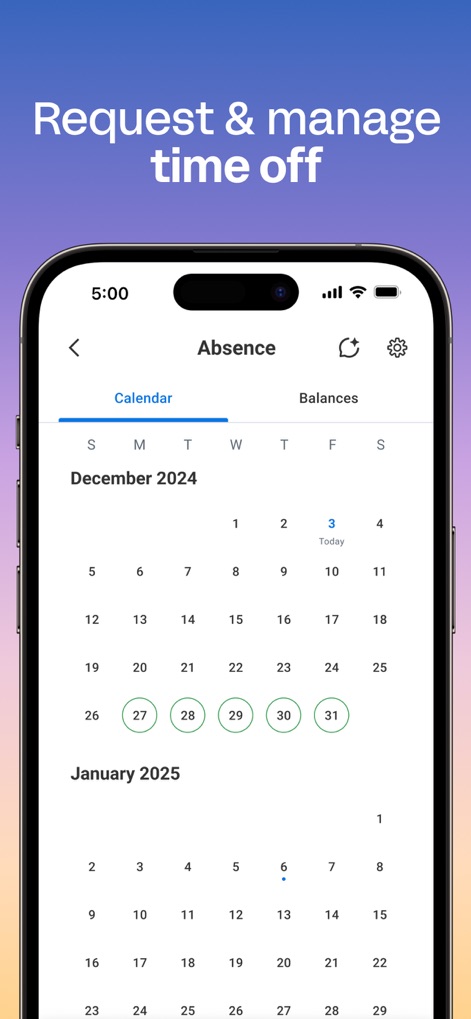
Yes, users can request and manage time off using the Workday app. The app features a calendar view to track absences and shows the approval status for vacation hours.
Does the Workday app send push notifications?
Yes, the Workday app sends push notification alerts and reminders. These notifications cover time tracking, important updates, and approvals, allowing users to take immediate action directly from the app.
Can I view coworker profiles and the organizational chart in the Workday app?
Yes, the Workday app allows users to browse the company directory and securely view coworker profiles. Managers can view team profiles and the organizational chart.
The following screenshots and description are sourced directly from the app's official store listing and are the property of the app developer.
App Store
Screenshots

Dashboard Overview
This app's intuitive homepage provides instant access to essential modules such as "Benefits and Pay" and "Time Tracking", alongside important "Announcements".
Time Tracking Simplified
Streamline daily routines with the ability to "Check In/Out" directly from the app, featuring location context via a "map" and customizable time "reminders".
Financial Clarity
Gain comprehensive financial clarity through the app's "Benefits and Pay Overview", which details "Most Recent Pay" and "Current Benefit Costs".
Simplified Expenses
The app streamlines expense management, enabling users to quickly fill in details such as the "Memo" and "Expense Report Date" for new reports.
Absence Management
Users can efficiently "request & manage time off" with a clear "calendar" interface, highlighting available and selected "absence" dates.
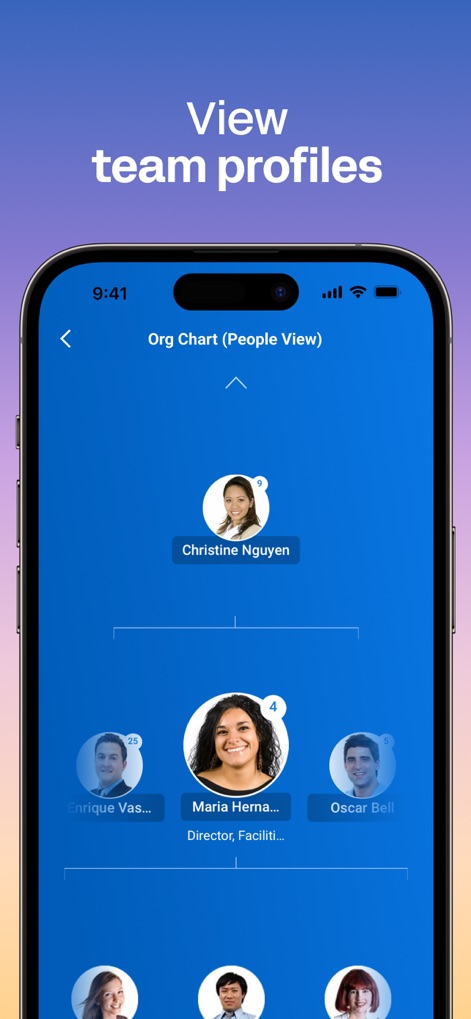
Team Directory
Explore the organizational structure through an interactive "Org Chart (People View)", allowing users to easily view "coworker profiles" and team hierarchies.
Description
Download
More Like This
Apps with similar features and user experience

Paylocity
Paylocity Corporation

Paychex Flex
Paychex Inc.

Paycom
Paycom Payroll, LLC

Gusto Mobile
Gusto, inc.

Amazon A to Z
AMZN Mobile LLC

TaxDome Client Portal
TaxDome LLC

MyWalmart
Walmart

BrightHR
Peninsula Online Services Limited

Waapi
Senior Sistemas S/A
This page is not an official page of the app or its developer, but an independent editorial publication created for informational and commentary purposes. Unless expressly stated otherwise, neither the app nor its developer is affiliated with, endorsed by, sponsored by, authorized by, or otherwise officially connected with MWM, Apple, Google Play, the app publisher, or the app's developer, and nothing on this page implies that the app was developed using MWM's services. Any trademarks, logos, screenshots, and other content remain the property of their respective owners.