
This page is not an official page of the app or its developer, but an independent editorial publication created for informational and commentary purposes. Unless expressly stated otherwise, neither the app nor its developer is affiliated with, endorsed by, sponsored by, authorized by, or otherwise officially connected with MWM, Apple, Google Play, the app publisher, or the app's developer, and nothing on this page implies that the app was developed using MWM's services. Any trademarks, logos, screenshots, and other content remain the property of their respective owners.


Alli360 by Kids360
Screen time, tamed. This app hands parents back the reins, giving them real power over their teen's digital habits.
Downloads
250k+User Rating
Total Ratings
28.8KPublisher
Category
UtilitiesLocales
32Latest Version
2.53.1Size
141.8 MBFirst Released
Apr 25, 2024A comprehensive evaluation of features designed for proactive parental control and healthy digital habits for teenagers.
Analytical Review: Alli360 by Kids360 Key Features
Essential Communication Uninterrupted
The app ensures that critical communication tools, such as calls and messages, remain fully functional even when other apps are restricted, guaranteeing parents can always reach their child for safety and peace of mind.
Scheduled Access Control
This tool allows parents to establish custom schedules for school, bedtime, or other important periods, automatically restricting access to entertainment, gaming, and social media applications during designated times to promote focus and healthy routines.
Application Time Limits
The app provides the ability for parents to set specific daily or weekly time limits for individual entertainment applications and games, helping to manage and reduce excessive screen time for teenagers.
Detailed Usage Analytics
It offers comprehensive insights into a teenager's smartphone usage, allowing parents to view total screen time and identify which applications are most frequently used, facilitating informed discussions about digital habits.
Customizable App Restrictions
This feature allows parents to selectively limit or completely block access to any specific application on their child's device, providing granular control over the digital environment.
Transparent Installation Policy
The app emphasizes that it requires the child's explicit knowledge and consent for installation, fostering an environment of trust and open communication between parents and teenagers regarding digital monitoring.
Robust Data Privacy
It assures users that all personal data is handled and stored in strict compliance with relevant legislation and GDPR policies, ensuring the privacy and security of sensitive family information.
Flexible Access & Trial
The app offers free basic monitoring functionalities upon connecting a second device and provides a trial period for its advanced time management features, allowing parents to experience the benefits before committing to a subscription.
Frequently Asked Questions
Everything you need to know about Alli360 by Kids360
What is the Alli360 app?
Alli360 is a service that helps parents set time limits for children in entertainment applications and games. It complements the Kids360 for parents app and is installed on the teen's device.
How does Alli360 integrate with the Kids360 app for parents?
Alli360 is installed on the child's device and complements the Kids360 for parents app, which is installed on the parent's device. They work together for comprehensive parental control.
What parental control features does the Alli360 app provide?
Alli360 offers time limits for specific apps, schedules for school and rest times, application blocking, and detailed screen time tracking. It also ensures essential communication apps remain accessible.
How do I begin using the Alli360 app for parental control?
To start using Alli360, first install Kids360 for parents on your device. Then, install Alli360 on your teen's phone, enter the provided link code, and allow monitoring within the app.
Is the Alli360 app safe and compliant with privacy regulations?
Yes, Alli360 is designed for family safety and requires explicit consent for installation on a child's device. Personal data is stored in strict accordance with legislation and GDPR policies.
Does Alli360 allow parents to block specific applications on a child's phone?
Yes, Alli360 allows parents to select specific applications they wish to limit or block completely from their child's device. This feature helps manage app access effectively.
Does Alli360 block communication apps on a child's device?
No, Alli360 ensures that applications for calls, messages, taxis, and other non-entertainment purposes always remain available. This allows parents to maintain constant communication with their child.
What is the cost of using the Alli360 app?
Monitoring smartphone time after connecting a second device is free. Time management functions, including application limits and schedules, are available during a trial period and through a subscription purchase.
Can parents set daily schedules for app usage using Alli360?
Yes, Alli360 enables parents to set specific schedules for school time and evening rest. During these periods, games, social networks, and other entertainment apps automatically become unavailable.
Where can I find technical support for the Alli360 app?
For technical problems, you can access 24-hour support directly within the Alli360 app. Alternatively, you can contact the support team via email at support@kids360.app.
The following screenshots and description are sourced directly from the app's official store listing and are the property of the app developer.
App Store
Screenshots
This screenshot visually confirms the Alli360 app icon and highlights its endorsement as "The Choice of Caring Parents", building immediate trust.
Easy Installation Process

This image illustrates the essential dual-app ecosystem, showing both the Alli360 app for a child and the Kids360 app for parents working in tandem.
Integrated Monitoring Solution

The screenshot demonstrates the secure pairing process, highlighting the "Add a child" interface and the input field for the unique link code.
Secure Device Pairing

Users can see the detailed "Apps" list where specific time limits, such as "Limited to 1h" for TikTok, and "Locked" status for Roblox, are clearly displayed.
Flexible App Restrictions

This visual demonstrates the "Timetables" feature, allowing parents to easily toggle on schedules like "Sleep" from 9 pm - 7 am and "Study" from 8 am - 12 pm.
Customizable Timetables
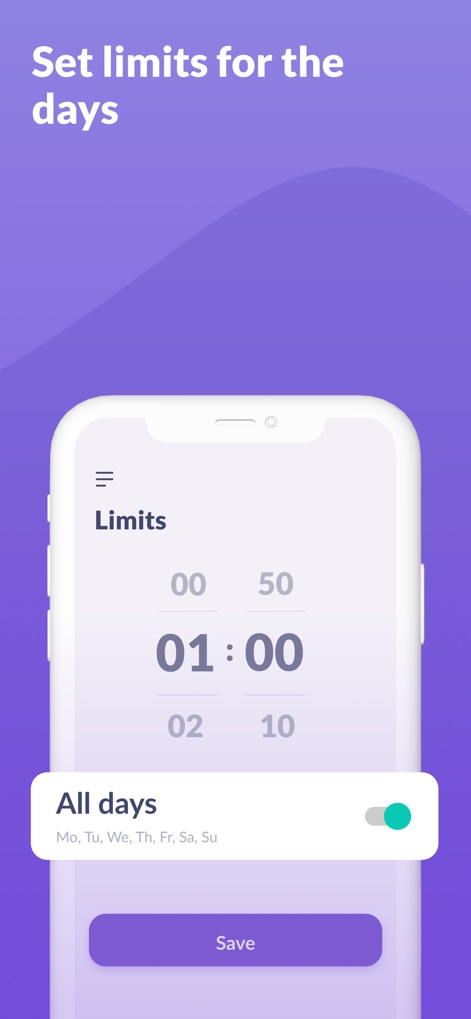
The app allows for precise "Limits" to be set for daily screen time, as evidenced by the "01:00" duration and the convenient "All days" toggle for consistent enforcement.
Daily Time Caps
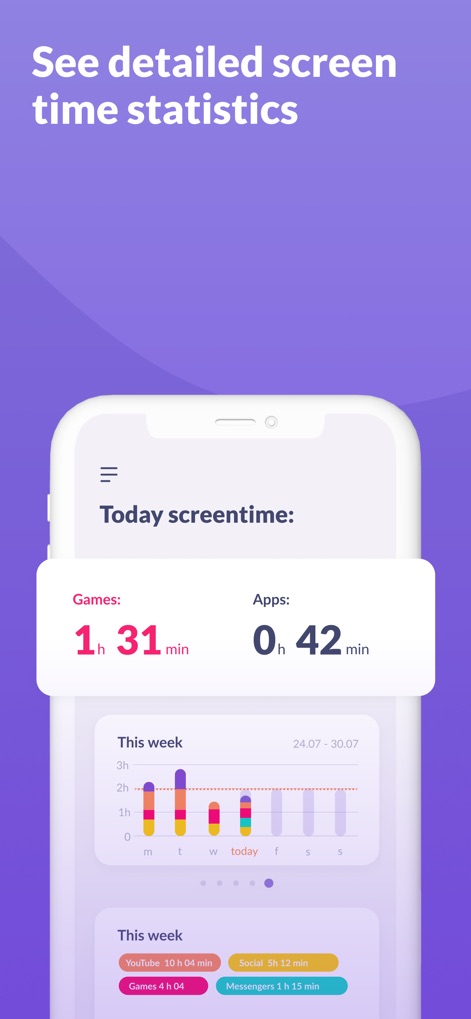
This view provides "Today screentime" statistics, breaking down usage into categories like "Games" (1h 31min) and "Apps" (0h 42min), alongside a clear weekly screen time bar chart.
Comprehensive Usage Insights
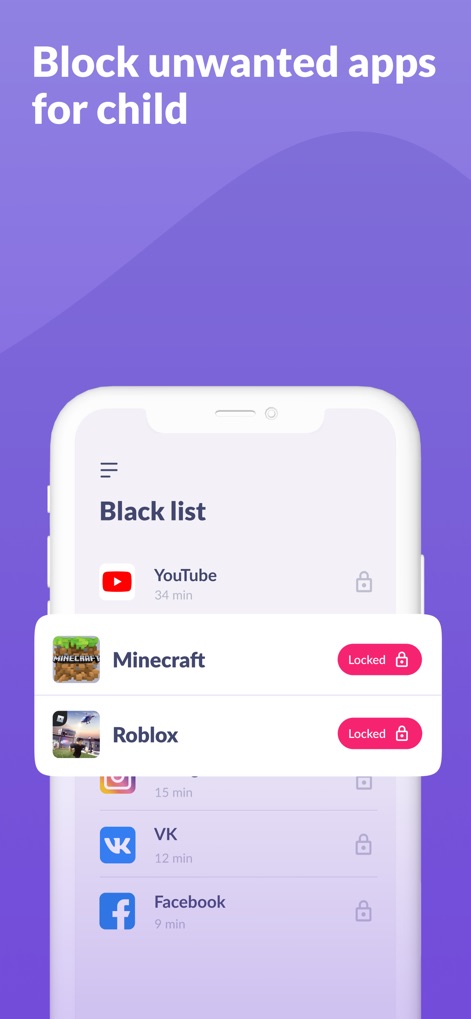
The "Black list" feature is showcased here, enabling parents to swiftly block access to unwanted applications, as seen with the "Locked" status for Minecraft and Roblox.
Application Blacklisting
Description
Download
More Like This
Apps with similar features and user experience

Findos - Find My Device
Pollux Bilisim Teknolojileri Sanayi ve Ticaret Limited Sirketi

Boost Family Guard
Smith Micro Software, Inc.

Google Family Link
Google LLC

Findmykids: GPS Phone Tracker
LETEM LTD

Nintendo Switch Parental Cont…
Nintendo Co., Ltd.

Parental Control App Kids360
ANKO SOLUTIONS LLC

JusTalk Kids - Safe Messenger
Ningbo Jus Internet Technology Co., Ltd.

FlashGet Kids:parental control
HONGKONG FLASHGET NETWORK TECHNOLOGY CO., LIMITED

Parental Control App: AirDroid
SAND STUDIO CORPORATION LIMITED
This page is not an official page of the app or its developer, but an independent editorial publication created for informational and commentary purposes. Unless expressly stated otherwise, neither the app nor its developer is affiliated with, endorsed by, sponsored by, authorized by, or otherwise officially connected with MWM, Apple, Google Play, the app publisher, or the app's developer, and nothing on this page implies that the app was developed using MWM's services. Any trademarks, logos, screenshots, and other content remain the property of their respective owners.