
This page is not an official page of the app or its developer, but an independent editorial publication created for informational and commentary purposes. Unless expressly stated otherwise, neither the app nor its developer is affiliated with, endorsed by, sponsored by, authorized by, or otherwise officially connected with MWM, Apple, Google Play, the app publisher, or the app's developer, and nothing on this page implies that the app was developed using MWM's services. Any trademarks, logos, screenshots, and other content remain the property of their respective owners.


AnyDesk Remote Desktop
Remote access often means compromise. AnyDesk, however, shatters these limitations, granting users seamless, secure control across any distance.
Downloads
12.5M+User Rating
Total Ratings
256.3KPublisher
Category
UtilitiesLocales
28Latest Version
8.1.0Size
47.1 MBFirst Released
Jan 26, 2017Key Features of AnyDesk Remote Desktop
An analytical overview of AnyDesk's core functionalities and their impact on various user segments.
Remote Desktop Control
It allows users to securely access and control remote computers from various devices, enabling seamless work and support from any location.
Banking-Standard Security
The app provides banking-standard TLS 1.2 encryption and secure session verification, ensuring data integrity and user privacy during remote connections.
Optimal Performance & Responsiveness
This tool features outstanding performance, including high frame rates and low latency, which guarantees a smooth and responsive remote desktop experience.
Cloud and On-Premise Deployment
It allows users and organizations to choose between cloud-based or self-hosted (on-premises) solutions, offering flexibility to meet specific infrastructure and security requirements.
Versatile Use Across Audiences
The app provides solutions for a diverse range of users, including IT support, remote employees, and students, adapting to various professional and personal remote needs.
Ad-Free Personal Use
The app provides a completely ad-free experience and is available free of charge for personal use, making it accessible and user-friendly for individuals.
Frequently Asked Questions
Everything you need to know about AnyDesk Remote Desktop
Is AnyDesk Remote Desktop free for personal use?
Yes, AnyDesk is ad-free and free for personal use. It connects remote devices securely for individuals, IT professionals, and students.
What is AnyDesk Remote Desktop software used for?
AnyDesk Remote Desktop is powerful remote assistance software. It enables secure and reliable remote access between devices, connecting users whether they are nearby or globally.
How do I initiate a remote connection using AnyDesk?
To initiate a connection with AnyDesk, install and launch the app on both devices. Enter the AnyDesk-ID from the remote device, then confirm the access request to establish control.
Does AnyDesk Remote Desktop allow file transfer?
Yes, AnyDesk Remote Desktop supports file transfer. Users can access and manage files on remote devices, as evidenced by the file browsing interface during a session.
Is AnyDesk a secure remote access solution?
Yes, AnyDesk provides banking-standard encryption to ensure secure and reliable remote access. This protects data during connections for both IT professionals and private users.
What are the performance benefits of AnyDesk?
AnyDesk offers outstanding performance with high frame rates and low latency. It provides a smooth remote experience, suitable for various users including IT support and students.
Can AnyDesk connect to different types of devices?
Yes, AnyDesk connects to various remote devices. It supports cross-platform access, allowing users to control computers like MacBooks, home fileservers, and office PCs.
What kind of encryption does AnyDesk use?
AnyDesk utilizes banking-standard encryption. This security measure ensures that all remote connections are protected and reliable, safeguarding user data during access sessions.
The following screenshots and description are sourced directly from the app's official store listing and are the property of the app developer.
App Store
Screenshots
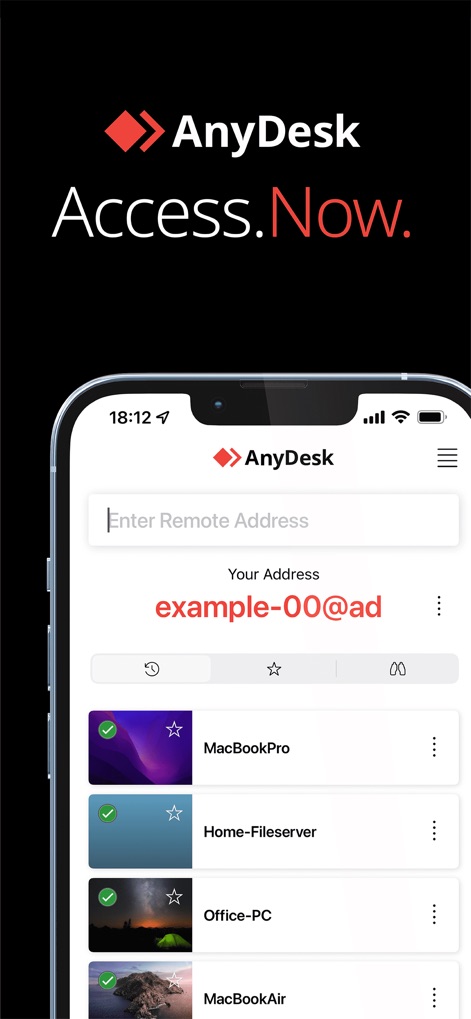
Quick Access Dashboard
This tool provides a streamlined dashboard, featuring a dedicated input for remote addresses and a readily accessible list of previously connected devices.
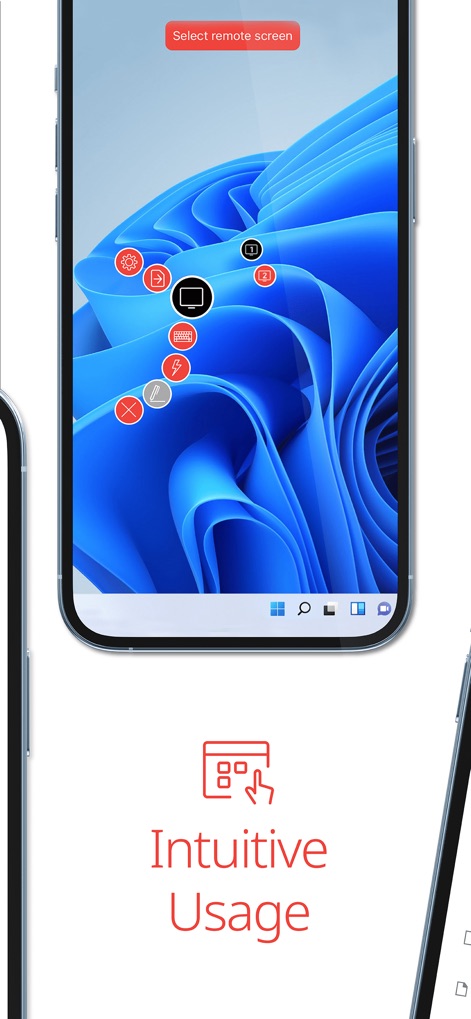
Interactive Remote Control
Users gain full command over the remote desktop, utilizing an intuitive control overlay for various functions and a clear prompt to select the remote screen.

Secure File Sharing
The app facilitates secure file management, presenting detailed file information like names and sizes within an organized directory structure for easy transfers.

Cross-Device Compatibility
This tool extends remote desktop capabilities across multiple mobile devices, vividly demonstrating a macOS Finder window on both phone and tablet displays.
Description
Download
More Like This
Apps with similar features and user experience

向日葵远程控制-Sunlogin remotecontrol
Shanghai best oray information s&t co.,ltd

UU远程-远程办公/游戏串流
Guangzhou NetEase Computer System Co.Ltd

AweSun Remote Desktop
AWERAY PTE. LTD.

TeamViewer Remote Control
TeamViewer Germany GmbH

ToDesk远程控制
Hainan Youqu Technology Co., Ltd.

DeskIn Remote Desktop
ZULER TECHNOLOGY PTE. LTD.

Termius - Modern SSH Client
Termius Corporation

RealVNC Viewer: Remote Desktop
RealVNC Limited

LogMeIn Pro & Central
GoTo Group, Inc.
This page is not an official page of the app or its developer, but an independent editorial publication created for informational and commentary purposes. Unless expressly stated otherwise, neither the app nor its developer is affiliated with, endorsed by, sponsored by, authorized by, or otherwise officially connected with MWM, Apple, Google Play, the app publisher, or the app's developer, and nothing on this page implies that the app was developed using MWM's services. Any trademarks, logos, screenshots, and other content remain the property of their respective owners.