
This page is not an official page of the app or its developer, but an independent editorial publication created for informational and commentary purposes. Unless expressly stated otherwise, neither the app nor its developer is affiliated with, endorsed by, sponsored by, authorized by, or otherwise officially connected with MWM, Apple, Google Play, the app publisher, or the app's developer, and nothing on this page implies that the app was developed using MWM's services. Any trademarks, logos, screenshots, and other content remain the property of their respective owners.

极简记工时·小时工记加班
Hourly work is complex; this app hands you total control over every minute, every cent. Say goodbye to payroll disputes.
Downloads
500k+User Rating
Total Ratings
15.4KPublisher
Category
BusinessLocales
1Latest Version
5.7.1Size
58.0 MBFirst Released
Feb 16, 2023An evaluation of key functionalities for flexible and hourly workers.
Core Features Analysis of '极简记工时·小时工记加班'
Customizable Salary & Work Hour Tracking
The app provides comprehensive salary management with fully customizable work hour types, allowing users to accurately track various pay rates and work scenarios.
Advanced Time & Income Statistics
It provides robust statistical reporting, including custom attendance cycles, monthly, annual, and custom time period summaries, aiding in financial oversight.
Flexible Clock-in/Out with Auto-Calculation
It allows users to flexibly clock in and out for various work schedules, automatically calculating total work duration for accurate timekeeping.
Daily Wage Tracking Support
The app supports tracking and managing daily wages, which is particularly beneficial for users paid on a daily basis.
Settlement Marking
It provides a settlement marking feature, allowing users to easily track paid and unpaid work periods and invoices.
Subsidies & Deductions Management
This tool features intelligent management of subsidies and deductions, ensuring precise calculation of net earnings.
Data Export to Excel
This tool enables users to export detailed work hour data to Excel, facilitating external record-keeping and reporting.
Desktop Widgets
The app offers desktop widgets for quick access and overview of work hours and earnings.
Frequently Asked Questions
Everything you need to know about 极简记工时·小时工记加班
What are the main features of the "极简记工时·小时工记加班" app?
The "极简记工时·小时工记加班" app manages salaries, customizable work hours, subsidies, and deductions. It includes flexible clock-in, automatic duration calculation, daily wage support, custom attendance cycles, and Excel export.
Does "极简记工时·小时工记加班" allow customization of work hour rates?
Yes, "极简记工时·小时工记加班" provides fully customizable salary management. Users can define multiple work hour rates, including different hourly wages and overtime rates, within the app.
Can users manage subsidies and deductions in "极简记工时·小时工记加班"?
Yes, "极简记工时·小时工记加班" offers comprehensive subsidy and deduction management. Users can define and track various types of allowances and penalties directly within the application.
How does "极简记工时·小时工记加班" handle clock-in and work duration?
"极简记工时·小时工记加班" supports flexible clock-in and clock-out for fixed work hours. The app automatically calculates and records the total work duration for each shift.
Can work hour details be exported from "极简记工时·小时工记加班"?
Yes, "极简记工时·小时工记加班" allows users to export detailed work hour data. The application supports exporting comprehensive attendance records directly to an Excel file.
Does "极简记工时·小时工记加班" include a desktop widget?
Yes, "极简记工时·小时工记加班" supports desktop widgets. This feature enables users to view their current clock-in status and work details conveniently from their device's home screen.
Does "极简记工时·小时工记加班" offer a dark mode option?
Yes, "极简记工时·小时工记加班" provides a dark mode feature. This visual setting enhances user comfort and reduces eye strain, particularly during nighttime or in low-light conditions.
What kind of attendance statistics does "极简记工时·小时工记加班" provide?
"极简记工时·小时工记加班" offers monthly, annual, and custom period attendance statistics. Users can track their work hours and income trends over various chosen timeframes.
The following screenshots and description are sourced directly from the app's official store listing and are the property of the app developer.
App Store
Screenshots

See how the app provides a clear monthly overview of total work hours and income, alongside a detailed calendar grid displaying daily earnings and time worked.
Effortless Tracking
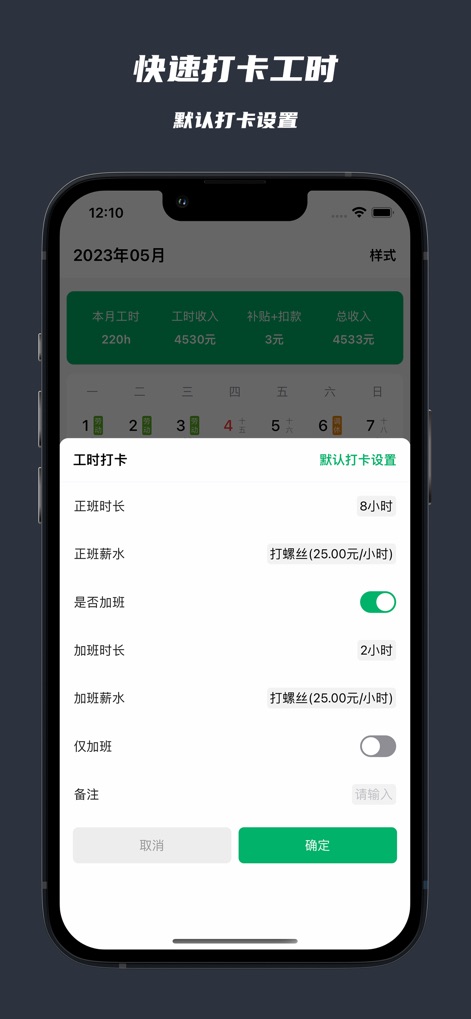
Users can swiftly set their regular shift duration and corresponding salary, while easily toggling and defining specific overtime hours and rates.
Streamlined Clock-In
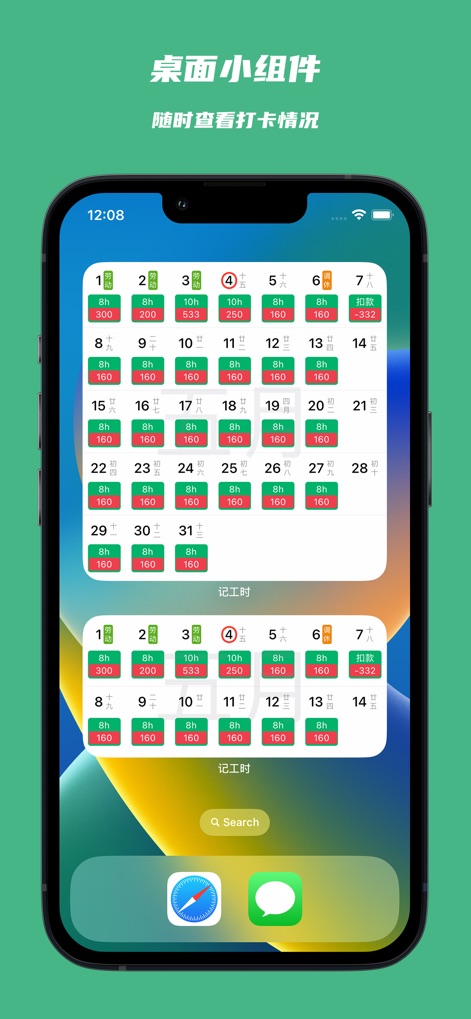
Enhance productivity with dynamic desktop widgets, allowing for real-time monitoring of work hours and earnings directly from the device's home screen.
Widget Power
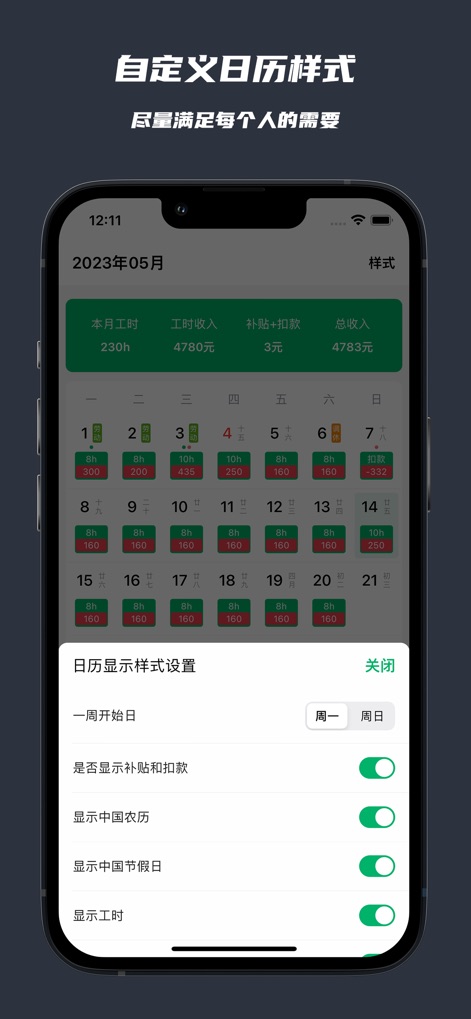
Tailor the calendar view to personal preferences by customizing the week's starting day and choosing to display or hide detailed subsidy and deduction figures.
Personalized Calendar

The app empowers users to define and manage multiple custom work types, each with its own flexible hourly rate, including differentiated overtime pay.
Flexible Wage Setup
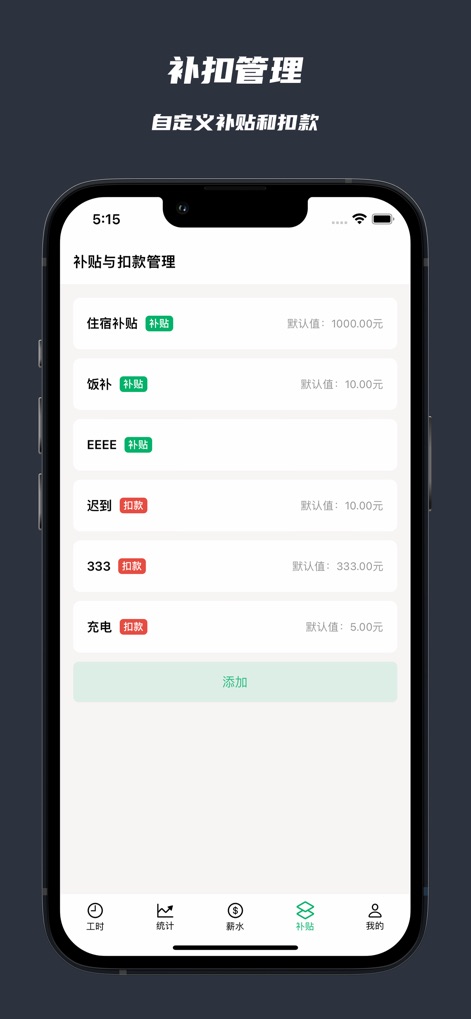
Users can easily add and manage custom subsidies like accommodation allowance, alongside various deductions such as late penalties or charges.
Comprehensive Adjustments
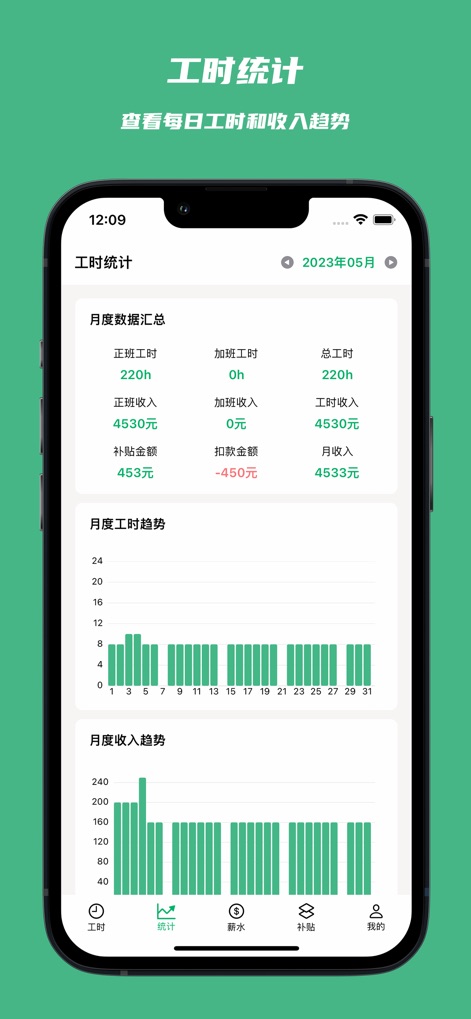
Gain valuable financial insights through a detailed monthly data summary, complemented by clear visual trend graphs for both work hours and income.
Insightful Analytics

Experience a comfortable viewing environment with the app's sleek dark mode, maintaining full functionality for tracking daily work hours and earnings within the calendar.
Dark Mode Elegance
Description
Download
More Like This
Apps with similar features and user experience

Supershift Shift Work Calendar
Supershift GmbH

安心记加班-记考勤加班工资记录记账记工本
Shanghai Anjiaxin Network Technology Co., Ltd

Work Shift Calendar (Shifter)
Luis Alberto Reyes Halaby

My Shift Planner - Calendar
MyBuzz Technologies Limited

Work hours tracker - Timesheet
Kanstantsin Markau

Punch Time Clock
Trent Morris

记工时考勤
Beijing Chejiang Internet Technology Co., Ltd.

Time Squared: Hours Tracker
TSQ Publishing Corp.

wac - shift & earnings tracker
Work and Communications Ltd
This page is not an official page of the app or its developer, but an independent editorial publication created for informational and commentary purposes. Unless expressly stated otherwise, neither the app nor its developer is affiliated with, endorsed by, sponsored by, authorized by, or otherwise officially connected with MWM, Apple, Google Play, the app publisher, or the app's developer, and nothing on this page implies that the app was developed using MWM's services. Any trademarks, logos, screenshots, and other content remain the property of their respective owners.