
This page is not an official page of the app or its developer, but an independent editorial publication created for informational and commentary purposes. Unless expressly stated otherwise, neither the app nor its developer is affiliated with, endorsed by, sponsored by, authorized by, or otherwise officially connected with MWM, Apple, Google Play, the app publisher, or the app's developer, and nothing on this page implies that the app was developed using MWM's services. Any trademarks, logos, screenshots, and other content remain the property of their respective owners.


Work Hours Tracker - Timesheet
No more guessing; this app puts your time and money in your control.
Downloads
100k+User Rating
Total Ratings
2.6KPublisher
Category
ProductivityLocales
10Latest Version
7.10.0Size
116.7 MBFirst Released
Jun 12, 2024An Analytical Overview for Hourly and Flexible Workers
Key Features of Work Hours Tracker - Timesheet
Automatic Wage Calculation
It automatically calculates income based on worked hours, ensuring accurate pay tracking for users with hourly and flexible schedules.
Automatic Hour Calculation
The app automatically calculates worked hours by simply inputting shift start and end times, minimizing manual effort and errors for users.
Calendar-based Timesheet Tracking
The app provides accurate tracking of working hours and days within a convenient calendar format, simplifying schedule management for employees.
Income Adjustments & Bonuses
This tool features the ability to add bonuses, deductions, advances, and salary payments, providing a comprehensive view of total earnings for accurate financial records.
Data Export Options
It allows users to export data to formats like XLSX (Excel), PDF, and HTML, facilitating easy sharing with employers or for detailed personal analysis.
Annual Reporting
The app generates automatic annual reports, calculating total hours, working days, and income by month and year for clear historical records and tax purposes.
Flexible Tracking Periods
It allows users to track work by weekly, half-month, or custom periods, adapting to various pay schedules and personal preferences common in flexible employment.
Quick Entry Templates
This tool features convenient templates for faster data entry, allowing users to reuse previously entered shift data and streamline their daily tracking.
Frequently Asked Questions
Everything you need to know about Work Hours Tracker - Timesheet
What is the Work hours tracker - Timesheet app?
Work hours tracker - Timesheet is an application designed for tracking working hours and calculating wages for employees with hourly pay and flexible schedules. It automatically calculates income based on recorded hours in a convenient calendar format.
How does the Timesheet app calculate wages?
The Timesheet app automatically calculates wages by allowing users to enter the start and end times of a shift. It also supports calculating earnings by rate, percentage, or coefficient, as shown in the detailed entry screen.
Can I track flexible work schedules with the Work hours tracker - Timesheet app?
Yes, the Work hours tracker - Timesheet app supports flexible work schedules. It allows tracking work by weekly, half-month, or custom periods and helps plan work shifts efficiently through features like defining consecutive working/non-working days.
Does the Timesheet app provide annual income reports?
Yes, the Timesheet app provides annual reports. It automatically calculates total hours, working days, and income by month and year, offering comprehensive statistics for review.
What are the export options available in the Work hours tracker - Timesheet app?
The Work hours tracker - Timesheet app offers various export options. Users can export their data to XLSX (Excel), PDF, and HTML formats for easy sharing and analysis.
Is there a cost to use the Work hours tracker - Timesheet app?
The Work hours tracker - Timesheet app is available for free with ads and basic features. Users can upgrade to TIMESHEET PRO via a monthly or annual subscription for full access to advanced features.
Does the Timesheet app support data synchronization across multiple devices?
Yes, the Timesheet app supports secure data synchronization. It uses iCloud to sync data across a user's devices, ensuring consistency and accessibility of all recorded information.
Can users add bonuses or deductions in the Work hours tracker - Timesheet app?
Yes, users can add bonuses and adjustments in the Work hours tracker - Timesheet app. It supports adding bonuses, deductions, advances, and salary payments to income calculations.
Does Work hours tracker - Timesheet have quick entry options for shift data?
Yes, Work hours tracker - Timesheet includes quick entry templates. These convenient templates allow for faster data entry by reusing previously entered information, streamlining the tracking process.
Can I manage my Timesheet Pro subscription?
Yes, users can manage their Timesheet Pro subscription. Auto-renewal may be turned off by going to the user's Account Settings after purchase, providing full control over the subscription.
The following screenshots and description are sourced directly from the app's official store listing and are the property of the app developer.
App Store
Screenshots

This tool offers an intuitive calendar view for tracking daily work hours and associated income, complete with clear summary statistics below.
Calendar Tracking
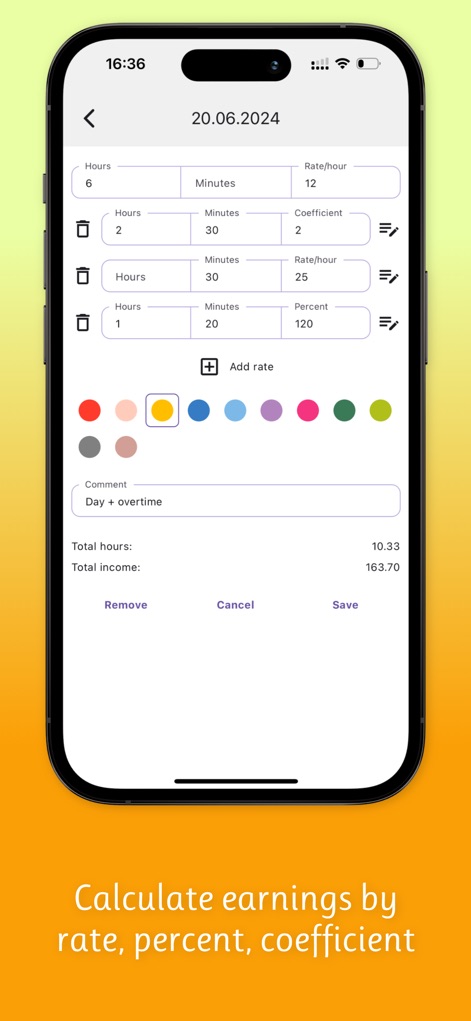
Users can precisely calculate earnings by entering specific hours and minutes, supported by flexible fields for various rates, coefficients, or percentages.
Wage Calculation

The app generates detailed annual and monthly reports, displaying a clear breakdown of total days, hours, and income earned throughout the year.
Comprehensive Reports

The app simplifies complex schedules, allowing users to customize work patterns by selecting specific days of the week and defining consecutive working days.
Flexible Scheduling

Experience the app's comfortable dark theme, which keeps the calendar and financial summaries crisp and easy to read.
Dark Theme
Description
Download
More Like This
Apps with similar features and user experience

Supershift Shift Work Calendar
Supershift GmbH

安心记加班-记考勤加班工资记录记账记工本
Shanghai Anjiaxin Network Technology Co., Ltd

Work Shift Calendar (Shifter)
Luis Alberto Reyes Halaby

极简记工时·小时工记加班
敏强 李

My Shift Planner - Calendar
MyBuzz Technologies Limited

Punch Time Clock
Trent Morris

记工时考勤
Beijing Chejiang Internet Technology Co., Ltd.

wac - shift & earnings tracker
Work and Communications Ltd

Working Hours 4b
BUDESCU SORIN GEORGE
This page is not an official page of the app or its developer, but an independent editorial publication created for informational and commentary purposes. Unless expressly stated otherwise, neither the app nor its developer is affiliated with, endorsed by, sponsored by, authorized by, or otherwise officially connected with MWM, Apple, Google Play, the app publisher, or the app's developer, and nothing on this page implies that the app was developed using MWM's services. Any trademarks, logos, screenshots, and other content remain the property of their respective owners.