
This page is not an official page of the app or its developer, but an independent editorial publication created for informational and commentary purposes. Unless expressly stated otherwise, neither the app nor its developer is affiliated with, endorsed by, sponsored by, authorized by, or otherwise officially connected with MWM, Apple, Google Play, the app publisher, or the app's developer, and nothing on this page implies that the app was developed using MWM's services. Any trademarks, logos, screenshots, and other content remain the property of their respective owners.


Supershift Shift Work Calendar
Tired of calendar chaos? This app hands you back control over your unpredictable work life.
Downloads
5M+User Rating
Total Ratings
123.7KPublisher
Category
ProductivityLocales
13Latest Version
2026.13Size
187.3 MBFirst Released
Apr 21, 2016An in-depth look at core functionalities for managing complex shift work schedules.
Supershift Shift Work Calendar: Key Features Evaluation
Comprehensive Work Reports
This tool features detailed reporting capabilities, allowing users to generate reports for earnings, hours worked per shift, overtime, and shift counting, which is vital for financial tracking and vacation planning.
Integrated Personal Calendar Events
It allows users to display personal events from external iOS calendars (e.g., Google or iCloud) alongside their shifts, providing a comprehensive view of both work and personal commitments.
Advanced Shift Rotation Planning
It allows users to define and apply complex shift rotations up to two years in advance, significantly streamlining long-term schedule management for recurring patterns.
iOS Calendar Export & Sharing
It allows users to export their shift schedules to iOS calendars (e.g., Google or iCloud), facilitating easy sharing with family and friends for better coordination.
Cross-Device Cloud Synchronization
This tool features cloud synchronization to keep schedules updated across all iOS devices, ensuring data integrity and enabling easy restoration of information on new devices.
Customizable Shift Display
The app provides extensive customization options for shifts, including colors and icons, and allows users to add multiple shifts per day, enhancing visual organization for complex schedules.
Apple Watch Integration
The app provides seamless integration with Apple Watch, allowing users to view current and upcoming shifts, along with countdown timers, directly from their wrist for quick, on-the-go access.
Customizable Home Screen Widgets
This tool features versatile home screen widgets, offering day, two-week, four-week, or agenda views, providing quick access to schedule information without opening the app.
Printable PDF Calendar Export
The app provides the ability to create and share customizable PDF versions of monthly calendars, including detailed shift information, which is useful for formal communication or printing.
Dark Mode Support
The app provides a comfortable dark mode, optimizing the viewing experience for users, particularly during nighttime or low-light conditions.
Frequently Asked Questions
Everything you need to know about Supershift Shift Work Calendar
What is Supershift Shift Work Calendar?
Supershift is a calendar application for managing shift work schedules and personal events. It offers features like customizable shifts, reports, and Apple Watch integration.
Can I customize shifts in Supershift Shift Work Calendar?
Yes, Supershift allows customization of shifts with colors and icons. Users can also add multiple shifts for any given day.
Does Supershift Shift Work Calendar have a dark mode?
Yes, Supershift includes a dark mode. This feature makes viewing schedules at night more comfortable for users.
How can I track earnings and hours in Supershift Shift Work Calendar?
Supershift allows users to create reports for earnings, hours per shift, overtime, and shift counting. This helps track work-related data efficiently.
Is Supershift Shift Work Calendar compatible with Apple Watch?
Yes, Supershift is compatible with Apple Watch. Users can view current and upcoming shifts, including countdown timers, on the watch app and complications.
Does Supershift Shift Work Calendar provide home screen widgets?
Yes, Supershift offers widgets for home screen display. These widgets can show day, 2 weeks, 4 weeks, or an agenda view of the schedule.
Can Supershift Pro export shifts to other calendar apps?
Yes, Supershift Pro allows exporting shifts to the iOS calendar, compatible with Google or iCloud. This feature helps share schedules with others.
Can Supershift Pro generate and share PDF calendars?
Yes, Supershift Pro enables users to create and share PDF versions of their monthly calendar. PDFs are customizable with various shift details.
Does Supershift Pro offer cloud synchronization across devices?
Yes, Supershift Pro features cloud sync to keep all iOS devices synchronized. This also facilitates data restoration when users get new devices.
What iOS version does Supershift's cloud sync require?
Supershift's cloud sync feature requires iOS 10 or later. This ensures proper functionality for synchronizing data across compatible devices.
How can I share my shift schedule with friends and family using Supershift?
Supershift Pro allows exporting shifts to the iOS calendar (e.g., Google or iCloud calendar). This enables users to easily share their schedule with friends and family.
Can I create rotating shift patterns in Supershift Shift Work Calendar?
Yes, Supershift supports defining rotations for shift patterns. Users can apply these rotations up to two years in advance for simplified scheduling.
Where can I view the privacy policy for Supershift?
The privacy policy for Supershift is available online. It can be accessed directly at https://supershift.app/privacy.html.
The following screenshots and description are sourced directly from the app's official store listing and are the property of the app developer.
App Store
Screenshots
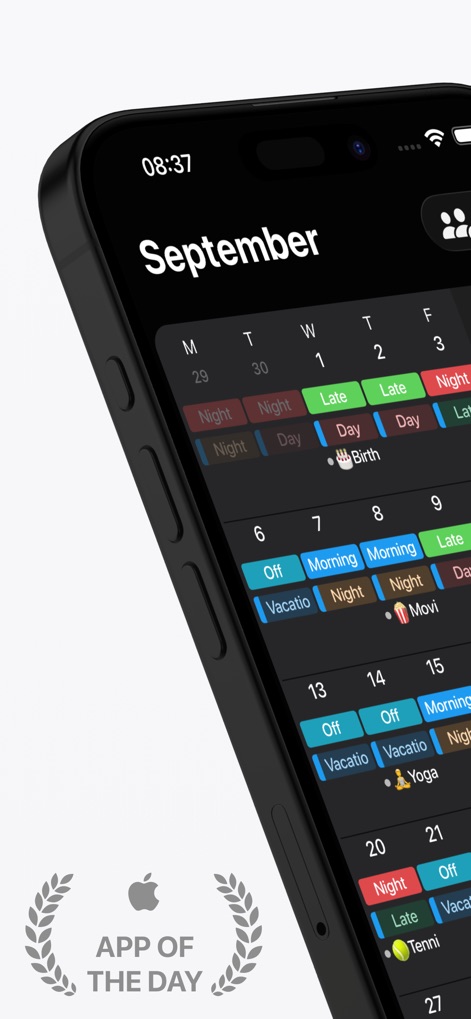
See how the app clearly displays various shift types with distinct color-coding and integrates personal events like birthdays, all within a celebrated "App of the Day" interface.
Dynamic Schedule Display
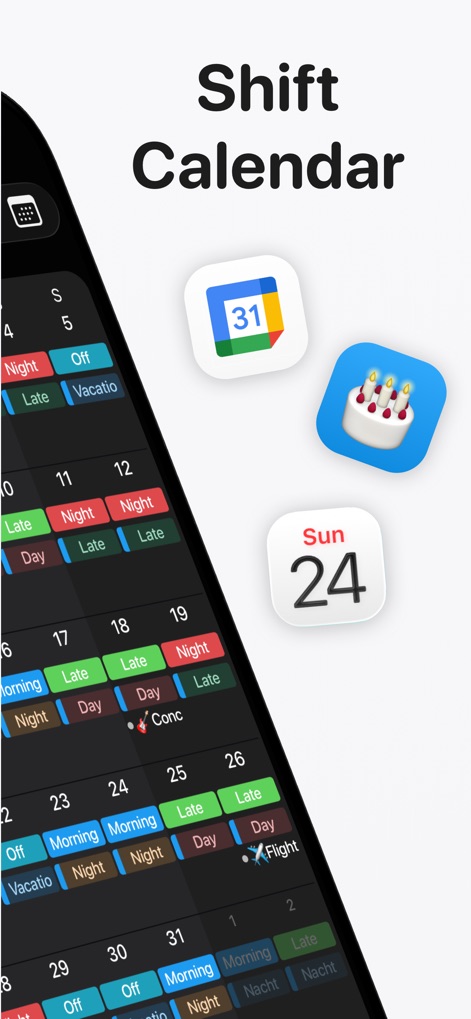
This tool seamlessly merges professional shift schedules with external calendar events, as shown by the detailed daily entries and suggestive calendar icons.
Integrated Calendar View
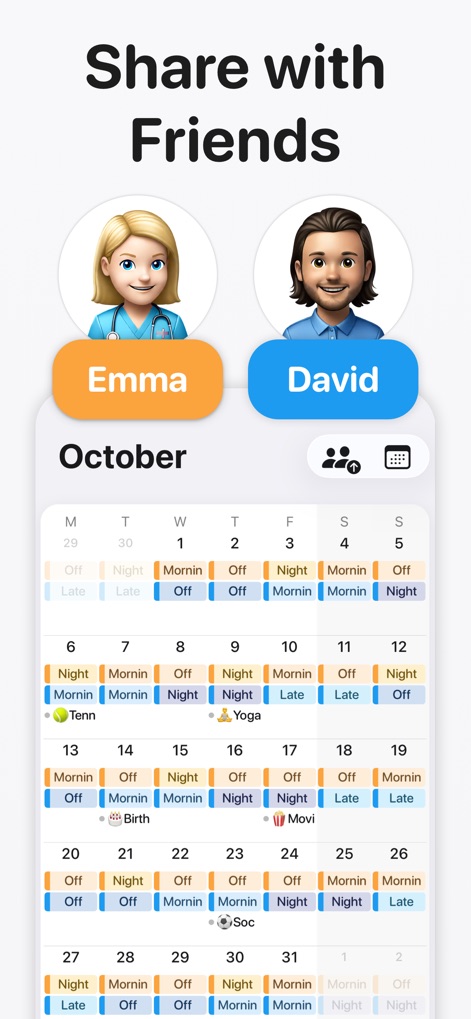
Users can effortlessly share their meticulously planned shift schedules with contacts like "Emma" and "David", fostering better coordination and communication.
Collaborative Planning Made Easy
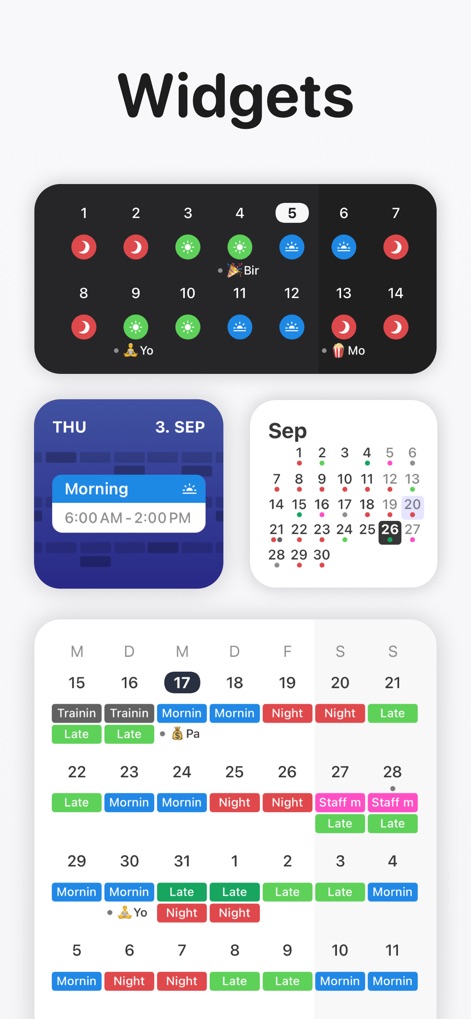
The app offers diverse widget layouts, from a detailed daily shift view to a condensed monthly calendar, empowering users with quick access to their schedules.
Versatile Widget Options
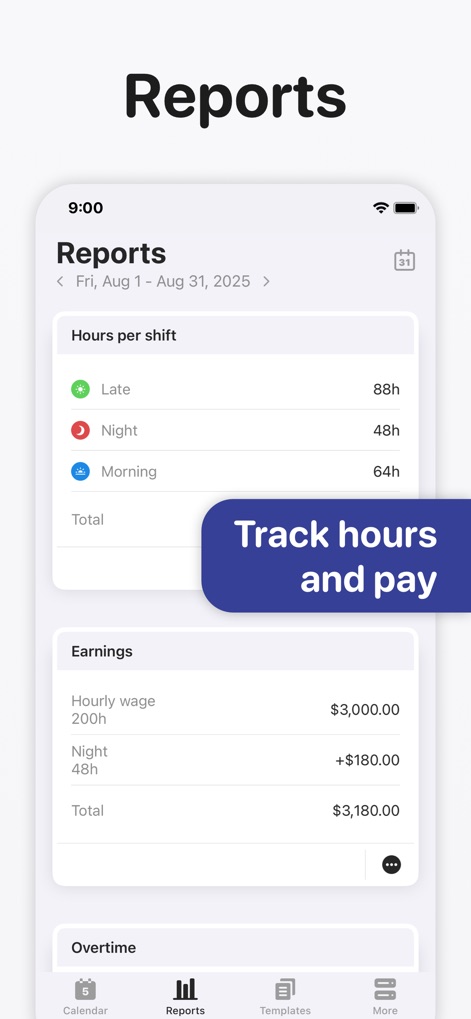
This powerful feature provides detailed reports on "Hours per shift" and "Earnings", allowing users to precisely track their work contributions and financial compensation.
Comprehensive Financial Insights
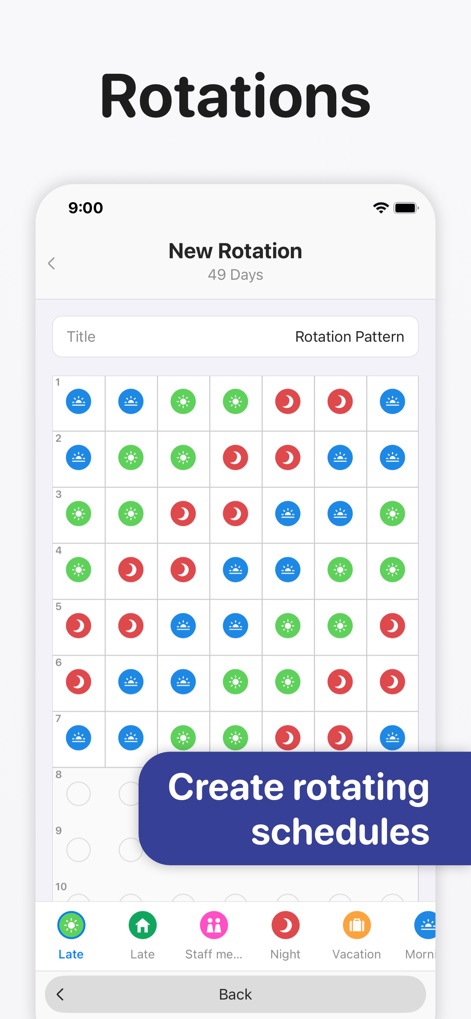
Define complex work patterns with ease using the "Rotation Pattern" grid, enabling users to generate consistent and predictable schedules far in advance.
Streamlined Shift Rotations
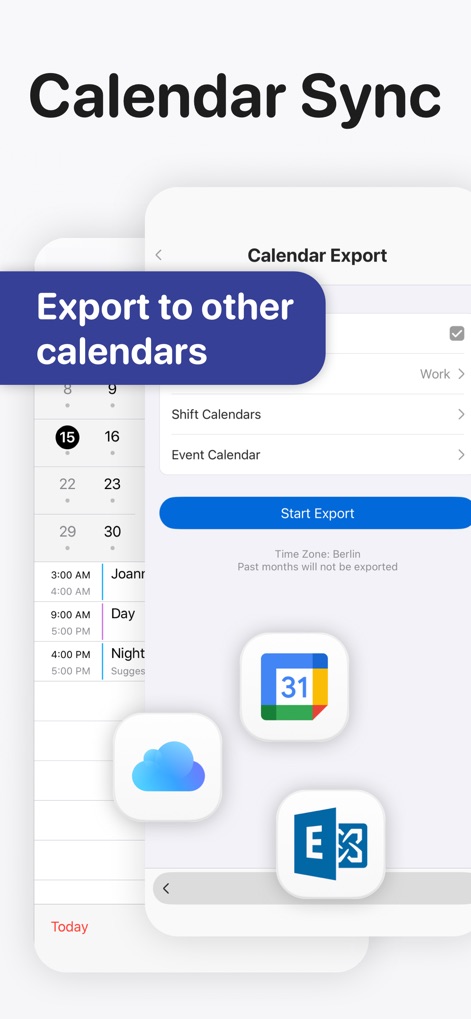
The app facilitates effortless "Calendar Export" to external platforms, allowing users to share their schedules with popular services like iCloud and Google Calendar.
Seamless Calendar Integration
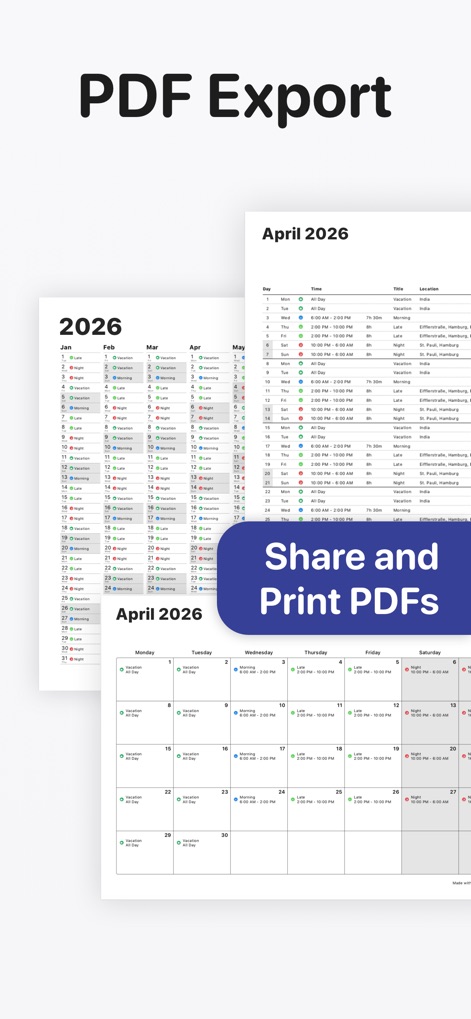
Generate polished, print-ready "PDF" versions of the monthly calendar, perfect for sharing detailed shift information or maintaining physical records.
Professional PDF Export
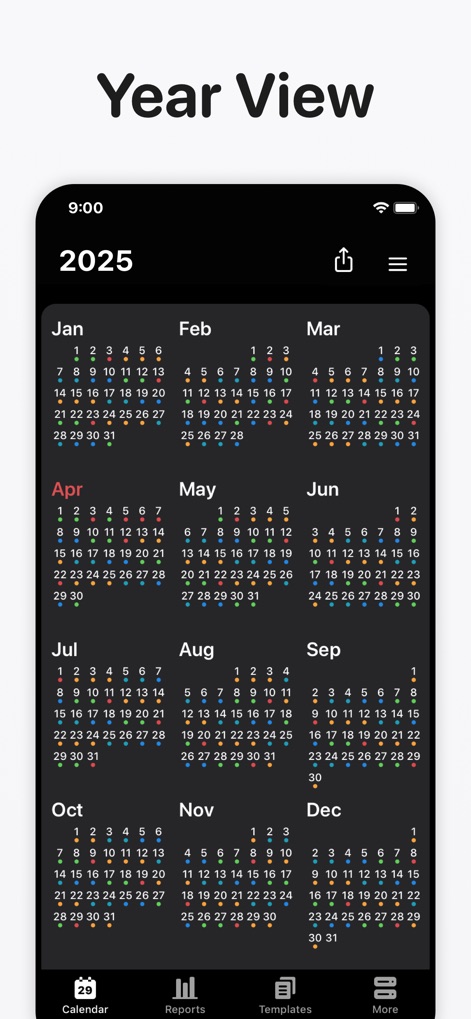
Gain a comprehensive perspective of the entire year with the "Year View", where users can see a bird's-eye summary of all scheduled shifts and events.
Annual Overview Mastery
Description
Download
More Like This
Apps with similar features and user experience

安心记加班-记考勤加班工资记录记账记工本
Shanghai Anjiaxin Network Technology Co., Ltd

Work Shift Calendar (Shifter)
Luis Alberto Reyes Halaby

极简记工时·小时工记加班
敏强 李

My Shift Planner - Calendar
MyBuzz Technologies Limited

Work hours tracker - Timesheet
Kanstantsin Markau

Punch Time Clock
Trent Morris

记工时考勤
Beijing Chejiang Internet Technology Co., Ltd.

Time Squared: Hours Tracker
TSQ Publishing Corp.

wac - shift & earnings tracker
Work and Communications Ltd
This page is not an official page of the app or its developer, but an independent editorial publication created for informational and commentary purposes. Unless expressly stated otherwise, neither the app nor its developer is affiliated with, endorsed by, sponsored by, authorized by, or otherwise officially connected with MWM, Apple, Google Play, the app publisher, or the app's developer, and nothing on this page implies that the app was developed using MWM's services. Any trademarks, logos, screenshots, and other content remain the property of their respective owners.