
This page is not an official page of the app or its developer, but an independent editorial publication created for informational and commentary purposes. Unless expressly stated otherwise, neither the app nor its developer is affiliated with, endorsed by, sponsored by, authorized by, or otherwise officially connected with MWM, Apple, Google Play, the app publisher, or the app's developer, and nothing on this page implies that the app was developed using MWM's services. Any trademarks, logos, screenshots, and other content remain the property of their respective owners.


Punch Time Clock
Time tracking? It's usually a nightmare. Punch Time Clock turns that nightmare into an afterthought.
Downloads
1M+User Rating
Total Ratings
36.9KPublisher
Category
BusinessLocales
1Latest Version
2.3.3Size
29.4 MBFirst Released
Jul 25, 2018An evaluation of core functionalities designed for diverse working professionals.
Key Analytical Features of Punch Time Clock
Effortless Time Tracking
The app provides a simple one-tap mechanism to clock in, take breaks, and clock out, with an option to easily make retroactive adjustments for forgotten actions, ensuring accurate time logging.
Automatic Overtime Calculations
It automatically calculates daily and weekly overtime based on Weekly and Biweekly pay schedules, ensuring precise tracking of extended work hours and accurate compensation.
Comprehensive Timesheet Overview
This tool features detailed timesheets that display hours worked and estimated earnings, offering a complete overview of work history for easy record-keeping and financial monitoring.
Professional Timesheet Exports
It allows users to export timesheets as professionally formatted PDF or CSV files, enabling seamless sharing with employers, client invoicing, and secure personal record retention.
Organized Shift Tagging
The app enables users to categorize shifts using custom tags, facilitating efficient filtering of timesheets by job, client, or project, thereby enhancing overall organization and workflow efficiency.
Flexible Shift Management with Notes
This tool offers the flexibility to create new shifts or modify existing ones, including the ability to add personal notes to each shift for improved task or project tracking and context.
Frequently Asked Questions
Everything you need to know about Punch Time Clock
What is Punch Time Clock?
Punch Time Clock is an essential time-tracking app designed for shift workers, freelancers, small-business owners, and employees. It simplifies managing and tracking work hours effortlessly and accurately.
How does Punch Time Clock track time?
Yes, Punch Time Clock allows users to clock in, take breaks, and clock out with a simple tap. It also supports retroactive adjustments for forgotten clock-outs.
Can Punch Time Clock generate timesheet reports?
Yes, Punch Time Clock generates comprehensive timesheets showing hours worked and estimated earnings. Users can export these as professional PDF or CSV files.
Does Punch Time Clock support overtime calculations?
Yes, Punch Time Clock automatically calculates daily and weekly overtime for Weekly and Biweekly pay schedules. This ensures accurate tracking of all work hours.
Is Punch Time Clock free to use?
Yes, Punch Time Clock is completely free with no limits on its core features. Users can upgrade to Punch PRO via a one-time purchase for advanced functionalities.
What advanced features are included in Punch PRO?
Punch PRO includes advanced features such as pay estimates, timesheet exporting, notes, and tagging. These are available through a one-time purchase within the app.
Can I edit shifts within the Punch Time Clock app?
Yes, Punch Time Clock allows users to create new shifts from scratch or edit existing ones. Users can also add personal notes to each shift for better tracking.
How can I organize my shifts in Punch Time Clock?
Punch Time Clock allows users to organize shifts using Tags. This feature enables filtering timesheets by job, client, or project for enhanced organization and efficiency.
Does Punch Time Clock provide a privacy policy?
Yes, Punch Time Clock provides a privacy policy. The link to this policy is available within the app's description for user review.
Is Punch Time Clock reliable and secure?
Yes, Punch Time Clock is reliable and secure. It is built with the latest technology specifically to keep user data safe and protected.
The following screenshots and description are sourced directly from the app's official store listing and are the property of the app developer.
App Store
Screenshots
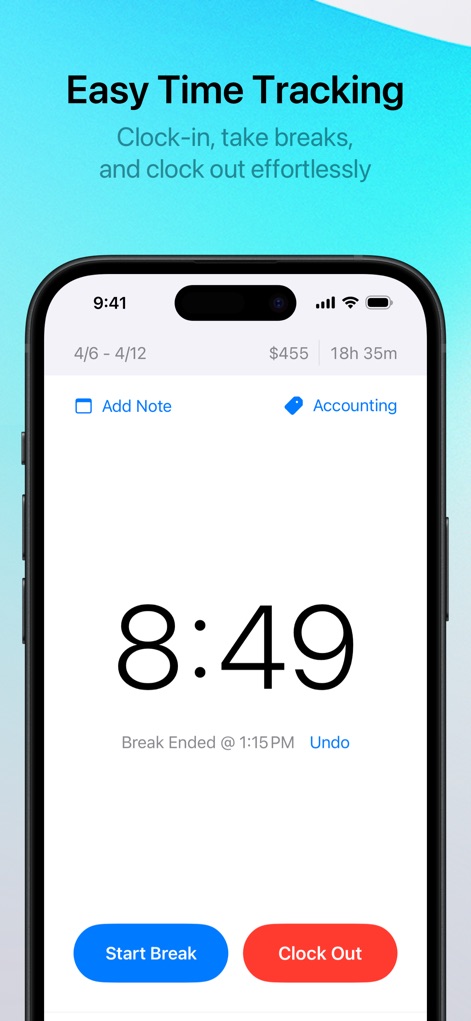
The app simplifies time management with a prominent digital clock display and clear "Start Break" and "Clock Out" action buttons.
Effortless Tracking
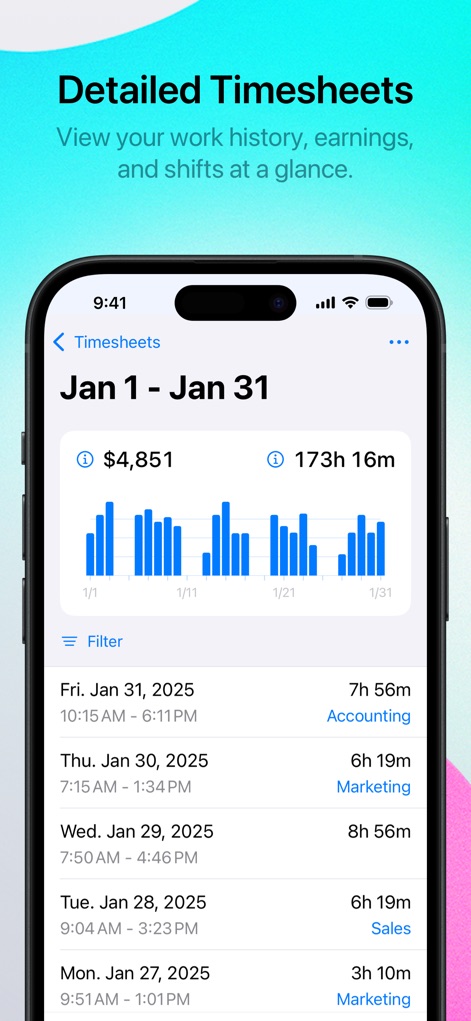
Users gain comprehensive insights through a visual bar graph of hours worked and a detailed list of individual shifts, complete with tags.
Detailed Timesheets
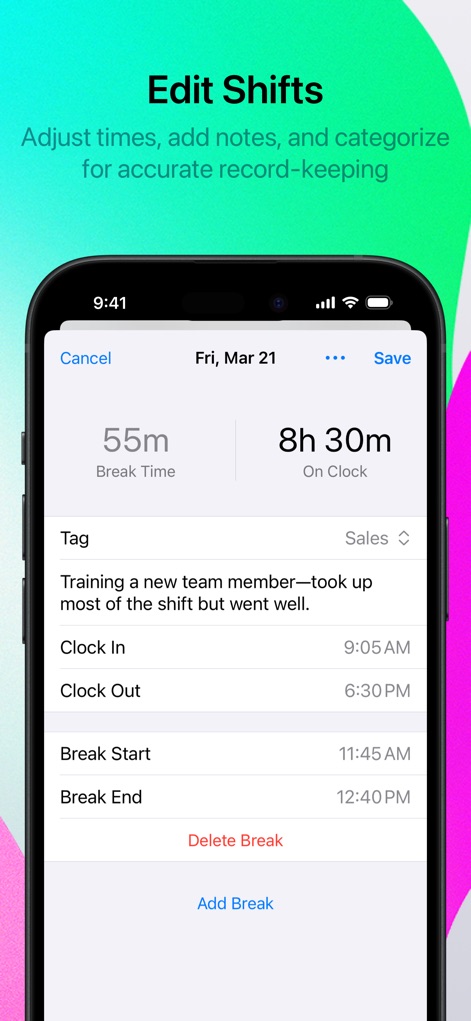
This tool allows precise modification of shift details, including editable clock-in/out times and a customizable tag selector for categorization.
Flexible Adjustments
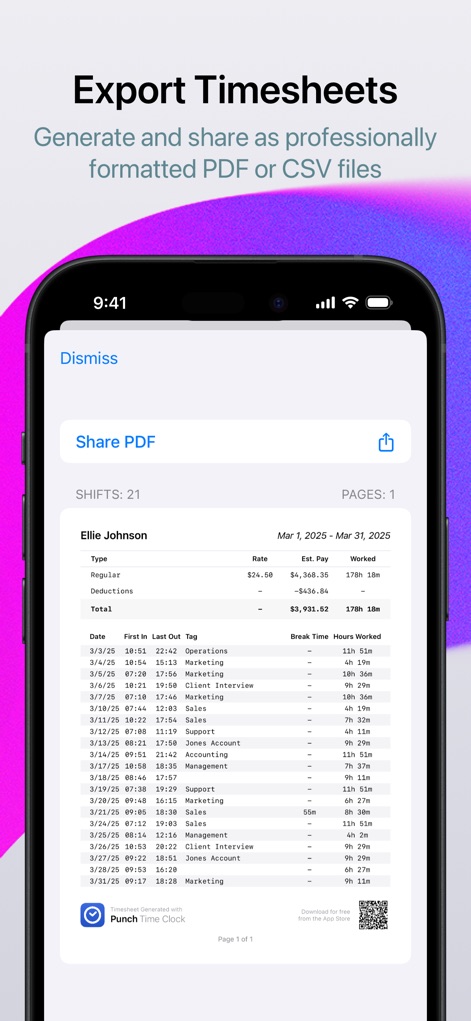
The app facilitates convenient sharing with a dedicated "Share PDF" button and presents a clear, professional PDF preview of timesheets.
Professional Exports
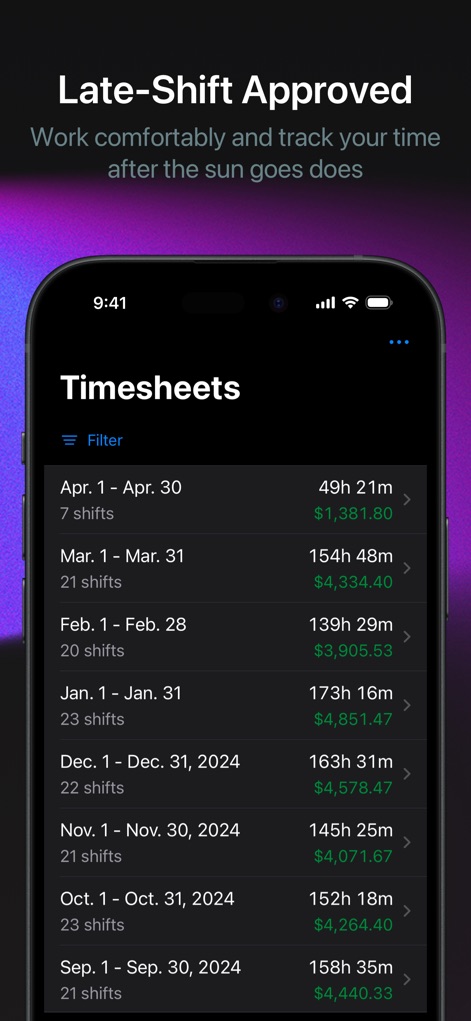
Users can review their extensive work history via an organized monthly summary list within the app's sleek dark mode interface.
Organized History
Description
Download
More Like This
Apps with similar features and user experience
Supershift Shift Work Calendar
Supershift GmbH

安心记加班-记考勤加班工资记录记账记工本
Shanghai Anjiaxin Network Technology Co., Ltd

Work Shift Calendar (Shifter)
Luis Alberto Reyes Halaby

极简记工时·小时工记加班
敏强 李

My Shift Planner - Calendar
MyBuzz Technologies Limited

Work hours tracker - Timesheet
Kanstantsin Markau

记工时考勤
Beijing Chejiang Internet Technology Co., Ltd.

Time Squared: Hours Tracker
TSQ Publishing Corp.

wac - shift & earnings tracker
Work and Communications Ltd
This page is not an official page of the app or its developer, but an independent editorial publication created for informational and commentary purposes. Unless expressly stated otherwise, neither the app nor its developer is affiliated with, endorsed by, sponsored by, authorized by, or otherwise officially connected with MWM, Apple, Google Play, the app publisher, or the app's developer, and nothing on this page implies that the app was developed using MWM's services. Any trademarks, logos, screenshots, and other content remain the property of their respective owners.