
This page is not an official page of the app or its developer, but an independent editorial publication created for informational and commentary purposes. Unless expressly stated otherwise, neither the app nor its developer is affiliated with, endorsed by, sponsored by, authorized by, or otherwise officially connected with MWM, Apple, Google Play, the app publisher, or the app's developer, and nothing on this page implies that the app was developed using MWM's services. Any trademarks, logos, screenshots, and other content remain the property of their respective owners.


Brick - Ditch Distractions
Smartphones hijack attention. This app puts the user back in charge, offering a tangible way to reclaim focus.
Downloads
750k+User Rating
Total Ratings
41.3KPublisher
Category
ProductivityLocales
1Latest Version
2026.13.0Size
47.1 MBFirst Released
Sep 15, 2023An analytical overview of the app's functionalities designed to enhance focus and productivity for smartphone users.
Evaluation of 'Brick - Ditch Distractions' Core Features
NFC-Powered App & Notification Blocker
The app provides a unique NFC-driven mechanism to temporarily disable distracting applications and their notifications, creating a focused environment.
Customizable Essential App Whitelist
It allows users to define a personalized list of applications that remain accessible even when other distracting apps are blocked, ensuring essential tools are always available.
Seamless Session Activation & Deactivation
This tool features a simple tap-to-block and tap-to-unblock functionality using the NFC device, offering quick and intuitive control over distraction-free sessions.
Digital Habits Usage Tracker
The app offers a feature to track usage history, enabling users to monitor their progress in reducing digital distractions and identify improvements over time.
On-Device Data Privacy Assurance
It ensures that all user usage information remains securely on the device and is never transmitted off-phone, safeguarding personal data and building trust.
Direct User Feedback Mechanism
This tool provides a direct way for users to contact the creators, offer feedback, request features, and report issues, fostering community engagement and product improvement.
Frequently Asked Questions
Everything you need to know about Brick - Ditch Distractions
How does Brick - Ditch Distractions work?
Brick - Ditch Distractions combines software with NFC-powered hardware. Users tap the physical Brick device to temporarily block distracting apps and notifications, leaving only chosen essential tools. Tapping it again unblocks everything.
What features does the Brick app offer?
The Brick app enables users to customize which apps remain unblocked, track their usage history for distraction-free time, and contact the creators for feature requests or support.
Does Brick - Ditch Distractions collect personal usage data?
No, Brick - Ditch Distractions does not collect user data. The app explicitly states that none of your usage information leaves your phone, ensuring user privacy.
Can I select which apps Brick blocks?
Yes, users can choose which apps Brick blocks. The Brick app provides options to customize and select specific applications to be blocked during focus sessions.
How do I start a focus session with the Brick app?
To begin a focus session with Brick, simply open the app and tap your physical Brick device. This action initiates the blocking of distracting apps and notifications on your phone.
Can I schedule focus sessions using the Brick app?
Yes, the Brick app allows scheduling focus times. Users can create routines by setting a name, Brick Mode, start time, and repeating days to build daily habits for distraction-free periods.
Does Brick - Ditch Distractions track my focus time?
Yes, Brick - Ditch Distractions tracks your focus progress. The app monitors and displays your usage history, enabling you to see and review the time spent undistracted.
The following screenshots and description are sourced directly from the app's official store listing and are the property of the app developer.
App Store
Screenshots
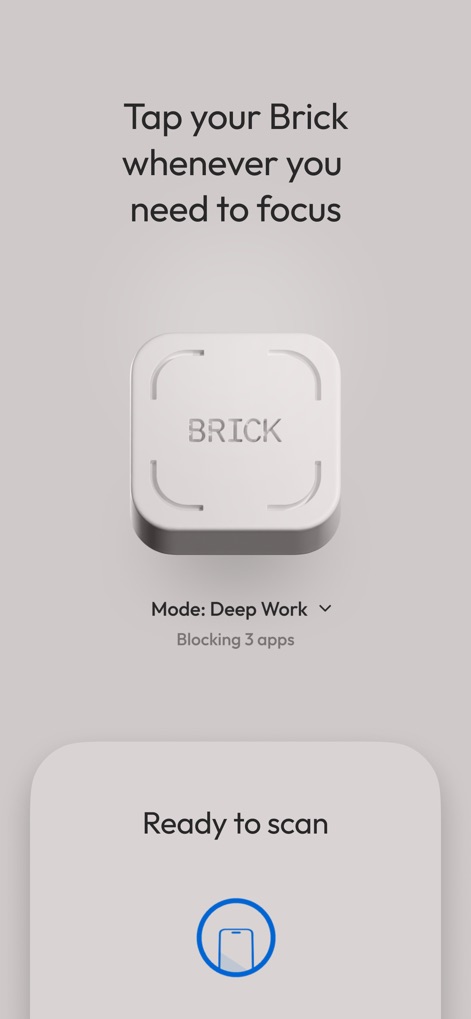
Users can activate focus modes by tapping their device to the physical Brick, instantly blocking distractions and displaying the selected 'Deep Work' mode.
Instant Focus Activation
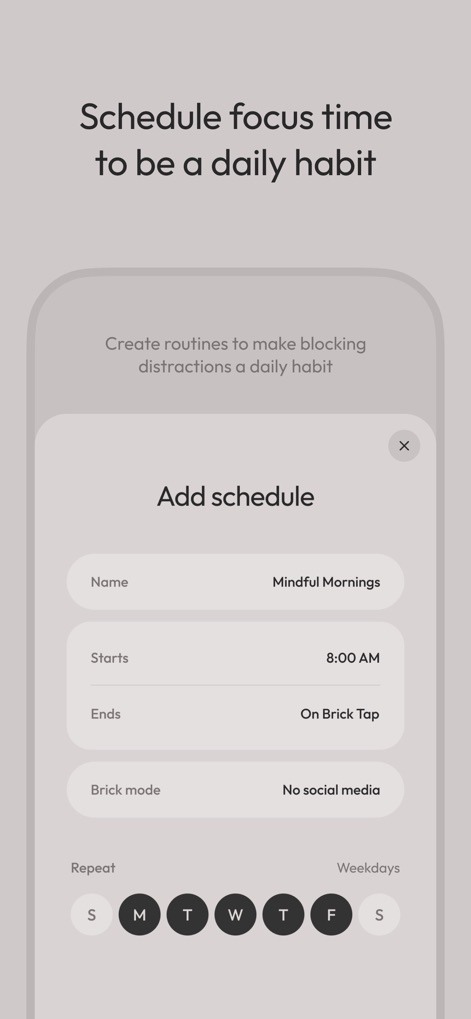
The app allows users to create custom routines with specific start and end times, and define their 'Brick mode' to ensure daily focus habits.
Automate Your Focus
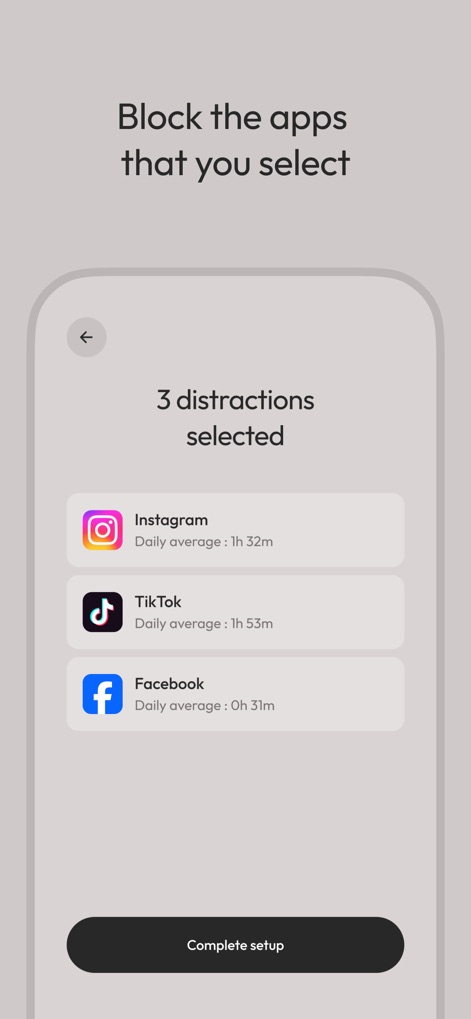
This tool provides granular control over distractions, allowing users to select specific apps to block and view their daily average usage for each.
Customize Distraction Blocking
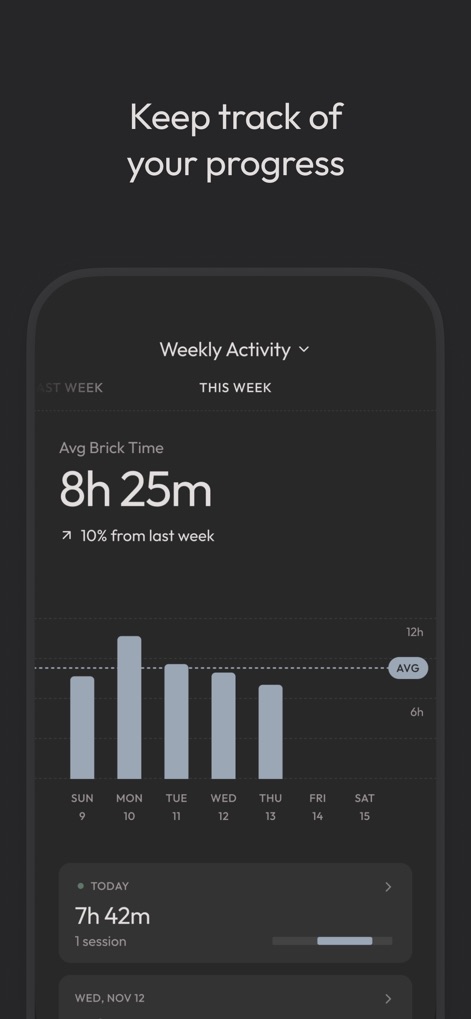
The app offers a comprehensive dashboard to monitor focus sessions, displaying 'Avg Brick Time' and a visual bar chart of weekly activity.
Monitor Progress Visually

Once activated, the interface prominently displays a running timer for the 'Bricked' session and offers a clear 'Unbrick device' option to regain full phone access.
Embrace Deep Focus
Description
Download
More Like This
Apps with similar features and user experience

Opal: Screen Time Control
OPAL OS CORPORATION

BePresent: Screen Time Control
Screen Detox Inc

one sec | screen time + focus
riedel.wtf apps S.L.
ScreenZen- Screen Time Control
ScreenZen LLC

Refocus: Block Apps & Websites
Labi, LLC

Clarymind: Focus + Self Care
Seamint Co., Ltd.

Roots: Screen Time Control
MWM

AppBlock: Block Apps & Website
MobileSoft s.r.o.

ClearSpace: Reduce Screen Time
Clearspace Technologies, Inc.
This page is not an official page of the app or its developer, but an independent editorial publication created for informational and commentary purposes. Unless expressly stated otherwise, neither the app nor its developer is affiliated with, endorsed by, sponsored by, authorized by, or otherwise officially connected with MWM, Apple, Google Play, the app publisher, or the app's developer, and nothing on this page implies that the app was developed using MWM's services. Any trademarks, logos, screenshots, and other content remain the property of their respective owners.