
This page is not an official page of the app or its developer, but an independent editorial publication created for informational and commentary purposes. Unless expressly stated otherwise, neither the app nor its developer is affiliated with, endorsed by, sponsored by, authorized by, or otherwise officially connected with MWM, Apple, Google Play, the app publisher, or the app's developer, and nothing on this page implies that the app was developed using MWM's services. Any trademarks, logos, screenshots, and other content remain the property of their respective owners.


EasyMp3 Video to mp3 Converter
Unleash audio from video: The app grants users total control over their sound, transforming clips into custom tracks.
Downloads
1M+User Rating
Total Ratings
16.2KPublisher
Category
MusicLocales
24Latest Version
8.2.1Size
28.1 MBFirst Released
Sep 30, 2018An evaluation of core functionalities and their relevance to tech-savvy users and content creators.
EasyMp3 Video to mp3 Converter: Feature Analysis
Video to Audio Conversion
The app provides efficient extraction and conversion of audio tracks from a wide array of video file formats, making it easy to create audio-only content.
Advanced Audio Customization
It allows users to precisely control audio output quality by adjusting bitrate and sample rate during conversion, and refine sound with an integrated equalizer.
Comprehensive Audio Editing
This tool features robust editing capabilities, including the ability to cut, concatenate, adjust playback speed, and modify volume of audio files, catering to creative content needs.
Broad Format Compatibility
The app supports a wide range of video (e.g., mp4, mov, avi) and audio (e.g., aac, mp3, wav) formats for both input and output, ensuring versatility for diverse media libraries.
Integrated Media Management & Playback
It allows users to play converted audio files directly within the app, create custom playlists, and enjoy background playback, streamlining personal media library management.
ID3 Tag Editing
This tool enables users to easily edit ID3 tags for MP3 and M4A files, allowing for comprehensive customization of metadata like album art, title, and artist information.
Frequently Asked Questions
Everything you need to know about EasyMp3 Video to mp3 Converter
What is EasyMp3 Video to mp3 Converter?
EasyMp3 Video to mp3 Converter is an application that extracts and converts audio from video files, allowing users to edit and manage the extracted audio.
Can EasyMp3 Video to mp3 Converter extract audio from video files?
Yes, EasyMp3 Video to mp3 Converter extracts audio from video files. It also offers reconversion of audio files and various editing functions within the app.
What video formats does EasyMp3 Video to mp3 Converter support for input?
EasyMp3 Video to mp3 Converter supports mp4, mov, m4v, wmv, avi, flv, webm, mkv, mpeg, mpg, ogv, ts, and 3gp video formats for conversion.
What audio formats can EasyMp3 Video to mp3 Converter output?
EasyMp3 Video to mp3 Converter outputs aac, mp3, wav, m4a (aac), m4a (alac), caf, and aiff audio files as conversion destinations.
Does EasyMp3 Video to mp3 Converter include an audio player?
Yes, EasyMp3 Video to mp3 Converter includes an in-app audio player. It supports background playback, equalizer, playlists, and control with genuine earphones.
What audio editing features are available in EasyMp3 Video to mp3 Converter?
EasyMp3 Video to mp3 Converter offers audio cutting, stereo/monaural conversion, bitrate and sample rate changes, playback speed adjustments, volume changes, and an equalizer.
Can I edit ID3 tags with EasyMp3 Video to mp3 Converter?
Yes, EasyMp3 Video to mp3 Converter allows ID3 tag editing for MP3 and M4A files. Users can modify album art, album name, title, and artist information.
Does EasyMp3 Video to mp3 Converter merge audio files?
Yes, EasyMp3 Video to mp3 Converter concatenates multiple audio files. Users can also utilize fade and crossfade options during the merging process.
Is EasyMp3 Video to mp3 Converter free to use?
EasyMp3 Video to mp3 Converter offers all basic functions free of charge. Some advanced functions within the application require an in-app purchase.
Can I set the bitrate and sample rate during audio conversion in EasyMp3?
Yes, EasyMp3 allows users to select bit rates (16k-320k) and sample rates (16.0k-48.0k) during audio conversion. An "auto" option is available for both.
Does EasyMp3 Video to mp3 Converter download videos?
No, EasyMp3 Video to mp3 Converter does not have a video download function. Users are responsible for preparing the video file that will be the conversion source.
Does EasyMp3 Video to mp3 Converter extract only vocals?
No, EasyMp3 Video to mp3 Converter extracts audio from video files but does not offer the function to extract only vocals or non-vocal audio.
The following screenshots and description are sourced directly from the app's official store listing and are the property of the app developer.
App Store
Screenshots
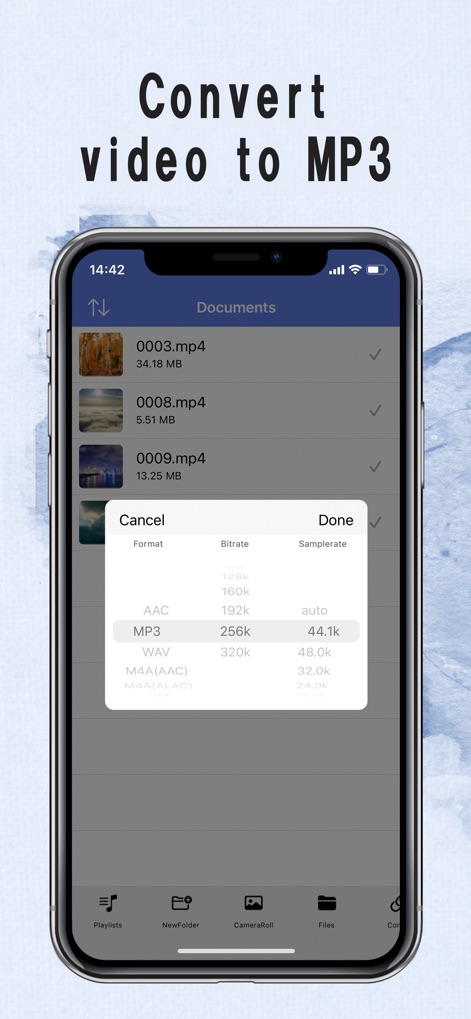
Users can precisely control the output, selecting the desired format and adjusting bit rate and sample rate for optimal audio conversion quality.
Conversion Settings

The app features an integrated audio player, providing essential playback controls and easy access to converted MP3 files.
Seamless Playback

Explore the intuitive interface for managing audio, enabling users to create and organize custom playlists with ease.
Playlist Creation
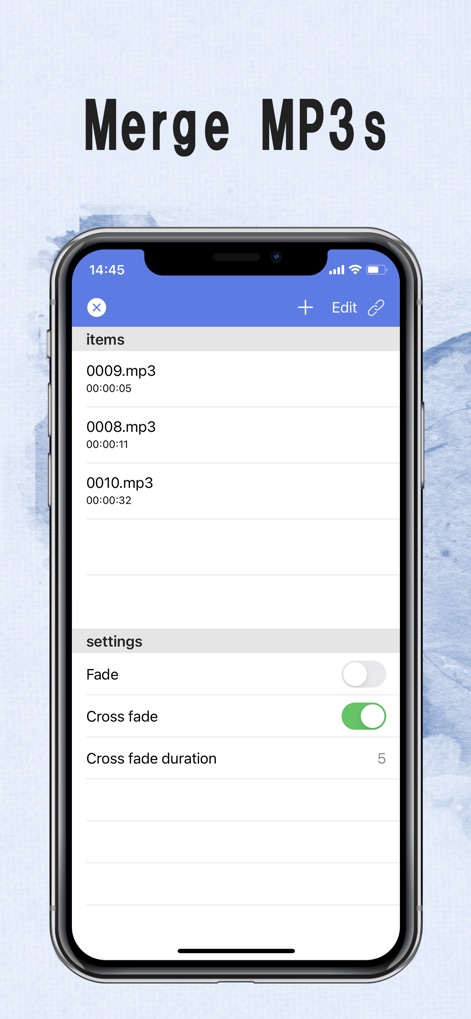
This tool offers robust audio merging capabilities, allowing users to combine multiple MP3 files and apply sophisticated cross-fade effects.
Audio Merging
Description
Download
More Like This
Apps with similar features and user experience

MP3 Converter -Audio Extractor
妍 岳

Audio Editor - Music Mixer
妍 岳

MP3 Converter: Video to Audio
Fitness Labs SRL

Audio Editor: MP3 Converter
ZHN Co., Ltd.

MP3 Converter - video2mp3
ZHN Co., Ltd.

EZAudioCut - Audio Editor Lite
龙刚 李

Audio Extractor-Audio Editing
正军 刘

Audio Editor & Music Mixer
Wuhan Net Power Technology Co., Ltd

Audio Converter&Ringtone Maker
俊鹏 位
This page is not an official page of the app or its developer, but an independent editorial publication created for informational and commentary purposes. Unless expressly stated otherwise, neither the app nor its developer is affiliated with, endorsed by, sponsored by, authorized by, or otherwise officially connected with MWM, Apple, Google Play, the app publisher, or the app's developer, and nothing on this page implies that the app was developed using MWM's services. Any trademarks, logos, screenshots, and other content remain the property of their respective owners.