
This page is not an official page of the app or its developer, but an independent editorial publication created for informational and commentary purposes. Unless expressly stated otherwise, neither the app nor its developer is affiliated with, endorsed by, sponsored by, authorized by, or otherwise officially connected with MWM, Apple, Google Play, the app publisher, or the app's developer, and nothing on this page implies that the app was developed using MWM's services. Any trademarks, logos, screenshots, and other content remain the property of their respective owners.


Epson iPrint
Desktop dependency for printing is obsolete. This app transforms any mobile device into a powerful Epson print and scan hub.
Downloads
25M+User Rating
Total Ratings
2.6MPublisher
Category
Photo & VideoLocales
13Latest Version
7.13.2Size
33.0 MBFirst Released
Dec 14, 2009Epson iPrint: Mobile Productivity Analysis
An evaluation of key features designed for seamless printing and scanning from iOS devices.
Direct Mobile Printing & Scanning
The app provides direct printing of documents, photos, and emails, along with the capability to scan and share physical copies, all from an iPhone, iPad, or iPod Touch.
Global Remote Printing
It allows users to print to their email-enabled Epson printer from virtually any location worldwide, offering significant flexibility for home office and busy professionals.
Mobile Document & Photo Capture
This tool features the ability to capture physical documents or photos using a device's camera, enhance them, and prepare them for printing or saving, along with direct scanning from an Epson all-in-one.
Advanced Print Customization
The app provides extensive control over print jobs, including options for paper size, type, number of copies, page range, duplex printing, and quality optimization.
Real-time Printer Status & Ink Levels
It allows users to conveniently monitor their printer's operational status and check ink levels directly from their mobile device, aiding in efficient print management.
Integrated Mobile Copying
This tool features the ability to initiate and manage copying of documents and photos directly from a mobile device using a connected Epson printer, streamlining the copying process.
Frequently Asked Questions
Everything you need to know about Epson iPrint
What is Epson iPrint?
Epson iPrint is a mobile application for iPhone, iPad, or iPod Touch that enables direct printing, scanning, and sharing. It supports printing photos, emails, webpages, and files like Microsoft Word, Excel, PowerPoint, and PDF documents.
Can I print documents with Epson iPrint?
Yes, Epson iPrint allows users to print documents, including Microsoft Word, Excel, PowerPoint, and PDF files. It also prints stored files and email attachments directly from a mobile device.
Does Epson iPrint support scanning?
Yes, Epson iPrint supports scanning documents from an Epson all-in-one printer. Users can then save, email, or share the scanned files online directly from their mobile device.
Can I print photos from my iPhone using Epson iPrint?
Yes, Epson iPrint enables printing photos directly from an iPhone, iPad, or iPod Touch. It includes advanced features like automatic backlight and color cast correction for high-quality photo output.
How can I check printer ink levels with Epson iPrint?
Users can check their printer's status and ink levels directly within the Epson iPrint app. This feature provides essential information to ensure the printer is operational for printing tasks.
Can I print remotely using Epson iPrint?
Yes, Epson iPrint includes remote print functionality. Users can print from any location to email-enabled Epson printers, offering convenience for printing tasks away from the immediate area.
Does Epson iPrint require location services for Wi-Fi printing?
Yes, Epson iPrint requires device location services for Wi-Fi connections to search for wireless networks. The application explicitly states it does not collect your actual location data.
Can Epson iPrint copy documents?
Yes, Epson iPrint provides a copy function. Users can copy documents and photos using their mobile device in conjunction with a nearby Epson printer, streamlining the copying process.
What types of files can Epson iPrint print?
Epson iPrint prints various file types, including photos, emails, webpages, and documents such as Microsoft Word, Excel, PowerPoint, and PDF. It also supports printing stored files.
The following screenshots and description are sourced directly from the app's official store listing and are the property of the app developer.
App Store
Screenshots
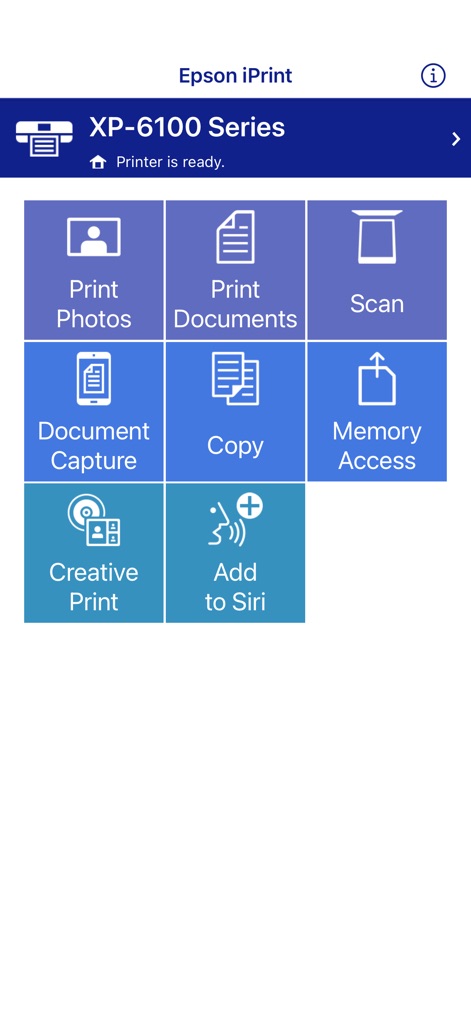
Core Functions Hub
The app's intuitive home screen presents a grid of essential functions, providing quick access to tasks while clearly displaying the connected printer's status.

Document Printing Preview
Users can review a comprehensive document preview, allowing verification of content and selection of print settings such as paper size before printing.

Efficient Scanning Workflow
This tool offers a clear scanned image preview, followed by practical sharing and action options like saving, emailing, or directly printing the digitized file.

Photo Printing Simplified
The interface features a prominent photo preview with dimensional details, alongside a convenient thumbnail gallery for managing multiple image selections.
Description
Download
More Like This
Apps with similar features and user experience

Docuslice - Poster Printing
Jeremiah Lachica

Printer Pro: Smart Printer App
Ivan Spyrydonov

HP
HP Inc.

Canon PRINT
Canon Inc.

Epson Smart Panel
Seiko Epson Corporation

Brother Mobile Connect
Brother Industries, LTD.

Printer App: Smart Print
Netpeak EOOD

Smart Printer App: iPrint
AppFusion OU

小白学习打印-手机打印,教辅试卷错题整理
Nanjing White Box Information Technology Co., Ltd
This page is not an official page of the app or its developer, but an independent editorial publication created for informational and commentary purposes. Unless expressly stated otherwise, neither the app nor its developer is affiliated with, endorsed by, sponsored by, authorized by, or otherwise officially connected with MWM, Apple, Google Play, the app publisher, or the app's developer, and nothing on this page implies that the app was developed using MWM's services. Any trademarks, logos, screenshots, and other content remain the property of their respective owners.