
This page is not an official page of the app or its developer, but an independent editorial publication created for informational and commentary purposes. Unless expressly stated otherwise, neither the app nor its developer is affiliated with, endorsed by, sponsored by, authorized by, or otherwise officially connected with MWM, Apple, Google Play, the app publisher, or the app's developer, and nothing on this page implies that the app was developed using MWM's services. Any trademarks, logos, screenshots, and other content remain the property of their respective owners.

Epson Smart Panel
The app cuts the cord to your desktop. It grants users absolute wireless command over their Epson devices, transforming routine printer and scanner chores into effortless mobile actions.
Downloads
25M+User Rating
Total Ratings
1.7MPublisher
Category
Photo & VideoLocales
45Latest Version
5.2.2Size
208.0 MBFirst Released
Mar 31, 2020Epson Smart Panel: A Mobile Command Hub for Integrated Device Management
An analytical overview of key functionalities enhancing user convenience and connectivity.
Unified Mobile Control for Printers and Scanners
This tool features a single, intuitive interface for managing both Epson printers and scanners, simplifying the mobile command experience for users.
Effortless Wireless Setup
The app allows users to easily set up their Epson devices on a Wi-Fi network, ensuring quick and seamless connectivity.
Simplified Operation via Action Tiles
This tool features innovative action tiles that streamline the operation of Epson products, making tasks simple and quick to execute.
Real-time Device Monitoring
It provides capabilities to monitor the status and performance of connected Epson printers and scanners directly from a mobile device.
Personalized Auto-Configuration
The app offers auto-configuration and customization features that tailor the user experience to their specific Epson device, ensuring optimal functionality.
Integrated Support & Supplies Management
It allows users to register their products, find help, and order supplies conveniently from within the application.
Frequently Asked Questions
Everything you need to know about Epson Smart Panel
What is Epson Smart Panel?
Epson Smart Panel is a mobile command center for Epson wireless printers or scanners. It enables users to set up, monitor, and operate their Epson products conveniently from a mobile device.
Can Epson Smart Panel print photos?
Yes, Epson Smart Panel allows users to print photos. The app features a dedicated section with an "Innovate action tile" for selecting and printing photos directly from the mobile device.
What are the core functions of the Epson Smart Panel app?
Epson Smart Panel offers key functions including Print, Scan, Document Capture, and Copy. It also provides maintenance features such as Preset Copy and Print Head Cleaning.
Does Epson Smart Panel support all Epson printers and scanners?
No, Epson Smart Panel only supports specific products listed on its official website at https://support.epson.net/appinfo/smartpanel/guide/en/. Unsupported devices require Epson iPrint for printers or Document Scan for scanners.
Can I edit photos using the Epson Smart Panel app?
Yes, users can edit photos within the Epson Smart Panel app. Available editing features include Adjust Tilt, Auto Correct Photo, Sharpness, and Brightness & Contrast adjustments.
How do I find help or support for Epson Smart Panel?
Users can get support directly within the Epson Smart Panel app by accessing the "Help" section. This interface provides options to register products, order supplies, or find assistance.
How does Epson Smart Panel facilitate product setup?
Epson Smart Panel simplifies product setup by allowing users to easily connect their Epson device to a Wi-Fi network. The app also features auto-configuration and customization to tailor the user experience.
The following screenshots and description are sourced directly from the app's official store listing and are the property of the app developer.
App Store
Screenshots
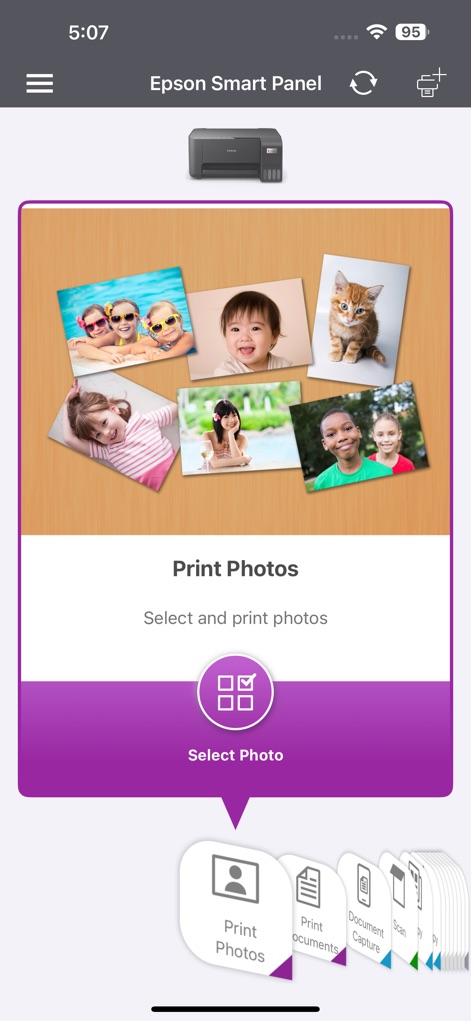
Effortless Photo Printing
This interface highlights the dedicated "Print Photos" section with a clear "Select Photo" button, complemented by an intuitive navigation bar for other essential tasks.
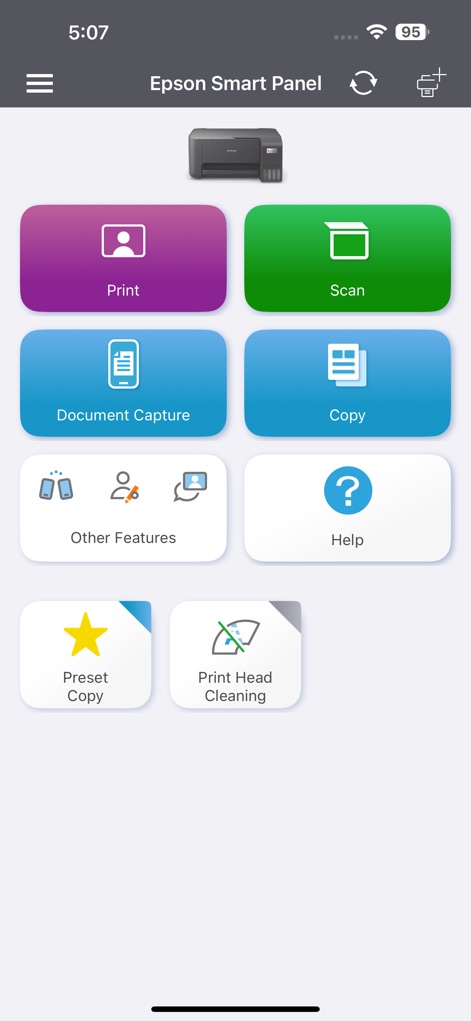
Command Center Dashboard
The app provides a streamlined dashboard featuring prominent "Print" and "Scan" action tiles, alongside quick access to device maintenance functions like "Print Head Cleaning".
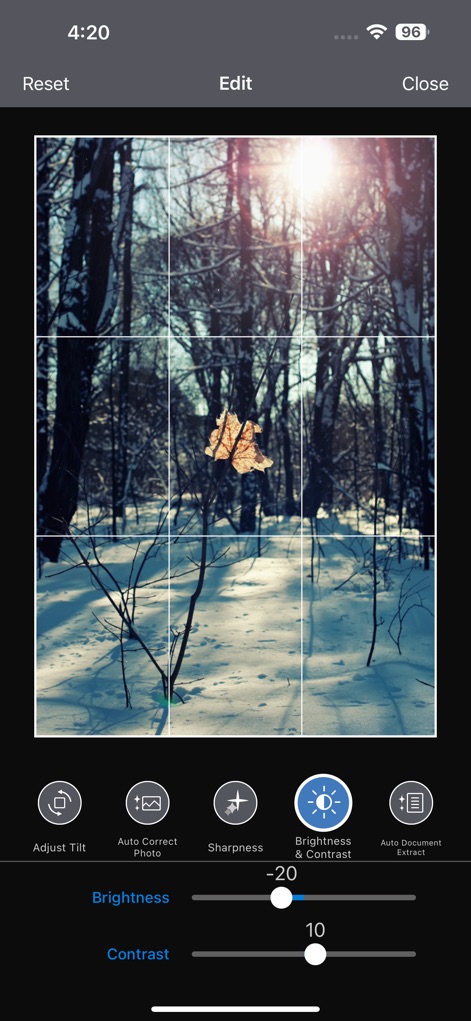
Advanced Image Editing
Users can perfect their visuals using the detailed "Brightness & Contrast" adjustment sliders and a precise "cropping grid," enhanced by options such as "Auto Correct Photo."

Guided Product Setup
The app facilitates initial connection through clear "guided setup messages" and a dynamic "product search" screen, ensuring a hassle-free start for new users.
Description
Download
More Like This
Apps with similar features and user experience

Docuslice - Poster Printing
Jeremiah Lachica

Printer Pro: Smart Printer App
Ivan Spyrydonov

HP
HP Inc.

Canon PRINT
Canon Inc.

Brother Mobile Connect
Brother Industries, LTD.

Epson iPrint
Seiko Epson Corporation

Printer App: Smart Print
Netpeak EOOD

Smart Printer App: iPrint
AppFusion OU

小白学习打印-手机打印,教辅试卷错题整理
Nanjing White Box Information Technology Co., Ltd
This page is not an official page of the app or its developer, but an independent editorial publication created for informational and commentary purposes. Unless expressly stated otherwise, neither the app nor its developer is affiliated with, endorsed by, sponsored by, authorized by, or otherwise officially connected with MWM, Apple, Google Play, the app publisher, or the app's developer, and nothing on this page implies that the app was developed using MWM's services. Any trademarks, logos, screenshots, and other content remain the property of their respective owners.