Final Cut Pro for iPad

Final Cut Pro for iPad

Download on App Store
Logo of Final Cut Pro for iPad

Final Cut Pro for iPad: Your Professional Production Studio Anywhere

Unleash your creativity with a touch-first interface designed for the next generation of creators. Edit with precision using the jog wheel, capture with Live Multicam, and harness the power of AI to transform your footage into cinematic masterpieces on the go.

Publisher

Apple Inc.

Category

Photo & Video

Downloads

1M+

User Rating

4.3/5

Total Ratings

4K+

Locales

7

Your Mobile Production Suite

Discover the interface used by 1M+ users.
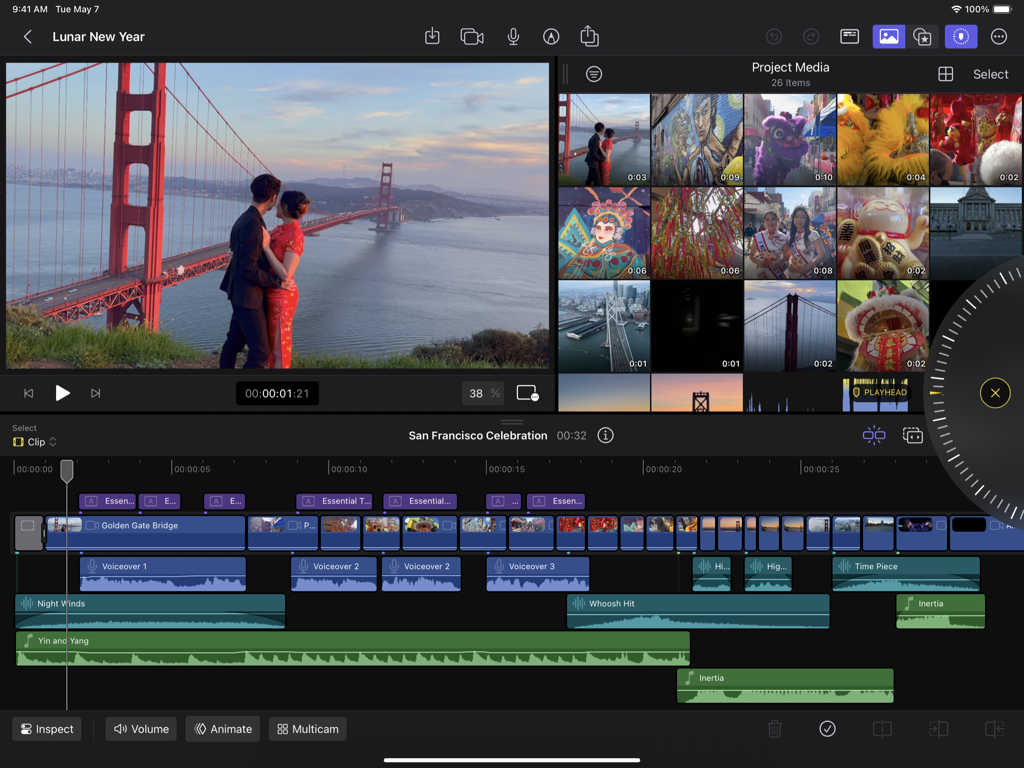
Final Cut Pro for iPad interface showing a video project with the magnetic timeline and precision jog wheel

Final Cut Pro for iPad interface showing a video project with the magnetic timeline and precision jog wheel

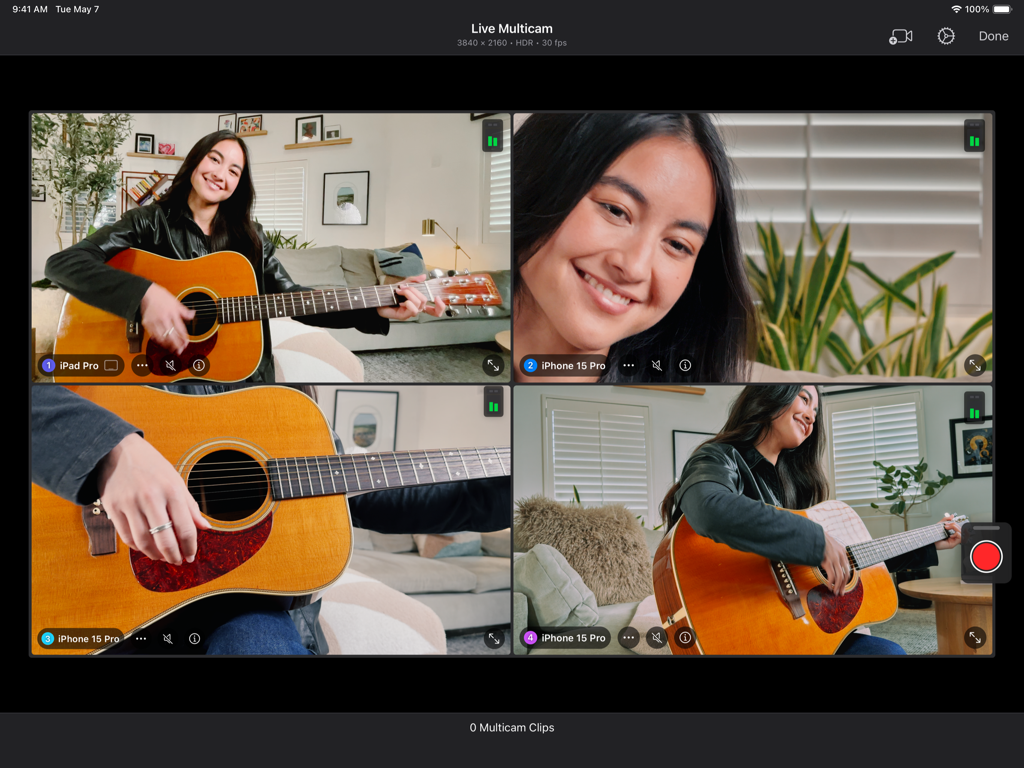
Final Cut Pro for iPad interface displaying the Live Multicam feature with four simultaneous camera angles of a woman playing guitar.

Final Cut Pro for iPad interface displaying the Live Multicam feature with four simultaneous camera angles of a woman playing guitar.

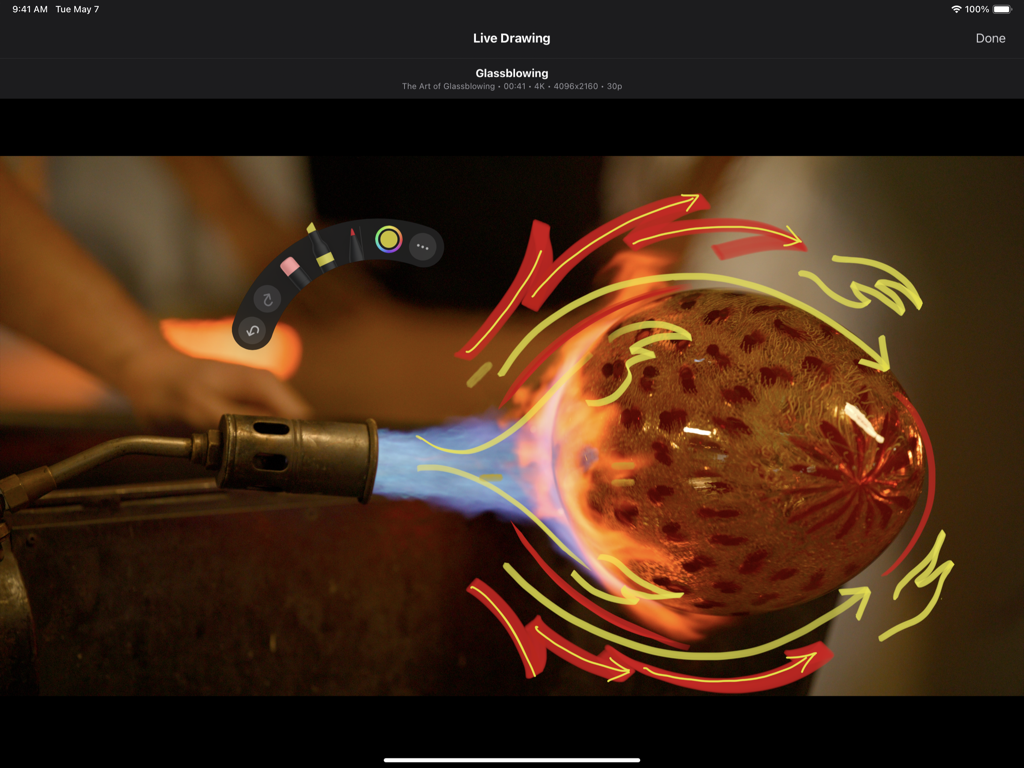
Hand drawn animations using the Live Drawing feature in Final Cut Pro for iPad

Hand drawn animations using the Live Drawing feature in Final Cut Pro for iPad

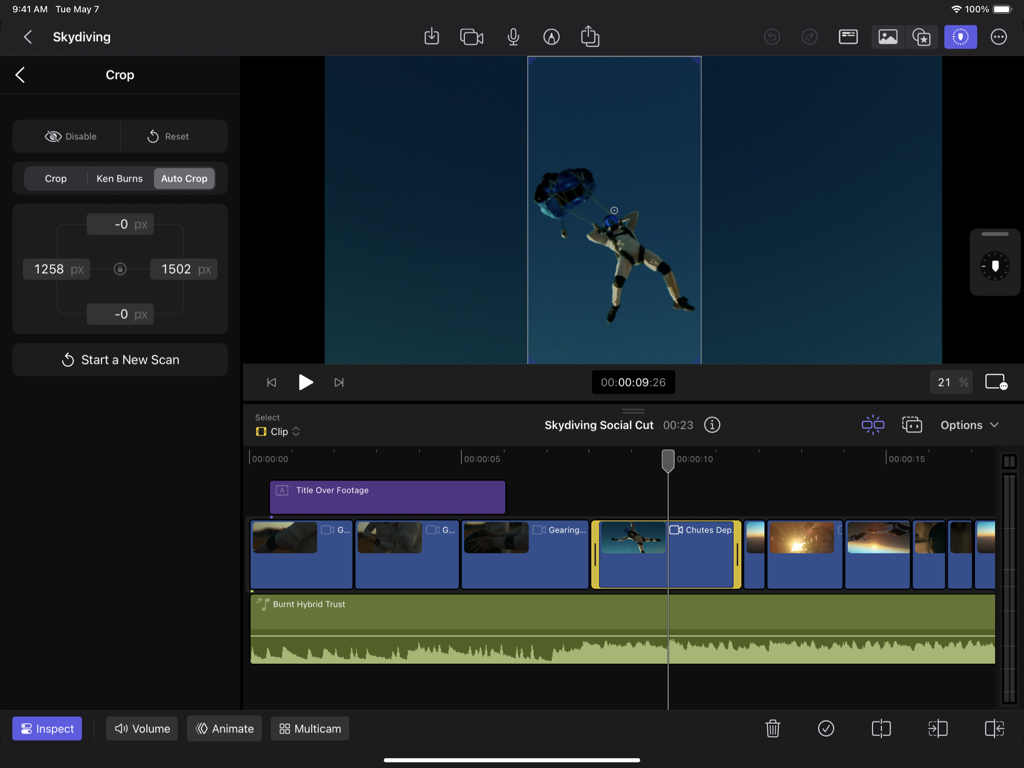
A user editing a skydiving video using the Auto Crop AI feature in Final Cut Pro for iPad to create vertical content

A user editing a skydiving video using the Auto Crop AI feature in Final Cut Pro for iPad to create vertical content

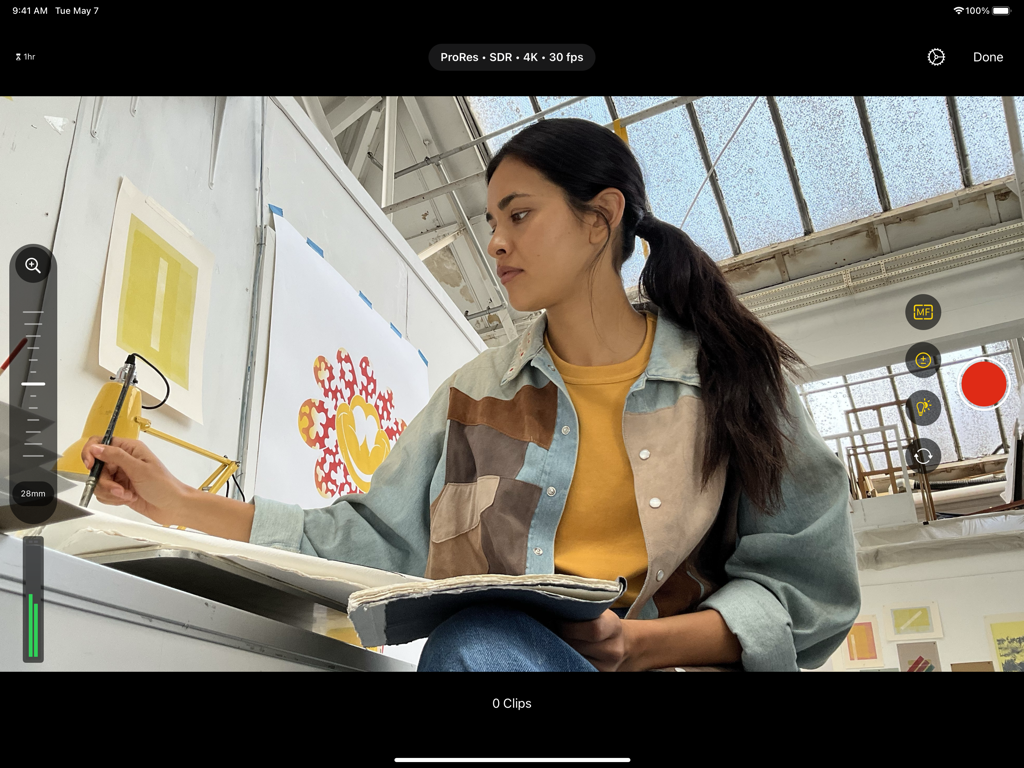
Final Cut Pro for iPad pro camera interface showing 4K video recording settings and a creator in a studio

Final Cut Pro for iPad pro camera interface showing 4K video recording settings and a creator in a studio

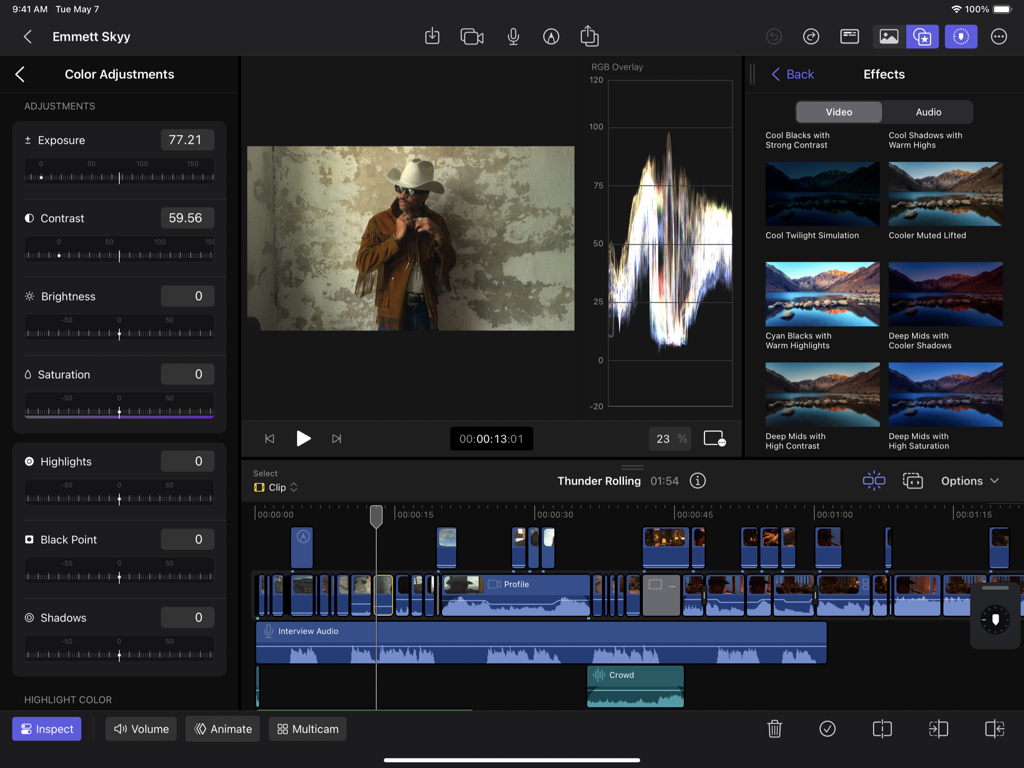
Final Cut Pro for iPad interface showing color adjustment controls and video editing timeline

Final Cut Pro for iPad interface showing color adjustment controls and video editing timeline

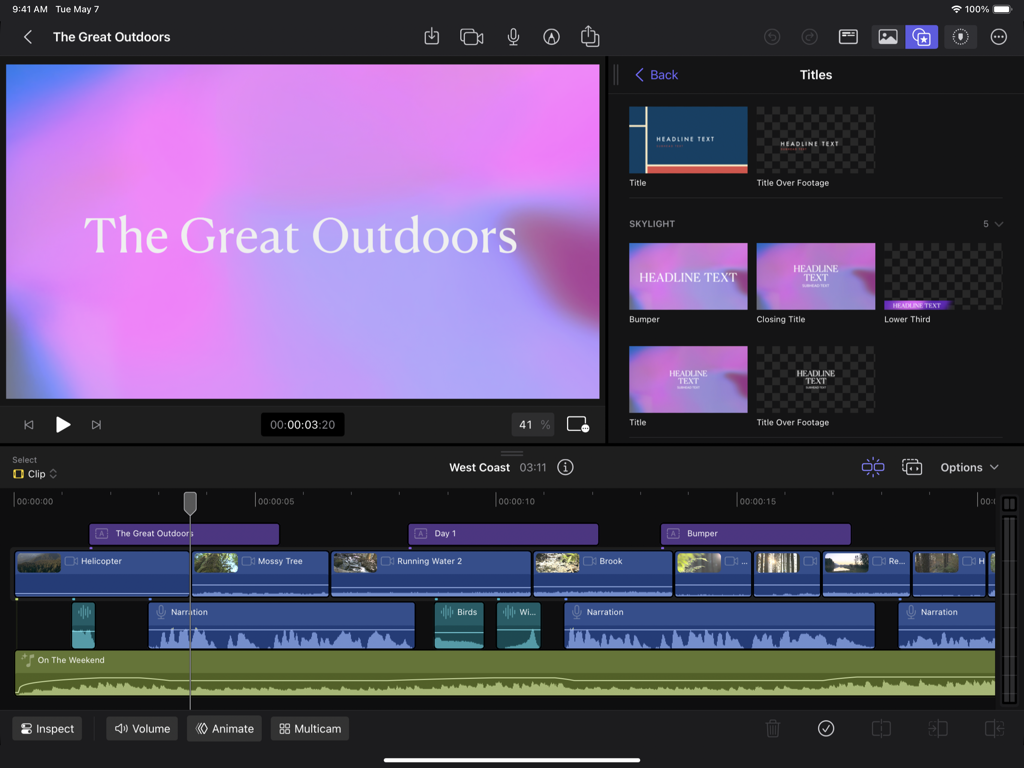
Professional video editing interface on iPad showing a magnetic timeline and title library

Professional video editing interface on iPad showing a magnetic timeline and title library

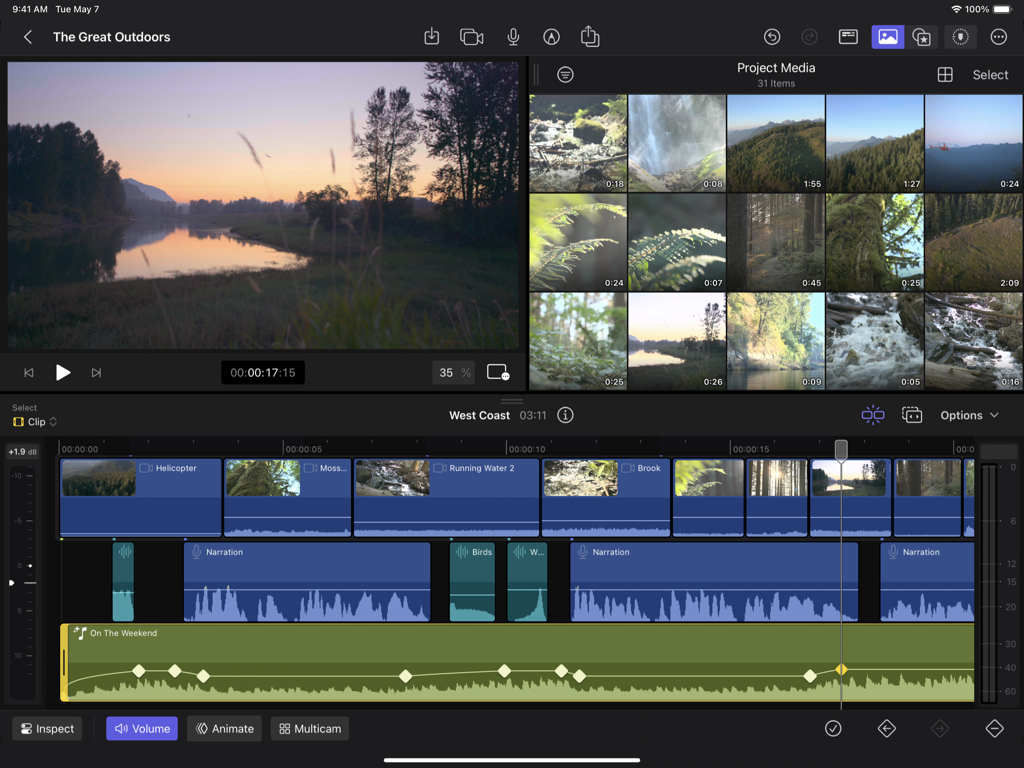
The professional video editing interface of Final Cut Pro for iPad showing a magnetic timeline with multiple video and audio tracks alongside a media library and preview window.

The professional video editing interface of Final Cut Pro for iPad showing a magnetic timeline with multiple video and audio tracks alongside a media library and preview window.

Pro Studio Performance, Anywhere You Go

The tools that make this app stand out, trusted by 1M+ users.

🎬

Intuitive Multi-Touch Editing

Navigate complex projects with the Magnetic Timeline and use the tactile Jog Wheel for frame-accurate edits with just your fingertips or Apple Pencil.

📱

Wireless Live Multicam

Direct a full production from your iPad by wirelessly syncing and monitoring up to four iPhones or iPads simultaneously for the ultimate studio-in-a-backpack.

🤖

Fast Cut AI Intelligence

Instantly remove backgrounds or reframe footage for TikTok and Reels using powerful AI tools that eliminate hours of tedious manual work.

About the app

Everything you need to know about Final Cut Pro for iPad.

Description

Final Cut Pro reimagines video creation for iPad with a touch-first interface for creators, professionals, and students. Capture with the built-in pro camera using manual controls to dial in your shot or seamlessly connect, record, and sync up to four iPhones or iPads with Live Multicam. Navigate complex projects with Multi-Touch and edit with precision using the jog wheel and Magnetic Timeline. Add a personal touch with Live Drawing to create handwritten animations directly on top of your footage. Choose from a vast library of graphics, effects, and music to polish your projects. Final Cut Pro for iPad puts the power of a production studio at your fingertips. Unleash your creativity with a touch-first interface optimized for iPad • Navigate the Magnetic Timeline and complex projects with intuitive Multi-Touch gestures • View, edit, and move your media with frame accuracy using the jog wheel • Draw, highlight, and write directly on top of your footage with Live Drawing using Apple Pencil or Apple Pencil Pro • Skim your footage without ever touching the screen with Apple Pencil hover* • Create stunning videos with an HDR workflow on the Liquid Retina XDR or Ultra Retina XDR display** • Connect a keyboard to access powerful key commands and make precise edits with Apple Pencil or Apple Pencil Pro Preview, record, and sync up to four iPhones or iPads with Live Multicam • Quickly start a Live Multicam session by connecting to any iPhone or iPad running the Final Cut Camera app • Remotely preview and initiate recording on all your connected devices right in Final Cut Pro for iPad • Dial in each angle’s ISO, shutter speed, white balance, manual focus, and more directly on iPad • Monitor your video with focus peaking, audio meters, and zebras to ensure your multicam clips look and sound great • Instantly edit your multicam clips with preview media that is automatically synced in the media browswer • Save time in post with background media transfer that seamlessly replaces preview media with originals as you work Capture the perfect shot with the built-in pro camera mode • Easily record in a range of video resolutions, frame rates, and formats including ProRes*** • Set your exposure with ISO and shutter speed controls • Adjust your white balance using presets or set a custom color temperature • Accurately pull focus and capture sharp footage with focus peaking Speed up workflows with Fast Cut AI features powered by the Apple Neural Engine • Automatically improve the color and brightness of your videos with Enhance Light and Color • Remove the background behind a subject without using a green screen with Scene Removal Mask • Intelligently analyze and adjust footage for vertical, square, and other aspect ratios with Auto Crop • Reduce or remove background noise with Voice Isolation Finish videos with a spectacular library of pro content • Customize your video with dynamic titles, lower thirds, bumpers, and transitions • Apply beautiful color presets to dial in the perfect look • Score your videos with soundtracks that dynamically adjust to the length of your edit Share your final video or send your project to Final Cut Pro for Mac • Send your project to Final Cut Pro for Mac for additional tools including Magnetic Mask, advanced color correction, and third-party content options**** Unlock pro editing tools to take your iMovie for iOS projects to the next level • Import projects created in iMovie for iOS to take advantage of the advanced editing tools in Final Cut Pro for iPad***** Upgrading to the latest iPadOS is recommended * Requires iPad models with M2 chip or later, or iPad mini (A17 Pro) ** Requires iPad Pro (M4 chip) or iPad Pro 12.9-inch (5th generation or later) *** Requires iPad Pro (M4 chip), iPad Pro 12.9-inch (6th generation or later), or iPad Pro 11-inch (4th generation or later) **** Requires Final Cut Pro 11 or later ***** Requires iMovie for iOS 3.0 or later

Latest Version

2.3

Size

961.8 MB

First Released

May 23, 2023

Ready to Edit Without Limits?

Join the next generation of professional creators. Download Final Cut Pro for iPad and turn your best ideas into cinematic reality, wherever inspiration strikes.

Download on App Store
FAQ

Frequently Asked Questions

Everything you need to know about Final Cut Pro for iPad

What is Final Cut Pro: Create Video?

Final Cut Pro: Create Video reimagines video creation for iPad with a touch-first interface. It provides professionals, creators, and students with powerful editing tools, multi-camera recording, and intelligent features.

Can Final Cut Pro for iPad connect multiple cameras?

Yes, Final Cut Pro for iPad features Live Multicam, allowing users to connect and sync up to four iPhones or iPads running the Final Cut Camera app for simultaneous recording.

Does Final Cut Pro for iPad support Apple Pencil for drawing?

Yes, Final Cut Pro for iPad supports Live Drawing. Users create handwritten animations and annotations directly on top of their footage using Apple Pencil or Apple Pencil Pro.

How does Final Cut Pro for iPad handle background removal?

Final Cut Pro for iPad includes a Scene Removal Mask feature. This intelligent tool automatically removes the background behind a subject without requiring a green screen.

Can Final Cut Pro for iPad automatically adjust video aspect ratios?

Yes, Final Cut Pro for iPad includes Auto Crop. This feature intelligently analyzes footage and adjusts it for vertical, square, and other aspect ratios.

Does Final Cut Pro for iPad improve video color and brightness automatically?

Yes, Final Cut Pro for iPad features Enhance Light and Color. This tool automatically improves the color and brightness of videos for optimal visual quality.

Can I transfer projects from Final Cut Pro for iPad to Mac?

Yes, users can send their Final Cut Pro for iPad projects to Final Cut Pro for Mac. This requires Final Cut Pro 12.0 on the Mac for additional tools.

Does Final Cut Pro for iPad allow import of iMovie projects?

Yes, Final Cut Pro for iPad allows importing projects created in iMovie for iOS. This enables users to utilize the advanced editing tools of Final Cut Pro for iPad.

What kind of built-in content does Final Cut Pro for iPad offer?

Final Cut Pro for iPad offers spectacular pro content including dynamic titles, lower thirds, bumpers, transitions, color presets, and soundtracks that adjust dynamically to edit length.

Can Final Cut Pro for iPad remove background noise from audio?

Yes, Final Cut Pro for iPad includes Voice Isolation. This feature reduces or removes unwanted background noise, enhancing the clarity of audio in videos.

Does Final Cut Pro for iPad require specific iPad models for HDR workflow?

Yes, HDR workflow in Final Cut Pro for iPad requires iPad Pro (M5), iPad Pro (M4), or iPad Pro 12.9-inch (5th generation or later) models.

How does the jog wheel function in Final Cut Pro for iPad?

The jog wheel in Final Cut Pro for iPad allows users to view, edit, and move media with frame accuracy. It enhances precision editing within the touch-first interface.

Does Final Cut Pro for iPad have manual camera controls?

Yes, Final Cut Pro for iPad features a built-in pro camera. It provides manual controls to dial in shots, including ISO, shutter speed, white balance, and manual focus during Live Multicam sessions.

Can Final Cut Pro for iPad monitor multi-camera video with technical tools?

Yes, Final Cut Pro for iPad monitors multi-camera video with focus peaking, audio meters, and zebras. These tools ensure multicam clips look and sound professional.

App information, icons, screenshots, and descriptions displayed on this page are sourced from the Apple App Store and are the property of their respective developers. Download estimates and rankings are based on MWM's proprietary models and may not reflect actual figures. This page is provided for informational and analytical purposes only.

Believe this page infringes your intellectual property? File a dispute