
This page is not an official page of the app or its developer, but an independent editorial publication created for informational and commentary purposes. Unless expressly stated otherwise, neither the app nor its developer is affiliated with, endorsed by, sponsored by, authorized by, or otherwise officially connected with MWM, Apple, Google Play, the app publisher, or the app's developer, and nothing on this page implies that the app was developed using MWM's services. Any trademarks, logos, screenshots, and other content remain the property of their respective owners.


Filmmaker Pro - Video Editor
Your device, their studio. It provides the muscle for broadcast-ready video, allowing users to cut, animate, and finalize projects with unmatched control and zero data compromise.
Downloads
12.5M+User Rating
Total Ratings
358.8KPublisher
Category
Photo & VideoLocales
13Latest Version
12.6.4Size
1.1 GBFirst Released
Apr 7, 2016Filmmaker Pro - Comprehensive Feature Analysis
An in-depth look at key capabilities for modern content creation.
Chroma Key (Green Screen)
It enables users to create professional-looking videos by easily removing green or blue screen backgrounds, opening up possibilities for virtual sets and special effects.
Motion Tracking
This tool features motion tracking capabilities, allowing users to automatically track objects or faces in their video clips and apply effects, text, or graphics that follow the movement, enhancing dynamic content.
Keyframe Animation
The app provides precise control over visual elements and effects through keyframe animation, enabling users to create custom, dynamic movements and transitions for a polished look.
Voice-to-Text Captions
It automatically generates captions from spoken audio using voice-to-text technology, improving accessibility and engagement for viewers, especially on social media platforms.
Multi-Track 4K Editing
The app provides support for unlimited video clips, audio tracks, voiceovers, and text overlays, combined with 4K video editing capabilities, enabling users to create complex, high-resolution projects.
Royalty-Free Audio Library
This tool features an extensive library of 256 royalty-free music tracks and a sound effects collection, allowing users to enhance their videos with professional audio without copyright concerns.
Advanced Text & Graphics
It offers a vast selection of fonts, advanced text animations, curved text options, and a wide array of graphics and animated stickers, providing extensive customization for branding and visual storytelling.
Picture-in-Picture (PiP)
The app supports Picture-in-Picture for video, photos, and GIFs, enabling users to layer multiple visual elements simultaneously for engaging tutorials, reaction videos, or creative compositions.
Frequently Asked Questions
Everything you need to know about Filmmaker Pro - Video Editor
Does Filmmaker Pro collect or store user data?
No, Filmmaker Pro does not collect or store any user data. All processing occurs locally on the device, and all AI models are included within the app bundle.
Does Filmmaker Pro support 4K video editing?
Yes, Filmmaker Pro supports 4K video editing. This feature is available on iPhone SE and later models, as well as all iPad Pro devices.
What video editing features are available in Filmmaker Pro?
Filmmaker Pro offers a wide range of video editing capabilities, including trimming, splitting, duplicating clips, adjusting playback speed, volume control, reverse video, 46 transitions, 30 filters, video grading, and real-time effects playback.
Does Filmmaker Pro - Video Editor have a green screen feature?
Yes, Filmmaker Pro includes Chroma Key (Green Screen) functionality. This feature allows users to perform green screen effects directly within the app.
How many royalty-free music tracks are included with Filmmaker Pro?
Filmmaker Pro offers 256 royalty-free music tracks and a Sound Effects Collection for use in your projects. Users can trim audio tracks and adjust playback speed.
Does Filmmaker Pro offer Picture-in-Picture effects?
Yes, Filmmaker Pro provides Picture-in-Picture (PiP) functionality. This includes support for Picture-in-Picture Video, Picture-in-Picture Photo, and Picture-in-Picture GIF effects.
Are there text animation options in Filmmaker Pro?
Filmmaker Pro provides 17 premium text animation options, 9 standard text animation options, and a "Stroke Path" animation for drawing text on videos. Users can curve text and adjust its duration.
Does Filmmaker Pro - Video Editor have an auto-save feature?
Yes, Filmmaker Pro includes an auto-save feature. This ensures that all edits made within the app are continuously saved and not lost during usage.
Is motion tracking available in Filmmaker Pro?
Yes, Filmmaker Pro offers motion tracking. This advanced video editing feature is included to allow users to track movement within their videos.
Does Filmmaker Pro support audio ducking?
Yes, Filmmaker Pro includes audio ducking. This feature allows users to automatically reduce the volume of background audio when a voiceover or other primary audio track is present.
Does Filmmaker Pro include face editing tools?
Yes, Filmmaker Pro offers various face editing tools, including options to adjust nose, lips, eyes, and eyebrows for pose, size, slimness, and width.
How does the Filmmaker Pro All Access Subscription work?
The All Access Subscription in Filmmaker Pro is billed monthly or annually, based on the selected plan. Subscriptions auto-renew unless cancelled 24 hours before the current period ends.
How do I cancel my Filmmaker Pro subscription?
You can manage your Filmmaker Pro subscription and turn off auto-renewal by accessing your Account Settings after purchase through iTunes.
The following screenshots and description are sourced directly from the app's official store listing and are the property of the app developer.
App Store
Screenshots
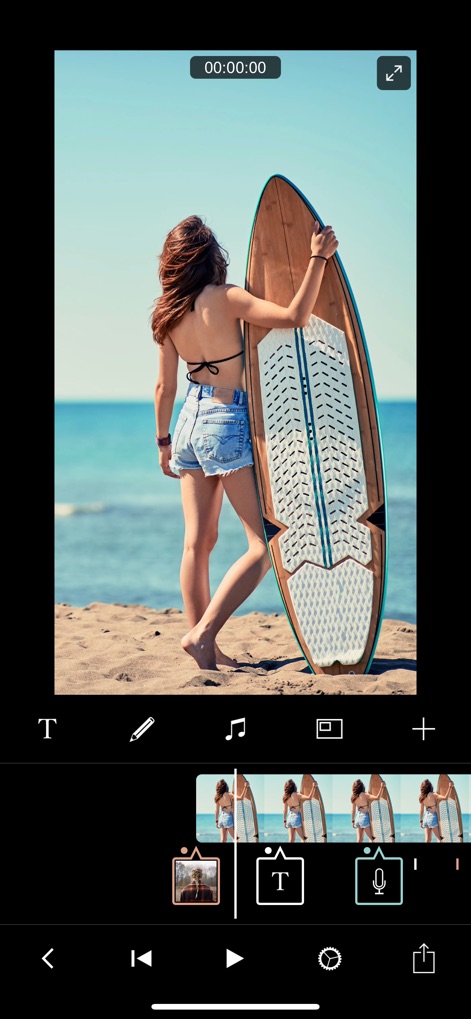
Intuitive Timeline Editing
This tool offers a clear color-coded timeline view for efficient asset management and a large preview window for real-time adjustments.
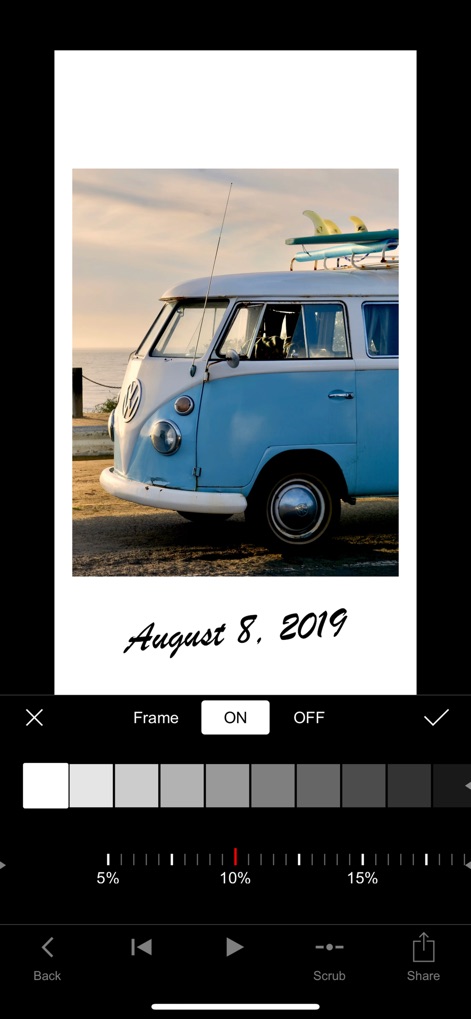
Image Enhancement Tools
Users can easily refine their visuals with detailed frame options and precise color grading controls, including brightness and saturation.

Extensive Audio Library
The app provides access to a vast collection of royalty-free music tracks from services like Epidemic Sound, categorized for easy discovery and integration.

Dynamic Text Overlays
Discover diverse text overlay options, allowing users to select from various caption styles and customize fonts for engaging visual storytelling.

Creative Typography Options
This tool allows for precise text customization, offering a wide array of font categories like "Special" and fine-tuning features for placement and animation.
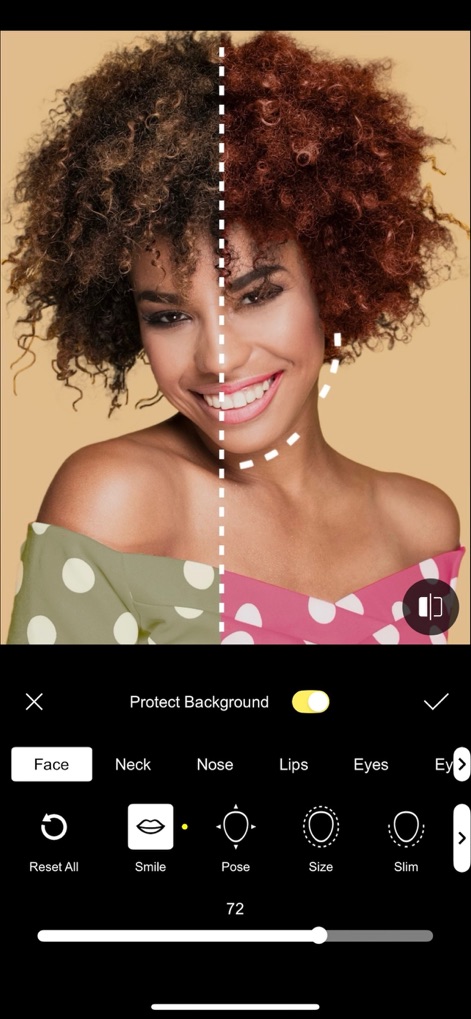
Advanced Portrait Retouching
Users can enhance facial features with specialized tools for areas like lips and eyes, ensuring pristine results while preserving the background integrity.
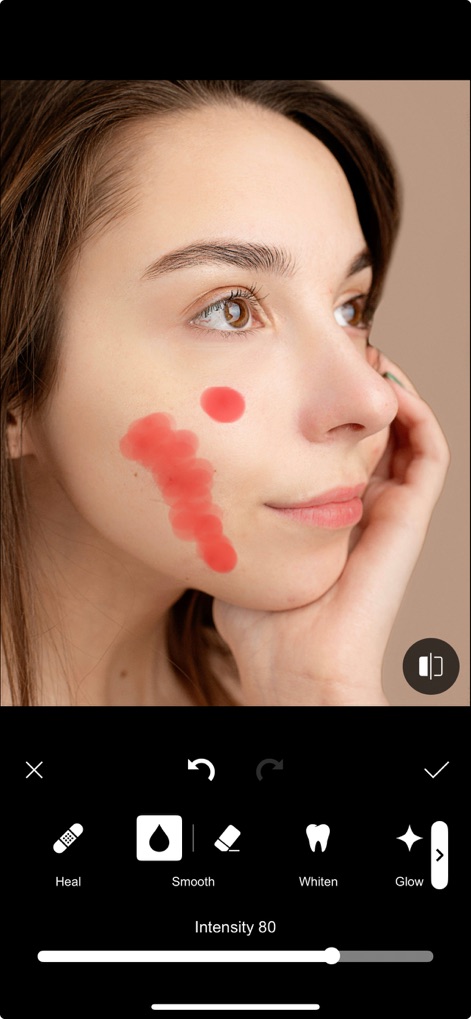
Flawless Skin Refinement
The app provides dedicated tools for skin smoothing and healing imperfections, with adjustable intensity sliders for natural-looking results.

Precise Audio Control
This tool enables granular control over audio with fade-in/fade-out options and an intuitive waveform display for adjusting sound levels.

Versatile PiP Effects
Users can effortlessly integrate Picture-in-Picture videos, with flexible controls for resizing and repositioning the overlaid content.

Engaging Animated Graphics
The app enhances video content with a rich library of animated stickers, including social media call-to-actions like a "Like" button and "Subscribe" prompts.
Description
Download
More Like This
Apps with similar features and user experience

VN: AI Video Editor
Ubiquiti Labs, LLC

Splice - Video Editor & Maker
Bending Spoons Apps ApS

Blurrr-Music video editor
TBPS INTERNATIONAL TECHNOLOGY PTE. LTD.

Node Video
小为 罗

Time Cut: Smooth Slow Motion
立亚 林

LumaFusion
Luma Touch LLC

Slow Motion Video Fx Editor
Brain Craft Ltd

WEILO - My Last Video Editor
vimosoft

Video Effects Editor: Riveo
Forge and Form GmbH
This page is not an official page of the app or its developer, but an independent editorial publication created for informational and commentary purposes. Unless expressly stated otherwise, neither the app nor its developer is affiliated with, endorsed by, sponsored by, authorized by, or otherwise officially connected with MWM, Apple, Google Play, the app publisher, or the app's developer, and nothing on this page implies that the app was developed using MWM's services. Any trademarks, logos, screenshots, and other content remain the property of their respective owners.