
This page is not an official page of the app or its developer, but an independent editorial publication created for informational and commentary purposes. Unless expressly stated otherwise, neither the app nor its developer is affiliated with, endorsed by, sponsored by, authorized by, or otherwise officially connected with MWM, Apple, Google Play, the app publisher, or the app's developer, and nothing on this page implies that the app was developed using MWM's services. Any trademarks, logos, screenshots, and other content remain the property of their respective owners.


FL Studio Remote
Unleash your workflow from the desktop. This app hands users direct, mobile control over FL Studio's core, transforming a tablet into a tactical command center.
Downloads
100k+User Rating
Total Ratings
78Publisher
Category
MusicLocales
1Latest Version
2.1.2Size
20.7 MBFirst Released
Jul 8, 2025Evaluating core functionalities and user benefits for music production.
FL Studio Remote: A Workflow Enhancement Analysis
Remote DAW Control
The app provides seamless wireless MIDI control over FL Studio, enabling real-time manipulation of instruments and effects.
Deep Customization of Layouts
It allows users to design and save personalized virtual controller layouts, perfectly adapting to unique production workflows and preferences.
Comprehensive Control Element Library
This tool features an extensive array of control types, including pads, faders, X/Y pads, and specific FL Studio elements, for building highly tailored interfaces.
Rich Pre-Configured Control Tabs
The app offers a variety of pre-built controller tabs for common tasks such as transport, MIDI keyboard, FPC pads, and mixer, for immediate utility.
Effortless Wireless Connectivity
It provides an automatic, no-setup-required WiFi connection to FL Studio, ensuring quick and hassle-free integration with the desktop application.
Multi-Device Control Capability
This tool features the ability to connect up to 15 devices simultaneously, facilitating collaborative work or complex multi-controller setups.
Frequently Asked Questions
Everything you need to know about FL Studio Remote
What is FL Studio Remote?
FL Studio Remote is a free virtual MIDI controller built by the FL Studio team. It connects to FL Studio over WiFi to control the software like a physical MIDI controller, utilizing pads, faders, and knobs.
Does FL Studio Remote produce sound?
No, FL Studio Remote does not produce sound. It functions solely as a virtual MIDI controller, sending control signals to FL Studio on a computer via WiFi.
How does FL Studio Remote connect to FL Studio?
FL Studio Remote connects to FL Studio over WiFi. The connection is automatic as long as both the iOS device running the app and the computer running FL Studio are on the same network.
Can users customize layouts in FL Studio Remote?
Yes, FL Studio Remote allows users to create their own custom tabs using various control types, including pads, faders, knobs, jog wheels, and X/Y pads. Each control is fully customizable.
How many devices can connect to FL Studio Remote simultaneously?
FL Studio Remote supports connecting up to 15 devices at once. These devices can include Phones, Tablets, or Chromebooks, all controlling FL Studio simultaneously.
Does FL Studio Remote include a piano keyboard?
Yes, FL Studio Remote includes a MIDI keyboard as one of its built-in controller tabs. This feature is visually confirmed in Screenshot #1, which displays a piano keyboard layout.
Is FL Studio Remote a free application?
Yes, FL Studio Remote is a free application. It is developed by the FL Studio team as a virtual MIDI controller and is available without cost.
What types of controls are available in FL Studio Remote?
FL Studio Remote offers controls such as pads, faders, knobs, jog wheels, X/Y pads, piano keyboards, harmonic grids, clip launchers, and mixer strips. These are available in built-in or custom layouts.
Does FL Studio Remote replace a previous app?
Yes, FL Studio Remote replaces the previous application called Image-Line Remote. This replacement applies to FL Studio versions 2025.1 and newer.
The following screenshots and description are sourced directly from the app's official store listing and are the property of the app developer.
App Store
Screenshots
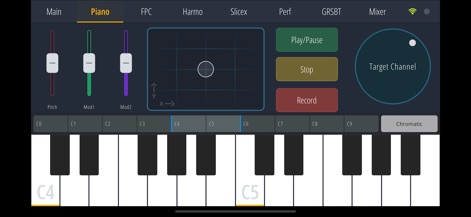
This screenshot reveals the app's comprehensive MIDI keyboard interface and the expressive X/Y pad, allowing users to intuitively control instruments and modulate sound parameters.
Melodic Input Hub
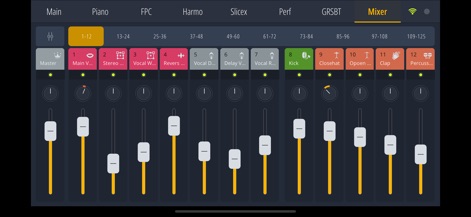
This view showcases the app's robust multi-channel mixer, offering precise control over individual track faders and dedicated channel selectors for streamlined audio engineering.
Dynamic Mixer Mastery
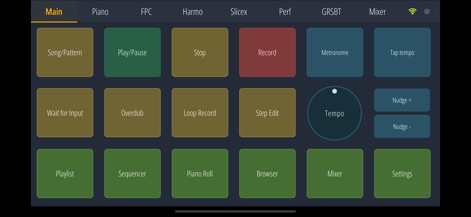
This screenshot highlights the app's central transport controls and customizable command pads, enabling users to manage project playback and essential functions with ease.
Workflow Command Center
Description
Download
More Like This
Apps with similar features and user experience

TouchOSC
Hexler LLC

MixEffect (Trial & Pro Unlock)
Adam Tow

Blackout Lighting Console
Blackout Lighting Console LLC

Logic Remote
Apple Inc.

LK - Ableton & Midi Controller
Imaginando Lda

Eos Remote
Trent Barclay

Mixing Station
Mixing Station GmbH

TouchOSC Mk1
Hexler LLC

MIDI Guitar
Jam Origin ApS
This page is not an official page of the app or its developer, but an independent editorial publication created for informational and commentary purposes. Unless expressly stated otherwise, neither the app nor its developer is affiliated with, endorsed by, sponsored by, authorized by, or otherwise officially connected with MWM, Apple, Google Play, the app publisher, or the app's developer, and nothing on this page implies that the app was developed using MWM's services. Any trademarks, logos, screenshots, and other content remain the property of their respective owners.