
This page is not an official page of the app or its developer, but an independent editorial publication created for informational and commentary purposes. Unless expressly stated otherwise, neither the app nor its developer is affiliated with, endorsed by, sponsored by, authorized by, or otherwise officially connected with MWM, Apple, Google Play, the app publisher, or the app's developer, and nothing on this page implies that the app was developed using MWM's services. Any trademarks, logos, screenshots, and other content remain the property of their respective owners.


LG XBOOM – 2024 and earlier
Take back control. The app grants users total command over their LG audio experience, turning sound into an instrument.
Downloads
2.5M+User Rating
Total Ratings
2.3KPublisher
Category
MusicLocales
14Latest Version
1.12.31Size
205.3 MBFirst Released
Jan 27, 2020Key functionalities for enhanced audio and visual control
LG XBOOM App Feature Analysis
Seamless Bluetooth Connectivity
The app enables seamless audio connection to Bluetooth-enabled LG XBOOM and UltraGear speakers, facilitating direct music playback from mobile devices.
Dynamic Audio Equalization
This tool features an extensive equalizer with various presets (e.g., Standard, Bass Blast, Pop, Classic, Rock, Jazz, Football) and sound effects for tailored listening experiences.
Interactive DJ Functionality
It allows users to engage with an integrated DJ mode, complete with a DJ Scratcher and various sound effects like Flanger, Phaser, Wah, and Delay, for creative audio manipulation.
Visual Lightshow Control
The app provides dynamic lighting effect customization, allowing users to synchronize vibrant visuals with their audio for an immersive experience.
Frequently Asked Questions
Everything you need to know about LG XBOOM – 2024 and earlier
What is the LG XBOOM app used for?
The LG XBOOM app enables users to play music from their mobile device via Bluetooth. It also provides control over compatible LG XBOOM speakers, including features like lighting effects, DJ mode, and customizable equalizer settings.
Which LG speaker models are compatible with the LG XBOOM app?
The LG XBOOM app supports various LG speaker models, including XBOOM 360 (RP4, XO3, XO2T), UltraGear Gaming (GP9, GP3), One Body (ON9, ON7, ON5), Loud Speakers (RN Series, XL Series), and Portable Speakers (PL7, PN7, XG Series).
Can I control lighting effects with the LG XBOOM app?
Yes, the LG XBOOM app allows users to control and convert lighting effects for their compatible speakers. Features include various ambient settings, Party, Water, Forest effects, brightness adjustments, and a Party Strobe toggle.
Does the LG XBOOM app include a DJ mode?
Yes, the LG XBOOM app features a DJ mode. Users can execute DJ Scratcher functions and apply DJ Effects such as FLANGER, PHASER, WAH, and DELAY to enhance their audio playback.
How do I adjust the equalizer (EQ) on my LG XBOOM speaker using the app?
The LG XBOOM app provides equalizer settings with sound effects like STANDARD, BASS BLAST, POP, CLASSIC, ROCK, JAZZ, and FOOTBALL. Users can also manually adjust Bass and Treble levels via an editing screen.
Does the LG XBOOM app require Bluetooth access permissions?
Yes, the LG XBOOM app requires Bluetooth permission. This access is necessary for the app to detect and connect to compatible LG XBOOM speakers, enabling music streaming and control functionalities.
Which LG app should be used for speaker models manufactured after 2025?
For LG models released after 2025, users must install the LG ThinQ app. The LG XBOOM – 2024 and earlier app is designed for compatible models produced before this period.
Can I manage speaker power settings through the LG XBOOM app?
Yes, the LG XBOOM app offers an 'Auto power management' option within Device Settings. This feature automatically turns off the speaker's power if no connection or operation occurs for a specific duration.
Is the LG XBOOM app compatible with Apple MFi certified devices?
Yes, the LG XBOOM app for iOS is specifically designed to support models certified with Apple Inc.'s MFi program. This ensures compatibility with "Made for iPhone" and "Made for iPod" accessories.
The following screenshots and description are sourced directly from the app's official store listing and are the property of the app developer.
App Store
Screenshots

Users can initiate an immediate "Connection" to their speaker or opt to "Connect Later", streamlining the initial setup process.
Seamless Setup

The app offers essential "Bluetooth" connectivity and a precise "Volume" slider, providing fundamental control over the connected speaker.
Core Controls

Users can craft their desired atmosphere through the "Light Studio" feature, choosing from various ambient presets such as "Refreshing morning".
Dynamic Lighting
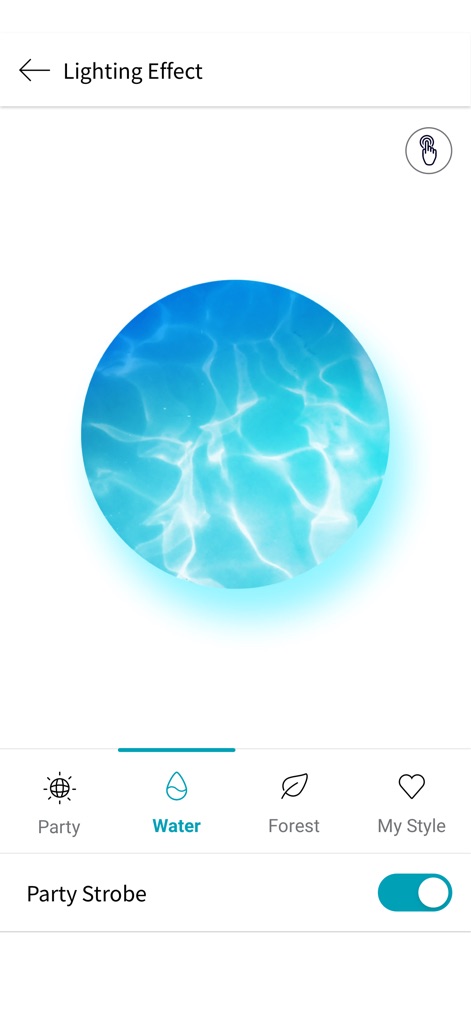
The app provides a range of "Lighting Effect" categories, including a dynamic "Water" visualization and a "Party Strobe" toggle for vibrant displays.
Vibrant Visuals

This menu allows for fine-tuning device behavior, from "Auto power management" to setting an "Alarm" for specific times.
Advanced Settings

Users can easily manage their music through the "New Playlist" feature and reorder songs using the intuitive "up and down arrows" for personalized queues.
Music Organizer
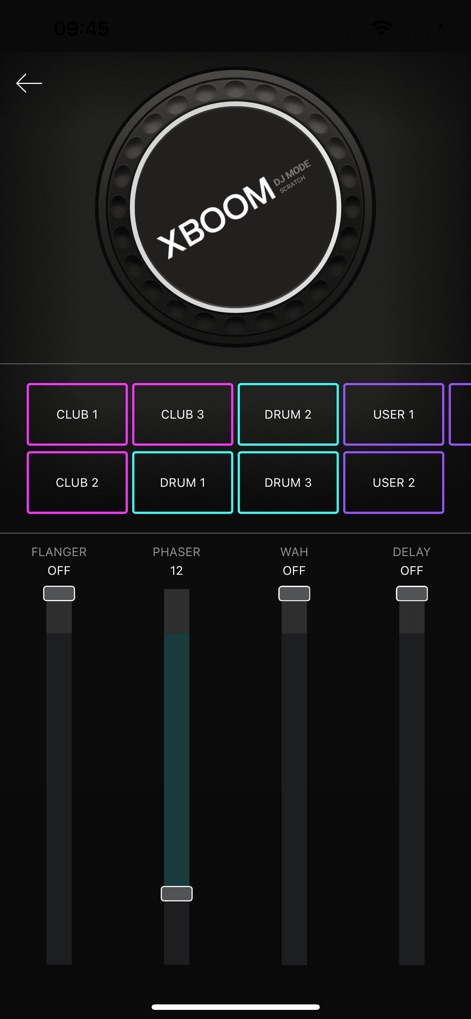
The app transforms into a DJ console, offering interactive "DJ Mode Scratch" pads and faders for creative effects like "Phaser" and "Delay".
DJ Mode Unleashed

Specifically for UltraGear speakers, this screen displays "Linked" device status and offers specialized "Sound Effect" presets like "FPS" and "RTS".
Gaming Audio Hub
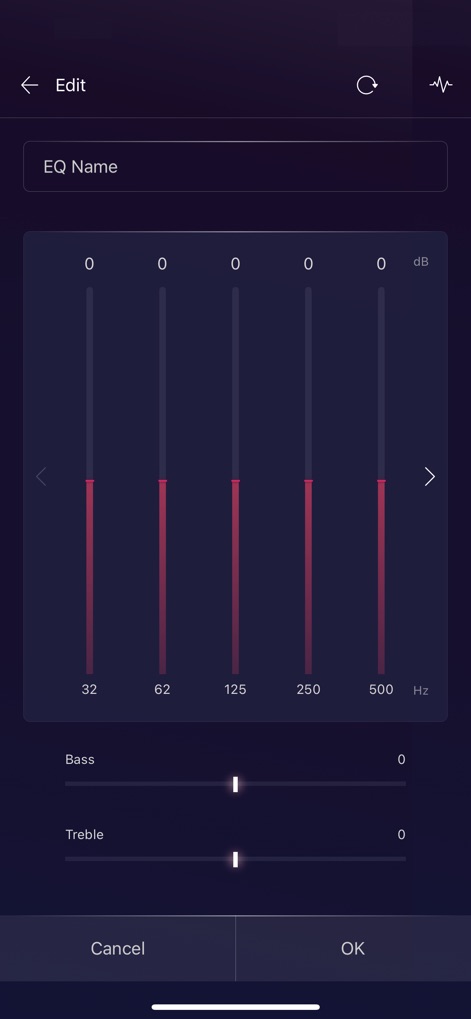
Users can customize their audio profile using a granular "graphic equalizer" with adjustable frequency bands and dedicated "Bass" and "Treble" sliders.
Precision Equalizer
Description
Download
More Like This
Apps with similar features and user experience

Bose
Bose Corporation

Marshall Bluetooth
Marshall Group AB (publ)

JBL PartyBox
Harman International Industries

Bose Connect
Bose Corporation

Bose QC Earbuds
Bose Corporation

JBL Headphones
Harman International Industries

soundcore
Power Mobile Life LLC

JBL Portable
Harman International Industries

Xiaomi Earbuds
Beijing Xiaomi Co., Ltd
This page is not an official page of the app or its developer, but an independent editorial publication created for informational and commentary purposes. Unless expressly stated otherwise, neither the app nor its developer is affiliated with, endorsed by, sponsored by, authorized by, or otherwise officially connected with MWM, Apple, Google Play, the app publisher, or the app's developer, and nothing on this page implies that the app was developed using MWM's services. Any trademarks, logos, screenshots, and other content remain the property of their respective owners.