
This page is not an official page of the app or its developer, but an independent editorial publication created for informational and commentary purposes. Unless expressly stated otherwise, neither the app nor its developer is affiliated with, endorsed by, sponsored by, authorized by, or otherwise officially connected with MWM, Apple, Google Play, the app publisher, or the app's developer, and nothing on this page implies that the app was developed using MWM's services. Any trademarks, logos, screenshots, and other content remain the property of their respective owners.


Office Suite-Word, PDF, Sheets
No longer tethered to a desktop; users command their documents from anywhere.
Downloads
100k+User Rating
Total Ratings
376Publisher
Category
ProductivityLocales
19Latest Version
1.0.24Size
205.2 MBFirst Released
Mar 30, 2023An evaluation of core functionalities for productivity on iOS devices.
Key Features Analysis: Office Suite-Word, PDF, Sheets
All-in-One Office Suite
The app provides access to essential tools for creating and editing documents, spreadsheets, and presentations, making it a comprehensive solution for users on-the-go.
Comprehensive Word Editor
This tool features a comprehensive range of word processing capabilities, including formatting options, spell-check, word count, and the ability to insert images, tables, charts, and graphs into documents.
Versatile Spreadsheet Editor
It allows users to create and edit spreadsheets with essential features like data input, formula creation, cell formatting, and the generation of graphs and charts for data visualization.
Intuitive Presentation Builder
The app enables the creation of engaging presentations by allowing users to add images, videos, animations, speaker notes, and rehearse timings for smooth delivery.
Integrated PDF Converter
It allows users to convert documents, spreadsheets, and presentations into PDF format, which is crucial for sharing work professionally and maintaining consistent formatting across devices.
Mobile Document Scanner
The app includes a document scanner that uses the iPhone or iPad camera to digitize physical documents, saving them as PDFs or image files for easy sharing and storage.
Frequently Asked Questions
Everything you need to know about Office Suite-Word, PDF, Sheets
What is Office Suite-Word, Sheets, PPT?
Office Suite-Word, Sheets, PPT is a comprehensive productivity app for iPhone and iPad, combining essential tools for creating and editing documents, spreadsheets, and presentations. It offers a user-friendly interface.
Can I edit documents with Office Suite-Word, Sheets, PPT on my iPhone?
Yes, Office Suite-Word, Sheets, PPT allows users to create and edit documents, spreadsheets, and presentations on their iPhone and iPad. It includes a comprehensive word processor for various editing tasks.
Does Office Suite-Word, Sheets, PPT include a PDF converter?
Yes, Office Suite-Word, Sheets, PPT includes a PDF converter. This feature allows users to convert their documents, spreadsheets, and presentations into PDF format for consistent sharing.
How can I scan documents using Office Suite-Word, Sheets, PPT?
Office Suite-Word, Sheets, PPT includes a document scanner feature. Users can scan documents using their iPhone or iPad camera and save them as PDF or image files.
What types of files can I manage with the Office Suite-Word, Sheets, PPT app?
The Office Suite-Word, Sheets, PPT app allows users to create, edit, and manage Word documents (DOCX), Excel spreadsheets (XLSX), PowerPoint presentations (PPT), and PDF files. It also handles image files.
Is Office Suite-Word, Sheets, PPT a subscription-based app?
Yes, Office Suite-Word, Sheets, PPT operates on a subscription model. The subscription automatically renews unless canceled at least 24 hours before the current period ends.
How do I manage my subscription for Office Suite-Word, Sheets, PPT?
Users manage their Office Suite-Word, Sheets, PPT subscription in the Account Settings on the App Store after purchase. This allows control over automatic renewal.
Can Office Suite-Word, Sheets, PPT create charts and graphs in spreadsheets?
Yes, the spreadsheet editor in Office Suite-Word, Sheets, PPT is equipped to create graphs and charts. This visualizes data and enhances the presentability of spreadsheets.
Does Office Suite-Word, Sheets, PPT offer presentation editing features?
Yes, Office Suite-Word, Sheets, PPT includes a presentation builder. Users can add images, videos, animations, and speaker notes to slides for engaging presentations.
Where can I find the Privacy Policy for Office Suite-Word, Sheets, PPT?
The Privacy Policy for Office Suite-Word, Sheets, PPT is available at https://blog.a1apps.co/privacy-policy-a1office-suite-word-sheets-ppt/. This link provides detailed information on data handling.
The following screenshots and description are sourced directly from the app's official store listing and are the property of the app developer.
App Store
Screenshots

Discover how the app integrates essential office tools and offers robust capabilities to create, view, and edit various document types on one screen.
Unified Office Hub

Explore the sophisticated word processing capabilities, including advanced text formatting options and effortless editing of DOCX files, providing a professional experience.
Professional Document Editing

Witness the app's powerful Word editor, offering a full suite of formatting tools and an intuitive color picker for dynamic document creation and revision.
Word Processor Mastery

Observe the app's robust PDF editor, enabling users to easily modify text, insert images, and add links directly within their documents for comprehensive management.
Advanced PDF Management

Examine the powerful spreadsheet editor, showcasing its ability to display interactive data visualizations and provide granular cell formatting options for effective data analysis.
Dynamic Spreadsheet Tools

Discover the intuitive presentation builder, featuring drawing capabilities and seamless insertion of text and graphic elements to craft impactful slides.
Engaging Presentation Creator
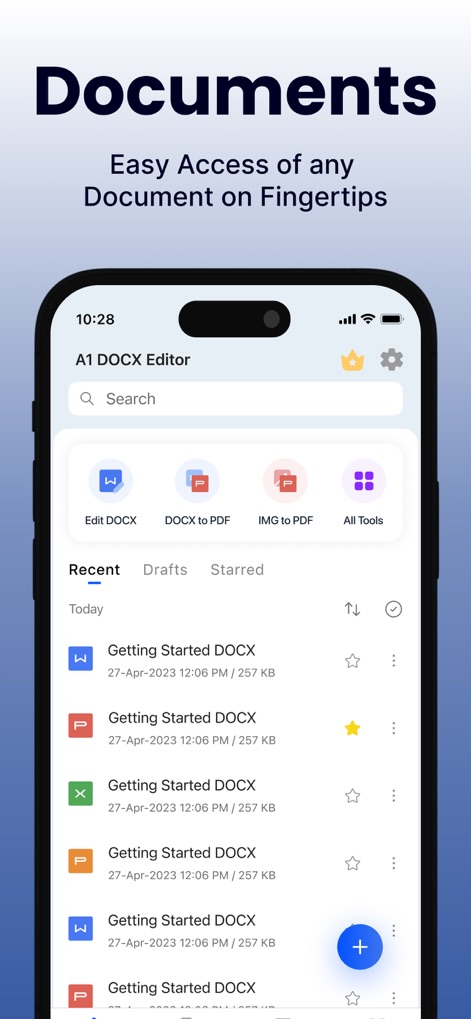
View the app's organized document manager, providing quick access to recent files and convenient shortcuts for editing and converting various document types.
Seamless Document Access

Witness the app's efficient file conversion feature, demonstrating its ability to seamlessly transform documents from DOCX to PDF format with high quality.
Effortless File Conversion
Description
Download
More Like This
Apps with similar features and user experience

PDF PRO Scan Image & Documents
Balzo srl

The PDF Scanner, PDF editor HQ
NEXT K.U.M. LTD

CamScanner - PDF Scanner App
INTSIG Information Co., Ltd

Adobe Scan: PDF & OCR Scanner
Adobe Inc.

WPS Office: PDF, Docs, Sheets
KINGSOFT OFFICE SOFTWARE CORPORATION LIMITED

iLovePDF - PDF Editor & Scan
ILOVEPDF S.L.

Scanner App: Genius Scan
The Grizzly Labs

Microsoft Lens: PDF Scanner
Microsoft Corporation

Clear Scan: Doc Scanner App
INDY MOBILE APP COMPANY LIMITED
This page is not an official page of the app or its developer, but an independent editorial publication created for informational and commentary purposes. Unless expressly stated otherwise, neither the app nor its developer is affiliated with, endorsed by, sponsored by, authorized by, or otherwise officially connected with MWM, Apple, Google Play, the app publisher, or the app's developer, and nothing on this page implies that the app was developed using MWM's services. Any trademarks, logos, screenshots, and other content remain the property of their respective owners.