
This page is not an official page of the app or its developer, but an independent editorial publication created for informational and commentary purposes. Unless expressly stated otherwise, neither the app nor its developer is affiliated with, endorsed by, sponsored by, authorized by, or otherwise officially connected with MWM, Apple, Google Play, the app publisher, or the app's developer, and nothing on this page implies that the app was developed using MWM's services. Any trademarks, logos, screenshots, and other content remain the property of their respective owners.


PDF Scanner App: Scanner+ Docs
Your phone isn't just a camera; it's a digitizing powerhouse for every scrap of paper and fading photo you own.
Downloads
2.5M+User Rating
Total Ratings
27.2KPublisher
Category
BusinessLocales
8Latest Version
3.7.2Size
200.9 MBFirst Released
May 26, 2020Evaluating core functionalities for document and photo management.
Key Features Analysis of Scanner+ Docs
OCR Text Recognition
The app features Optical Character Recognition (OCR) to recognize text from scanned documents, including handwritten notes, enabling text extraction and editing for enhanced productivity.
High-Quality Document Scanning
The app provides efficient digitization of physical documents into high-quality digital copies, including multi-page PDFs, streamlining paperwork for various users.
Integrated Document Management
This tool includes a drag-and-drop file manager with smart tags, enabling users to keep their digitized documents organized, searchable, and easily accessible.
Versatile Export & Sharing
It allows users to export scanned documents in multiple formats (.PDF, .DOCX, .TXT) and share them across a wide array of platforms and applications, ensuring seamless workflow integration.
Searchable PDF Conversion
This tool converts images and photos into searchable PDF documents, allowing users to easily find specific information within their digitized files.
E-Signature Functionality
The app provides a quick and efficient way to digitally sign PDF documents and reuse signatures across multiple files, saving time for business owners and professionals.
Photo Digitization & Restoration
This tool allows users to convert physical photos into enhanced digital scans, automatically detecting boundaries, cropping, and restoring colors for preserving memories.
Automatic Smart Cropping
This tool automatically crops document edges after scanning, saving users valuable time and ensuring clean, professional-looking digital copies without manual adjustments.
Document Redaction (Hide/Blur)
This tool enables users to hide or blur confidential or unwanted sections of scanned documents, ensuring privacy and professional presentation.
Advanced Photo Enhancement
It allows users to enhance and colorize old or damaged photos, fixing blurs and converting black and white images into vibrant digital versions to revive memories.
The following screenshots and description are sourced directly from the app's official store listing and are the property of the app developer.
App Store
Screenshots

See how the app automatically recognizes document edges and instantly converts scans to PDF format.
Document Scanning Power

Witness the app's ability to restore old photos, offering both colorization and enhancement features for vibrant results.
Photo Restoration Magic
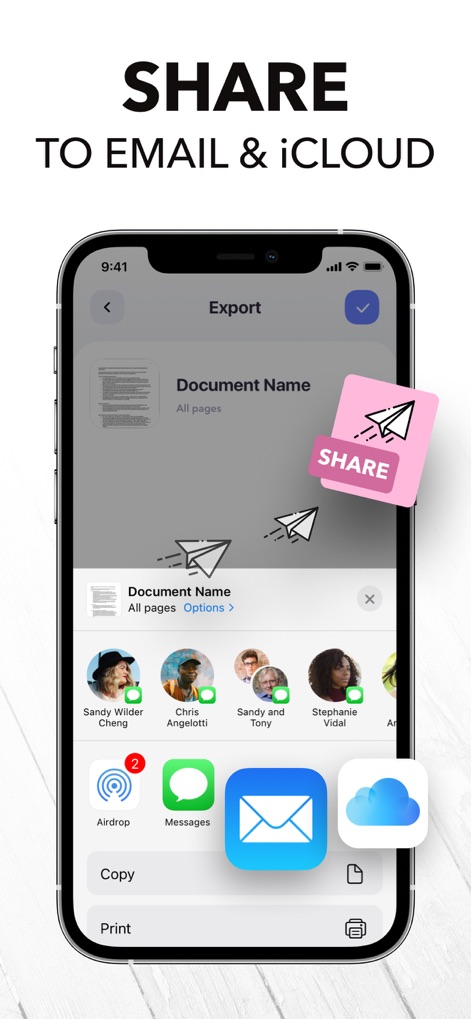
This tool allows users to effortlessly share documents through various platforms, including email and iCloud integration.
Seamless Sharing Options

Discover the flexibility to save scanned documents in multiple formats, such as PDF, JPEG, and TXT.
Versatile Export Formats

The app provides an intuitive interface for digitally signing documents and managing multiple signature options.
Effortless Document Signing

Experience the app's advanced OCR capability, allowing users to recognize and copy editable text from scanned images.
Smart Text Recognition

Explore powerful editing features that enable users to hide confidential information and highlight important text within documents.
Advanced Document Editing

This app provides versatile document scanning, automatically recognizing edges and offering a top-rated user experience.
Universal Document Scan

Easily convert scanned items into various formats, including PDF, JPEG, and TXT, directly from the editing screen.
Instant Format Conversion

The app helps users maintain organized documents through a user-friendly interface with dedicated folders and smart tags.
Intuitive File Management
Description
Download
More Like This
Apps with similar features and user experience

PDF PRO Scan Image & Documents
Balzo srl

The PDF Scanner, PDF editor HQ
NEXT K.U.M. LTD

CamScanner - PDF Scanner App
INTSIG Information Co., Ltd

Adobe Scan: PDF & OCR Scanner
Adobe Inc.

WPS Office: PDF, Docs, Sheets
KINGSOFT OFFICE SOFTWARE CORPORATION LIMITED

iLovePDF - PDF Editor & Scan
ILOVEPDF S.L.

Scanner App: Genius Scan
The Grizzly Labs

Microsoft Lens: PDF Scanner
Microsoft Corporation

Clear Scan: Doc Scanner App
INDY MOBILE APP COMPANY LIMITED
This page is not an official page of the app or its developer, but an independent editorial publication created for informational and commentary purposes. Unless expressly stated otherwise, neither the app nor its developer is affiliated with, endorsed by, sponsored by, authorized by, or otherwise officially connected with MWM, Apple, Google Play, the app publisher, or the app's developer, and nothing on this page implies that the app was developed using MWM's services. Any trademarks, logos, screenshots, and other content remain the property of their respective owners.