
This page is not an official page of the app or its developer, but an independent editorial publication created for informational and commentary purposes. Unless expressly stated otherwise, neither the app nor its developer is affiliated with, endorsed by, sponsored by, authorized by, or otherwise officially connected with MWM, Apple, Google Play, the app publisher, or the app's developer, and nothing on this page implies that the app was developed using MWM's services. Any trademarks, logos, screenshots, and other content remain the property of their respective owners.


Photo to PDF Convert Scanner +
Your phone's camera isn't just for selfies; it's a potent document digitizer.
Downloads
5M+User Rating
Total Ratings
26.4KPublisher
Category
BusinessLocales
14Latest Version
3.8.0Size
113.3 MBFirst Released
Feb 4, 2020Analyzing Key Features for Enhanced Productivity and Security
Software Evaluation: Photo to PDF Convert Scanner +
Maximal Document Security
It allows users to enhance document security with features like e-signatures, watermarks, and biometric authentication (Face ID, PIN), ensuring sensitive information is protected.
Rapid & High-Quality Scanning
The app provides quick and high-quality scanning of various documents (IDs, passports, bills) with color and perspective correction, supporting multi-page scanning into a single PDF.
Effective Text Conversion & Recognition (OCR)
This tool features Optical Character Recognition (OCR) to effortlessly extract and edit text from scanned images, eliminating the need for manual retyping and boosting productivity.
Advanced File Management
The app offers an advanced file management system with folders, tags, and customizable file names, facilitating easy organization and navigation of digital documents.
Quick Document Sharing
Users can swiftly share scanned documents via email, print them using Wi-Fi printers, and export them, streamlining collaboration and distribution workflows.
Secure & Accessible Storage
The app ensures secure and private access to all scanned or exported documents, even offline, without third-party interference, safeguarding data integrity.
The following screenshots and description are sourced directly from the app's official store listing and are the property of the app developer.
App Store
Screenshots

See how the app facilitates swift document scanning of items like a 'Board Meeting Agenda' and converts them into versatile 'PDF, JPG, TXT' formats.
Quick Document Scan

Observe the app's ability to 'convert any documents' seamlessly, complemented by intuitive 'pen and eraser' editing tools.
Universal Document Converter

This tool allows users to 'scan product barcodes' effortlessly, revealing instant 'purchase offers and price comparisons'.
Smart Barcode Scanner

Discover how the app empowers users to 'edit & sign PDF files' directly on their device, featuring integrated 'e-signature and OCR' capabilities.
Secure PDF Management

Witness the app's precision in 'extracting any text' from images, providing a full 'keyboard for immediate editing'.
Intelligent Text Extraction
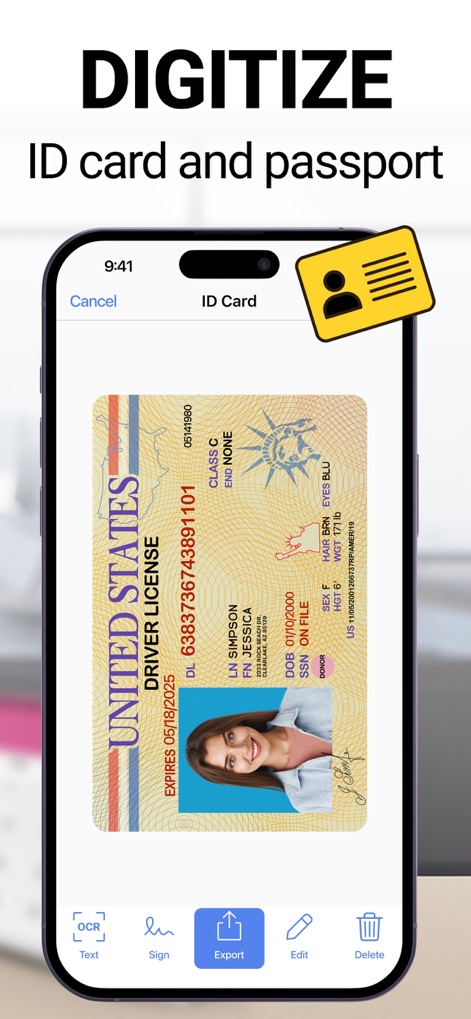
Explore the convenience of using this app to 'digitize ID cards and passports', complete with 'OCR functionality for swift data capture'.
Essential ID Digitizer

The app simplifies 'sharing to email and clouds', offering various platforms like 'Google Disk and iCloud' for quick distribution.
Effortless Document Sharing

Users can accurately 'measure the length & area' of real-world objects, utilizing the app's integrated 'digital ruler feature'.
Precise Object Measurement
Description
Download
More Like This
Apps with similar features and user experience

PDF PRO Scan Image & Documents
Balzo srl

The PDF Scanner, PDF editor HQ
NEXT K.U.M. LTD

CamScanner - PDF Scanner App
INTSIG Information Co., Ltd

Adobe Scan: PDF & OCR Scanner
Adobe Inc.

WPS Office: PDF, Docs, Sheets
KINGSOFT OFFICE SOFTWARE CORPORATION LIMITED

iLovePDF - PDF Editor & Scan
ILOVEPDF S.L.

Scanner App: Genius Scan
The Grizzly Labs

Microsoft Lens: PDF Scanner
Microsoft Corporation

Clear Scan: Doc Scanner App
INDY MOBILE APP COMPANY LIMITED
This page is not an official page of the app or its developer, but an independent editorial publication created for informational and commentary purposes. Unless expressly stated otherwise, neither the app nor its developer is affiliated with, endorsed by, sponsored by, authorized by, or otherwise officially connected with MWM, Apple, Google Play, the app publisher, or the app's developer, and nothing on this page implies that the app was developed using MWM's services. Any trademarks, logos, screenshots, and other content remain the property of their respective owners.