
This page is not an official page of the app or its developer, but an independent editorial publication created for informational and commentary purposes. Unless expressly stated otherwise, neither the app nor its developer is affiliated with, endorsed by, sponsored by, authorized by, or otherwise officially connected with MWM, Apple, Google Play, the app publisher, or the app's developer, and nothing on this page implies that the app was developed using MWM's services. Any trademarks, logos, screenshots, and other content remain the property of their respective owners.


RICOH Smart Device Connector
This app cuts the cord. It offers users direct control over Ricoh hardware, transforming any smart device into a command center for printing and projection.
Downloads
1M+User Rating
Total Ratings
241Publisher
Category
BusinessLocales
26Latest Version
3.16.19Size
72.0 MBFirst Released
Sep 22, 2014An evaluation of core functionalities enhancing office and educational workflows.
RICOH Smart Device Connector: Key Feature Analysis
Seamless Mobile & Cloud Scanning
The app provides direct scanning capabilities, allowing users to save scanned documents directly to their smart device or integrate with major cloud storage platforms such as Box, Dropbox, Google Drive, and Microsoft OneDrive.
Multi-Source Document Output
It allows users to print or project documents and images directly from a smart device or popular cloud storage services like Box, Dropbox, Google Drive, and Microsoft OneDrive.
Effortless Device Connection
This tool features quick and easy connection to Ricoh MFPs and projectors using multiple convenient methods like Bluetooth, QR codes, or IP addresses, streamlining initial setup and daily use.
Secure Mobile Authentication
The app provides a secure method for user authentication directly through a smart device, enhancing security protocols and simplifying access control for Ricoh devices.
Direct Office Document Printing
It allows users to directly print Microsoft Office documents, providing seamless integration with standard business productivity suites without requiring format conversion.
Interactive Presentation Support
This tool features advanced projection capabilities, enabling users to display documents and images from their smart device or cloud storage directly onto Ricoh projectors and Interactive Whiteboards, facilitating dynamic presentations.
Versatile Content Printing
The app provides the ability to print a wide range of content, including emails, their attachments, and web pages, directly from the mobile device for immediate hard copies.
Annotated Content Preservation
It allows users to save documents that have been annotated during sessions on a RICOH Interactive Whiteboard, ensuring that collaborative work and notes are securely preserved for later review.
Frequently Asked Questions
Everything you need to know about RICOH Smart Device Connector
How can I connect a RICOH device to the RICOH Smart Device Connector app?
The RICOH Smart Device Connector app connects to RICOH MFPs or projectors using Bluetooth Low Energy, QR codes, an IP address, or a hostname. The app interface displays a "Connect with QR Code" option.
Which cloud services are compatible with RICOH Smart Device Connector?
The RICOH Smart Device Connector supports Box, Dropbox, Google Drive, and Microsoft OneDrive. This allows users to print, scan, and project documents and images directly from these cloud storage services.
Can I print emails and web pages using RICOH Smart Device Connector?
Yes, the RICOH Smart Device Connector facilitates printing of emails, file attachments, and webpages. These items can be printed directly from the smart device through the app.
Does the RICOH Smart Device Connector app provide document scanning capabilities?
Yes, the RICOH Smart Device Connector app provides document scanning capabilities. Users can scan documents to their smart device or directly to supported cloud services like Box, Dropbox, Google Drive, and Microsoft OneDrive.
Does RICOH Smart Device Connector support projection to a RICOH Interactive Whiteboard?
Yes, RICOH Smart Device Connector supports projecting documents and images to a RICOH Interactive Whiteboard. It also supports RICOH projectors. Specific firmware versions may be required for certain Interactive Whiteboard models.
Is there a fax function available in the RICOH Smart Device Connector app?
Yes, the RICOH Smart Device Connector app includes a dedicated Fax feature. This function is accessible directly from the app's main menu for users to send faxes.
Can users authenticate through the RICOH Smart Device Connector app?
Yes, the RICOH Smart Device Connector app enables user authentication directly via a smart device. This feature enhances security and manages access to connected RICOH machines.
What are the available print setting options in RICOH Smart Device Connector?
The RICOH Smart Device Connector offers print settings such as copies, color/B&W, paper size, orientation, 1-sided or 2-sided, paper tray selection, stapling, and combining documents.
Does RICOH Smart Device Connector automatically detect network machines?
Yes, the RICOH Smart Device Connector app automatically searches for available machines on the same network. This automatic detection excludes RICOH Interactive Whiteboards, which require manual connection.
Can RICOH Smart Device Connector print Microsoft Office documents?
Yes, RICOH Smart Device Connector supports printing Microsoft Office documents. Users should note that the layout of these documents may change when printed through the app.
The following screenshots and description are sourced directly from the app's official store listing and are the property of the app developer.
App Store
Screenshots
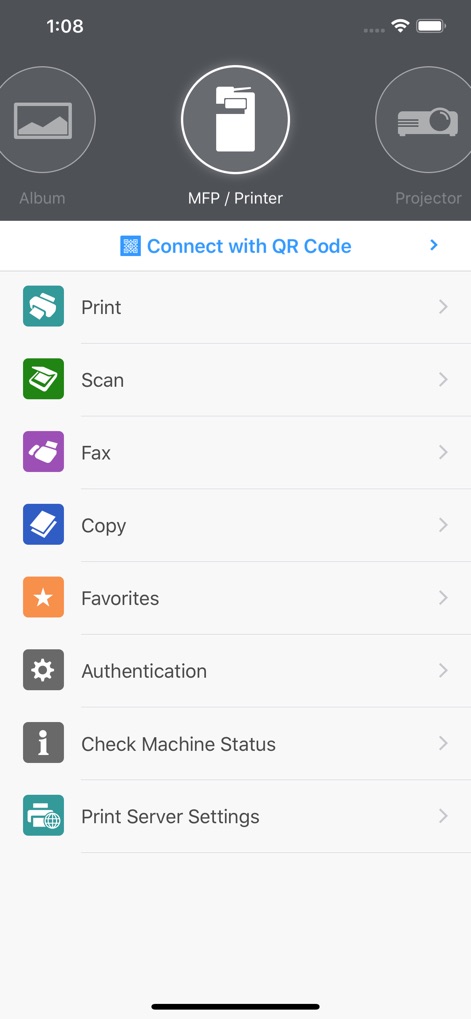
Discover how the app provides a centralized control panel, allowing users to effortlessly navigate between intuitive circular icons for 'MFP / Printer' and 'Projector' functions, and access a comprehensive list of actions like 'Print' and 'Scan'.
Centralized Control Panel
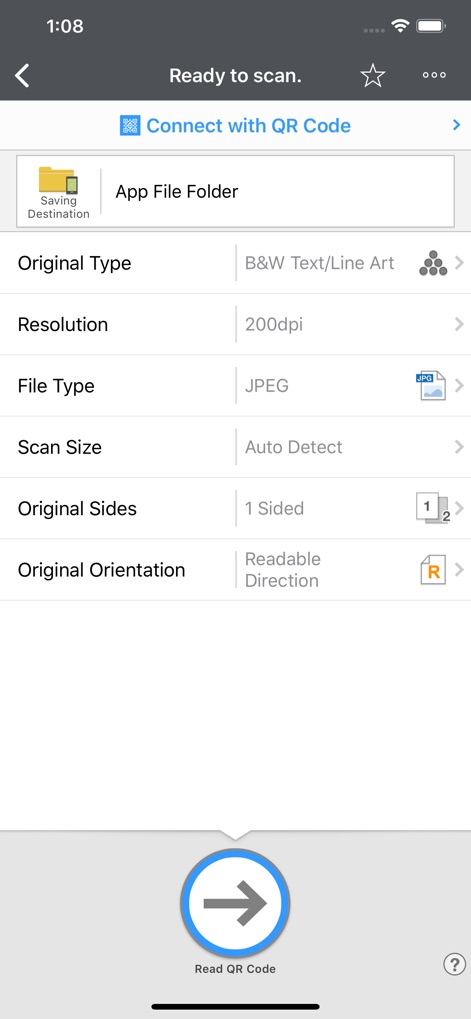
Explore the detailed scanning parameters available, where users can customize the 'Saving Destination' to local folders or cloud services, and fine-tune scan quality with options like 'Resolution' and 'File Type'.
Customizable Scanning Options
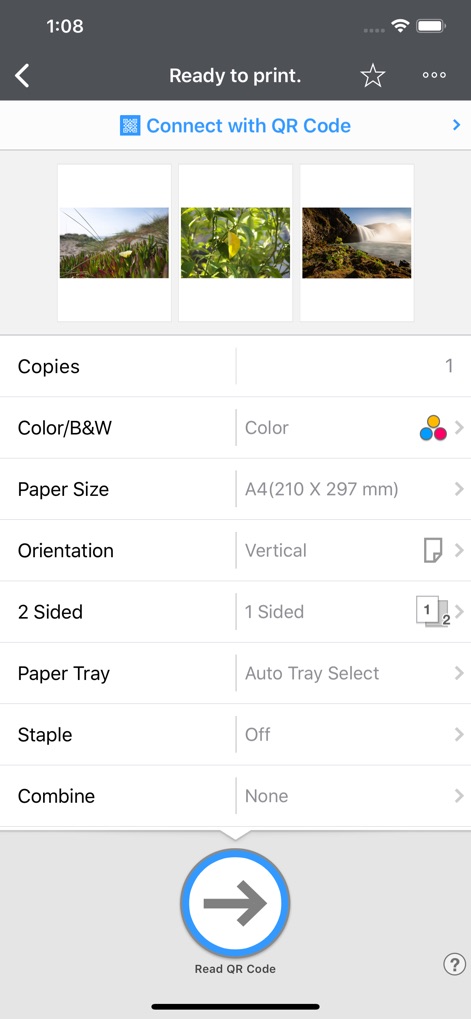
Witness the app's robust print configuration, showcasing visual thumbnails of selected documents and offering advanced controls such as '2 Sided' printing and 'Staple' finishing options for professional output.
Advanced Print Settings
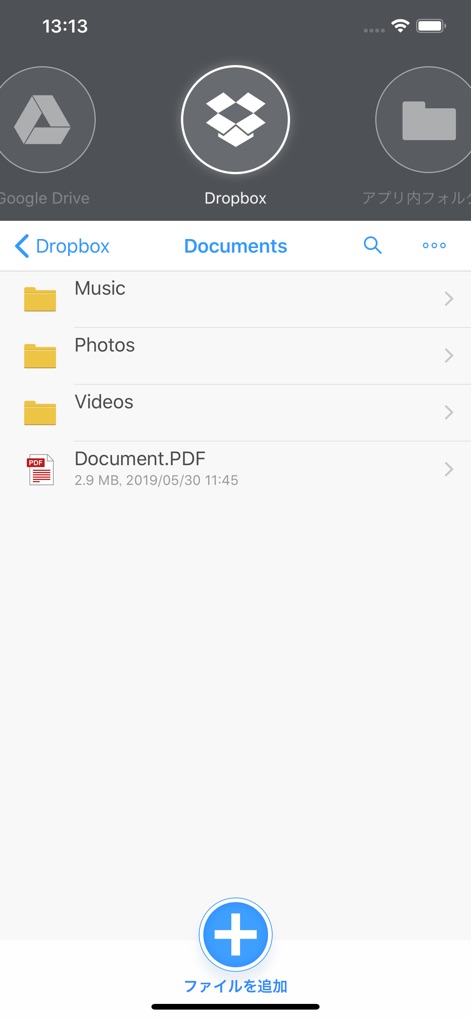
Observe the app's powerful cloud integration, enabling users to seamlessly access and manage files directly from services like 'Google Drive' and 'Dropbox', with an intuitive file browsing interface to locate specific documents.
Seamless Cloud Integration
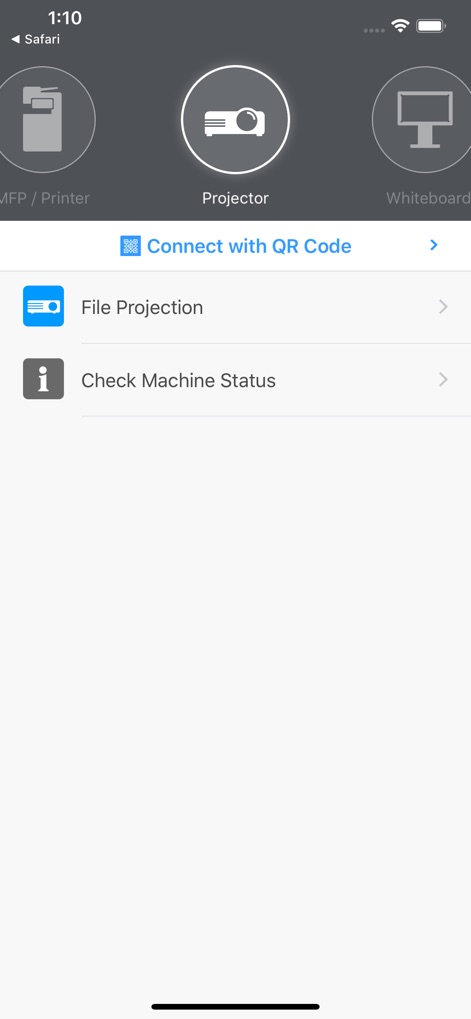
Discover the app's capabilities for presentation and collaboration, featuring direct selection of 'Projector' and 'Whiteboard' devices, alongside the streamlined 'File Projection' option for sharing content effortlessly.
Effortless Projection Control
Description
Download
More Like This
Apps with similar features and user experience

DJI Mimo
SZ DJI TECHNOLOGY CO., LTD

DJI Ronin
SZ DJI TECHNOLOGY CO., LTD

Roku TV Remote Control & Cast
Aleh Piashkou

Remote for Hisense TV.
Duscov Stepan

Alpha Linker - Camera Transfer
恒茂 刘

MyCentsys Pro
Centurion Systems (Pty) Ltd

Roku TV Remote Control・
Artur Belov

Luminair
Synthe FX, LLC

FUJIFILM XApp
FUJIFILM Corporation
This page is not an official page of the app or its developer, but an independent editorial publication created for informational and commentary purposes. Unless expressly stated otherwise, neither the app nor its developer is affiliated with, endorsed by, sponsored by, authorized by, or otherwise officially connected with MWM, Apple, Google Play, the app publisher, or the app's developer, and nothing on this page implies that the app was developed using MWM's services. Any trademarks, logos, screenshots, and other content remain the property of their respective owners.