
This page is not an official page of the app or its developer, but an independent editorial publication created for informational and commentary purposes. Unless expressly stated otherwise, neither the app nor its developer is affiliated with, endorsed by, sponsored by, authorized by, or otherwise officially connected with MWM, Apple, Google Play, the app publisher, or the app's developer, and nothing on this page implies that the app was developed using MWM's services. Any trademarks, logos, screenshots, and other content remain the property of their respective owners.


Scan Hero: PDF Scanner
Physical documents are a productivity trap. This app liberates users, offering instant, device-based command over every piece of paper.
Downloads
25M+User Rating
Total Ratings
717.3KPublisher
Category
BusinessLocales
14Latest Version
4.24.35Size
243.9 MBFirst Released
Feb 16, 2016Scan Hero: PDF Scanner - Key Features Evaluation
An analysis of core functionalities and their relevance for productivity and business workflows.
High-Quality Document Scanning
The app provides automatic and manual scanning capabilities for various documents, saving them as PDF files or images with adjustable quality settings.
Optical Character Recognition (OCR)
This tool features OCR technology, allowing users to recognize and extract text from scanned documents in multiple languages, enabling easy search and editing.
Digital Signature Integration
It allows users to create and apply digital signatures directly onto scanned documents, streamlining approval and contract processes.
Advanced Document Editing & Organization
The app provides comprehensive editing options, including re-cropping, perspective adjustment, filter application, and the ability to organize and reorder pages within multi-page documents.
Secure Document Management
This tool features robust management options, enabling users to save scans to cloud services like iCloud, synchronize them across devices, and protect access with Face ID or a passcode.
Diverse Camera Modes
It allows users to utilize specialized camera modes for specific document types, such as Single, Multi, Passport & ID Card, and Book Mode, ensuring optimal capture for different scenarios.
Effortless Sharing and Printing
The app provides seamless sharing functionalities, allowing users to send scans individually or as multi-file PDFs via email or messaging, and supports wireless printing.
Privacy Protection Tools
This tool features a 'Hide' function to secure private information within scanned documents, enhancing data confidentiality.
Frequently Asked Questions
Everything you need to know about Scan Hero: PDF Scanner
What is the Scan Hero app?
Scan Hero is a mobile assistant application for scanning documents to PDF or image. It allows users to edit, sign, and share documents, simplifying paperwork management on the go.
What file formats does Scan Hero support for saving scanned documents?
Scan Hero saves scanned documents as PDF files or images. Premium features also enable text extraction from scans using OCR technology.
Can Scan Hero digitize ID cards and passports?
Yes, Scan Hero provides specific "Passport & ID Card Modes" within its camera features. These modes are designed to efficiently digitize identification documents directly from your device.
Does Scan Hero include OCR (Optical Character Recognition)?
Yes, Scan Hero offers OCR technology as a Premium Feature. It recognizes and extracts text from your scanned documents, supporting multiple languages like English, Spanish, and German.
Can users sign documents within the Scan Hero app?
Yes, Scan Hero allows users to sign scans directly on their device screen. This premium feature enables creation and saving of multiple signatures for easy application to documents.
How does Scan Hero secure my scanned files?
Scan Hero protects your files using Face ID or a passcode. This security measure helps ensure the privacy and confidentiality of your scanned documents within the app.
How do Scan Hero subscriptions work?
Scan Hero subscriptions are charged to your App Store account upon purchase and auto-renew. Cancellation is required at least 24 hours before the current period ends to avoid renewal charges.
Is it possible to print documents using Scan Hero?
Yes, Scan Hero enables users to print scanned documents and clipboard text wirelessly. This functionality is part of the app's comprehensive document management features.
What specific camera modes are available in Scan Hero?
Scan Hero provides "Camera Modes" including Single, Multi, Passport & ID Card, Book, and QR. These modes are optimized for various scanning needs, from single pages to QR codes.
Does Scan Hero offer a free trial for premium features?
Yes, Scan Hero offers a free trial period. Any unused portion of a free trial is forfeited upon purchasing a premium subscription during that trial period.
The following screenshots and description are sourced directly from the app's official store listing and are the property of the app developer.
App Store
Screenshots

Versatile Export Options
The app streamlines document conversion, allowing users to save scans as various formats like PDF and JPG, and also offers diverse Camera Modes such as 'Single' and 'Multi' for different scanning needs.

Intelligent Text Extraction
Users can leverage the app's powerful OCR technology to convert scanned documents into editable text, with features like highlighted text sections and an 'Edit text' option for refining content.

Secure Identity Capture
This tool simplifies digitizing official documents, offering dedicated 'ID Card' and 'Passport' camera modes to precisely capture and store personal identification.
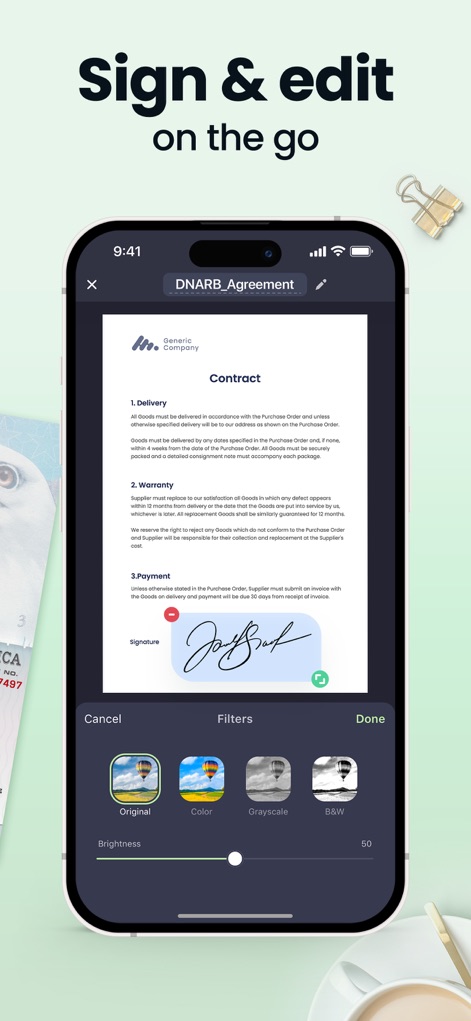
Effortless Document Management
The app empowers users to manage documents conveniently, featuring on-screen signature application and a range of filter options like 'Grayscale' and 'B&W' for professional document appearance.
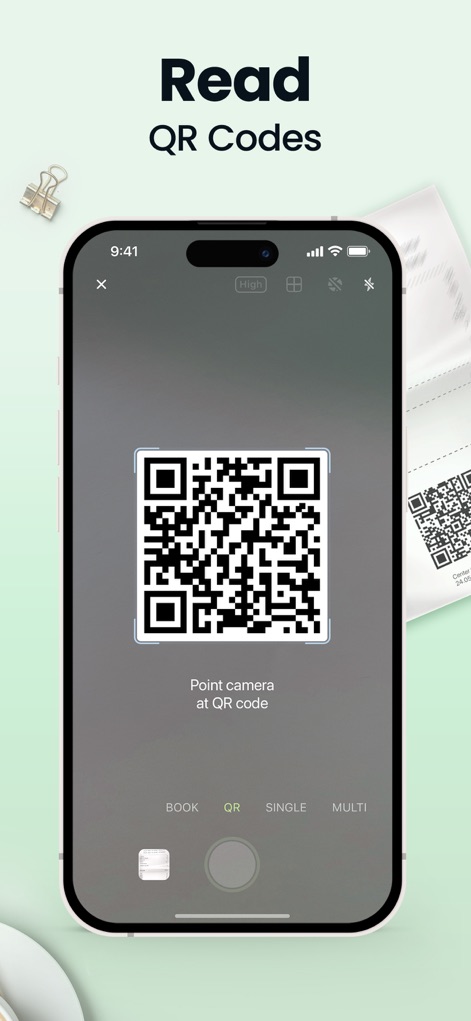
Instant QR Scanning
This tool extends its utility beyond documents, enabling quick QR code reading with a dedicated 'QR Mode' and clear on-screen instructions like 'Point camera at QR code'.

Seamless Sharing & Export
The app facilitates efficient workflow completion, providing direct sharing options for scans as 'PDF' or 'Image' formats and the ability to export multiple files as an 'Image in ZIP'.
Description
Download
More Like This
Apps with similar features and user experience

PDF PRO Scan Image & Documents
Balzo srl

The PDF Scanner, PDF editor HQ
NEXT K.U.M. LTD

CamScanner - PDF Scanner App
INTSIG Information Co., Ltd

Adobe Scan: PDF & OCR Scanner
Adobe Inc.

WPS Office: PDF, Docs, Sheets
KINGSOFT OFFICE SOFTWARE CORPORATION LIMITED

iLovePDF - PDF Editor & Scan
ILOVEPDF S.L.

Scanner App: Genius Scan
The Grizzly Labs

Microsoft Lens: PDF Scanner
Microsoft Corporation

Clear Scan: Doc Scanner App
INDY MOBILE APP COMPANY LIMITED
This page is not an official page of the app or its developer, but an independent editorial publication created for informational and commentary purposes. Unless expressly stated otherwise, neither the app nor its developer is affiliated with, endorsed by, sponsored by, authorized by, or otherwise officially connected with MWM, Apple, Google Play, the app publisher, or the app's developer, and nothing on this page implies that the app was developed using MWM's services. Any trademarks, logos, screenshots, and other content remain the property of their respective owners.