
This page is not an official page of the app or its developer, but an independent editorial publication created for informational and commentary purposes. Unless expressly stated otherwise, neither the app nor its developer is affiliated with, endorsed by, sponsored by, authorized by, or otherwise officially connected with MWM, Apple, Google Play, the app publisher, or the app's developer, and nothing on this page implies that the app was developed using MWM's services. Any trademarks, logos, screenshots, and other content remain the property of their respective owners.


SkyDemon
Master the skies with Europe's most intuitive vector charts, real-time virtual radar, and intelligent safety alerts designed for the precision-focused pilot.
Downloads
546K+User Rating
Total Ratings
17K+Publisher
Category
NavigationLocales
-Latest Version
4.2.3Size
55.2 MBFirst Released
Feb 10, 2012Master the Skies with Unmatched Precision
Transform your iPad into a professional-grade electronic flight bag. Experience why thousands of pilots trust our sophisticated vector charts and real-time safety tools for every VFR mission.
Unrivaled Visual Clarity
Experience the world's most readable aeronautical charts. Our dynamic vector maps eliminate clutter, providing only the most relevant airspace and navigation data at any zoom level.
Innovative Virtual Radar
Fly with total situational awareness. Get a side-on projection of your flight path that highlights terrain, obstacles, and restricted airspaces long before you reach them.
Frequently Asked Questions
Everything you need to know about SkyDemon
What is SkyDemon?
SkyDemon is Europe's preferred software for VFR flight planning and in-flight navigation, accessible on iOS devices via a subscription.
Does SkyDemon provide warnings for flight hazards?
Yes, SkyDemon provides intelligent warnings for approaching airspace, NOTAM, obstacles, terrain, and other hazards, including specific danger areas.
Can I file a VFR flight plan with SkyDemon?
Yes, SkyDemon allows users to file a VFR flightplan for their route directly to air traffic controllers.
Does SkyDemon display rainfall data?
Yes, SkyDemon can overlay animated rainfall data on the main map, showing the trend of rainfall over time during planning.
What kind of charts does SkyDemon use?
SkyDemon uses vector charts with dynamic airspace clipping and selectable map layers, designed for clarity and legibility across Europe.
Does SkyDemon show other aircraft during flight?
Yes, SkyDemon displays alerts for other aircraft, including their relative position (e.g., 'Aircraft Ahead, 11 O'Clock'), distance, and altitude.
Does SkyDemon provide weather briefings?
SkyDemon provides automatic TAF, METAR, and SIGMET briefings during planning, with graphical decoding. Live updates are available in-flight with an internet connection.
What is SkyDemon's geographic coverage?
Yes, SkyDemon offers extensive European chart coverage as standard, making it Europe's favorite software for VFR flight planning.
The following screenshots and description are sourced directly from the app's official store listing and are the property of the app developer.
App Store
Screenshots
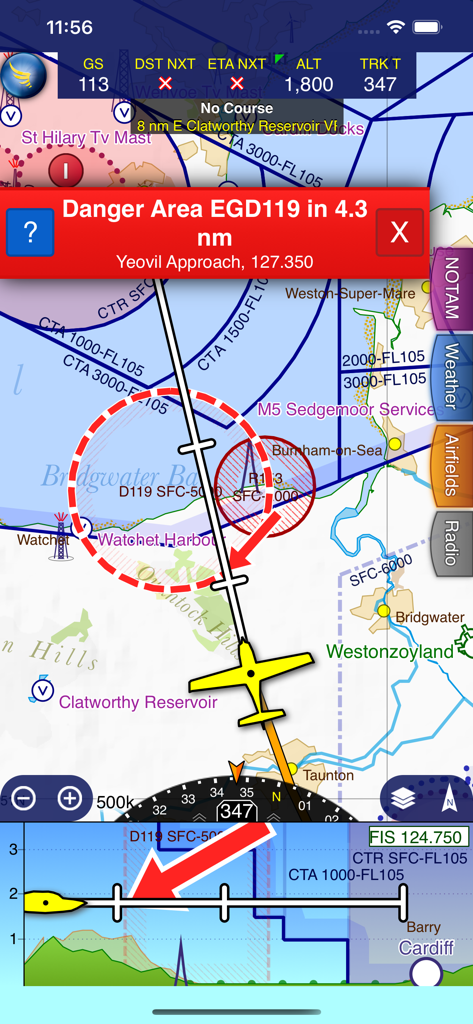
SkyDemon flight navigation interface with a red danger area warning and a virtual radar side-on projection
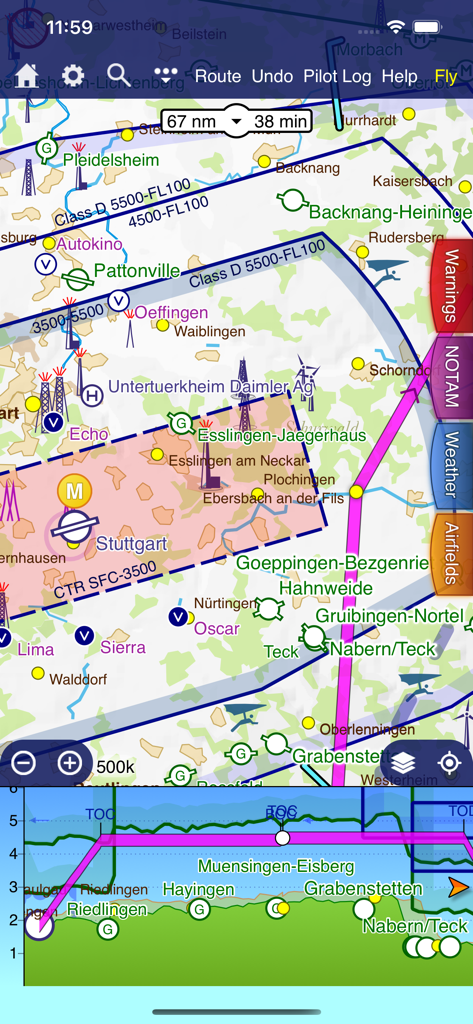
SkyDemon flight planning interface featuring a vector map and virtual radar side-on projection
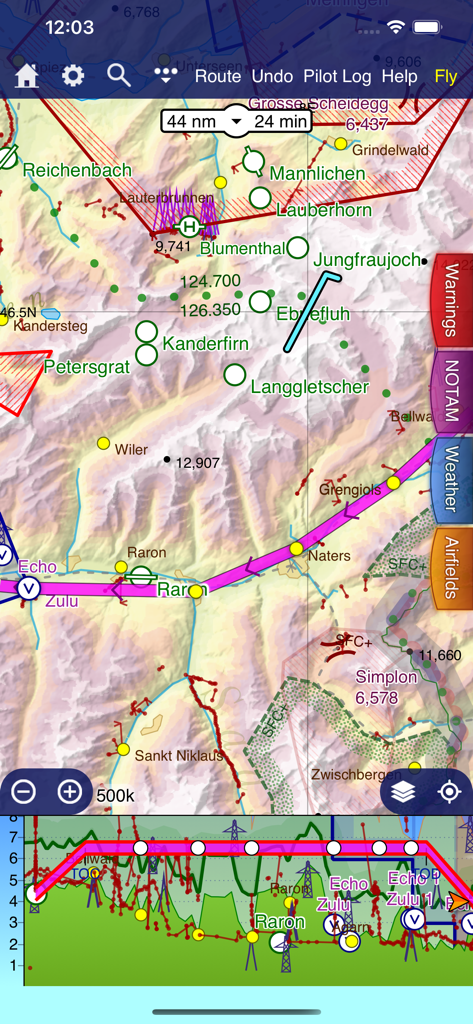
SkyDemon VFR navigation map and virtual radar terrain view
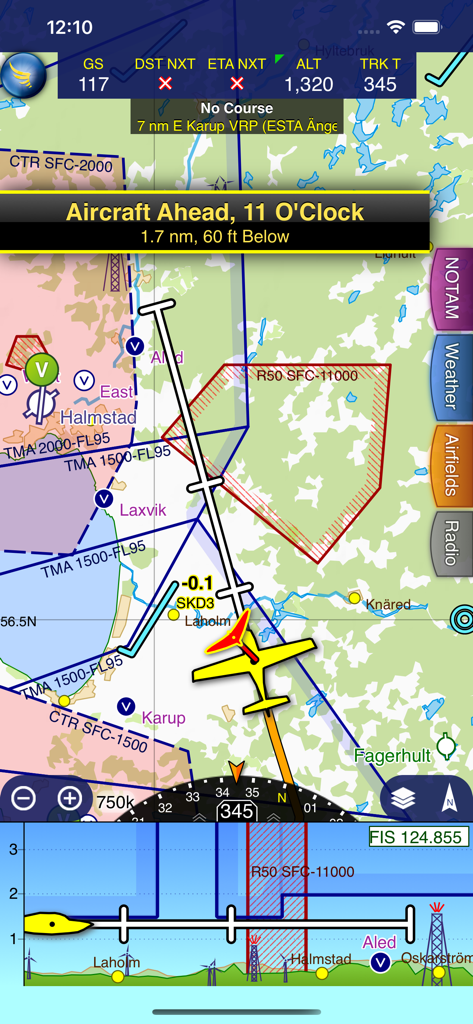
SkyDemon app screen showing in-flight navigation with a vector map, aircraft traffic alert, and virtual radar.
Description
Download
More Like This
Apps with similar features and user experience
Navigraph Charts
Navigraph KB

Airports
Applicate Ltd

OzRunways EFB
OzRunways Pty. Ltd.
fDeck: flight instruments
Darren Yeates

Noisy Goose
Automata Solutions Ltd.
StationWeather - METAR and TAF
Oliver Puetz
Drone UAV Fly Forecast: AirMap
MONIQ TAP COMPANY LIMITED

Airmate
Myriel Aviation SA

AvPlan EFB
BJA Consulting Pty Ltd
This page is not an official page of the app or its developer, but an independent editorial publication created for informational and commentary purposes. Unless expressly stated otherwise, neither the app nor its developer is affiliated with, endorsed by, sponsored by, authorized by, or otherwise officially connected with MWM, Apple, Google Play, the app publisher, or the app's developer, and nothing on this page implies that the app was developed using MWM's services. Any trademarks, logos, screenshots, and other content remain the property of their respective owners.