
This page is not an official page of the app or its developer, but an independent editorial publication created for informational and commentary purposes. Unless expressly stated otherwise, neither the app nor its developer is affiliated with, endorsed by, sponsored by, authorized by, or otherwise officially connected with MWM, Apple, Google Play, the app publisher, or the app's developer, and nothing on this page implies that the app was developed using MWM's services. Any trademarks, logos, screenshots, and other content remain the property of their respective owners.


Soulear
The ultimate companion for your visual otoscope and camera devices. Experience real-time HD viewing, capture high-quality footage, and take control of your personal hygiene with ease.
Downloads
1M+User Rating
Total Ratings
300Publisher
Category
UtilitiesLocales
9Latest Version
1.0.33Size
49.6 MBFirst Released
Jan 19, 2022Transform Your Self-Care Routine
Use Soulear to gain a crystal-clear perspective on your personal hygiene and health from the comfort of your home.
Live HD Visualization
View high-quality camera feeds in real-time to inspect hard-to-reach areas with professional precision.
Digital Health Records
Instantly save photos and videos to your album to track your progress or share during telehealth visits.
Frequently Asked Questions
Everything you need to know about Soulear
What is the main function of the Soulear app?
Soulear is a hardware device support software. It enables real-time viewing of camera image data after connecting a device. Users can also save and view photos and videos directly within the app.
How do I connect a device to the Soulear app?
To connect a device to Soulear, open the app and follow the prompts. The app displays a "Connect Device" button when no equipment is detected, initiating the connection process for compatible hardware.
Does Soulear allow real-time viewing of camera images?
Yes, Soulear allows users to view a connected camera's image data in real time. This is a core function of the hardware device support software provided by the app.
Can Soulear save photos and videos?
Yes, Soulear saves taken photos and videos. The app stores these media files directly into the system photo album for user access and management.
Where does Soulear store saved photos and videos?
Soulear stores all taken photos and videos directly into the system photo album. Users can then view these saved images and videos through the app's dedicated "Photo album" section.
Does the Soulear app include a photo album feature?
Yes, the Soulear app includes a "Photo album" feature. Users access this section to view all saved images and videos, confirming the app's media management capabilities.
How can users get support for the Soulear app?
Users can access support for the Soulear app through several options. The app's menu includes "FAQ" and "After-sales Feedback" sections for assistance and queries.
Does Soulear have a Privacy Agreement?
Yes, Soulear includes a "Privacy Agreement." Users can review the app's privacy policies by accessing this dedicated section within the application's menu, ensuring transparency.
Does Soulear offer any VIP features?
Yes, Soulear indicates a "VIP" status. This badge appears next to the app's name in the interface, suggesting the availability of premium features or an exclusive user tier within the application.
The following screenshots and description are sourced directly from the app's official store listing and are the property of the app developer.
App Store
Screenshots

Empty photo album screen in the Soulear app for visual otoscope images and videos
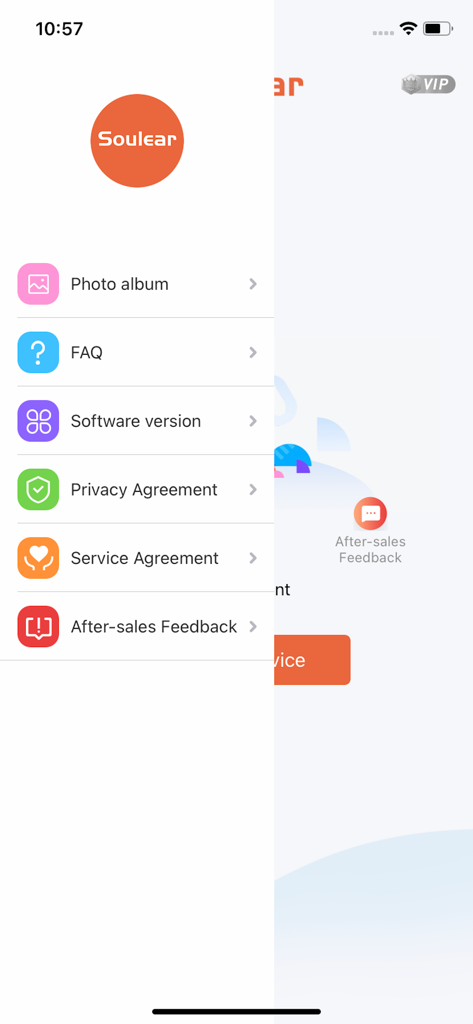
Side navigation menu of the Soulear app showing options for photo album, faq, and app settings.
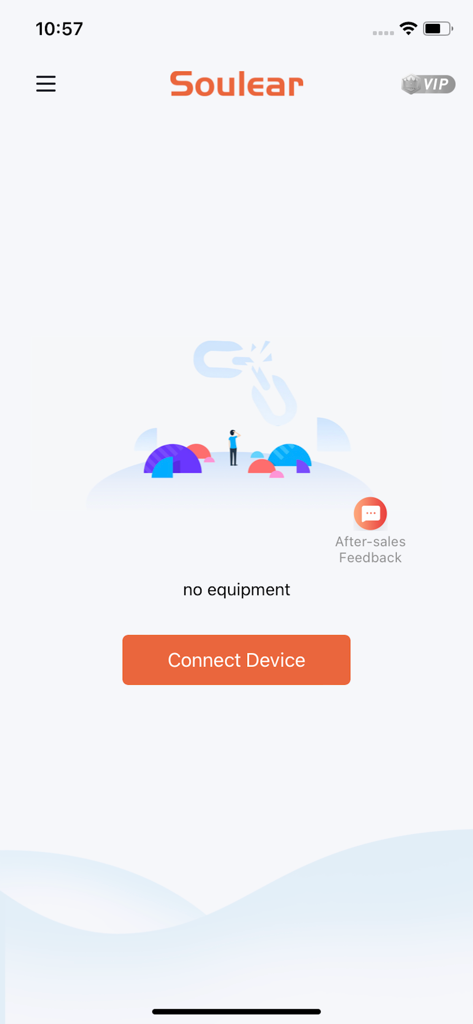
The home screen of the Soulear app showing a no equipment status and a button to connect a device.
Description
Download
More Like This
Apps with similar features and user experience

DJI Mimo
SZ DJI TECHNOLOGY CO., LTD

DJI Ronin
SZ DJI TECHNOLOGY CO., LTD

Roku TV Remote Control & Cast
Aleh Piashkou

Remote for Hisense TV.
Duscov Stepan

Alpha Linker - Camera Transfer
恒茂 刘

MyCentsys Pro
Centurion Systems (Pty) Ltd

Roku TV Remote Control・
Artur Belov

Luminair
Synthe FX, LLC

FUJIFILM XApp
FUJIFILM Corporation
This page is not an official page of the app or its developer, but an independent editorial publication created for informational and commentary purposes. Unless expressly stated otherwise, neither the app nor its developer is affiliated with, endorsed by, sponsored by, authorized by, or otherwise officially connected with MWM, Apple, Google Play, the app publisher, or the app's developer, and nothing on this page implies that the app was developed using MWM's services. Any trademarks, logos, screenshots, and other content remain the property of their respective owners.