
This page is not an official page of the app or its developer, but an independent editorial publication created for informational and commentary purposes. Unless expressly stated otherwise, neither the app nor its developer is affiliated with, endorsed by, sponsored by, authorized by, or otherwise officially connected with MWM, Apple, Google Play, the app publisher, or the app's developer, and nothing on this page implies that the app was developed using MWM's services. Any trademarks, logos, screenshots, and other content remain the property of their respective owners.


AntiLost - Clap to Find Phone
No more frantic searches; this app grants instant retrieval.
Downloads
750k+User Rating
Total Ratings
3.6KPublisher
Category
UtilitiesLocales
1Latest Version
1.9.5Size
50.6 MBFirst Released
Mar 21, 2024An Analytical Review for Security-Conscious Users
Key Features of AntiLost - Clap to Find Phone
Intruder Photo Capture
This tool features a security mechanism that captures photos of individuals attempting to unlock the phone without authorization, enhancing privacy and deterring theft.
Motion-Activated Anti-Theft Alarm
It allows users to enable a loud alarm that activates if the phone is moved or picked up without permission, providing an immediate deterrent against theft or unauthorized handling.
Frequently Asked Questions
Everything you need to know about AntiLost - Clap to Find Phone
What is AntiLost - Clap to Find Phone?
AntiLost is an app designed to secure your phone. It helps locate a lost device by clapping, identifies unauthorized users by taking photos, and deters theft with an alarm when the phone is moved.
How does AntiLost - Clap to Find Phone help locate a lost device?
AntiLost enables you to find your phone by clapping. A simple clap makes the phone respond with a loud sound and a bright flashlight, helping you to quickly locate it.
Does AntiLost - Clap to Find Phone identify unauthorized users trying to access my phone?
Yes, AntiLost captures photos if someone attempts to unlock your phone and tries to break into the device without permission. This feature enhances your security and privacy.
What security features does AntiLost - Clap to Find Phone offer against theft?
AntiLost provides an alarm that activates loudly when your phone is moved or picked up without your permission. This instant alert helps prevent loss or theft of the device.
What are the subscription options for AntiLost - Clap to Find Phone?
AntiLost offers two main subscription options: a Weekly Price at $3.99 and a Lifetime purchase at $19.99. Payment is charged to your iTunes Account.
Does AntiLost - Clap to Find Phone offer a free trial period?
Yes, AntiLost offers a subscription with a free trial period. This trial automatically renews to a paid subscription unless auto-renew is turned off at least 24 hours before its end.
How can I cancel my AntiLost - Clap to Find Phone subscription or free trial?
You can cancel your subscription or free trial in your iTunes Account Settings. This must be done at least 24 hours before the end of the current period to avoid automatic renewal.
Where can I find the Privacy Policy for AntiLost - Clap to Find Phone?
The Privacy Policy for AntiLost is available at the following URL: https://sites.google.com/view/antilostapp/privacy-policy. It outlines how the app handles user data.
Does the 'Clap to Discover' feature in AntiLost - Clap to Find Phone work when the phone is locked?
Yes, the 'Clap to Discover' feature requires you to lock the phone without closing the AntiLost app. Once locked, a clap makes the phone respond with sound and flashlight.
The following screenshots and description are sourced directly from the app's official store listing and are the property of the app developer.
App Store
Screenshots

This visual demonstrates how a simple clap from the user, shown by the animated hands, triggers the phone's response to help locate it.
Clap to Locate

This screen highlights the intuitive 'Clap Finder' interface, providing clear activation instructions and a prominent 'Deactivate' button for user control.
Activate Clap Finder

The app captures and organizes a detailed 'Reports' list, showcasing intruder photos and precise timestamps of unauthorized access attempts.
Intruder Reports

Users can examine specific 'Report Details', viewing a full-screen image of the unauthorized individual and managing the entry.
Intruder Detail View
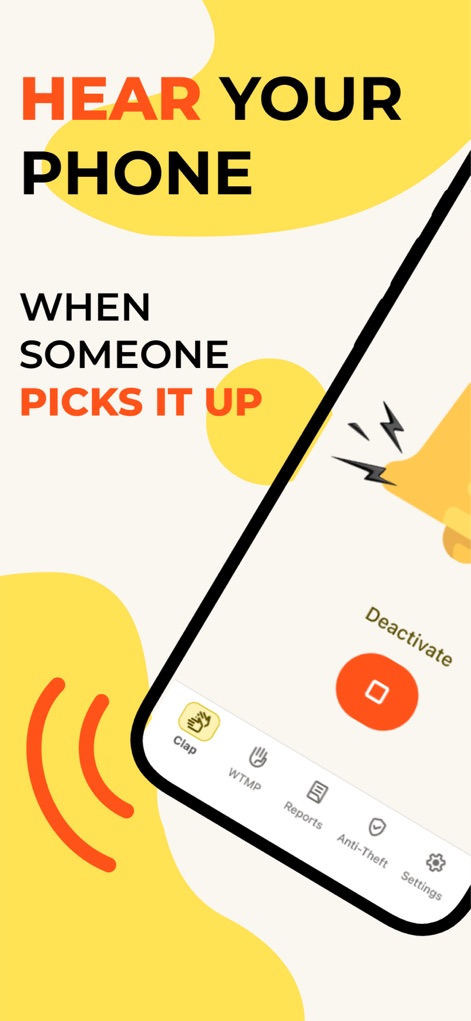
This tool activates a loud alarm when the phone is moved, clearly shown by the animated ringing phone and the option to 'Deactivate' the feature.
Motion Alarm Alert

The app proactively deters theft through a loud alarm, visually represented by the ringing phone and the illustration of an apprehended unauthorized user.
Security in Action
Description
Download
More Like This
Apps with similar features and user experience

Amor AntiTheft-Clap Find Phone
FUTURISTIX DIGITAL MARKETING PTE. LTD

ClapSeek: Find phone by clap
PIXEL VERTEX MOBILE PTE. LTD.

Dont Touch My Phone: Antitheft
FITNESS TRAINING GLOBAL ONE MEMBER COMPANY LIMITED

ClapBack: Antilost
CODEJOY TECHNOLOGY LIMITED

AntiLost: Phone Finder & Alarm
MATRIX MOBILE PTE. LTD.

ClapFind: Phone Finder
MATRIX MOBILE PTE. LTD.

Who Touched My Phone :Guardian
Emre Erol

ClapTrack : Clap to Find Phone
80ugame Limited

Find My Phone By Clapping
Hieu Tran Thanh
This page is not an official page of the app or its developer, but an independent editorial publication created for informational and commentary purposes. Unless expressly stated otherwise, neither the app nor its developer is affiliated with, endorsed by, sponsored by, authorized by, or otherwise officially connected with MWM, Apple, Google Play, the app publisher, or the app's developer, and nothing on this page implies that the app was developed using MWM's services. Any trademarks, logos, screenshots, and other content remain the property of their respective owners.