
This page is not an official page of the app or its developer, but an independent editorial publication created for informational and commentary purposes. Unless expressly stated otherwise, neither the app nor its developer is affiliated with, endorsed by, sponsored by, authorized by, or otherwise officially connected with MWM, Apple, Google Play, the app publisher, or the app's developer, and nothing on this page implies that the app was developed using MWM's services. Any trademarks, logos, screenshots, and other content remain the property of their respective owners.


Canon PRINT Business
Total mobile control. This app hands users direct command over their Canon office fleet, cutting the cords and the excuses.
Downloads
2.5M+User Rating
Total Ratings
770Publisher
Category
BusinessLocales
12Latest Version
8.3.3Size
23.8 MBFirst Released
Nov 26, 2012An evaluation of core functionalities for enterprise and SMB environments
Key Features Analysis: Canon PRINT Business
Remote Device Control & Monitoring
The app allows IT administrators and professionals to remotely monitor the detailed status of multi-function devices and printers via their Remote UI, and even display the control panel on a mobile terminal for direct interaction.
Secure Mobile Printing with Advanced Options
It provides robust mobile printing capabilities for documents, images, and web pages, featuring crucial enterprise settings such as Department ID Management, User Authentication, duplex printing, stapling, and various output controls, ensuring secure and controlled document output.
Mobile Scanning and Cloud Integration
This tool enables users to read scanned data directly from Canon multi-function devices and seamlessly integrate with local and cloud storage services to manage and upload files, facilitating efficient document digitization workflows.
Streamlined Printer Discovery and Connection
The app features automatic detection of networked multi-function devices and printers, alongside manual search options (IP/DNS) and QR code registration, ensuring quick and effortless setup and connection for users within an office environment.
Remote MFD Job Submission
It allows users to remotely initiate various multi-function device operations, including copying, sending faxes, and scanning documents to email, directly from their mobile device, extending office productivity beyond the physical machine.
Tap-to-Login Authentication
This tool features a convenient tap-to-login function for Bluetooth-enabled multi-function devices and printers, streamlining the user authentication process and enhancing security for controlled access to device functions.
Frequently Asked Questions
Everything you need to know about Canon PRINT Business
What is Canon PRINT Business?
Canon PRINT Business is a free application for iPhone and iPad. It enables printing, scanning, and uploading data to cloud storage from Canon laser multi-function devices or laser printers.
Is Canon PRINT Business a free application?
Yes, Canon PRINT Business is a free application. It allows users to print, scan, and manage documents from compatible Canon laser devices using an iPhone or iPad.
What are the main features of Canon PRINT Business?
Canon PRINT Business allows printing, scanning data, capturing images, and working with local or cloud storage files. It also supports device detection, remote operation, copying, faxing, and emailing.
How do I connect a printer to Canon PRINT Business?
Canon PRINT Business can automatically detect devices on a network or manually search via IP address/DNS. Users can also connect using Bluetooth or register devices with a QR code.
Which devices are supported by Canon PRINT Business?
Canon PRINT Business supports imageRUNNER ADVANCE, Color imageRUNNER, imageRUNNER, Color imageCLASS, imageCLASS, i-SENSYS, imagePRESS, LBP, Satera, Laser Shot, and Business Inkjet series.
Can I print photos with Canon PRINT Business?
Yes, Canon PRINT Business allows users to print photographs, documents, camera roll photos, and web pages from an iPhone or iPad to compatible Canon laser devices.
What settings can be adjusted when printing with Canon PRINT Business?
Print settings in Canon PRINT Business include output method, Department ID Management, User Authentication, output size, copies, print range, paper source, color, 2-sided, staple, and image quality.
What settings can be adjusted when scanning with Canon PRINT Business?
Scan settings in Canon PRINT Business include color, resolution, original size, file format, 2-sided, original type, density, and original placement.
Can I scan and send documents via email using Canon PRINT Business?
Yes, Canon PRINT Business allows users to scan and send documents by e-mail directly from a multi-function device or printer using the app.
Is Canon PRINT Business being replaced?
Yes, Canon PRINT Business has been merged with Canon PRINT. Users are advised to use Canon PRINT in the future for their printing and scanning needs.
Does Canon PRINT Business support Bluetooth connectivity for devices?
Yes, Canon PRINT Business can search for multi-function devices and/or printers using Bluetooth. It also supports logging in by touching the mobile terminal to a Bluetooth-installed machine.
The following screenshots and description are sourced directly from the app's official store listing and are the property of the app developer.
App Store
Screenshots
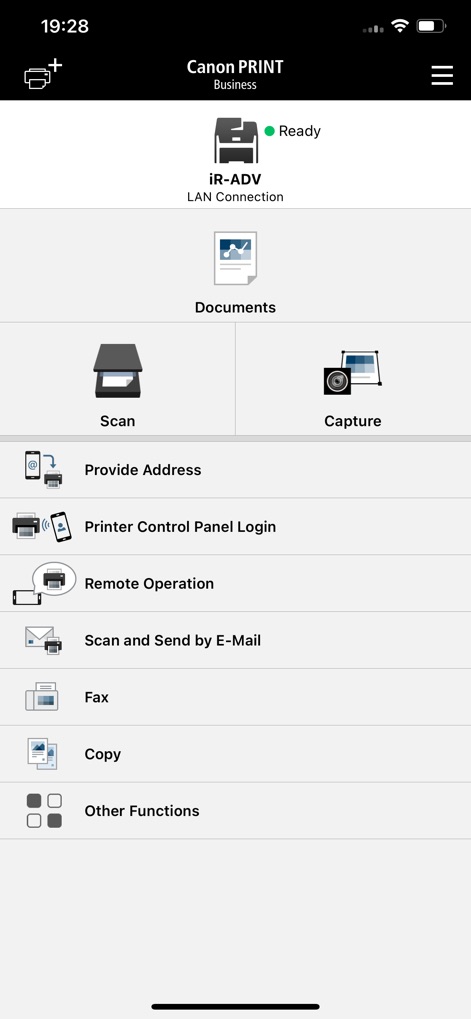
See how the app centralizes essential tasks, from initiating a 'Scan' to utilizing the 'Remote Operation' for device control.
Core Functions Hub

The app provides a clear 'Preview' of documents, alongside essential 'Printer' settings, ensuring accurate output every time.
Printing Made Easy

Users can fine-tune scan parameters, adjusting 'Resolution' and 'File Format' for optimal document capture and management.
Precision Scan Options

The app offers multiple methods for device connection, including 'Auto Search' for network printers and 'QR Code' scanning for quick registration.
Seamless Device Discovery
Description
Download
More Like This
Apps with similar features and user experience

DJI Mimo
SZ DJI TECHNOLOGY CO., LTD

DJI Ronin
SZ DJI TECHNOLOGY CO., LTD

Roku TV Remote Control & Cast
Aleh Piashkou

Remote for Hisense TV.
Duscov Stepan

Alpha Linker - Camera Transfer
恒茂 刘

MyCentsys Pro
Centurion Systems (Pty) Ltd

Roku TV Remote Control・
Artur Belov

Luminair
Synthe FX, LLC

FUJIFILM XApp
FUJIFILM Corporation
This page is not an official page of the app or its developer, but an independent editorial publication created for informational and commentary purposes. Unless expressly stated otherwise, neither the app nor its developer is affiliated with, endorsed by, sponsored by, authorized by, or otherwise officially connected with MWM, Apple, Google Play, the app publisher, or the app's developer, and nothing on this page implies that the app was developed using MWM's services. Any trademarks, logos, screenshots, and other content remain the property of their respective owners.