
This page is not an official page of the app or its developer, but an independent editorial publication created for informational and commentary purposes. Unless expressly stated otherwise, neither the app nor its developer is affiliated with, endorsed by, sponsored by, authorized by, or otherwise officially connected with MWM, Apple, Google Play, the app publisher, or the app's developer, and nothing on this page implies that the app was developed using MWM's services. Any trademarks, logos, screenshots, and other content remain the property of their respective owners.


Clockify Time Tracker
Time disappears without a trace. This app puts a leash on it, offering professionals control over every billable minute.
Downloads
1M+User Rating
Total Ratings
5.3KPublisher
Category
ProductivityLocales
5Latest Version
2.16.11Size
59.2 MBFirst Released
Nov 7, 2017An in-depth assessment of key functionalities driving productivity for freelancers and agencies.
Core Analytical Evaluation: Clockify Time Tracker
Cost-Free Scalability
The app provides a robust and fully functional time tracking solution completely free of charge, supporting unlimited team members, projects, and workspaces. This eliminates cost barriers, making it an ideal choice for freelancers and growing agencies.
Project and Client Assignment
This tool allows users to efficiently assign time logs to specific projects and clients. This capability is fundamental for accurate client billing, project cost analysis, and organized workflow management, especially for professionals managing multiple engagements.
Flexible Time Logging
It allows users to choose between logging their hours manually or automatically with a single click. This flexibility accommodates various working styles and ensures precise time capture, whether for active work sessions or retrospective entry.
Comprehensive Reporting
The app features access to useful reports through its web version. These reports provide critical insights into time distribution, project progress, and team performance, essential for informed decision-making and optimizing productivity.
Frequently Asked Questions
Everything you need to know about Clockify Time Tracker
Is Clockify Time Tracker a free application?
Yes, Clockify Time Tracker is a completely free time tracking tool. It offers unlimited team members, projects, and workspaces without any cost.
What features are included in Clockify Time Tracker?
Clockify Time Tracker offers time logging (manual/automatic), project and client assignment, team management, timesheets, calendar views, reporting, and multiple workspace support.
Can Clockify Time Tracker manage teams and multiple users?
Yes, Clockify Time Tracker supports unlimited team members and users. It is designed for agencies and freelancers who work with teams on various projects.
How can users log time in Clockify Time Tracker?
Users can log hours in Clockify Time Tracker either manually or automatically with a single click. The app allows assigning time logs to specific projects and clients.
Does Clockify Time Tracker allow assigning time to projects and clients?
Yes, Clockify Time Tracker allows users to assign their logged hours to relevant projects and clients. This feature helps in organizing and categorizing time entries efficiently.
Does Clockify Time Tracker provide reporting functionalities?
Yes, Clockify Time Tracker provides useful reports that show how time is spent. Users can view tracked hours, billable hours, and analyze data grouped by project.
Is Clockify Time Tracker available across different devices?
Yes, Clockify Time Tracker works everywhere, supporting usage on various devices like phones and tablets. This ensures flexibility in time tracking.
Are there limits on projects or workspaces in Clockify Time Tracker?
No, Clockify Time Tracker offers unlimited projects and workspaces. Users can create and manage as many projects and workspaces as needed without restrictions.
What is the timesheet feature in Clockify Time Tracker?
The timesheet feature in Clockify Time Tracker allows users to log their weekly time in an organized format. Users can submit these timesheets for approval.
Can time entries be categorized in Clockify Time Tracker?
Yes, users can categorize time in Clockify Time Tracker. Each time entry allows details such as project, task, tags, and a billable status.
The following screenshots and description are sourced directly from the app's official store listing and are the property of the app developer.
App Store
Screenshots
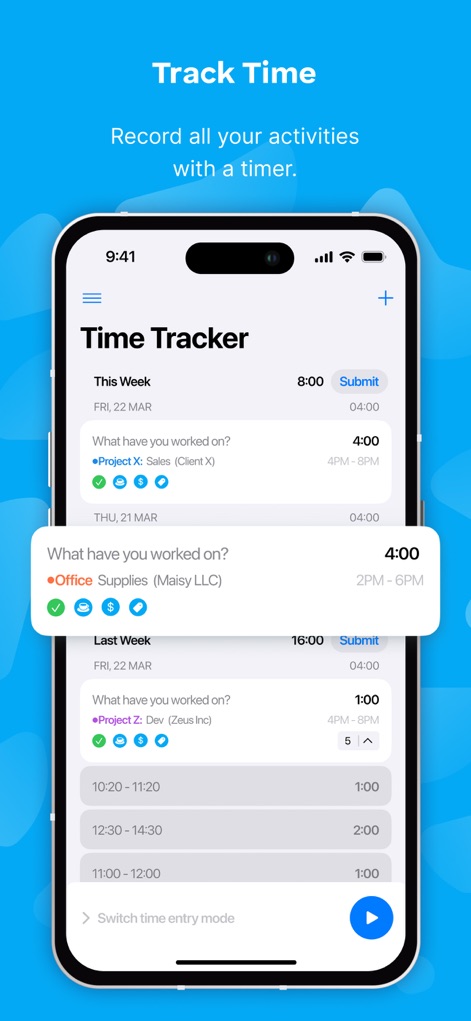
Users can effortlessly log daily activities with a clear timer display and categorize entries by project or client for accurate record-keeping.
Effortless Time Tracking

This tool simplifies weekly reporting with a clear timesheet grid and options to submit hours for approval or create reusable templates.
Simplified Timesheets

The app provides granular control over time entries, allowing users to specify exact start/end times and categorize work by project and billable status.
Detailed Entry Control

Users gain valuable insights into time allocation through detailed reports, featuring a weekly bar chart breakdown and a comprehensive project distribution pie chart.
Insightful Performance Reports

The calendar view helps visualize daily commitments, displaying time-blocked events and detailed activity descriptions for better schedule management.
Integrated Schedule View

The app supports seamless management of multiple workspaces, enabling users to switch between different organizations and access main navigation links effortlessly.
Multi-Workspace Management

This tool ensures productivity on the go, showcasing responsive interfaces for both mobile reports and tablet time tracking across various devices.
Cross-Device Accessibility

The app emphasizes its value proposition with unlimited time tracking capabilities and a clear, ad-free interface for uninterrupted workflow.
Unrestricted Feature Access
Description
Download
More Like This
Apps with similar features and user experience

Supershift Shift Work Calendar
Supershift GmbH

安心记加班-记考勤加班工资记录记账记工本
Shanghai Anjiaxin Network Technology Co., Ltd

Work Shift Calendar (Shifter)
Luis Alberto Reyes Halaby

极简记工时·小时工记加班
敏强 李

My Shift Planner - Calendar
MyBuzz Technologies Limited

Work hours tracker - Timesheet
Kanstantsin Markau

Punch Time Clock
Trent Morris

记工时考勤
Beijing Chejiang Internet Technology Co., Ltd.

Time Squared: Hours Tracker
TSQ Publishing Corp.
This page is not an official page of the app or its developer, but an independent editorial publication created for informational and commentary purposes. Unless expressly stated otherwise, neither the app nor its developer is affiliated with, endorsed by, sponsored by, authorized by, or otherwise officially connected with MWM, Apple, Google Play, the app publisher, or the app's developer, and nothing on this page implies that the app was developed using MWM's services. Any trademarks, logos, screenshots, and other content remain the property of their respective owners.