
This page is not an official page of the app or its developer, but an independent editorial publication created for informational and commentary purposes. Unless expressly stated otherwise, neither the app nor its developer is affiliated with, endorsed by, sponsored by, authorized by, or otherwise officially connected with MWM, Apple, Google Play, the app publisher, or the app's developer, and nothing on this page implies that the app was developed using MWM's services. Any trademarks, logos, screenshots, and other content remain the property of their respective owners.


Easy Photo Compressor
The fastest way to batch resize images, convert HEIC to JPEG, and strip private location data so you can share, upload, and save space with confidence.
Downloads
364K+User Rating
Total Ratings
2K+Publisher
Category
Photo & VideoLocales
14Latest Version
6.0Size
26.3 MBFirst Released
Nov 8, 2020Efficiency at Your Fingertips
Stop fighting file size limits and privacy concerns with the ultimate photo utility designed for your iPhone.
Reclaim Your Phone Storage
Shrink large photo files instantly to free up gigabytes of space and avoid paying for expensive monthly iCloud subscriptions.
Instant Batch Conversions
Resize and convert hundreds of images at once between HEIC, JPEG, and WebP for faster web uploads and professional marketplace listings.
Frequently Asked Questions
Everything you need to know about Easy Photo Compressor
What is the main purpose of the Easy Photo Compressor app?
The Easy Photo Compressor app simplifies resizing and compressing photos. It also allows batch processing, file format conversion, and deletion of location and Exif data to free up storage instantly.
Can Easy Photo Compressor process multiple photos at once?
Yes, Easy Photo Compressor supports resizing and processing multiple photos simultaneously. Users can select numerous images from their file list for batch operations.
What file formats does Easy Photo Compressor support for conversion?
Easy Photo Compressor supports conversion for JPEG, HEIC, PNG, WebP, TIFF, and AVIF file formats. Users can choose their desired output format directly within the app.
Does Easy Photo Compressor allow users to remove Exif and GPS data from photos?
Yes, Easy Photo Compressor provides the option to delete location information and Exif data from photos. This feature helps users share their images more safely and protect privacy.
How can I change the image quality using Easy Photo Compressor?
Easy Photo Compressor allows users to adjust image quality using options like SLQ, LQ, Normal, HQ, and SHQ. This setting controls the compression level and final image quality.
What information does the file list display in Easy Photo Compressor?
The file list in Easy Photo Compressor displays essential details for each photo, including its file size, resolution, and file format. This helps users easily identify and manage larger photos.
Can I save and share photos directly from the Easy Photo Compressor app?
Yes, Easy Photo Compressor enables users to directly save and share their modified photos after processing. Dedicated buttons for saving and sharing are available in the interface.
The following screenshots and description are sourced directly from the app's official store listing and are the property of the app developer.
App Store
Screenshots
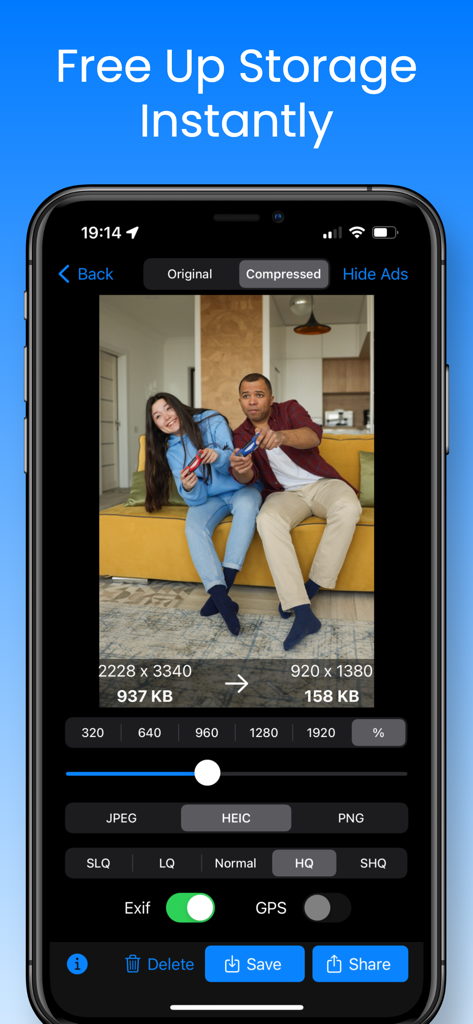
Interface of Easy Photo Compressor app showing a photo file size reduction from 937KB to 158KB for quick storage optimization
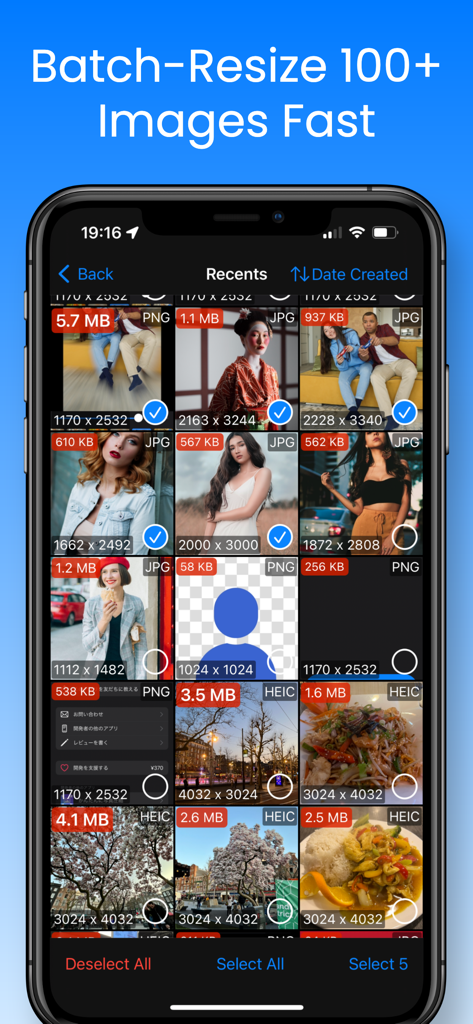
Easy Photo Compressor app interface showing a grid of images with file sizes and formats for batch resizing
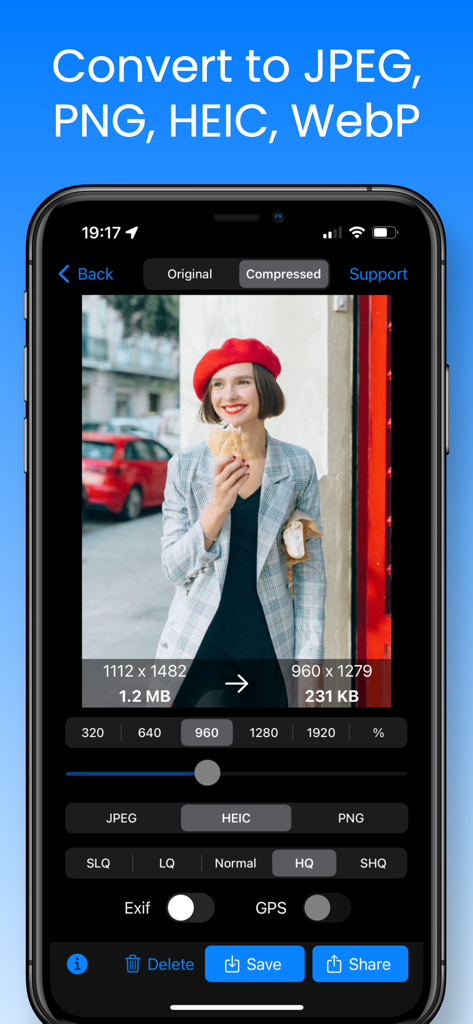
Interface of the Easy Photo Compressor app showing image resizing and file format conversion on an iPhone
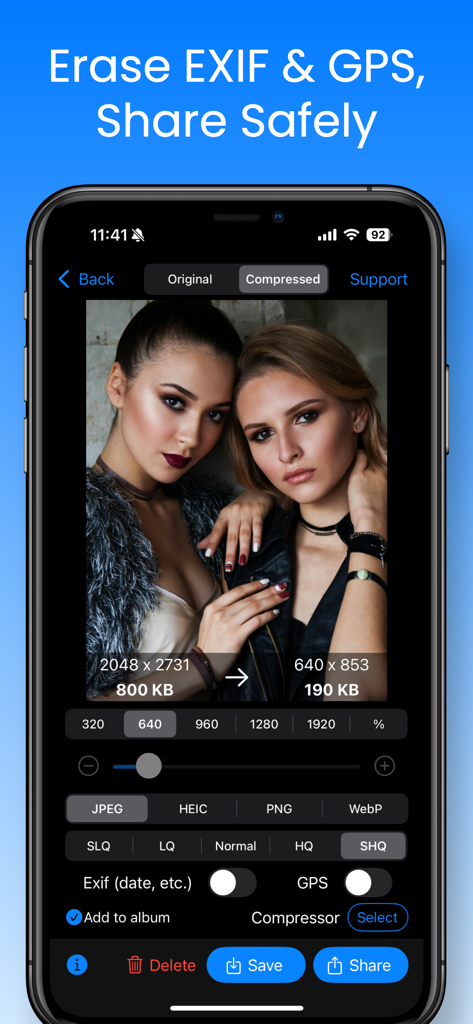
A smartphone screen displaying the Easy Photo Compressor app with options to erase EXIF and GPS data for safe sharing.
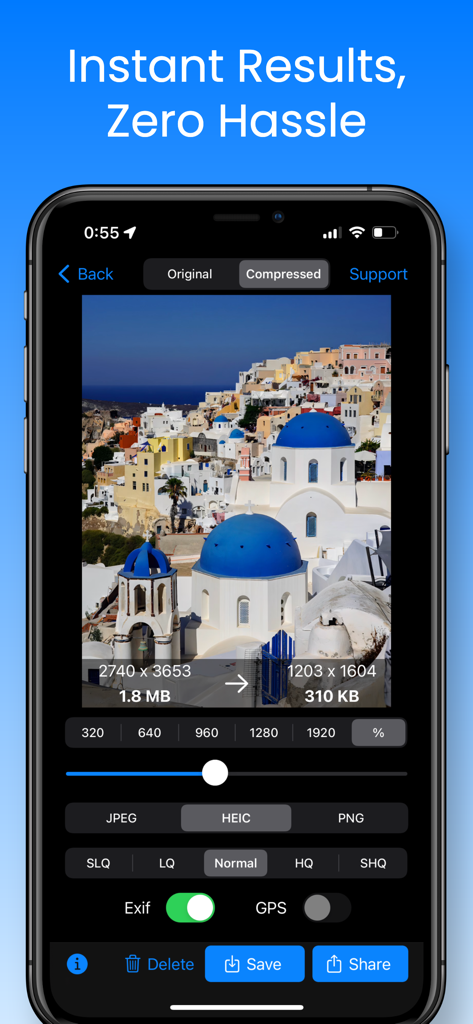
Easy Photo Compressor app interface on iPhone showing photo compression from 1.8MB to 310KB with options for resizing and privacy
Description
Download
More Like This
Apps with similar features and user experience

Square Fit Photo Video Editor
Honk Honk Punch Pty Ltd

Image Size
Vitalij Schaefer

Compress Photos & Pictures
New Marketing Lab, Inc

JPEG-PNG Image file converter
handyCloset Inc.

Photo Resizer: resize image
Ryoichi Fukugawa

Photo & Picture Resizer
Farluner Apps Grzegorz Balcerzak

Compress Photos, Resize Image
SMDA GROUP SP. Z OO

Photo Compress - Shrink Pics
Brachmann Online Marketing GmbH & Co. KG

Size Image
Abdullah Albalawi
This page is not an official page of the app or its developer, but an independent editorial publication created for informational and commentary purposes. Unless expressly stated otherwise, neither the app nor its developer is affiliated with, endorsed by, sponsored by, authorized by, or otherwise officially connected with MWM, Apple, Google Play, the app publisher, or the app's developer, and nothing on this page implies that the app was developed using MWM's services. Any trademarks, logos, screenshots, and other content remain the property of their respective owners.