
This page is not an official page of the app or its developer, but an independent editorial publication created for informational and commentary purposes. Unless expressly stated otherwise, neither the app nor its developer is affiliated with, endorsed by, sponsored by, authorized by, or otherwise officially connected with MWM, Apple, Google Play, the app publisher, or the app's developer, and nothing on this page implies that the app was developed using MWM's services. Any trademarks, logos, screenshots, and other content remain the property of their respective owners.


Photo Compress - Shrink Pics
Storage full? This app grants instant photo liberation without the quality hit.
Downloads
2.5M+User Rating
Total Ratings
6.8KPublisher
Category
Photo & VideoLocales
18Latest Version
3.0.1Size
6.0 MBFirst Released
Mar 20, 2015Evaluating 'Photo Compress - Shrink Pics' for common user needs.
Key Features Analysis
Efficient Storage Reclamation
The app provides a straightforward method to significantly reduce photo file sizes, enabling users to free up substantial storage space on their iPhone or iPad devices quickly.
Enhanced Sharing Capability
It allows users to compress images, making them smaller and faster to send via messaging apps like WhatsApp or iMessage, and optimizing them for quick uploads to social media platforms such as Facebook and Instagram.
Batch Photo Processing
The app enables users to compress single photos, multiple selections, or entire albums simultaneously, offering significant time savings and efficiency for managing large photo collections.
HEIC/HEIF to JPEG Conversion
This tool features the ability to convert modern HEIC/HEIF photo formats to the more widely compatible JPEG format, resolving issues with sharing and viewing on various devices and platforms.
Quality Preservation & Preview
It allows users to adjust the JPEG compression level and preview the image quality before saving, ensuring that photo quality remains acceptable while achieving desired file size reductions.
Storage Impact Visibility
This tool provides a clear view of storage usage both before and after compression, giving users immediate feedback on the space they've reclaimed.
Frequently Asked Questions
Everything you need to know about Photo Compress - Shrink Pics
What is the main purpose of the Photo Compress - Shrink Pics app?
The Photo Compress - Shrink Pics app reduces picture file sizes to save disk space. It also helps users reduce photo sizes for sharing on platforms like WhatsApp or Instagram.
Is the Photo Compress - Shrink Pics app free to download?
Yes, the Photo Compress - Shrink Pics app is free to download. Users can acquire it without initial cost.
What compression options does the Photo Compress - Shrink Pics app offer?
The Photo Compress - Shrink Pics app allows customization of JPG compression strength and optional reduction of image size. It can also compress images without resizing them.
Can Photo Compress - Shrink Pics convert HEIC/HEIF photos to JPEG?
Yes, the Photo Compress - Shrink Pics app converts HEIC/HEIF photos to JPEG files. This feature is available for users.
Does Photo Compress - Shrink Pics delete original photos after compression?
Yes, Photo Compress - Shrink Pics offers the option to delete original photos after compression, keeping only the compressed versions. Users must also delete from "Recently Deleted" album.
Can users preview compressed image quality in Photo Compress - Shrink Pics?
Yes, Photo Compress - Shrink Pics includes a preview function to check image quality. This feature also displays the estimated disk space before and after compression.
Does Photo Compress - Shrink Pics offer video compression functionality?
The Photo Compress - Shrink Pics app's main screen features a button labeled "Compress videos as well!". This indicates that video compression is available or an offered feature.
How do I customize compression settings in Photo Compress - Shrink Pics?
Photo Compress - Shrink Pics allows users to customize compression settings. This includes adjusting image quality with a slider and reducing the image size by a specific percentage.
Where are compressed photos saved by Photo Compress - Shrink Pics?
Photo Compress - Shrink Pics saves the newly compressed photos in the "Recents" album of the user's photo library. Users can locate them there after the compression process.
The following screenshots and description are sourced directly from the app's official store listing and are the property of the app developer.
App Store
Screenshots

This tool's intuitive home screen allows users to quickly add images for compression and assures secure, local processing directly on the device.
Effortless Compression Launch

This tool simplifies the process by allowing users to effortlessly select multiple photos from their library and visually confirm selections with clear checkmark indicators.
Seamless Photo Selection
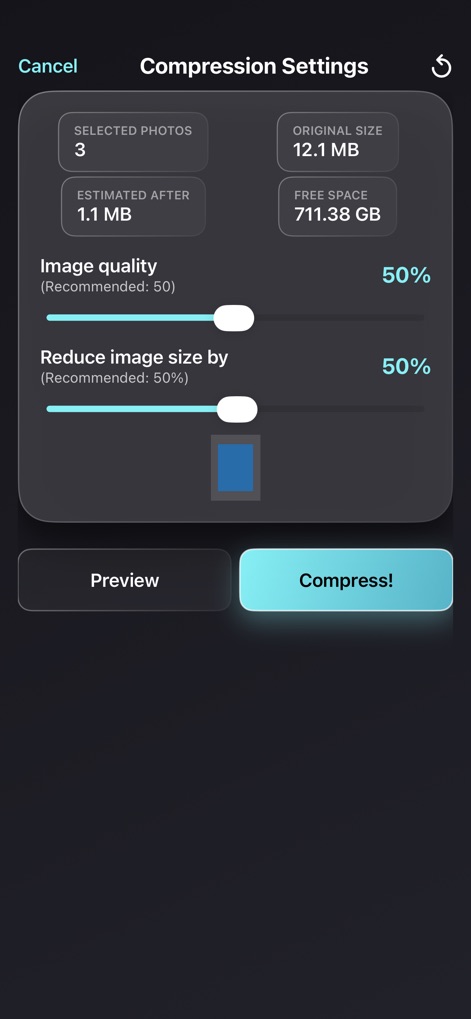
This tool provides granular control over compression with distinct sliders for image quality and optional image resizing, alongside a clear estimated size reduction.
Precision Compression Control

The app allows users to visually compare their original and compressed images through a dedicated preview screen, ensuring the desired quality retention.
Quality Comparison Preview

Upon completion, the app clearly displays the original versus compressed sizes, providing a summary of space saved, and offers the convenient option to delete original photos.
Efficient Storage Management
Description
Download
More Like This
Apps with similar features and user experience

Square Fit Photo Video Editor
Honk Honk Punch Pty Ltd

Image Size
Vitalij Schaefer

Compress Photos & Pictures
New Marketing Lab, Inc

JPEG-PNG Image file converter
handyCloset Inc.

Compress Photos, Resize Image
SMDA GROUP SP. Z OO

Photo Resizer: resize image
Ryoichi Fukugawa

Size Image
Abdullah Albalawi

Photo & Picture Resizer
Farluner Apps Grzegorz Balcerzak

Easy Photo Compressor
Osawa Shunsuke
This page is not an official page of the app or its developer, but an independent editorial publication created for informational and commentary purposes. Unless expressly stated otherwise, neither the app nor its developer is affiliated with, endorsed by, sponsored by, authorized by, or otherwise officially connected with MWM, Apple, Google Play, the app publisher, or the app's developer, and nothing on this page implies that the app was developed using MWM's services. Any trademarks, logos, screenshots, and other content remain the property of their respective owners.