
This page is not an official page of the app or its developer, but an independent editorial publication created for informational and commentary purposes. Unless expressly stated otherwise, neither the app nor its developer is affiliated with, endorsed by, sponsored by, authorized by, or otherwise officially connected with MWM, Apple, Google Play, the app publisher, or the app's developer, and nothing on this page implies that the app was developed using MWM's services. Any trademarks, logos, screenshots, and other content remain the property of their respective owners.

FTPManager - FTP, SFTP client
Finally, total file control from your device. Users gain a true desktop-level server interaction, not some cut-down mobile port.
Downloads
1M+User Rating
Total Ratings
3.1KPublisher
Category
BusinessLocales
14Latest Version
8.6.3Size
93.0 MBFirst Released
May 16, 2012An in-depth analysis of key functionalities for advanced mobile file management.
FTPManager: Core Feature Evaluation
Advanced In-App Text/Code Editor
It features an advanced in-app text editor, complete with line numbers, syntax highlighting for multiple programming and markup languages, and full-text search capabilities, enabling direct code editing on the go.
Secure FTP/SFTP Protocol Support
The app provides secure and encrypted access to both FTP (including FTP over TLS) and SFTP (SSH) servers, ensuring data integrity and confidentiality during remote file operations.
Robust File Transfer & Synchronization
The app facilitates robust file transfer operations, enabling seamless copying of files between servers, iOS devices, and cloud storage. It also supports photo library integration for backups and server synchronization, along with intuitive drag-and-drop functionality.
Comprehensive File Management & Manipulation
This tool features comprehensive file management capabilities, allowing users to effortlessly copy, move, rename, delete, sort, and search files directly on remote servers or local devices.
Extensive File Format Support & Media Streaming
It offers extensive support for a multitude of file formats, including text, documents (PDF, Word, Excel), various image types (JPG, PNG, RAW), and media files, allowing direct viewing, playback, and streaming of videos and music from servers to the device.
In-App FTP Server & Device-to-Device Transfer
This tool includes an in-app FTP server for convenient Wi-Fi transfers between computers and the iOS device, alongside a nearby file transfer feature that enables direct sharing between two iOS devices without internet connectivity.
Frequently Asked Questions
Everything you need to know about FTPManager - FTP, SFTP client
What is FTPManager?
FTPManager is a fully-featured FTP client that allows users to access, manage, and transfer files on FTP and SFTP servers directly from their iPhone or iPad. It supports streaming media and includes a text editor.
Does FTPManager support SFTP connections?
Yes, FTPManager supports SFTP (SSH) servers. It also accesses FTP (FTP over TLS) servers, ensuring secure file transfers and management capabilities directly from your device.
Can users manage files directly from the FTPManager app?
Yes, FTPManager allows users to copy, move, rename, and delete files on remote servers. It also supports sorting, searching, and copying files among FTP servers, iPhones, and iPads.
Can I stream videos and music with FTPManager?
Yes, FTPManager enables streaming of music and videos directly from your FTP server to your iPhone or iPad. This feature allows immediate playback without full downloads.
Does FTPManager include an in-app FTP server?
Yes, FTPManager features an in-app FTP server. This allows for file transfers between your computer and your iPhone/iPad over a Wi-Fi connection, simplifying local data exchange.
Does FTPManager offer a dark mode interface?
Yes, FTPManager supports Dark Mode. This feature provides an alternative color scheme for improved viewing comfort in low-light environments and can reduce eye strain.
Can I use multiple windows with FTPManager on an iPad?
Yes, FTPManager supports multiple windows on the iPad. This functionality enhances productivity by allowing users to view and interact with different sections of the app simultaneously.
What are the file transfer capabilities of FTPManager?
FTPManager supports copying files among servers, cloud storage, iPhone, and iPad. It also handles photo transfers between iOS photo libraries and servers, syncs files, and enables nearby file transfers.
Does FTPManager support nearby file transfers without Wi-Fi?
Yes, FTPManager facilitates nearby file transfers directly between two iOS devices. This feature operates without requiring a Wi-Fi or LTE connection, enabling convenient offline sharing.
What document formats does FTPManager support for viewing?
FTPManager supports various document formats including PDF, WORD, EXCEL, PPT, PAGES, NUMBERS, KEYNOTE, and EPUB. This allows users to view common office and e-book files.
What features are included in the FTPManager text editor?
The FTPManager text editor provides line numbers, syntax highlighting for languages like HTML, JavaScript, CSS, and Swift, and full-text search capabilities. This assists in editing code and text files.
What is the difference between the free and Pro versions of FTPManager?
The free version of FTPManager permits only one connection to an FTP server. To create more connections and access full features, users must purchase the Pro version.
What types of connections are displayed in FTPManager?
FTPManager displays connections to various servers like 'skyjos.com', 'TS-216', '192.168.2.2', and 'My VPS'. It also lists local options like 'My Files', 'Photo Library', and 'Nearby File Transfer'.
How does a user add a new connection in FTPManager?
Users add a new connection by tapping the '+' icon, which presents options to connect via FTP (File Transfer Protocol), SFTP (SSH File Transfer Protocol), or Dropbox.
How does FTPManager display files?
FTPManager displays files with details such as Name, Date, Size, and Type, and allows for sorting. Users can switch between a list view and a grid view for better organization.
The following screenshots and description are sourced directly from the app's official store listing and are the property of the app developer.
App Store
Screenshots

This interface shows immediate access to 'My Files' and a list of established 'Connections' for seamless server management.
Centralized Server Access

Users can easily establish new connections, choosing between robust protocols like 'FTP (File Transfer Protocol)' and 'SFTP (SSH File Transfer Protocol)'.
Secure Connection Options

The app presents a clear 'grid view' of various file types, from 'MP4 videos' to 'PDF documents', alongside intuitive bottom navigation for file operations.
Comprehensive File Explorer

This view highlights the 'list view' option for files, allowing precise selection with 'checkboxes' for batch operations and detailed information.
Efficient File Management
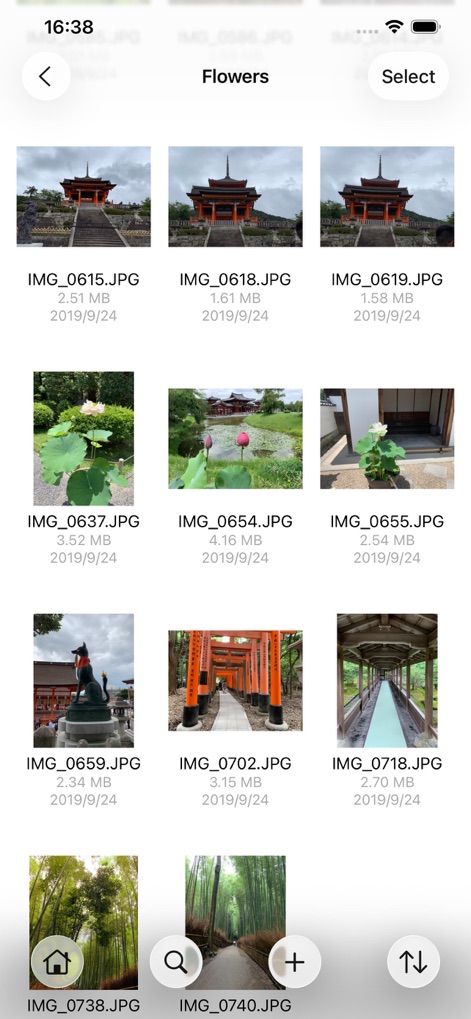
The app provides a dedicated browser for visual content, displaying 'thumbnail previews' of images and enabling quick navigation within a 'grid layout'.
Visual Media Browser

Professionals benefit from a built-in code editor featuring 'syntax highlighting' for languages like HTML and clear 'line numbers' for precise editing.
Integrated Code Editor

The tool includes a robust document viewer, capably displaying 'multi-page PDF files' and showing a 'page counter' for easy navigation.
Document Previewer

Users can directly view various document formats, as demonstrated by the 'plain text display' of a '.doc file' with clean readability.
Universal File Access
Description
Download
More Like This
Apps with similar features and user experience

xTerminal - SSH Terminal Shell
婉媚 邵

SSH Client - Secure ShellFish
Anders Borum

FTP Client Pro
Anders Havn

Termux
FREE AI UTILS COMPANY LIMITED

TN5250
Jan Frydendal

Blink Shell, Build & Code
Blink Shell, Inc

Terminal#
Vasiliy Shaydullin

Prompt 3
Panic, Inc.

NovaAccess - Tailnet Tools
GalaxNet Ltd.
This page is not an official page of the app or its developer, but an independent editorial publication created for informational and commentary purposes. Unless expressly stated otherwise, neither the app nor its developer is affiliated with, endorsed by, sponsored by, authorized by, or otherwise officially connected with MWM, Apple, Google Play, the app publisher, or the app's developer, and nothing on this page implies that the app was developed using MWM's services. Any trademarks, logos, screenshots, and other content remain the property of their respective owners.