
This page is not an official page of the app or its developer, but an independent editorial publication created for informational and commentary purposes. Unless expressly stated otherwise, neither the app nor its developer is affiliated with, endorsed by, sponsored by, authorized by, or otherwise officially connected with MWM, Apple, Google Play, the app publisher, or the app's developer, and nothing on this page implies that the app was developed using MWM's services. Any trademarks, logos, screenshots, and other content remain the property of their respective owners.


Game Emulator - RePlay
Nostalgia just got an upgrade. It delivers instant access to gaming history, right in your pocket.
Downloads
750k+User Rating
Total Ratings
12.0KPublisher
Category
EntertainmentLocales
16Latest Version
1.1.1Size
76.4 MBFirst Released
May 26, 2024An in-depth look at key functionalities enhancing mobile retro gaming for nostalgic and new players.
Game Emulator - RePlay: Core Feature Analysis
Real-time Save States
It allows users to save game progress at any point, providing flexibility and convenience crucial for mobile play and preventing loss of progress in games without built-in save features.
Wide Platform Compatibility
The app provides extensive compatibility, supporting .nds, .gba, .gbc, and .gb formats, enabling users to enjoy a vast library of classic Nintendo handheld titles.
Adjustable Game Speed
This tool features a unique speed-up option, allowing users to accelerate gameplay, skip dialogues, and quickly progress through less engaging sections of a game.
Cheat Code Support
It supports the importation and use of cheats for various game formats, offering enhanced fun and flexibility for customized gameplay experiences.
Authentic Emulation Experience
The app utilizes advanced emulation technology to perfectly recreate the original gameplay and visual effects, ensuring an authentic retro experience on mobile devices.
User-Friendly Game Library
The app provides a clean and intuitive game list interface, allowing users to easily browse imported game covers and titles for quick selection and play.
Frequently Asked Questions
Everything you need to know about Game Emulator - RePlay
What game formats does Game Emulator - RePlay support?
The Game Emulator - RePlay app supports multiple classic game formats. It is compatible with *.nds, *.gba, *.gbc, and *.gb files, allowing users to play a variety of retro games.
Does Game Emulator - RePlay have a speed-up function?
Yes, the Game Emulator - RePlay app includes a unique speed-up function. This feature allows users to increase game speed, progress quickly through games, and easily skip dialogues.
Can I use cheats in Game Emulator - RePlay?
Yes, Game Emulator - RePlay supports cheats. Users can import and apply cheats for *.nds, *.gba, *.gbc, and *.gb game formats, enhancing their gameplay experience.
Does Game Emulator - RePlay allow saving game progress?
Yes, Game Emulator - RePlay provides a Save State feature. Users can save their game progress at any time and resume playing later without worrying about interruptions.
What are the subscription options for Game Emulator - RePlay?
Game Emulator - RePlay offers subscription periods of 1 week, 1 month, or 1 year. Subscriptions automatically renew based on the selected period unless canceled at least 24 hours prior.
Is Game Emulator - RePlay officially affiliated with Nintendo?
No, Game Emulator - RePlay is not affiliated with or endorsed by Nintendo. It functions solely as an emulator service for playing classic games on mobile devices.
How do I cancel my Game Emulator - RePlay subscription?
You can cancel your Game Emulator - RePlay subscription by visiting the provided Apple support URL: https://support.apple.com/en-us/HT202039. Turn off auto-renew at least 24 hours before the current period ends.
The following screenshots and description are sourced directly from the app's official store listing and are the property of the app developer.
App Store
Screenshots

Witness the app's seamless dual-screen emulation and responsive on-screen touch controls, recreating handheld gaming on your mobile device.
Dual Screen Immersion

Explore a visually rich library showcasing diverse game covers and experience immersive retro gameplay with an authentic virtual D-pad.
Curated Game Collection
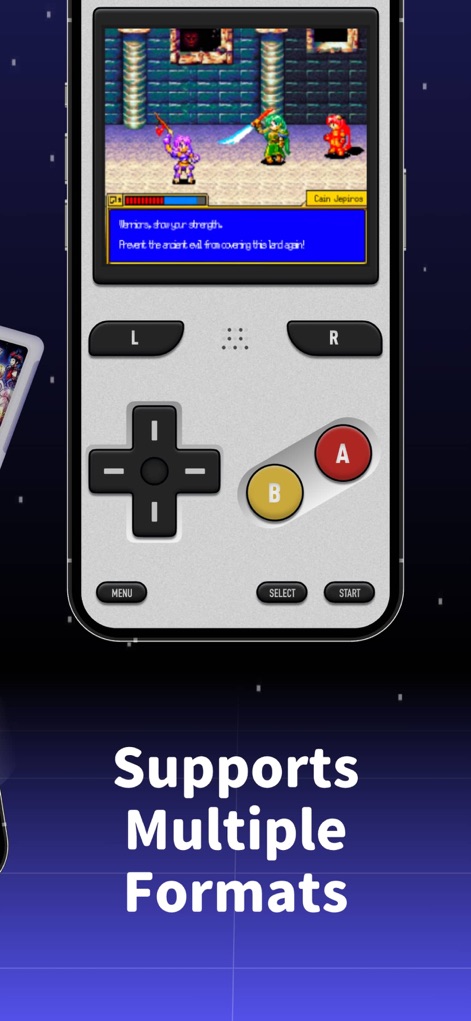
Relive classic experiences with the app's authentic on-screen D-pad and familiar A/B buttons, demonstrating support for multiple game formats.
Authentic Control Layout

Unlock new possibilities with the app's comprehensive cheat code interface, featuring toggles for 'Infinite Lives' and 'Invincible Mode'.
Powerful Cheat Management
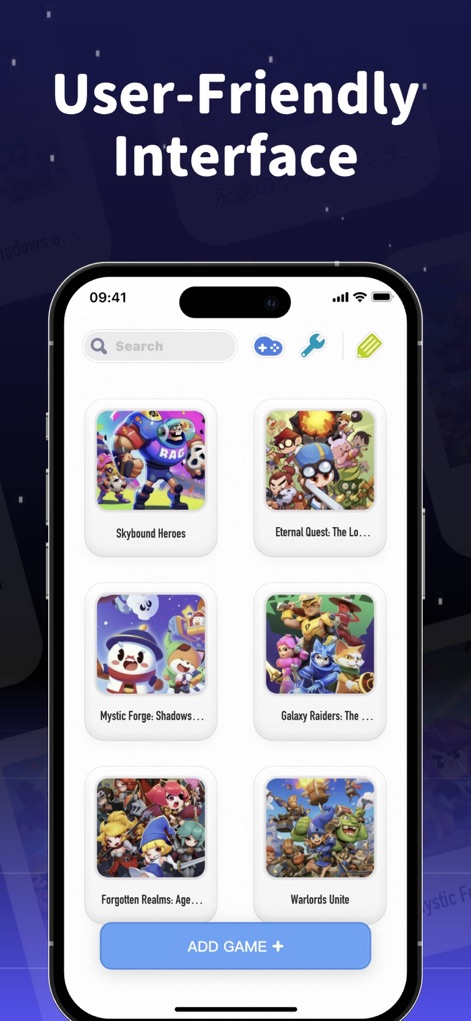
Navigate your collection effortlessly using the app's organized display of game covers and efficient search functionality to find your favorites.
Streamlined Game Library
Description
Download
More Like This
Apps with similar features and user experience
Retra - app console emulator
MODERN DEV LP

Manic EMU - Game Emulator
傲霜 李
Game Emulator: GamePod Emu
Aytek Sokmen

Gamuroid: All Game Emulator
UNIVERSAL TECHLAB COMPANY LIMITED

Lucky Emulator – GBA & DS
LUCKY MUSHROOM LIMITED
MyBoyGame-All in one Emulator
明 李

Delta - Game Emulator
Yvette Testut
Emu — Game Consoles App
METRONOM YAZILIM LIMITED SIRKETI

Gamebyte
TE-DE GROUP doo
This page is not an official page of the app or its developer, but an independent editorial publication created for informational and commentary purposes. Unless expressly stated otherwise, neither the app nor its developer is affiliated with, endorsed by, sponsored by, authorized by, or otherwise officially connected with MWM, Apple, Google Play, the app publisher, or the app's developer, and nothing on this page implies that the app was developed using MWM's services. Any trademarks, logos, screenshots, and other content remain the property of their respective owners.