
This page is not an official page of the app or its developer, but an independent editorial publication created for informational and commentary purposes. Unless expressly stated otherwise, neither the app nor its developer is affiliated with, endorsed by, sponsored by, authorized by, or otherwise officially connected with MWM, Apple, Google Play, the app publisher, or the app's developer, and nothing on this page implies that the app was developed using MWM's services. Any trademarks, logos, screenshots, and other content remain the property of their respective owners.


Lucky Emulator – GBA & DS
Rewind your gaming clock: This app resurrects your childhood handhelds on an iPhone.
Downloads
1M+User Rating
Total Ratings
16.8KPublisher
Category
EntertainmentLocales
12Latest Version
1.2.9Size
151.4 MBFirst Released
Jul 11, 2024An analytical overview of key features enhancing retro gaming on iOS for nostalgic enthusiasts.
Software Evaluation: Lucky Emulator – GBA & DS
Dual System Emulation
The app provides robust emulation for both Game Boy Advance (GBA) and Nintendo DS (NDS) titles, allowing users to relive classic experiences across two beloved platforms.
Advanced External Controller Support
This tool features extensive support for various Bluetooth controllers, including Xbox, PlayStation, 8BitDo, and MFi, offering a premium console-like gaming experience on iOS devices.
Comprehensive Save State Management
It allows users to save and load game progress instantly at any point, with multiple save slots per game and quick save/load options, ensuring convenience and progress preservation.
Instant Fast Forward
The app provides a convenient fast-forward function to quickly advance through slower game sections, such as repetitive grinding or lengthy cutscenes, optimizing play time for nostalgic gamers.
Flexible ROM Import & Quick Access
It allows users to easily import their personal game ROMs from Files or iCloud and provides quick access shortcuts for favorite titles, facilitating a personalized and accessible game library.
Authentic NDS Dual-Screen Display
This tool features specific dual-screen layouts designed for Nintendo DS games, enhancing the authenticity and playability of NDS titles in both portrait and landscape orientations.
Customizable On-Screen Controls
The app provides fully customizable on-screen controls, enabling users to tailor their virtual gamepad experience to individual preferences and optimize gameplay without external hardware.
Optimized Performance & Smooth Gameplay
This tool ensures smooth and reliable performance for both GBA and NDS titles, delivering an uninterrupted and enjoyable retro gaming experience on iOS devices.
Frequently Asked Questions
Everything you need to know about Lucky Emulator – GBA & DS
What game systems does Lucky Emulator support?
Lucky Emulator supports Game Boy Advance (GBA) and Nintendo DS (NDS) retro games. It allows users to relive classic titles on iPhone and iPad.
How do I import games into Lucky Emulator?
Lucky Emulator allows users to easily import their own game ROMs from Files or iCloud. It also provides quick access shortcuts for favorite titles.
Can I use a Bluetooth controller with Lucky Emulator?
Yes, Lucky Emulator supports Bluetooth controllers, including Xbox, PlayStation, 8BitDo, and MFi controllers. It also offers fully customizable on-screen controls.
Does Lucky Emulator have save state functionality?
Yes, Lucky Emulator includes save state functionality. Users save and load their progress anytime. It provides multiple save slots per game, along with quick save and quick load options.
How do subscriptions work in Lucky Emulator?
Subscriptions for Lucky Emulator automatically renew unless canceled 24 hours before the period ends. Users manage or cancel subscriptions in App Store account settings.
Is Lucky Emulator affiliated with Nintendo?
No, Lucky Emulator is not affiliated with Nintendo. The app explicitly states it has no association with Nintendo or its registered trademarks like 'Nintendo' or game console names.
Can I play games in landscape mode on Lucky Emulator?
Yes, Lucky Emulator supports playing games in both portrait and landscape orientations. It also offers NDS dual-screen layouts for an authentic Nintendo DS experience.
Does Lucky Emulator have a fast-forward feature?
Yes, Lucky Emulator includes a fast-forward feature. Users speed through slower game parts with one tap. This is ideal for RPG grinding or skipping long cutscenes.
The following screenshots and description are sourced directly from the app's official store listing and are the property of the app developer.
App Store
Screenshots
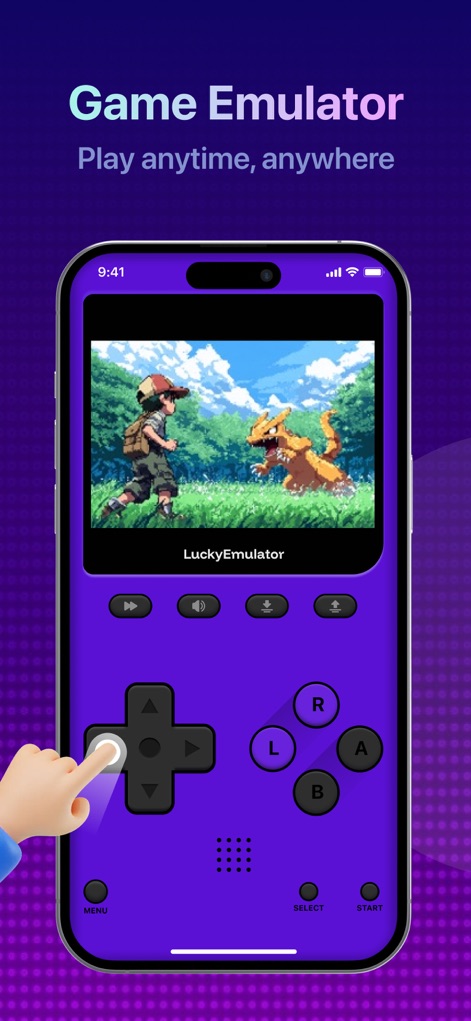
Dive into classic GBA titles using the app's responsive on-screen controls and enjoy dedicated portrait mode gameplay for a truly mobile experience.
On-Screen Immersion
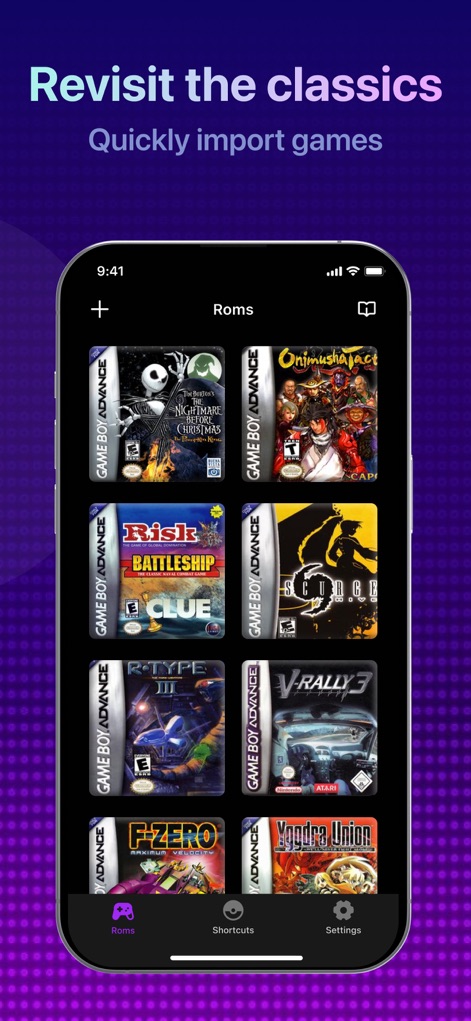
Effortlessly browse and manage your imported game ROM library, utilizing the intuitive quick access shortcuts for instant gaming.
Curated Game Collection

The app supports immersive landscape mode for expansive views and allows connection of external Bluetooth controllers for enhanced precision and comfort.
Flexible Play Styles
Description
Download
More Like This
Apps with similar features and user experience
Retra - app console emulator
MODERN DEV LP

Manic EMU - Game Emulator
傲霜 李
Game Emulator: GamePod Emu
Aytek Sokmen

Gamuroid: All Game Emulator
UNIVERSAL TECHLAB COMPANY LIMITED
MyBoyGame-All in one Emulator
明 李

Game Emulator - RePlay
彩连 刘

Delta - Game Emulator
Yvette Testut

Emu — Game Consoles App
METRONOM YAZILIM LIMITED SIRKETI

Gamebyte
TE-DE GROUP doo
This page is not an official page of the app or its developer, but an independent editorial publication created for informational and commentary purposes. Unless expressly stated otherwise, neither the app nor its developer is affiliated with, endorsed by, sponsored by, authorized by, or otherwise officially connected with MWM, Apple, Google Play, the app publisher, or the app's developer, and nothing on this page implies that the app was developed using MWM's services. Any trademarks, logos, screenshots, and other content remain the property of their respective owners.