
This page is not an official page of the app or its developer, but an independent editorial publication created for informational and commentary purposes. Unless expressly stated otherwise, neither the app nor its developer is affiliated with, endorsed by, sponsored by, authorized by, or otherwise officially connected with MWM, Apple, Google Play, the app publisher, or the app's developer, and nothing on this page implies that the app was developed using MWM's services. Any trademarks, logos, screenshots, and other content remain the property of their respective owners.


GBA, PSP, DS Game Emulator
It unlocks a digital arcade for your pocket. Users gain direct access to a vast history of gaming, transforming a modern device into a time machine.
Downloads
500k+User Rating
Total Ratings
1.2KPublisher
Category
EntertainmentLocales
1Latest Version
3.9Size
318.0 MBFirst Released
Nov 13, 2024An analysis of key functionalities that enhance the retro gaming experience for nostalgic and new players alike.
GBA, PSP, DS Game Emulator: Core Feature Assessment
Extensive Multi-Platform Emulation
The app provides broad compatibility with a vast array of classic gaming systems, including iconic consoles like Game Boy, NES, SNES, N64, DS, PSP, and PlayStation, catering directly to the nostalgic desire of the target audience to revisit their cherished childhood libraries all in one place.
Flexible Save & Load States
This tool features unlimited save slots, allowing users to effortlessly save and load their game progress at any point. This modern quality-of-life improvement addresses a key pain point of retro gaming, offering convenience and reducing frustration, especially for mobile play.
Game Speed Acceleration
It allows users to speed up gameplay with a quick toggle, effectively bypassing slow sections, grinding, or lengthy cutscenes. This enhances the mobile gaming experience by respecting the user's time and adapting retro titles to a faster-paced modern lifestyle.
Multiplayer Capabilities
The app provides the ability to challenge friends and enjoy classic games together. This fosters social interaction and shared nostalgic experiences, appealing to the audience's desire to connect over their favorite vintage titles.
Customizable Controller Skins
This tool features a variety of sleek and stylish controller skins, enabling users to personalize their gameplay interface. It enhances the visual appeal and user experience, aligning with modern app customization expectations.
Instant Audio Muting
It allows users to instantly silence game audio from the pause menu. This offers practical convenience for playing in diverse environments, ensuring a discreet gaming experience when needed.
Integrated Gaming Community
The app provides a platform for users to boast game levels, share game states, and explore content from fellow gamers. This fosters engagement and extends the life of titles beyond single-player progression.
Retro Game Trivia & Quizzes
This tool features interactive fun facts and quizzes about favorite games. It offers an engaging way for users to deepen their knowledge and appreciation for vintage titles, appealing to their inherent nostalgia.
Frequently Asked Questions
Everything you need to know about GBA, PSP, DS Game Emulator
What is GBA, PSP, DS Game Emulator?
GBA, PSP, DS Game Emulator is an iOS app that functions as an all-in-one emulator for classic gaming systems, including GB, GBA, GBC, DS, NES, SNES, N64, PSP, PSX, and PS1.
What game consoles does Gameboy Emulator: Retro Games support?
Gameboy Emulator: Retro Games supports GB, GBA, GBC, DS, NES, SNES, N64, PSP, PSX, and PS1 consoles. Additional console support is planned for future updates.
How can I save my game progress in GBA, PSP, DS Game Emulator?
Yes, GBA, PSP, DS Game Emulator allows users to effortlessly save and load game progress directly from the pause menu. It offers unlimited save slots for multiple game saves.
Does Gameboy Emulator: Retro Games include a fast forward feature?
Yes, Gameboy Emulator: Retro Games includes a fast forward feature. Users can speed up slower game sections with a quick toggle available from the pause menu.
Can I customize the controller appearance in GBA, PSP, DS Game Emulator?
Yes, GBA, PSP, DS Game Emulator allows users to personalize gameplay with custom controller skins. A variety of sleek and stylish options are available to choose from.
Does Gameboy Emulator: Retro Games support multiplayer gaming?
Yes, Gameboy Emulator: Retro Games supports multiplayer capabilities. Users can challenge friends and play together, often requiring devices to be on the same WiFi network.
How much do subscriptions cost for GBA, PSP, DS Game Emulator?
Subscriptions for GBA, PSP, DS Game Emulator cost $4.99 for one week, $6.99 for one month, or $29.99 for lifetime access. These are auto-renewing subscriptions.
Is it legal to download games for Gameboy Emulator: Retro Games?
Gameboy Emulator: Retro Games requires users to only use legally obtained game files. Unauthorized downloads are illegal, and the app does not support or condone piracy.
How do I manage or cancel my GBA, PSP, DS Game Emulator subscription?
Users can manage or cancel GBA, PSP, DS Game Emulator subscriptions via their iTunes Account settings: Setting > iTunes & App Store > Apple ID > manage subscription after purchase.
Does GBA, PSP, DS Game Emulator offer community features?
Yes, GBA, PSP, DS Game Emulator includes community features. Users can share game levels and states, download content from other gamers, and engage with quizzes.
The following screenshots and description are sourced directly from the app's official store listing and are the property of the app developer.
App Store
Screenshots
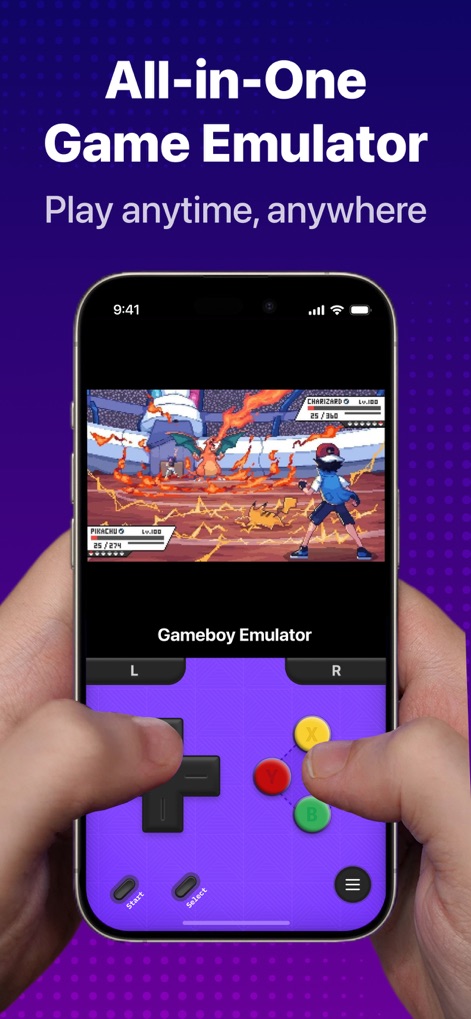
This screenshot highlights the app's capability to run classic titles like Pokémon directly on a mobile device, complete with an intuitive on-screen Gameboy-style controller for seamless gameplay.
All-in-One Emulation
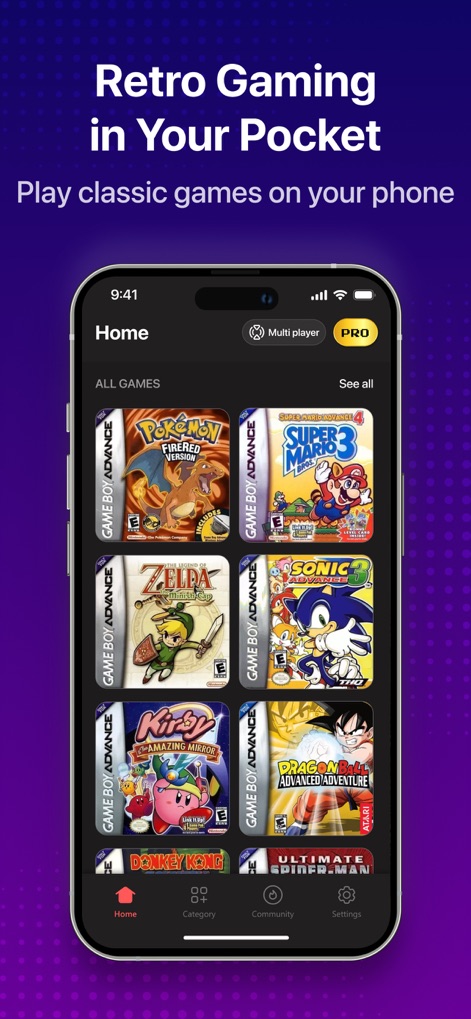
Users can explore an extensive library of classic game titles, neatly organized with appealing cover art on the home screen, alongside easy navigation options at the bottom for categories and community features.
Curated Game Library

Experience classic adventures in stunning detail, as demonstrated by the crisp visuals of games like The Legend of Zelda and Mario Kart, further enhanced by responsive on-screen controls and optional physical gamepad integration.
Enhanced HD Graphics

This screen clearly displays the app's impressive support for a multitude of classic gaming systems, from the iconic Nintendo DS to the beloved PlayStation, offering a truly comprehensive emulation experience.
Multi-Console Compatibility

Users can personalize their gaming experience with a wide array of custom controller skins, offering unique aesthetics from the clean 'Retro Grey' to the vibrant 'Graffiti' design for every preference.
Custom Controller Skins
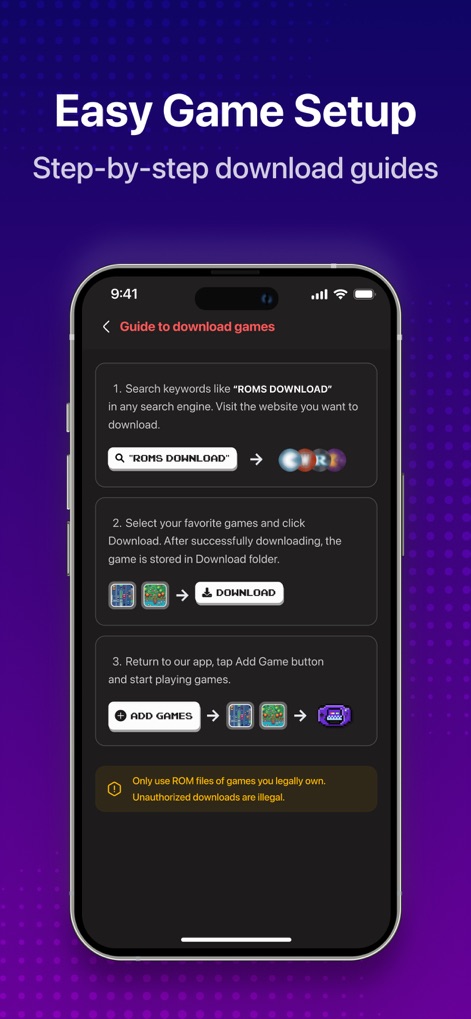
The app provides a clear, step-by-step guide for users to easily integrate game files, detailing the process from searching for ROMs to adding them directly into their library.
Streamlined Game Setup
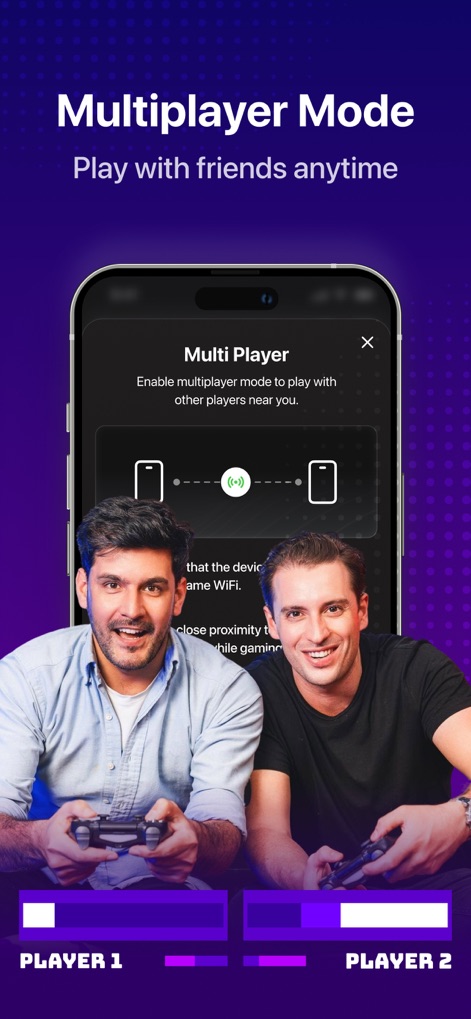
This screenshot highlights the app's robust multiplayer capabilities, enabling friends to connect and enjoy classic games together, as demonstrated by the 'Multi Player' interface and two users sharing a gaming experience.
Real-time Multiplayer
Description
Download
More Like This
Apps with similar features and user experience
Retra - app console emulator
MODERN DEV LP

Manic EMU - Game Emulator
傲霜 李
Game Emulator: GamePod Emu
Aytek Sokmen

Gamuroid: All Game Emulator
UNIVERSAL TECHLAB COMPANY LIMITED

Lucky Emulator – GBA & DS
LUCKY MUSHROOM LIMITED
MyBoyGame-All in one Emulator
明 李

Game Emulator - RePlay
彩连 刘

Delta - Game Emulator
Yvette Testut
Emu — Game Consoles App
METRONOM YAZILIM LIMITED SIRKETI
This page is not an official page of the app or its developer, but an independent editorial publication created for informational and commentary purposes. Unless expressly stated otherwise, neither the app nor its developer is affiliated with, endorsed by, sponsored by, authorized by, or otherwise officially connected with MWM, Apple, Google Play, the app publisher, or the app's developer, and nothing on this page implies that the app was developed using MWM's services. Any trademarks, logos, screenshots, and other content remain the property of their respective owners.