
This page is not an official page of the app or its developer, but an independent editorial publication created for informational and commentary purposes. Unless expressly stated otherwise, neither the app nor its developer is affiliated with, endorsed by, sponsored by, authorized by, or otherwise officially connected with MWM, Apple, Google Play, the app publisher, or the app's developer, and nothing on this page implies that the app was developed using MWM's services. Any trademarks, logos, screenshots, and other content remain the property of their respective owners.


Microsoft Family Safety
Create a safe space for your family to explore, learn, and play. Set healthy digital boundaries, manage screen time, and filter content across Xbox, Windows, and mobile devices.
Downloads
4M+User Rating
Total Ratings
18K+Publisher
Category
LifestyleLocales
33Latest Version
2.0.5Size
105.3 MBFirst Released
Jul 28, 2020Empower Your Family’s Digital Journey
Protect your loved ones with smart tools designed to build healthy digital habits and provide peace of mind across all their favorite devices.
Master Screen Time Balance
Set healthy boundaries across Xbox, Windows, and Android to ensure gaming and browsing stay within your family's daily limits.
Filtered Exploration
Automatically block inappropriate content and mature apps, creating a safe space for your kids to learn and play on the web.
Frequently Asked Questions
Everything you need to know about Microsoft Family Safety
What is the purpose of the Microsoft Family Safety app?
The Microsoft Family Safety app helps families create healthy digital habits and protect loved ones. It enables setting boundaries, monitoring activity, and managing screen time and content across various devices.
Can I block inappropriate content with Microsoft Family Safety?
Yes, Microsoft Family Safety allows users to block inappropriate content and limit browsing to kid-friendly websites. This feature works with Microsoft Edge on Windows, Xbox, and Android devices.
How does Microsoft Family Safety help manage screen time?
Microsoft Family Safety enables setting screen time limits for apps, games, and devices on Xbox, Windows, and Android. It also provides an activity summary of screen time and online usage.
Can I set daily screen time limits for specific devices using Microsoft Family Safety?
Yes, Microsoft Family Safety allows you to set daily screen time limits for devices such as Windows and Xbox. You can choose specific days and set a duration, for example, 3 hours and 30 minutes.
Does Microsoft Family Safety provide a summary of my child's online activity?
Yes, Microsoft Family Safety provides an activity summary. Parents can view their kids’ weekly activity and screen time usage to understand online behavior and device interactions.
Can I manage app and game purchases with Microsoft Family Safety?
Yes, Microsoft Family Safety allows you to track spending and set limits. You can require approval for every purchase made using credit cards for associated accounts.
How can I add family members to Microsoft Family Safety?
You can easily add family members within the Microsoft Family Safety app by navigating to the "Your family" section. The app prompts you to have their number or email ready to add them.
Does Microsoft Family Safety share my family's data with third parties?
No, Microsoft Family Safety does not sell or share user data. It protects your data and information, providing meaningful choices about how and why data is collected and used.
The following screenshots and description are sourced directly from the app's official store listing and are the property of the app developer.
App Store
Screenshots
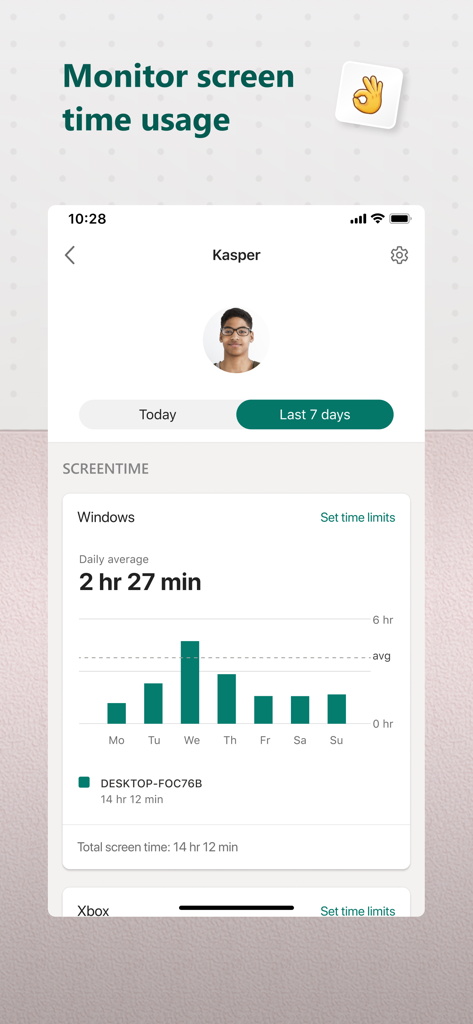
Weekly screen time usage report for a child on the Microsoft Family Safety app.
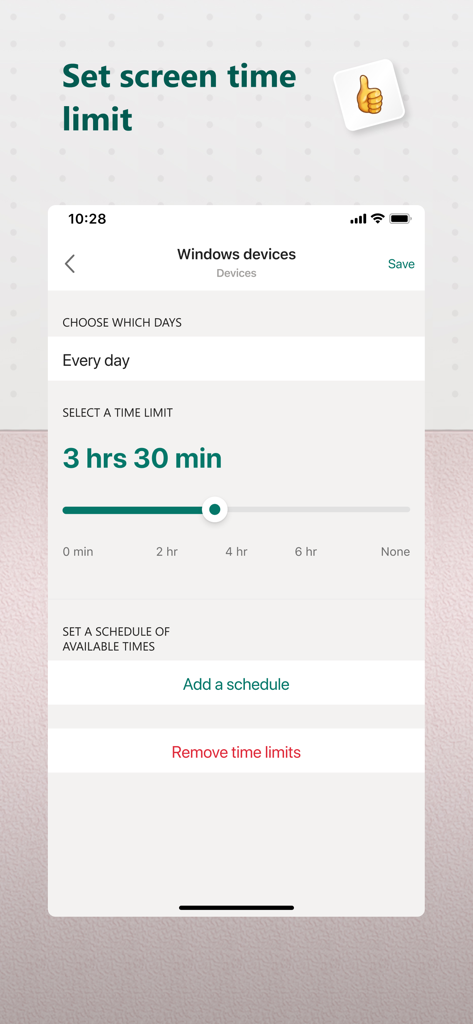
Setting a daily screen time limit for Windows devices in the Microsoft Family Safety app.
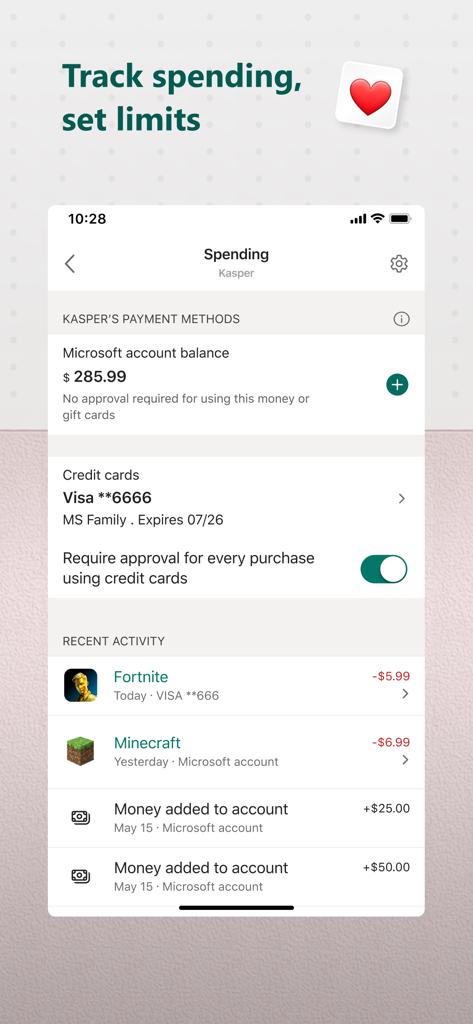
Parental dashboard in Microsoft Family Safety showing child spending activity and purchase approval settings
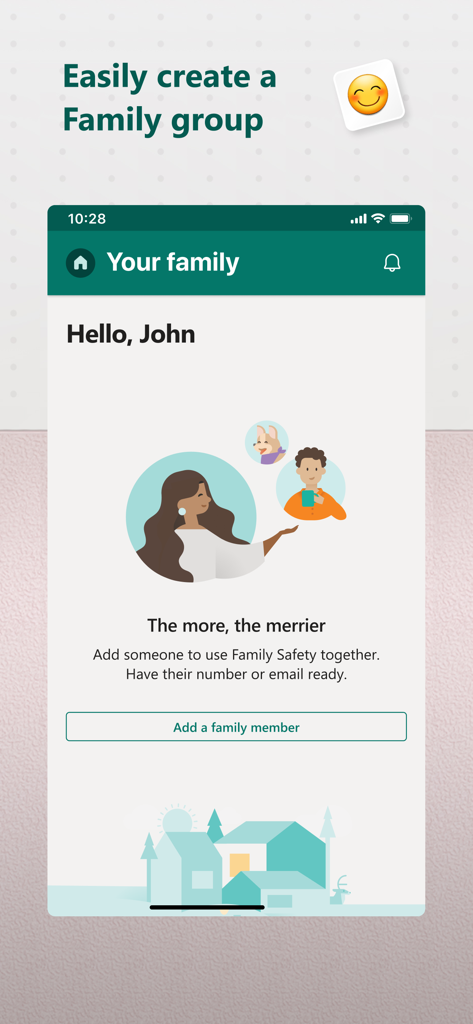
Microsoft Family Safety app screen for adding family members to a group
Description
Download
More Like This
Apps with similar features and user experience

Findos - Find My Device
Pollux Bilisim Teknolojileri Sanayi ve Ticaret Limited Sirketi

Boost Family Guard
Smith Micro Software, Inc.

Google Family Link
Google LLC

Findmykids: GPS Phone Tracker
LETEM LTD

Nintendo Switch Parental Cont…
Nintendo Co., Ltd.

Parental Control App Kids360
ANKO SOLUTIONS LLC

JusTalk Kids - Safe Messenger
Ningbo Jus Internet Technology Co., Ltd.

FlashGet Kids:parental control
HONGKONG FLASHGET NETWORK TECHNOLOGY CO., LIMITED

Parental Control App: AirDroid
SAND STUDIO CORPORATION LIMITED
This page is not an official page of the app or its developer, but an independent editorial publication created for informational and commentary purposes. Unless expressly stated otherwise, neither the app nor its developer is affiliated with, endorsed by, sponsored by, authorized by, or otherwise officially connected with MWM, Apple, Google Play, the app publisher, or the app's developer, and nothing on this page implies that the app was developed using MWM's services. Any trademarks, logos, screenshots, and other content remain the property of their respective owners.