
This page is not an official page of the app or its developer, but an independent editorial publication created for informational and commentary purposes. Unless expressly stated otherwise, neither the app nor its developer is affiliated with, endorsed by, sponsored by, authorized by, or otherwise officially connected with MWM, Apple, Google Play, the app publisher, or the app's developer, and nothing on this page implies that the app was developed using MWM's services. Any trademarks, logos, screenshots, and other content remain the property of their respective owners.


Qustodio Parental Control App
Finally, total digital oversight. The app offers the power to shape your child's online world, not just observe it.
Downloads
1M+User Rating
Total Ratings
19.0KPublisher
Category
LifestyleLocales
8Latest Version
182.35.0Size
149.5 MBFirst Released
May 13, 2020An analytical overview of the primary functionalities designed to empower parents in safeguarding and guiding their children's digital journey.
Qustodio Parental Control App: Core Features Analysis
Advanced Web Filtering
The app provides robust web filtering capabilities, allowing parents to block inappropriate content such as pornography, gambling, and other unwanted websites, ensuring a safer online environment for children.
Real-time GPS Location Tracking
The app provides real-time GPS location monitoring, enabling parents to track their child's whereabouts, locate lost devices, and ensure their physical safety.
Comprehensive Screen Time Controls
It allows users to set daily screen time limits, schedule restricted usage periods, and instantly pause internet access, fostering healthy digital habits and preventing excessive screen exposure.
Social Media & Messaging Monitoring
This tool offers alerts for social media activity (WhatsApp, Instagram, Line), search queries, and SMS messages, providing insights into potential online risks and interactions.
Application and Game Management
This tool features the ability to block specific applications and games, or set time limits for their use, helping parents manage how much time children spend on particular apps.
Detailed Activity Reports
It allows users to view comprehensive 30-day online activity reports, including web browsing history, app usage insights, and YouTube activity, offering a clear overview of digital behavior.
Safe Search Enforcement
The app enforces safe search settings across major search engines like Google, Bing, and YouTube, automatically filtering out inappropriate results to protect children from unsuitable content.
Co-Parent Supervision
This tool enables multiple parents or guardians to collaborate in monitoring and setting rules for their child's digital activities, facilitating shared responsibility in digital parenting.
Frequently Asked Questions
Everything you need to know about Qustodio Parental Control App
What is Qustodio Parental Control App?
Qustodio Parental Control App is an award-winning tool that helps parents manage their children's digital use. It offers features like screen time limits, app blocking, GPS tracking, and content filtering to ensure online safety.
How does Qustodio Parental Control App monitor social media?
Qustodio Parental Control App provides social media monitoring alerts for platforms such as WhatsApp, Instagram, and Line. It also allows parents to manage access to social media apps like TikTok, Facebook, and Snapchat.
Can I set daily screen time limits with Qustodio Parental Control App?
Yes, Qustodio Parental Control App allows parents to set daily screen time limits for their children. It also enables scheduling restricted times and custom routines for apps and websites.
Does Qustodio Parental Control App include GPS location tracking?
Yes, the Qustodio Parental Control App includes GPS location monitoring, allowing parents to track their child's location. It also enables finding a child's phone and saving favorite places.
How do I get Qustodio Parental Control App working on my child's device?
To use Qustodio Parental Control App, first download it onto your own device. Then, download the companion Kids App Qustodio onto your child’s device(s) for the two apps to work together.
Can Qustodio Parental Control App block games and other apps?
Yes, Qustodio Parental Control App allows parents to block specific games and applications. It also provides the ability to set limits on games and apps for controlled usage.
Does Qustodio Parental Control App send alerts for suspicious activity?
Yes, Qustodio Parental Control App sends various alerts. These include notifications for web activity, blocked websites, search alerts, SMS message alerts, and social monitoring alerts.
Is there a free trial available for Qustodio Parental Control App?
The Qustodio Premium family parental control app offers a free trial period. Any unused portion of this free trial is ended upon purchase confirmation of an annual subscription.
What is the pricing model for Qustodio Parental Control App?
Qustodio Parental Control App offers a basic plan with some features and a premium plan for full access. Premium is available as an annual subscription, charged to your iTunes account upon purchase confirmation.
Does Qustodio Parental Control App allow co-parenting or multi-parent access?
Yes, Qustodio Parental Control App supports co-parenting. It allows users to invite another parent or guardian to monitor and set rules for their child through a multi-parent login.
Does Qustodio Parental Control App sell user data to third parties?
No, Qustodio Parental Control App states explicitly that it does not and will not sell user data to third parties. Child's screen time activity is for parents' eyes only.
Can I pause the internet instantly with Qustodio Parental Control App?
Yes, Qustodio Parental Control App allows parents to pause the internet at the click of a button. This feature helps nurture healthy digital habits.
What languages does Qustodio Parental Control App support?
Qustodio Parental Control App is available in English, Spanish, French, German, Italian, Chinese, Japanese, Dutch, and Brazilian Portuguese.
Can Qustodio Parental Control App track calls and messages?
Yes, Qustodio Parental Control App provides features to track calls and messages. It also offers SMS message alerts and social media monitoring.
Does Qustodio Parental Control App filter inappropriate content on search engines?
Yes, Qustodio Parental Control App enforces safe search. It filters out inappropriate results on search engines like Google, Bing, and YouTube to protect children online.
The following screenshots and description are sourced directly from the app's official store listing and are the property of the app developer.
App Store
Screenshots

See how the app's comprehensive "Dashboard" presents a clear overview of digital activity, alongside the "Multi-parent login" feature for shared supervision.
Family Activity Glance

Explore the intuitive interface for setting specific "Daily time limits" for screen use, featuring an easy-to-use "day selector" for customizing allowance across the week.
Screen Time Setup
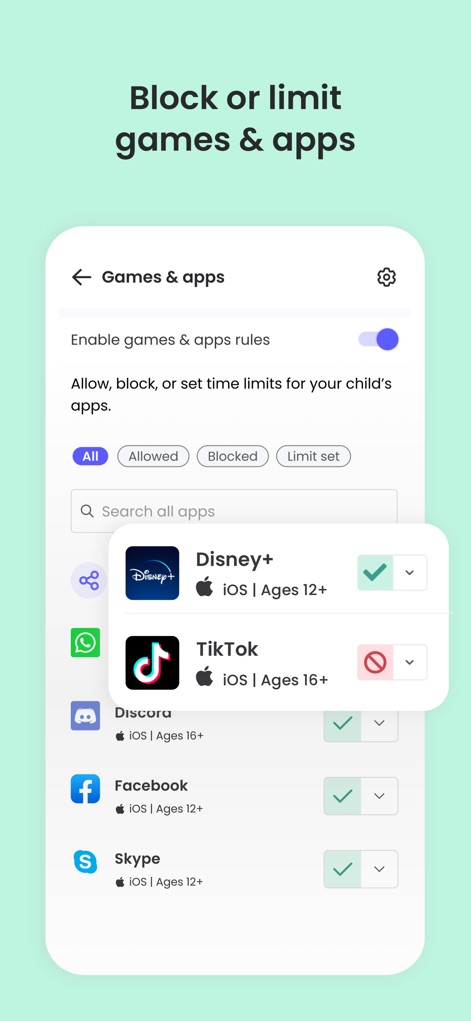
Understand how users can "Block or limit games & apps" through a dedicated toggle, enabling precise control over specific applications such as "TikTok" or "Discord".
Manage App Access
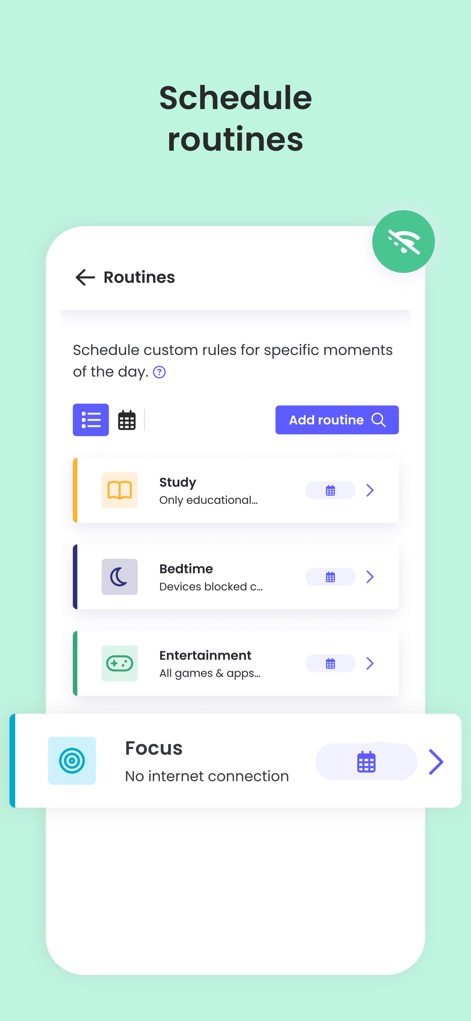
Discover how the app enables creating custom "Routines" for distinct activities like "Study" and "Bedtime", offering structured digital time management.
Custom Routine Settings

View the "Timeline" feature that delivers critical "Message alert" notifications for concerning content and "Search alert" flags for potentially harmful queries.
Real-time Notifications
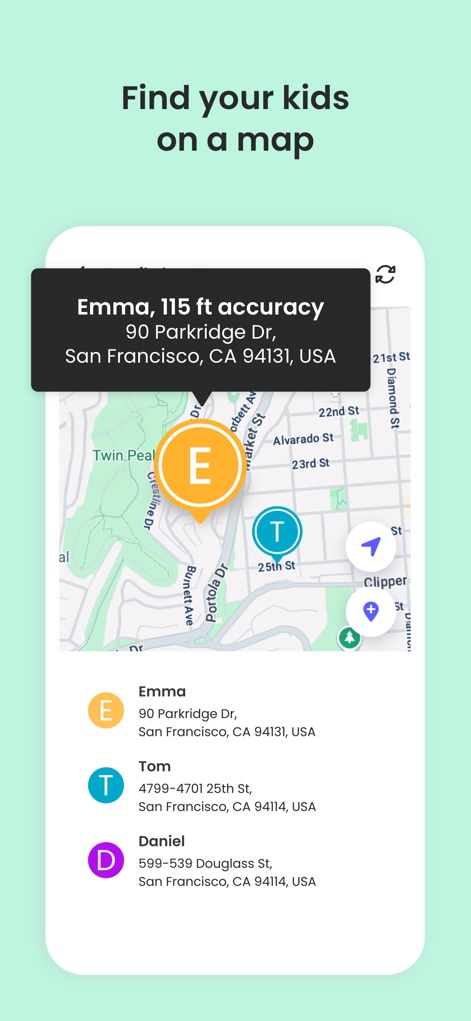
Observe the "GPS location monitoring" feature displaying children's real-time positions on a "map", complete with precise location "accuracy" details.
Family Location Tracking

See how the app provides an overview of "Call & messages" activity, displaying both call counts and message totals for specific contacts or blocked numbers.
Communication Monitoring

Explore the precise controls for "social media access", allowing users to manage popular platforms such as "TikTok" and "Instagram" with easy block or allow settings.
Social App Management

Learn about the "Additional parent" feature, which allows inviting another guardian to co-manage supervision by entering their "email address" for collaborative monitoring.
Co-Parent Collaboration

Discover the quick action to "Pause the internet" instantly, displaying the pause duration and offering "Unpause now" or "Edit pause" options.
Instant Internet Pause
Description
Download
More Like This
Apps with similar features and user experience

Findos - Find My Device
Pollux Bilisim Teknolojileri Sanayi ve Ticaret Limited Sirketi

Boost Family Guard
Smith Micro Software, Inc.

Google Family Link
Google LLC

Findmykids: GPS Phone Tracker
LETEM LTD

Nintendo Switch Parental Cont…
Nintendo Co., Ltd.

Parental Control App Kids360
ANKO SOLUTIONS LLC

JusTalk Kids - Safe Messenger
Ningbo Jus Internet Technology Co., Ltd.

FlashGet Kids:parental control
HONGKONG FLASHGET NETWORK TECHNOLOGY CO., LIMITED

Parental Control App: AirDroid
SAND STUDIO CORPORATION LIMITED
This page is not an official page of the app or its developer, but an independent editorial publication created for informational and commentary purposes. Unless expressly stated otherwise, neither the app nor its developer is affiliated with, endorsed by, sponsored by, authorized by, or otherwise officially connected with MWM, Apple, Google Play, the app publisher, or the app's developer, and nothing on this page implies that the app was developed using MWM's services. Any trademarks, logos, screenshots, and other content remain the property of their respective owners.