
This page is not an official page of the app or its developer, but an independent editorial publication created for informational and commentary purposes. Unless expressly stated otherwise, neither the app nor its developer is affiliated with, endorsed by, sponsored by, authorized by, or otherwise officially connected with MWM, Apple, Google Play, the app publisher, or the app's developer, and nothing on this page implies that the app was developed using MWM's services. Any trademarks, logos, screenshots, and other content remain the property of their respective owners.


Screen Recorder - Record.TV
Screen Recorder - Record.TV hands users the power to dominate mobile content creation. It captures every pixel, then transforms raw footage into polished, personality-driven video.
Downloads
1M+User Rating
Total Ratings
4.1KPublisher
Category
Photo & VideoLocales
37Latest Version
3.19Size
150.8 MBFirst Released
Jul 31, 2018An in-depth evaluation of key functionalities for mobile content creators.
Comprehensive Analysis: Screen Recorder - Record.TV
High-Quality Screen Recording
The app provides robust screen recording capabilities leveraging iOS 11 global APIs, ensuring high-fidelity capture of screen activity for tutorials, gameplay, or demonstrations.
Integrated Facecam & Audio Commentary
It allows users to seamlessly add personal video reactions with simultaneous audio commentary to their recordings, enhancing engagement and making content more dynamic for educational or entertainment purposes.
Unlimited Creative Assets
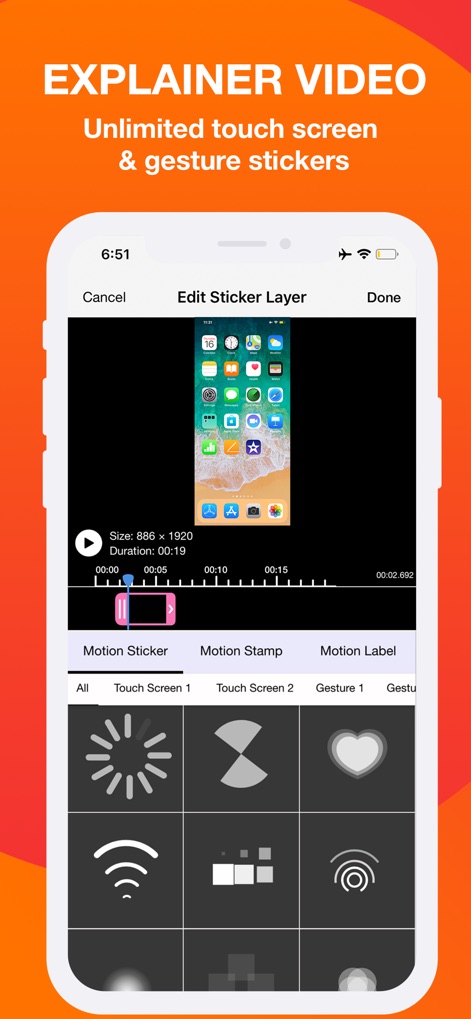
It unlocks access to a comprehensive library of music, stickers, and effects, empowering users to enrich their videos with creative elements and personality, catering to an 'all-in-one' solution need.
In-App Video Editing Suite
This tool features essential video editing functionalities including trimming, rotation, and applying various filters, enabling creators to refine their recordings directly within the app.
Versatile Export & Sharing Options
The app offers diverse options for sharing and exporting recorded content, allowing users to distribute videos to other applications, via email, AirDrop, or transfer to a computer for further professional editing.
Intuitive Recording Management
The app facilitates efficient organization of all recorded content within a single, user-friendly interface, simplifying access and workflow for active creators.
Frequently Asked Questions
Everything you need to know about Screen Recorder - Record.TV
Can I record my screen with Screen Recorder - Record.TV (Recordora)?
Yes, Screen Recorder - Record.TV (Recordora) records full-screen videos using iOS 11 global screen recording APIs. A 2-step guide is available upon app launch.
Does Screen Recorder - Record.TV support video reactions or facecam recording?
Yes, Screen Recorder - Record.TV (Recordora) supports adding video reactions with audio commentary, often called facecam. This feature is ideal for gaming or app demonstrations.
What video editing features does Screen Recorder - Record.TV offer?
Screen Recorder - Record.TV (Recordora) offers video trimming, rotation, and filters. Users can also add touch screen gestures, stickers, and text animations to their recordings.
How can I share or export recordings from Screen Recorder - Record.TV (Recordora)?
Screen Recorder - Record.TV (Recordora) allows sharing and exporting to other apps, email, or AirDrop. You can also export recordings to your computer via WiFi.
How much does Screen Recorder - Record.TV Premium cost?
Screen Recorder - Record.TV (Recordora) Premium offers a 3-day free trial followed by $2.99 per week or $9.99 per month. Subscriptions provide unlimited access to features.
Does Screen Recorder - Record.TV Premium subscription auto-renew?
Yes, the Screen Recorder - Record.TV (Recordora) Premium subscription automatically renews. Users must turn off auto-renewal at least 24 hours before the current period ends.
Does Screen Recorder - Record.TV include chroma key green screen effects?
Yes, Screen Recorder - Record.TV (Recordora) includes green screen effects with chroma key functionality. This feature is available within the video editing interface.
Where can I find the Terms of Use and Privacy Policy for Screen Recorder - Record.TV?
The Terms of Use for Screen Recorder - Record.TV (Recordora) are at https://tos.vidanimate.co. The Privacy Policy is available at https://privacy.vidanimate.co.
The following screenshots and description are sourced directly from the app's official store listing and are the property of the app developer.
App Store
Screenshots



Description
Download
More Like This
Apps with similar features and user experience

Medal - Game Clipping
Medal B.V.

Screen Recorder,Video Recorder
VIDEOSHOW PTE. LTD.

Screen Recorder
App of the Year LLC

Record it! :: Screen Recorder
DIGISET LLC

Screen Recorder Voice & Video
Arthur Eduardo Skaetta Alvarez Desenvolvimento de Software LTDA.

Screen Recorder ®
Poster App LLP

Super Screen Recorder: Full HD
Dream United, Ltd.

Screen Recorder: Go Record
Torqued Studios LLC

Screen Recorder-Video & Voice
Danila Ianushev
This page is not an official page of the app or its developer, but an independent editorial publication created for informational and commentary purposes. Unless expressly stated otherwise, neither the app nor its developer is affiliated with, endorsed by, sponsored by, authorized by, or otherwise officially connected with MWM, Apple, Google Play, the app publisher, or the app's developer, and nothing on this page implies that the app was developed using MWM's services. Any trademarks, logos, screenshots, and other content remain the property of their respective owners.