
This page is not an official page of the app or its developer, but an independent editorial publication created for informational and commentary purposes. Unless expressly stated otherwise, neither the app nor its developer is affiliated with, endorsed by, sponsored by, authorized by, or otherwise officially connected with MWM, Apple, Google Play, the app publisher, or the app's developer, and nothing on this page implies that the app was developed using MWM's services. Any trademarks, logos, screenshots, and other content remain the property of their respective owners.


Teleprompter: Floating Notes
Stop fumbling. This app projects your script over any screen, instantly transforming delivery from hesitant to commanding.
Downloads
1M+User Rating
Total Ratings
15.6KPublisher
Category
Photo & VideoLocales
20Latest Version
2.4.3Size
17.0 MBFirst Released
Mar 23, 2021Key Features for Content Creators and Public Speakers on Apple Devices
Analytical Review: Teleprompter: Floating Notes
Display scripts on top of any app
The app provides a floating overlay that displays scripts seamlessly over any application, including camera apps, which is crucial for producing polished video content and live streams.
Cross-device availability
This tool features comprehensive availability across iPhone, iPad, and Mac, ensuring a consistent teleprompting experience within the Apple ecosystem.
Script import and iCloud sync
It allows users to import scripts and synchronize them via iCloud, enabling effortless script management and access across all linked devices.
Customizable display settings
The app offers extensive customization for font size, type, color, background, and scrolling speed, allowing users to optimize readability and adapt to various environments.
Integrated video recording
This tool features an integrated video recording capability, simplifying the content creation workflow by allowing users to capture their delivery directly within the app.
Remote control support
It allows users to control script progression remotely, providing hands-free operation vital for solo presenters or those who need to maintain eye contact with the camera.
Frequently Asked Questions
Everything you need to know about Teleprompter: Floating Notes
What is Teleprompter: Floating Notes?
Teleprompter: Floating Notes is an app that displays scripts over any other app, including camera apps. It is designed for vloggers, YouTubers, and live hosts to read scripts while recording.
Can Teleprompter: Floating Notes record video?
Yes, Teleprompter: Floating Notes allows users to record video directly within the app. It also floats the teleprompter over camera apps for external recording.
Does Teleprompter: Floating Notes support remote control?
Yes, Teleprompter: Floating Notes supports remote control. Users can control the teleprompter's functions from other devices, including an Apple Watch.
What customization options are available in Teleprompter: Floating Notes?
Teleprompter: Floating Notes offers multiple customization options including font size, font color, background color, scrolling speed, and display ratio for scripts.
Can I import scripts into Teleprompter: Floating Notes?
Yes, Teleprompter: Floating Notes supports script import. It also offers iCloud synchronization to keep your scripts updated across all your devices.
How does the AI Mode work in Teleprompter: Floating Notes?
Teleprompter: Floating Notes features an AI Mode that allows the script to scroll automatically with speech. This ensures hands-free operation during recording or live streaming.
Is a one-time purchase option available for Teleprompter: Floating Notes?
Yes, Teleprompter: Floating Notes offers a one-time payment plan for unlimited access to all features, in addition to monthly or annual subscription options.
How do I cancel my Teleprompter: Floating Notes subscription?
You can manage your Teleprompter: Floating Notes subscription and turn off auto-renewal in your iTunes Account Settings after purchase. Cancellation must occur 24 hours before the period ends.
Can Teleprompter: Floating Notes be used on Mac?
Yes, Teleprompter: Floating Notes is available and fully functional on iPhone, iPad, and Mac devices. This ensures broad compatibility for users.
Does Teleprompter: Floating Notes integrate with Dynamic Island?
Yes, Teleprompter: Floating Notes provides controls that integrate with the Dynamic Island and Live Activities for enhanced user interaction.
Can Teleprompter: Floating Notes mirror scripts?
Yes, Teleprompter: Floating Notes has a feature to mirror scripts. This is useful for external teleprompter glass setups where text needs to be reversed.
The following screenshots and description are sourced directly from the app's official store listing and are the property of the app developer.
App Store
Screenshots

See how the app integrates script display with video recording and an AI mode for dynamic content creation, featuring on-screen controls and a transparent overlay.
Record & AI Mode

This tool showcases its floating display over camera apps, allowing users to scroll automatically with speech for natural, unscripted delivery.
Adaptive Floating Display
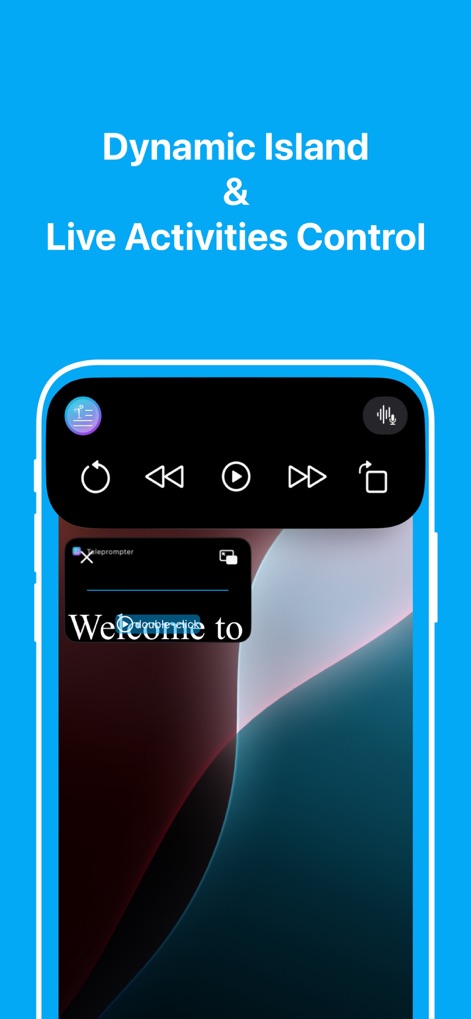
Observe the app's seamless integration with iOS Dynamic Island, providing quick playback controls and a compact floating teleprompter for active live sessions.
Dynamic Island Control

The app provides a mirrored script display, essential for teleprompter glass setups, ensuring text is readable from both standard and reflective surfaces.
Mirrored Script View

Users can effortlessly manage their teleprompter from a secondary device, with controls to start/pause and adjust script scrolling speed for precision delivery.
Intuitive Remote Control

This tool adapts to any shooting environment, allowing users to view scripts seamlessly in both portrait and landscape orientations for optimal setup flexibility.
Flexible Orientation View
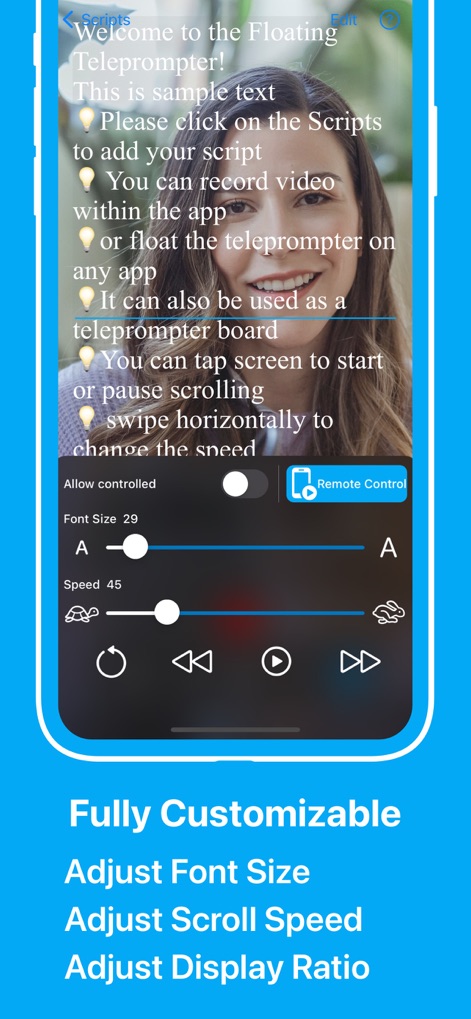
Explore the extensive customization options, including precise adjustments for font size and scroll speed, ensuring optimal readability and pacing for any presenter.
Personalized Display Customization

The app enhances convenience with Apple Watch integration, enabling users to start/pause scripts and adjust text scrolling via the digital crown.
Apple Watch Accessibility

Efficiently manage and synchronize scripts through the dedicated scripts history interface, offering import capabilities and iCloud sync for seamless access across devices.
Comprehensive Script Management
Description
Download
More Like This
Apps with similar features and user experience

Teleprompter
Teleprompter Apps Ltd

BIGVU Teleprompter Captions AI
BIGVU INC

Teleprompter for Video
Norton Five Ltd

Teleprompter.com
Teleprompter LLC

Vmake: AI Talking Video Editor
Starii Tech Pty Ltd

说得AI提词器相机-全能的脚本创作提词拍摄快速剪辑口播神器
Hangzhou Gaishi Technology Co., Ltd.

Teleprompter-Record Script
晨铭 李

Verba: Captions & Video Editor
Verba Creative Inc.

Teleprompter: Video Recording
志威 王
This page is not an official page of the app or its developer, but an independent editorial publication created for informational and commentary purposes. Unless expressly stated otherwise, neither the app nor its developer is affiliated with, endorsed by, sponsored by, authorized by, or otherwise officially connected with MWM, Apple, Google Play, the app publisher, or the app's developer, and nothing on this page implies that the app was developed using MWM's services. Any trademarks, logos, screenshots, and other content remain the property of their respective owners.