
This page is not an official page of the app or its developer, but an independent editorial publication created for informational and commentary purposes. Unless expressly stated otherwise, neither the app nor its developer is affiliated with, endorsed by, sponsored by, authorized by, or otherwise officially connected with MWM, Apple, Google Play, the app publisher, or the app's developer, and nothing on this page implies that the app was developed using MWM's services. Any trademarks, logos, screenshots, and other content remain the property of their respective owners.


Toggl Track: Hours & Time Log
Stop losing hours to guesswork. The app grants users total command over their time, turning effort into measurable data.
Downloads
1M+User Rating
Total Ratings
11.1KPublisher
Category
BusinessLocales
4Latest Version
6.17.0Size
130.1 MBFirst Released
Dec 9, 2017An Analytical Overview for Productivity-Focused Professionals
Key Features of Toggl Track: Hours & Time Log
Comprehensive Reporting
The app provides detailed reports, enabling users to analyze time allocation, generate summaries for clients, and gain insights into their daily or weekly productivity patterns.
Customizable Time Entries (Projects, Clients, Tags)
It allows users to categorize time entries with projects, clients, and tags, providing granular detail necessary for accurate billing, project management, and identifying specific work hour distribution.
Manual Time Entry and Editing
This tool features a manual mode, offering users the flexibility to add, edit, and meticulously account for all tracked time, ensuring data accuracy and control over entries.
Offline Tracking Capability
The app supports offline tracking, allowing continuous time logging even without an internet connection, with automatic synchronization once online, ensuring no data loss for mobile professionals.
Cross-Device Sync
It ensures seamless synchronization of time entries across various devices, allowing users to start tracking on one device and stop on another, maintaining data consistency and accessibility.
Calendar Integration
The app allows for integration with calendar applications, enabling users to automatically create time entries based on scheduled events, streamlining the logging process and improving accuracy.
Pomodoro Mode for Focus
This tool includes a Pomodoro mode, designed to enhance user focus and productivity through timed work intervals, complete with notifications and a countdown timer.
Suggested Time Entries
The app offers intelligent suggestions for time entries based on previous tracking habits, helping users quickly log recurring tasks and improve efficiency over time.
Frequently Asked Questions
Everything you need to know about Toggl Track: Hours & Time Log
Is Toggl Track a free application?
Yes, Toggl Track on iOS is completely free to use. Users can track and save their time without any cost.
What is Toggl Track?
Toggl Track is a time tracking application that allows users to record and save their time with a single tap across multiple devices.
Can I use Toggl Track across different devices?
Yes, Toggl Track syncs time seamlessly across all devices, including iPhone, Apple Watch, desktop, and web browsers.
Does Toggl Track offer reports on time usage?
Yes, Toggl Track provides Reports to discover what's taking up your time. Users can analyze daily or weekly snapshots and export data.
How does Toggl Track help organize time entries?
Toggl Track allows users to customize time entries by adding projects, clients, and tags. This helps organize and add details to tracked hours.
Does Toggl Track integrate with my calendar?
Yes, Toggl Track connects with your calendar app. It can instantly create time entries based on your calendar events.
What is Pomodoro mode in Toggl Track?
Toggl Track's Pomodoro mode helps users focus by tracking time in 25-minute increments. It includes notifications, a full-screen display, and a countdown timer.
Can I track time with Toggl Track if I am offline?
Yes, Toggl Track allows offline time tracking. The app seamlessly syncs all recorded time with your account and devices once you are back online.
Does Toggl Track support Siri commands?
Yes, Toggl Track is compatible with Siri. Users can start new time entries, stop tracking, or access reports using voice commands.
Can Toggl Track suggest time entries?
Yes, Toggl Track provides suggested time entries. These suggestions are based on the user's tracking habits and previous time entry data.
Can I manually add or edit time in Toggl Track?
Yes, Toggl Track offers a Manual Mode. This feature allows users to add and edit all tracked time manually, ensuring accuracy.
Are there widgets for Toggl Track on iOS?
Yes, Toggl Track includes iOS Widgets. These widgets allow users to start and stop tracking directly from their iPhone Home Screen.
How can I quickly add projects and tags to time entries in Toggl Track?
Users can quickly add projects and tags to their time entries in Toggl Track by using the "@" and "#" shortcuts.
The following screenshots and description are sourced directly from the app's official store listing and are the property of the app developer.
App Store
Screenshots

Discover the core brand identity and the playful visual metaphor of tracking with the Toggl Track logo and stylized 't' pathway.
Brand Identity Overview

Explore the app's intuitive Timer interface, showcasing the practical Suggestions list for quick entry and the comprehensive Your Activity log.
Effortless Time Tracking

Uncover how this tool empowers users to stay focused with the customizable Goals section, displaying progress for tasks like billable hours and weekly reading.
Achieve Productivity Goals
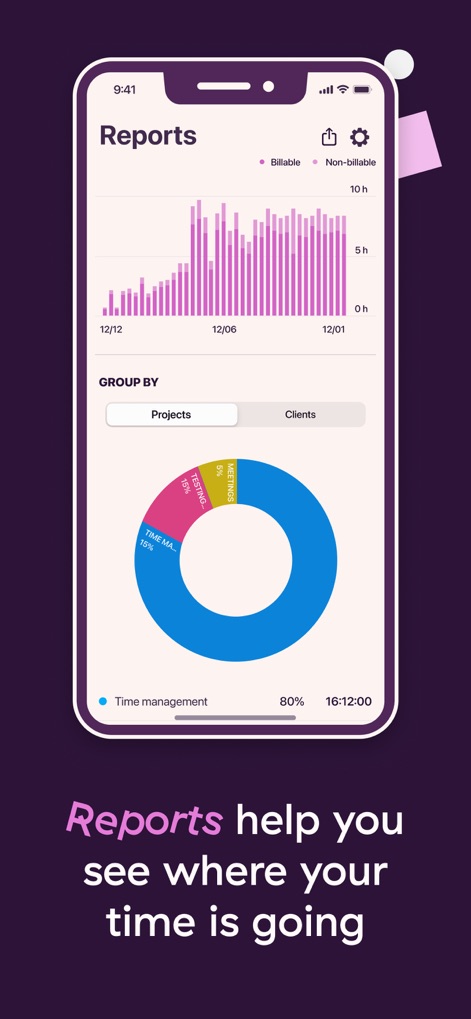
Visualize time allocation effectively through the Reports feature, featuring a clear bar chart of billable/non-billable hours and an informative donut chart breaking down time by projects.
Insightful Time Reports

Experience the convenience of automatic time tracking by integrating the app with a user's calendar, displaying scheduled events and associated time entries.
Seamless Calendar Integration

Enhance concentration and productivity with the dedicated Pomodoro mode, featuring a visual timer circle and a clear 'Start session' button.
Boost Focus Pomodoro

Discover immediate control over time tracking directly from the device's home screen, leveraging the iOS Live Activity and dynamic island integration.
Quick Access Widgets

Observe the app's seamless synchronization capabilities across multiple device interfaces, ensuring consistent data display and access to time logs anywhere.
Cross-Platform Sync
Description
Download
More Like This
Apps with similar features and user experience

Supershift Shift Work Calendar
Supershift GmbH

安心记加班-记考勤加班工资记录记账记工本
Shanghai Anjiaxin Network Technology Co., Ltd

Work Shift Calendar (Shifter)
Luis Alberto Reyes Halaby

极简记工时·小时工记加班
敏强 李

My Shift Planner - Calendar
MyBuzz Technologies Limited

Work hours tracker - Timesheet
Kanstantsin Markau

Punch Time Clock
Trent Morris

记工时考勤
Beijing Chejiang Internet Technology Co., Ltd.

Time Squared: Hours Tracker
TSQ Publishing Corp.
This page is not an official page of the app or its developer, but an independent editorial publication created for informational and commentary purposes. Unless expressly stated otherwise, neither the app nor its developer is affiliated with, endorsed by, sponsored by, authorized by, or otherwise officially connected with MWM, Apple, Google Play, the app publisher, or the app's developer, and nothing on this page implies that the app was developed using MWM's services. Any trademarks, logos, screenshots, and other content remain the property of their respective owners.