
This page is not an official page of the app or its developer, but an independent editorial publication created for informational and commentary purposes. Unless expressly stated otherwise, neither the app nor its developer is affiliated with, endorsed by, sponsored by, authorized by, or otherwise officially connected with MWM, Apple, Google Play, the app publisher, or the app's developer, and nothing on this page implies that the app was developed using MWM's services. Any trademarks, logos, screenshots, and other content remain the property of their respective owners.


Video Compress - Shrink Vids
Stop paying for extra iCloud space and ending up with 'Storage Full' warnings. Easily shrink large 4K videos to save gigabytes of space while keeping high quality for sharing on WhatsApp, iMessage, and Instagram.
Downloads
1M+User Rating
Total Ratings
32K+Publisher
Category
Photo & VideoLocales
8Latest Version
2.4Size
4.7 MBFirst Released
Jun 13, 2015Take Back Control of Your Storage
Stop the 'Storage Full' notifications. Shrink your videos in seconds without losing quality, and save more memories without paying for extra cloud space.
Instant Storage Recovery
Batch compress entire albums and automatically remove bulky originals to reclaim gigabytes of space instantly.
Seamless Social Sharing
Stop fighting with file limits. Shrink videos to the perfect size for WhatsApp, iMessage, and Instagram in one tap.
Frequently Asked Questions
Everything you need to know about Video Compress - Shrink Vids
How to use Video Compress - Shrink Vids?
Users tap the "+" icon to select videos from their gallery. They then choose a compression preset and adjust the bitrate. After previewing, they continue to compress, and the app saves the compressed videos.
Does Video Compress - Shrink Vids cost money?
No, Video Compress - Shrink Vids is free to download and use. The app description explicitly states, "Download now for free!"
Can Video Compress - Shrink Vids reduce video size for social media?
Yes, Video Compress - Shrink Vids reduces video size for sharing on platforms such as WhatsApp, iMessage, Facebook, and Instagram. It also optimizes videos for cloud storage.
Does Video Compress - Shrink Vids support 4K videos?
Yes, Video Compress - Shrink Vids supports 4K videos. It specifically works with 4K videos that have been recorded using the original camera app on iPhone or iPad.
What compression presets are available in Video Compress - Shrink Vids?
Video Compress - Shrink Vids provides presets including Full HD 1080p, HD 720p, HD 540p, 480p, and 360p. Users can also manually specify the bitrate for custom compression.
Can I preview the compressed video quality before saving in Video Compress - Shrink Vids?
Yes, Video Compress - Shrink Vids features a preview function to check the compressed video's image quality. The app limits this preview to 10 seconds.
Can Video Compress - Shrink Vids delete original videos after compression?
Yes, Video Compress - Shrink Vids offers an option to delete the original video once compression is successful. This feature helps save device storage space.
What devices are compatible with Video Compress - Shrink Vids?
Video Compress - Shrink Vids is compatible with iPhone, iPad, and iPod devices. It functions optimally with original videos recorded using the native camera app on these devices.
Does Video Compress - Shrink Vids compress photos?
Yes, Video Compress - Shrink Vids provides an option to compress photos in addition to videos. This feature is accessible from the app's main screen.
The following screenshots and description are sourced directly from the app's official store listing and are the property of the app developer.
App Store
Screenshots

Main interface of Video Compress app showing a plus button to select videos for compression

A video selection screen showing recent clips in the Video Compress app

A screen showing a video gallery with a selected video ready for compression.

Video compression app interface showing bitrate adjustment and estimated file size reduction
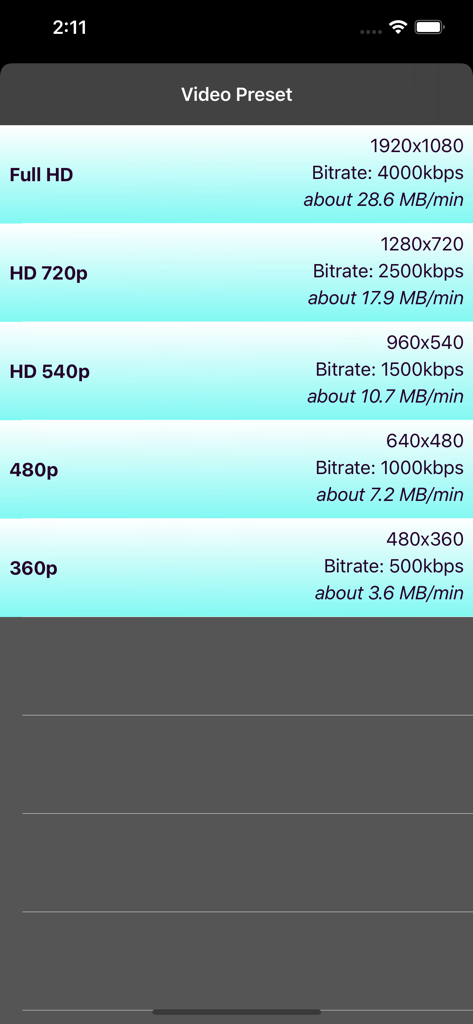
A list of video compression preset options showing resolution, bitrate and estimated file size per minute.

Interface showing options to preview original and compressed video quality

Interface of the Video Compress app showing a video being compressed with a progress bar and cancel button

App screen showing a successful video compression message with options to delete the original video and finish the process.
Description
Download
More Like This
Apps with similar features and user experience

Video compressor - save space
俊杰 阮

SlimSpace - Compressor
琛 王

转换猫-视频音频图片格式转换
ZHN Co., Ltd.

Video Compressor - HQ Compress
LightByte Co., Ltd.

The Video Compressor
Dalian Hengwei Electronics Co., Ltd

Media Converter - video to mp3
俊杰 阮

Compress Videos & Resize Video
New Marketing Lab, Inc

Easy Video Compressor - Resize
Osawa Shunsuke

Panda - Video Compressor
Farluner Apps Grzegorz Balcerzak
This page is not an official page of the app or its developer, but an independent editorial publication created for informational and commentary purposes. Unless expressly stated otherwise, neither the app nor its developer is affiliated with, endorsed by, sponsored by, authorized by, or otherwise officially connected with MWM, Apple, Google Play, the app publisher, or the app's developer, and nothing on this page implies that the app was developed using MWM's services. Any trademarks, logos, screenshots, and other content remain the property of their respective owners.