
This page is not an official page of the app or its developer, but an independent editorial publication created for informational and commentary purposes. Unless expressly stated otherwise, neither the app nor its developer is affiliated with, endorsed by, sponsored by, authorized by, or otherwise officially connected with MWM, Apple, Google Play, the app publisher, or the app's developer, and nothing on this page implies that the app was developed using MWM's services. Any trademarks, logos, screenshots, and other content remain the property of their respective owners.


Alight Motion
Mobile screens are no longer a limitation. This app unlocks desktop-tier animation, motion graphics, and visual effects, empowering users to craft studio-quality content anywhere.
Downloads
25M+User Rating
Total Ratings
241.1KPublisher
Category
Photo & VideoLocales
18Latest Version
6.2.53Size
187.1 MBFirst Released
Dec 21, 2019Alight Motion: Core Capabilities Analysis
A professional-grade mobile solution for motion graphics and video editing.
Keyframe Animation for All Settings
It allows users to achieve precise and dynamic animations across all visual properties, essential for professional-grade motion graphics.
Vector and Bitmap Graphics Support
The app provides direct on-device editing for both vector and bitmap graphics, offering unparalleled flexibility for digital artists and illustrators.
Sophisticated Visual Effects Library
This tool features over 160 foundational effect building blocks that can be intricately combined to craft complex and unique visual effects.
Multi-Layer Composition
It enables intricate compositions by supporting multiple layers of graphics, video, and audio, providing extensive creative control.
Diverse Export Options
The app supports a wide range of export formats, including MP4 video, GIF animation, PNG sequences, and still images, facilitating content distribution.
Advanced Animation Easing
It offers customizable animation easing curves, allowing for incredibly fluid and natural motion in animations, enhancing visual appeal.
Grouping and Masking Capabilities
This tool provides robust grouping and masking features, crucial for organizing complex projects and creating precise visual effects.
Parent/Child Layer Linking & Character Rigging
It enables the linking of parent and child layers and the rigging of character joints, offering advanced control for character animation and complex object hierarchies.
Frequently Asked Questions
Everything you need to know about Alight Motion
What is Alight Motion?
Alight Motion is a professional motion design app for iPhone, iPad, and Mac. It provides tools for animation, motion graphics, visual effects, video editing, and compositing on a smartphone.
Is Alight Motion free to use?
Yes, Alight Motion is free to use with basic features. However, projects created in the free version will include a watermark. Paid membership options are available to remove the watermark and access premium features.
How do I remove the watermark from Alight Motion videos?
To remove the watermark from videos created with Alight Motion and unlock a full library of premium effects and features, users must purchase one of the paid membership options available within the app.
Does Alight Motion support keyframe animation?
Yes, Alight Motion fully supports keyframe animation for all settings, enabling users to create sophisticated custom animations. This feature is a core component of the app's motion design capabilities.
What export options are available in Alight Motion?
Alight Motion allows users to export projects as MP4 video, GIF animation, PNG sequences, and still images. The app also supports sharing project packages for collaborative workflows.
Can Alight Motion edit vector graphics?
Yes, Alight Motion provides full support for vector graphics. Users can edit vector graphics directly on their smartphone, making it possible to illustrate and bring vector-based designs to life.
What camera features does Alight Motion offer?
Alight Motion offers dynamic camera features including panning, zooming, and support for focus blur and fog effects. These tools enable users to build complex scenes and add depth to their animations.
How does Alight Motion manage layers for animation?
Alight Motion supports multiple layers for graphics, video, and audio. It also features 'Parenting,' which allows users to link layers hierarchically for sophisticated animations, including character rigging.
Where can I manage my Alight Motion subscription?
Alight Motion subscriptions are managed through your Apple ID settings after purchase. Subscriptions automatically renew unless canceled at least 24 hours prior to the start of the next billing period.
Does Alight Motion allow custom fonts?
Yes, Alight Motion supports custom fonts. The app includes over 2000 fonts, and users have the option to import their own custom fonts to personalize their motion graphic projects.
The following screenshots and description are sourced directly from the app's official store listing and are the property of the app developer.
App Store
Screenshots

Dynamic Keyframe Control
Observe the precision of keyframe animation through the detailed timeline and the 'Move & Transform' panel, enabling custom motion paths.

Advanced Camera Dynamics
Explore how the app provides comprehensive camera controls, showcasing the dynamic 'Camera View' and various 'Camera Options' for cinematic effects.
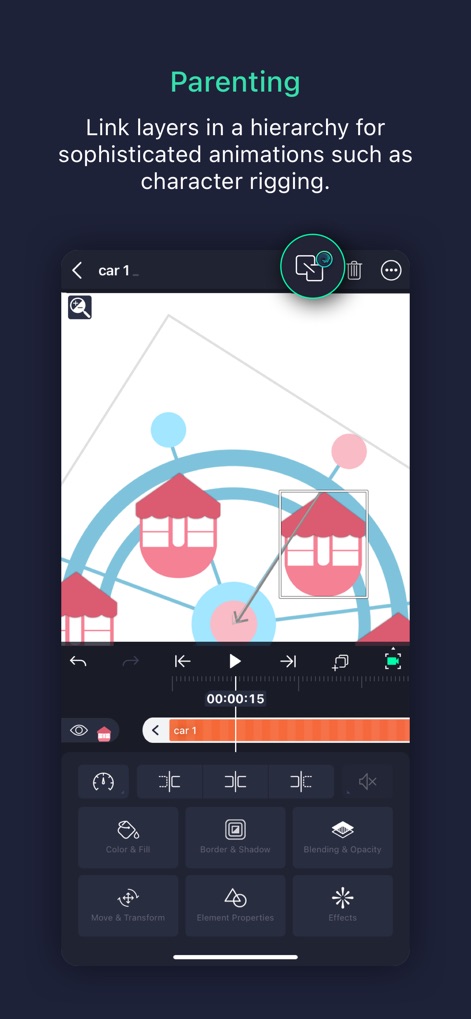
Hierarchical Layer Linking
Discover the power of layer parenting, illustrated by connected animated elements and direct access to 'Color & Fill' and 'Border & shadow' settings.

Precise Color Grading
Witness the app's robust color adjustment capabilities, featuring a real-time before/after split view and the intuitive color wheel for precise tuning.
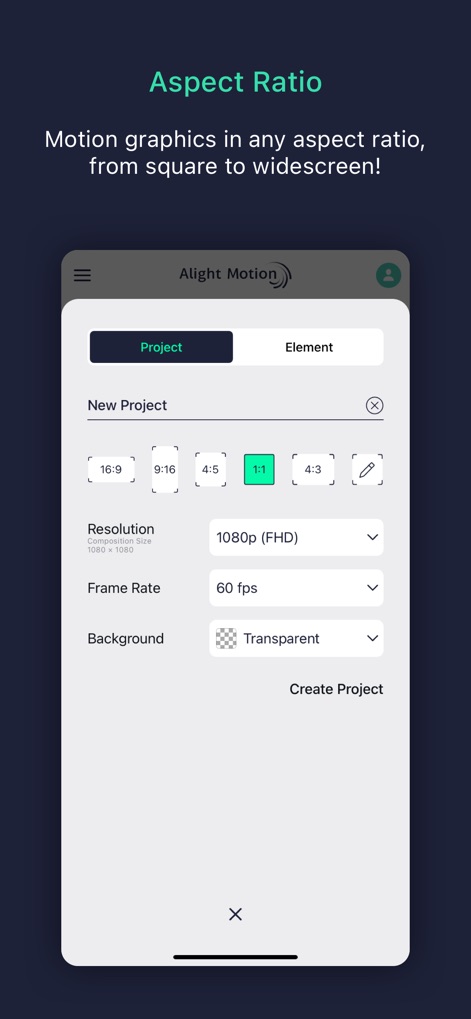
Flexible Project Setup
Understand the app's versatility in project creation, offering diverse aspect ratio presets and adjustable resolution and frame rate options.

Editable Vector Shapes
Engage with the app's vector graphic editing prowess, displaying editable points on a shape and precise position keyframing on the timeline.

Extensive Effects Library
Browse the extensive collection of visual effects, categorized for easy access like 'Color & Light' and 'Distortion/Warp,' with diverse effect thumbnails.

Versatile Export Options
Examine the app's comprehensive export capabilities, allowing users to output projects as MP4 Video or GIF Animation, among other formats.

Creative Blending Control
Delve into advanced creative control with various layer blending modes, accessible within the intuitive 'Blending & Opacity' panel.

Rich Typography Choices
Explore the vast array of available fonts, clearly displayed with previews, and the option for 'Importing Fonts' to expand creative possibilities.
Description
Download
More Like This
Apps with similar features and user experience

VN: AI Video Editor
Ubiquiti Labs, LLC

Splice - Video Editor & Maker
Bending Spoons Apps ApS

Blurrr-Music video editor
TBPS INTERNATIONAL TECHNOLOGY PTE. LTD.

Node Video
小为 罗

Filmmaker Pro - Video Editor
Tinkerworks Apps

Time Cut: Smooth Slow Motion
立亚 林

LumaFusion
Luma Touch LLC

Slow Motion Video Fx Editor
Brain Craft Ltd

WEILO - My Last Video Editor
vimosoft
This page is not an official page of the app or its developer, but an independent editorial publication created for informational and commentary purposes. Unless expressly stated otherwise, neither the app nor its developer is affiliated with, endorsed by, sponsored by, authorized by, or otherwise officially connected with MWM, Apple, Google Play, the app publisher, or the app's developer, and nothing on this page implies that the app was developed using MWM's services. Any trademarks, logos, screenshots, and other content remain the property of their respective owners.