
This page is not an official page of the app or its developer, but an independent editorial publication created for informational and commentary purposes. Unless expressly stated otherwise, neither the app nor its developer is affiliated with, endorsed by, sponsored by, authorized by, or otherwise officially connected with MWM, Apple, Google Play, the app publisher, or the app's developer, and nothing on this page implies that the app was developed using MWM's services. Any trademarks, logos, screenshots, and other content remain the property of their respective owners.


UBA Secure Pass
Security, finally demystified. This app empowers UBA users with direct control over their digital banking defenses.
Downloads
250k+User Rating
Total Ratings
915Publisher
Category
FinanceLocales
1Latest Version
v2.0Size
36.4 MBFirst Released
Apr 21, 2016An evaluation of the UBA Secure Pass application focusing on its core functionalities and user impact.
UBA Secure Pass: Key Analytical Features
Self-Activation Capability
This tool features a convenient self-activation process that enables existing Internet banking users to activate their Secure Pass directly, eliminating the need for a physical visit to a bank branch.
Mobile Token-Based Authorization
The app provides a robust mobile token-based authorization system that replaces physical tokens, offering a highly secure and convenient method for verifying and approving banking transactions directly from a mobile device.
Reduced Reliance on Physical Tokens
It allows users to significantly reduce their reliance on cumbersome physical token devices, streamlining the banking experience and minimizing the risk of loss or damage to a separate hardware token.
Multi-Channel Transaction Authorization
The app facilitates seamless authorization of transactions across various UBA digital platforms, including Internet Banking and Mobile Banking, ensuring a consistent and secure experience regardless of the channel used.
High-Value Transaction Approval
This tool features the capability to authorize transactions that exceed standard limits, providing enhanced flexibility and control for users managing significant financial activities.
Identity Management Support
It provides robust support for identity verification and management within UBA's virtual channels, adding an essential layer of security and fostering greater user trust in digital interactions.
Frequently Asked Questions
Everything you need to know about UBA Secure Pass
What is the UBA Secure Pass app?
UBA Secure Pass is UBA's customized mobile token. It authorizes transactions and manages identity across UBA's virtual channels, including Internet and Mobile Banking. It was formerly known as U-Token.
How does the UBA Secure Pass provide secure access?
The UBA Secure Pass ensures secure access and easy transaction authorization. It protects your e-token identity with a passcode and biometric authentication, preventing unauthorized access.
Can I self-activate my UBA Secure Pass?
Yes, UBA Secure Pass allows existing Internet banking users to self-activate the token. This process eliminates the need to visit a UBA banking hall, aligning with a do-it-yourself model.
Which banking channels does UBA Secure Pass support?
Yes, UBA Secure Pass supports both Internet Banking (formerly U-Direct) and Mobile Banking (formerly U-Mobile). It handles authorization for transactions with higher limits on these and other UBA channels.
Does UBA Secure Pass require a passcode?
Yes, you must create a 4-digit passcode for UBA Secure Pass. This passcode protects your e-token identity against unauthorized access and is a required security measure.
Does UBA Secure Pass support biometric authentication?
Yes, UBA Secure Pass offers biometric authentication. Users can enable this feature to protect their e-token identity, adding an extra layer of security alongside the 4-digit passcode.
How does UBA Secure Pass generate an e-token?
UBA Secure Pass generates an auto-generated e-token for transaction authorization. It displays a numerical sequence that users can copy to complete their banking transactions securely.
The following screenshots and description are sourced directly from the app's official store listing and are the property of the app developer.
App Store
Screenshots

The app guides users through a seamless activation, confirmed by the 'Your activation was Successful' message, and immediately prompts to 'Setup Passcode' for enhanced security.
Swift Activation Flow
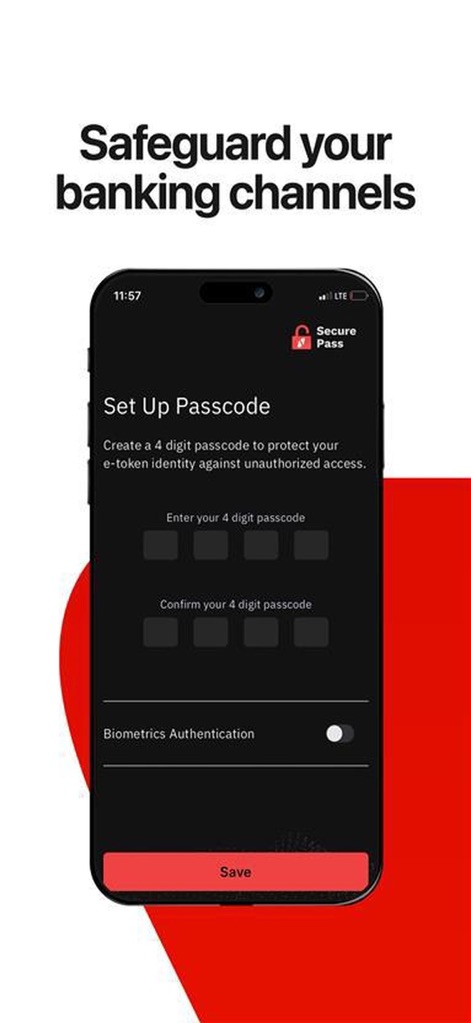
This tool empowers users to define their security, featuring clear input fields for a 4-digit passcode and an intuitive toggle for Biometrics Authentication.
Custom Security Settings

Observe the app's core function: displaying the auto-generated e-token for transaction authorization, complemented by a 'Copy E-token' button for efficient use.
Instant Transaction Tokens
Description
Download
More Like This
Apps with similar features and user experience

Mi_Pass
Banco de Chile

Raiffeisen SmartToken
Raiffeisen Bank S.A.

Synology Secure SignIn
Synology Inc.

DATEV SmartLogin
DATEV eG

VR SecureGo plus
Atruvia AG

Namirial OTP
Namirial Spa

UBS Access – secure login
UBS AG

Mobilní klíč eGovernmentu
MINISTERSTVO VNITRA

Commerzbank photoTAN
Commerzbank AG
This page is not an official page of the app or its developer, but an independent editorial publication created for informational and commentary purposes. Unless expressly stated otherwise, neither the app nor its developer is affiliated with, endorsed by, sponsored by, authorized by, or otherwise officially connected with MWM, Apple, Google Play, the app publisher, or the app's developer, and nothing on this page implies that the app was developed using MWM's services. Any trademarks, logos, screenshots, and other content remain the property of their respective owners.